



CBS CEO talks PlayStation Vue and standalone Showtime

CBS just announced its earnings for 2014, including $3.68 billion in revenue for Q4 (all those episodes of NCIS pay off, apparently), but its always-talkative CEO Les Moonves provided most of the interesting information. He confirmed that CBS has a deal with Sony to be on its new internet TV service PlayStation Vue, saying “they’re paying more than everyone else” for the privilege. That probably explains why the $20 per month Sling TV is missing the network channels — for now, “there’s a path to negotiation” according to Moonves — and why Vue will probably end up being more expensive.
As far as a Showtime internet service for cord cutters to match what HBO is launching soon, the CEO said it’s under consideration but “we’ll share as many details with you as HBO did, which is none at all.” Meanwhile, the CBS All Access and CBSN streaming services are said to be “exceeding expectations”, while CBS also noted it’s making more selling its shows internationally than it does from the top two US streaming services combined (we’ll assume that means Netflix and Amazon).
Filed under: Home Entertainment, HD
Source: CBS

Report: Android Lollipop experiences less app crashes than iOS 8

Android 5.0 Lollipop may not feel like the most stable operating system Google has ever put out, though a new report seems to claim otherwise. According to data from mobile application performance management solution Crittercism, application crash rates are .2% lower on devices running Lollipop than devices running iOS 8.
According to the report, Android Lollipop’s app crash rate is at a mere 2%, while the app crash rate on iOS 8 is 2.2%. The data also shows that iOS 8 has a higher app crash rate than iOS 7, with only a 1.9% rate. When talking specifically of Android, Lollipop’s crash rate is significantly less than previous versions of Android. Apps on KitKat and Ice Cream Sandwich both crash the same amount at 2.6%. Unfortunately, there was no information regarding the crash rates of devices running Jelly Bean.
This data seems to be proven true for previous iterations of each OS in the past. Back in 2012, we saw the same case. When comparing Android versus iOS apps crashing, Android versions 1.6 to 4.0.1 crashed significantly less than iOS versions 3.1.3 to 5.1.
No matter what side you’re on, a 2.2% or lower app crash rate is pretty good. Of course, a 0% rate would be best, but you likely won’t experience many crashes with either of these operating systems. Just remember, you might experience different results when comparing Lollipop and iOS 8 since all of this depends on which specific apps you’re using. Applications can crash for a number of different reasons: OS issues, device specific issues and many more.
Have you experienced any app crashes on your Lollipop or iOS 8 device? Let us know what you think in the comments.

Apple Two-Step Verification Now Available for iMessage and FaceTime
 Apple’s two-step verification system now covers FaceTime and iMessage, reports The Guardian. Signing into an iMessage or FaceTime account will ask users to input an authentication code from a verified device on accounts that have two-factor verification enabled to prevent unauthorized entry attempts.
Two-factor verification is an opt-in system that was first introduced in March of 2013 to increase the security of Apple ID accounts. Prior to today, a verification code was only required for making changes to an account, signing into iCloud, or making iTunes/App Store purchases from a new device.
Two-factor authentication for iCloud is a recent addition that was implemented in September following the breach of several celebrity iCloud accounts, leading to a slew of leaked photos. The hacking incident led Apple to improve the security of iCloud and it also prompted the company to send out security emails when a device is restored, iCloud is accessed, or a password change is attempted.
Last month, a Medium post highlighting some of the remaining shortcomings of two-factor authentication was shared by several technology sites, which may have inspired Apple to update the service to protect iMessage and FaceTime accounts. The post pointed out that it was still possible to log into iMessage, FaceTime, iTunes, the App Store, and into the website using an account with two-factor authentication enabled without being asked for a verification code.
It seems two-factor authentication for iMessage and FaceTime may still be rolling out to users, as MacRumors was able to log into iMessage and FaceTime accounts with two-factor authentication enabled without a code.

Google Maps gets lane guidance in 15 more European countries

Google Maps for iOS has picked up support for lane guidance, a feature that tells you which lane you should be in before your next turn, in a whole slew of new European countries today, including Denmark, Portugal, Austria, Greece, and many more.
Here are the newly supported countries, from Google:
Google Maps for mobile now has navigation lane guidance for Austria, Belgium, Bulgaria, Czech Republic, Denmark, Finland, Greece, Hungary, Liechtenstein, Luxembourg, Netherlands, Norway, Portugal, Sweden, and Switzerland.
Lane guidance initially rolled out in May of last year, and recently expanded to several other European countries last December. With this most recent expansion, the feature is now supported in a total of 23 countries.
Source: Google
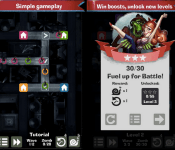
Half Alive: Zombies go home Android app Review
Everyone loves Zombies, right? Combine a Zombie with anything and it instantly becomes awesome. The same goes for Half Alive: Zombies go home, an addictive casual puzzle game developed by Rock-Inspired.
The goal is simple – help the Zombies reach their homes, sounds easy right?
The Zombies’ homes are located at the end of a variety of roads that have directional arrows on them. By tapping the arrows, you’re able to manipulate the direction the Zombie is walking in, and the goal is to match the colour of the Zombie to the correct house.

Obviously it starts off easy with only 3-4 directional changes, but quickly escalates to really challenge your speed and reactions.
The UI is very well laid out, with the action buttons location at the bottom of the screen. You have 3 options whilst in a game, and that is to speed up the Zombies for if you’re super confident and the pace is too slow, simply press and hold the fast forward button. You can use the fast forward button as many times as you like. The slow down snail button is also located at the bottom of the screen for when the pace is just too much – these are limited to a number of uses; and finally the reset button in case you’ve really messed up.
I had a few hiccups on my first run with Half Alive: Zombies go home where the game would freeze on my Galaxy Note 4, but the developer quickly responded and fixed the issue – I couldn’t have asked for better support.
With a variety of wave types, increasing difficutly, and Zombies, what’s not to like? Half Alive: Zombie go home is a great game that will be sure to find a permanent place on your Android device.
Check it out for free using the link below.
(function() var script = document.createElement(‘script’);script.src = ‘https://stacksocial.com/widget.js?publisher=androidguys&type=editorial_post_widget_preferences’;script.async = true;var entry = document.getElementsByTagName(‘script’)[0];entry.parentNode.insertBefore(script, entry);)();
http://www.androidguys.com/pubgalaxy/728×90.html
The post Half Alive: Zombies go home Android app Review appeared first on AndroidGuys.
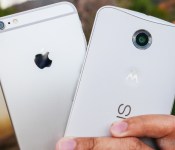
Nexus 6 vs iPhone 6 Plus
brightcove.createExperiences();
The change to the Nexus line came as a big surprise to many, not only in terms of the jump in size, but also with regards to its more premium design, and matching price tag. On the other hand, it was an inevitable move on the part of Apple to finally introduce a larger form factor with their flagship iPhone, with the two versions available bringing the fight, at least in terms of size, closer to their Android counterparts. So how do the so-called 6th iteration of both lines fare against each other? We find out, in this comprehensive look at the Nexus 6 vs iPhone 6 Plus!
Design

The most significant change with both these smartphones is clearly the size. The Nexus 6 is dramatically larger than the Nexus 5, and in the case of the iPhone 6 Plus, the jump is even more impressive when compared to the much smaller iPhone 5 family.

The iPhone 6 introduced a rounded look to its design language, with the larger Plus edition an identical counterpart, only with a screen bumped up to 5.5-inches. The result, as always, is an attractive phone featuring Apple’s typical design cues, only made a little bit harder to handle because of its size. Typical buttons include the volume rocker on the left side with the silence toggle, and the power button, which has been brought to the right side from its usual position up top for better access. A lone tactile home button up front also includes a fingerprint scanner underneath, and it lies somewhat concave to the front panel, with the 2.5D glass adding to the rounded look. The metallic construction automatically increases this phone’s attraction, with lines denoting where the separations are in the part. The Apple logo on the back is under the camera optics in the top corner.

In the case of the Nexus 6, Motorola’s design language takes center stage here, as the phone looks like a large Moto X (2014), albeit without the numerous customization options available. No buttons on the front mean that the inputs are made with software keys. One of the big concerns with the Nexus 6 was in terms of the handling, but the curve on the back does help with the phone’s feel in the hand. The camera optics are up top on the back of this white edition, with the now iconic Motorola dimple underneath, along with the Nexus logo in landscape. A metallic frame also helps the Nexus 6, adding to what is one of the most exquisite Nexus devices yet.

Design aesthetics remains a matter of opinion, but the main story in the case of either smartphone is with regards to their respective handling experiences. The iPhone 6 Plus is thinner, and its rounded sides do make it a bit more comfortable to grip, but the larger bezels on the Apple phone actually make it similar in size to the Nexus 6. It’s thickness makes the Nexus 6 a little harder to handle in one hand, though its curve does what it can to help.
In either case, you’re always going to have to perform some form of hand gymnastics to go from side to side or to reach the top, and while both are not the easiest to handle, they certainly do manage to be really easy on the eyes.
Display

Large displays are par for the course here as the trend continues to pick up steam, but in the case of the Nexus 6, an extra half inch and a higher resolution might be enough to make you choose the Android phone over its Apple competitor.

Apple’s display technology gets a bump up to 5.5-inches and offers Full HD resolution, which results in in a pixel density of 401 ppi. An IPS construction makes this screen pretty easy to view in daylight, and text is easier to view on this larger display, compared to previous smaller iterations of the iPhone. What I always notice on the iPhone screens, however, is that its color output is a little more subdued, for example, when compared to the AMOLED displays commonly found on Android devices.

That is exactly what the Nexus 6 sports, an AMOLED screen at just under 6-inches with Google and Motorola deciding to meet the trend of Quad HD, resulting in a pixel density of 493 ppi. The result is a display that is outputting some intense power, and for work and play, you will be able to read sharp text and enjoy any media in a large fashion. There have been some issues with screen burn-in reported, but on my particular unit, it hasn’t been an issue at all.
The colors on the iPhone 6 Plus are not bad at all, but they seem to pop out a little more on the Nexus 6. This can also be owed to the highly colorful motif of Android 5.0 Lollipop, though. Nonetheless, we have an evolution in both of these devices, and is surely a welcome change for veterans in either camp. If you do want a higher resolution to eke out that much more enjoyment from your smartphone usage though, the larger and more powerful screen of the Nexus 6 is the obvious choice.
Performance

Talking about performance in a comparison like this is always a bit of an odd situation, because what we’re pitting against each other are two completely different architectures, catering to equally different ecosystems.
Under the hood, the Nexus 6 packs a quad-core Qualcomm Snapdragon 805 processor, clocked at 2.7 GHz, backed by the Adreno 420 GPU, and 3 GB of RAM. The device boasts the kind of high-performance processing package you’d expect to find with a flagship Nexus smartphone, and can handle anything you throw at it with ease. Opening, closing, and switching between applications is a breeze, and gaming is also extremely smooth and enjoyable. While I might have seen a few hiccups here and there, it has more to do with the occasional bug in Android 5.0 Lollipop, which are sure to be fixed in updated versions.

Apple likes to put together their own processing packages, and any iOS user can tell you that their architecture works well for their needs. The A8 is the processor of choice for the iPhone 6 Plus, and its dual-core 1.4GHz Cyclone chip is backed by quad-core graphics in the PowerVR GX6450. iOS has gradually become more about flashiness in its interface, but overall, the simplicity of the operating system can be felt. Moving among applications is pretty seamless, and even the 1 GB of RAM is able to keep a good number of apps running simultaneously. Gaming is also a standard affair, with games moving along well without much incident.

Comparing Android and iOS on different processing architectures is really tough, but what I can tell you is that users in both camps have reported very good experiences nonetheless. Ultimately, iOS performs the way it should on the iPhone 6 Plus; and Lollipop, despite the need for just a little more polishing, performs really well on the Nexus 6.
Hardware

Hardware offerings on either of these phones are mostly typical fare, with the iPhone 6 Plus boasting one specific addition over the Nexus 6.
The fingerprint reader on the iPhone is a press version, meaning you can easily unlock the phone by pressing and holding the home button. The reader can also be used for some other functions like unlocking payments. Aside from that, however, you get the standard fare with various connectivity options and even NFC, though it is restricted to Apple Pay for the time being. With versions of the phone available across all networks, mobile internet is never an issue. The bottom mounted speaker performs as expected, offering a pretty good soundstage. On the storage front, the iPhone 6 Plus does come in a 128 GB flavor, but you’re going to have to put down a pretty penny to get that much storage.

A 2,915 mAh battery powers the iPhone 6 Plus, bringing a fair amount of battery life, though with enough power usage, it will struggle to get past the one day mark. Previous versions of the iPhone did have problems with longevity, and the larger and higher resolution screen on this edition does bring the bigger battery back down to size a bit.
On the Nexus 6, the lack of a fingerprint reader is made up for with its media consumption features. The main enhancement on the Nexus 6 is right on the front, with its dual front-facing speakers, whose placement simply trump the bottom mounted unit on the iPhone 6 Plus. NFC on the Nexus 6 is also wide open, and not left to just a payment platform. As far as connectivity goes, the Nexus 6 is the first of the line to get access across the board, with versions on AT&T, T-Mobile, Sprint, US Cellular and one possibly coming to Verizon soon.
In battery life, the Nexus 6 actually suffers from the same issues as the iPhone 6 Plus. A much larger display and a big bump in resolution means that the 3,220 mAh is just about what is necessary to make this phone get close to the day and a half mark, but never really going past it.
Unless you want a fingerprint scanner to unlock your phone, the dual front-facing speakers are a compelling notch in the Nexus 6’s belt, boosting media consumption along with the gorgeous screen.
Camera

The camera situation in this comparison is influenced by the ecosystem history. While the iPhone has a pedigree with good performing cameras, things have been a bit uneven in the case of the Nexus line.
The app on the iPhone 6 Plus is about as simple as you can get. Swiping on the viewfinder changes the various modes, and the different options for your pictures are accessed via buttons on the side. You get modes for regular photos, for video, for slo-mo video, and even a square interface that makes Instagramming easy. Panorama and time-lapse modes are also available for anyone that wants to get fancy with their smartphone photography.

When it comes to the Nexus 6, the interface of the Google Camera has gotten simpler over time. Swiping from the left side of the viewfinder brings up the photo and video modes, but adds Photo Sphere and Lens Blur, the latter of which is more usable due to its stylish defocusing. Accessing HDR+ is done via the small button on the opposite corner, which also allows for switching to the front facing camera and adding a few elements to the viewfinder.
Picture quality here, perhaps more so than in any other comparison between Android and iOS, shows that the evolution in either system has gone in the right direction. I’m quite familiar with the good quality of the iPhone cameras, so the way the pictures turned out were no surprise. The Nexus 6, on the other hand, has really stepped up its game with pictures that have a higher color saturation and good detail in the 13 megapixel photos.
Nexus 6 Camera Samples


What I did notice is that the metering systems in both phones are a bit different. In cases when the Nexus 6 would get a good exposure, the iPhone would underexpose, and the other way around at times. Where the iPhone does get a step ahead is in low light performance. Details are simply better captured in it than the grainier results from the Nexus 6.
iPhone 6 Plus Camera Samples
HDR modes on both of these cameras are at their best when used in the right spots. While the iPhone opts to have an HDR Auto mode, the Nexus 6 requires a little thought put into the shot, so that you’re taking advantage of how the scene can benefit from it. Video modes also fall under a similarly even scope, because both cameras benefit from optical image stabilization. The Nexus 6, however, can record in 4k resolution, putting it over the Full HD capabilities of what is already a good performer in the video space.
If this were last year’s competition, the iPhone 5S would have trumped the Nexus 5, and it did. This year though, we have a more even playing field, because Google and Motorola stepped its game up in the Nexus 6. The iPhone pushes ahead a little bit especially with its low light capabilities, but the Nexus 6 isn’t that far behind, and that’s saying something.
Software

Finally, we get to the age old question of Android vs iOS, and truth be told, if this was a comparison being made a couple years ago, there would be a far gap between the ecosystems. This situation has drastically reduced over time. iOS was a pioneer in app development, getting many now-essential applications far before Android did, but now, Android has matured, and even with a few niche holes here and there, the difference has become mostly negligible.

In the newest version of the operating system, iOS has been able to bring a number of features that Android pioneered, like the notification dropdown, a quick settings panel called “Control Center,” and a Holo-like design that has refreshed its look quite well. However, functionally, iOS remains about the same. No app drawer means organization requires folders, and despite the additions of the notification dropdown and Control Center, much of what veteran Apple users call home remains as such. That being said, there are still few limits on what you can do on iOS, and choosing is purely based on how you feel about its aesthetic, perhaps more than any thing else.

Android, on the other hand, has become rather ubiquitous outside of the Apple space, and its limits are just as far and few between now. The newest version of Android, Lollipop, brought with it a much starker aesthetic change, taking what already worked before, and finding ways of presenting them in even better fashion. Google Now is now a launcher that comes with a second homescreen for quick news and contextual cues from your Google history, and the notification dropdown has been made easier on the eyes, hiding an equally attractive quick settings panel.

The only real hole that I’ve ever seen in the Lollipop changes is in the recent apps screen – it is a nice rolodex-style way of going through apps, but putting all Chrome tabs there makes the list a little unwieldy. Thankfully, you can turn this function off in Chrome to clean things up a bit. Despite a few bugs here and there with this early version of Lollipop, it is a step forward for Android, whose forward movement over the last number of years has been readily apparent.
Will you find many applications that work on one but not the other? I bet not. So, choosing between these two depends on the interface you want to look at on the daily to access the ecosystem you support.
Specs Comparison
| Nexus 6 | iPhone 6 Plus | |
|---|---|---|
| Price | $649 | $749 – $949 |
| Display | 5.96″ AMOLED | 5.5″ IPS LCD |
| Resolution | 1440 x 2560 (493 ppi) | 1080 x 1920 (401 ppi) |
| SoC | Snapdragon 805 | Apple A8 |
| CPU | 4x 2.7GHz Krait 450 | 2x 1.4GHz (ARMv8 based) |
| GPU | Adreno 420 | PowerVR GX6450 |
| RAM | 3GB | 1GB |
| Memory | 32GB / 64 GB | 16/64/128 GB |
| MicroSD | No | No |
| Battery | 3220mAh | 2915mAh |
Gallery
Pricing and Final Thoughts

Seagate Seven Review: Hands-On With a 7mm Thick Portable Hard Drive [Mac Blog]
Seagate debuted several new products at CES this year, including the candy-colored Seagate Wireless portable hard drive and the Seagate Personal Cloud, a NAS (network attached storage) option for home users, but the company’s most attention-grabbing offering was the Seagate Seven.
Described as the world’s thinnest 500GB portable hard drive, the USB 3.0 Seagate Seven is only 7mm thick, as its name implies, which means it easily fits into a pocket or purse, and it’s fairly affordable at $99.
What’s in the Box?
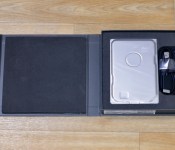
The Seagate Seven ships in a slim, padded box that contains the hard drive, a black fabric-covered USB cord to connect the drive to a computer, and a Quick Start Guide.

Design
Seagate describes the Seven as the culmination of 35 years of experience creating hard drives. Inside the Seven is Seagate’s ultra thin 5mm hard drive, which is encased in 2mm of 100 percent stainless steel for protection.
At first glance the Seagate Seven might be mistaken for an internal drive due to its slimness and its industrial design, but it is a standalone portable drive. Without touching the Seven, it can be hard to imagine just how thin it is, but if you own an iPhone 6 or an iPhone 6 Plus, that is a good approximation of thickness.

At 7mm, the Seven is slightly thicker than the 6.9mm iPhone 6 and slightly thinner than the 7.1mm iPhone 6 Plus. It weighs 6.3 ounces (178 grams), which makes it just about the same weight as the 6.07 ounce iPhone 6 Plus (172 grams).
The Seven is 4.8 inches tall and 3.2 inches wide, which means it fits in a pocket as well as the iPhone 6 Plus. In the simplest of terms, it’s really, really thin.

Its stainless steel design is simple but may not be appealing to all people due to its minimal, unfinished look, and it’s worth noting that the casing has a tendency to attract fingerprints. The drive itself feels well-built and it can withstand scratches and wear and tear, but it’s still susceptible to drops.
Read more 
Amazon handing out over $140 in apps in a “Free app of the day bundle”
Looking to save yourself a ton of cash and get your hands on a ton of apps all at the same time? Well, Amazon is doing just that yet again. In the spirit of sharing the love for Valentine’s Day, at least that is what I assume they are doing this for, Amazon is offering […]
The post Amazon handing out over $140 in apps in a “Free app of the day bundle” appeared first on AndroidSPIN.

Griffin iTrip AUX Bluetooth review
As someone who doesn’t own a car with built-in Bluetooth, I am somewhat jealous of those who can get in and connect quickly and painlessly. But, with that said, I’ve been able to work around the problem with the last few cars I’ve owned.
Be it a Bluetooth speakerphone with an FM transmitter or by plugging directly into the AUX port, I’m able to get by. The last few weeks, however, I’ve been using a Griffin iTrip AUX Bluetooth adapter to pair my phone to my car stereo.

For lack of a better way of describing, picture a car charger that has a 3.5mm headphone plug instead of a USB port. That’s essentially what you’re dealing with here.
Setup
I was impressed with how easy it was to take this out of the package and get rolling. All you really need to do is open up the Bluetooth settings on the phone and push the button on the adapter. Once your device finds it, you’re good to go. Other than that, just remember to switch your car input to auxiliary mode when you plan to listen to your phone.
Should your device not automatically connect the next time you get in the car, simply press the button again. I had no issues connecting over a two week period.
Worth knowing
If there’s one drawback to putting this guy into my car’s power adapter it’s that I lose the ability to charge up my device. In cases where I want to use turn-by-turn driving directions or listen to extended periods of music, I like to juice up. Note that if you only have one spot in your car that you’ll have to pick what’s more important: Bluetooth connection or charging.

Along these lines, I ended up simply plugging my phone into the (included 2′) 3.5mm cable and directly into the stereo. As I saw it, I already have the cord dangling, why not go direct? This way I could also plug in and charge up the device, too.
Truth be told, however, it’s more convenient to get in and automatically connect. And, if you can tuck the cord away neatly you’ll be doing alright for yourself.
Price and availability
The Griffin iTrip AUX runs $49.99 which I find to be a little more than I expected. At $30-$35 I would have no reservations recommending one of these. But, at the current price I am somewhat reticent. I love the quality, easy setup, and convenience, but I would like to see a lower cost. Or, perhaps, find a way to offer the USB charging again. My advice, keep an eye on Amazon for price drops.
(function() var script = document.createElement(‘script’);script.src = ‘https://stacksocial.com/widget.js?publisher=androidguys&type=editorial_post_widget_preferences’;script.async = true;var entry = document.getElementsByTagName(‘script’)[0];entry.parentNode.insertBefore(script, entry);)();
http://www.androidguys.com/pubgalaxy/728×90.html
The post Griffin iTrip AUX Bluetooth review appeared first on AndroidGuys.

New Qualcomm TV dongle hopes to challenge Chromecast

When Google first announced the Chromecast dongle, it was not clear whether it could compete in a world with devices like boxes from Roku or Apple TV. Google seems to have prevailed though with so many companies trying to emulate the success of the Chromecast. The latest example is a fiery red dongle that Qualcomm is working on that they are calling the 4K Streaming Adapter powered by their Snapdragon 800 processor and running a full version of Android alongside a wide array of wireless options.
The 4K Streaming Adapter is actually a reference design that Qualcomm hopes some other manufacturers will pick up on in developing their own solutions to market to customers. One of the keys to success in Qualcomm’s view is the inclusion of a full install of Android to give manufacturers flexibility on what is presented to users. This also means the dongle could support a full array of peripherals.
Another key difference Qualcomm is hoping exists with their version of a streaming stick is the inclusion of LTE antennas to go along with the normal WiFi chips. Qualcomm is including support for LTE-U, or LTE-Unlicensed, which gives users the ability to run a separate ad hoc LTE network separate from their carriers. This could provide a way for content to be delivered via LTE Broadcast that can even be customized based on geo-location.
Do you think a full version of Android and additional antenna options will give Qualcomm an edge in the TV streaming content stick market?


source: Slashgear
Come comment on this article: New Qualcomm TV dongle hopes to challenge Chromecast
 AIVAnet