


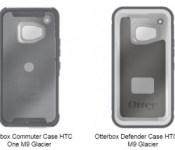
OtterBox cases for upcoming HTC One (M9) surface

To get an idea as to what the design of an upcoming device will be, accessories are always useful. For some reason, the mobile accessory manufacturers have no problem introducing products before the corresponding device is even announced. Here we have cases from OtterBox that will be paired with the upcoming HTC One (M9). OtterBox will have both Commuter and Defender cases for it with color options being Black or Glacier. As seen in the image above, the Duo Camera setup is gone. Other than that, these cases do not expose very much about the flagship-to-be from HTC.
Source: Androidworld
Via: GSMArena
Come comment on this article: OtterBox cases for upcoming HTC One (M9) surface

Marvel pulls Sony and ‘Spider-Man’ into its Cinematic Universe

You can add a few more entries to the long list of comic book movies due in the next few years, as Sony Pictures has revealed its plans for the Spider-Man franchise. As suggested in emails leaked during the recent hacking scandal, the studio has worked out an agreement with Marvel and Disney to include Spidey in the Marvel Cinematic Universe which already includes a slew of blockbuster movies, a couple of TV shows and even Netflix’s upcoming series. The superhero/photojournalist will appear in an upcoming MCU movie first, then on June 28, 2017 a standalone flick is coming, produced by Sony, departing executive Amy Pascal and Marvel Studios president Kevin Feige . Sony is keeping its exclusive rights to make Spider-Man flicks, but now it can dip into the popularity of the MCU series and what Marvel has achieved there (other Marvel characters can also cross into the Spider-Man series now), while fans can finally see the character pop up in stories on the big screen the same way he has in the comics.
Developing..
[Image credit: Disney XD via Getty Images]
Filed under: Home Entertainment, HD
Source: Marvel
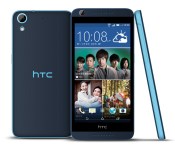
HTC goes after the Moto G with mid-range Desire 626

HTC has launched its latest offering aimed at budget buyers, the Desire 626. Now available for purchase in Taiwan, the Desire 626 offers a 64-bit CPU, 5-inch 720p display and LTE connectivity for NT$5990 ($190).

Xiaomi Mi 4 goes on sale in India, 64GB variant launching on February 24

Xiaomi’s metal-clad Mi 4 is going up for sale for the first time in the India later today. The flash sale (open only to registered users) commences at 2 PM IST on Flipkart. The 16GB version is currently available in the country, with Xiaomi stating that the 64GB model will make its debut on February 24.

Joe Danger is making its way to Google Play sometime this year

Joe Danger, the popular side-scrolling daredevil game, is making its way to Google Play, the Amazon Appstore and OUYA sometime this year. The game will be based off of Joe Danger Touch, which was originally released on iOS in 2013.
The game will have the same features as Joe Danger Touch, including 80 different levels and hours of gameplay. Joe Danger, the main character, is a dirt bike-riding daredevil that can perform a number of stunts over multiple different obstacles. Of course, there are hazards along the way like spike traps and shark-infested swimming pools. Here’s the list of features Joe Danger will offer Android users:
- 80 levels across 10 challenging tours give hours and hours of play
- Get a perfect run to win each level’s Pro Medal
- Beat your friends on the online scoreboards and win the full set of achievements
- Collect and play as 29 different characters
- Play the Daily Challenge mode for a special new level to beat every day
It will also be compatible with Android gaming controllers, allowing you to play on your television or monitor with an Xbox 360, PS3, or generic HID/USB controller. We’re not sure exactly when the game will launch on Android, though we know its ‘coming soon’. And pricing hasn’t been released either. The iOS counterpart is available for $2.99, so this may end up being a paid game when it launches. When more information is released, we’ll be sure to update you as to when you can pick it up.
Tim Cook to Speak at White House Cybersecurity Summit [iOS Blog]
Apple CEO Tim Cook will speak at a White House cybersecurity summit on Friday at Stanford University, according to The Hill. The summit is another battleground in which tech companies and the government will discuss encryption.

The White House is expected to reveal its next executive action on cybersecurity at the summit, which will bring together tech executives, leading academics and government officials to discuss ways in which the government can better collaborate with the private sector on cybersecurity initiatives.
Cook and other technology executives have called for government surveillance reform, calling for limitations on government authority to collect users’ information, oversight and accountability, transparency about demands and more.
Meanwhile, the FBI has been in talks with companies like Google and Apple about their privacy features and have expressed concern that their encryption makes it difficult for investigators to infiltrate a kidnapper or terrorist’s device for information that could prevent crimes or attacks. One Department of Justice official told Apple that investigators’ inability to access their devices could lead to children dying.
FBI Assistant Director Joe Demarest Jr. and Secret Service Deputy Director A.T. Smith are two of the government officials who will give remarks on Friday.
Note: Due to the political nature of the discussion regarding this topic, the discussion thread is located in our Politics, Religion, Social Issues forum. All forum members and site visitors are welcome to read and follow the thread, but posting is limited to forum members with at least 100 posts.

Macedonian officials accused of spying on 20,000 people over four years

Macedonia’s Prime Minister Nikola Gruevski along with secret police chief Saso Mijalkov have been spying on, well, just about everyone important in the country except themselves, according to the opposing political party. Opposition leader Zoran Zaev from the Social Democratic Party has accused the two of ordering constant surveillance on him for at least five years in a press conference earlier — years longer than the 14-month max duration of any court-sanctioned eavesdropping. But it’s not just Zaev himself: he says the other members of his party and (in a perfect example of what happens with unchecked government surveillance) even Gruevski’s own allies are targets of this politically motivated surveillance program.
In fact, he says the program has been spying on roughly 20,000 people for at least four years, and authorities did so with cooperation from mobile providers. “Gruevski and several people around him are behind this operation,” Zaev claims. “The material we have shows that illegal wire-tapping was under direct orders from Saso Mijalkov. This kind of massive wire-tapping can be done only by a domestic service.”
The prime minister has recently accused Zaev and the opposition of planning a coup against the government, charging them with espionage, which has led to five arrests thus far. Zaev maintains that Gruevski did that to shut them up, which clearly didn’t work if that’s the case. During the press conference, the Social Democrat Party played some of Zaev’s phone calls, which were allegedly recorded by government spies, along with a call between two known Gruevski allies.
Journalists at the event were handed even more material — CDs with 11 taped phone conversations and their transcripts — which the party says came from “brave people” within Macedonia’s intelligence agency. The opposition has promised that those materials will be released, as well, but for now, you can listen to the calls played during the conference… if you understand Macedonian.
[Image credit: AFP/Getty Images]
Filed under: Misc
Via: Boingboing
Source: Balkan Insight

European Parliament will not use Microsoft Outlook apps due to “security issues”

Shortly after it launched on mobile devices, the European Parliament has blocked Microsoft Outlook from internal use. The Microsoft Outlook app, which arrived last week on Android and iOS, has been deemed insecure by the government’s information technology (IT) department. Why? Apparently, the apps share password information with Microsoft and emails are stored in a third-party cloud that the European Parliament does not have access to.
The European Parliament’s IT department, DG ITEC, had this to say in an email to employees:
Please do not install this application, and in case you have already done so for your EP corporate email, please uninstall it immediately and change your password.
Via: PCWorld
Come comment on this article: European Parliament will not use Microsoft Outlook apps due to “security issues”

Daily Roundup: Snapchat selfie leads to murder arrest, connected sex toys for your techie Valentine and more!

Is iOS 9 bringing the updates we’ve been waiting for? Which sex toys should you buy for Valentine’s Day? Will the Earth’s potential robot takeover start at a hotel in Japan? We’ve got the answers to these questions and more in today’s Daily Roundup.
Teen charged with murder after posting gruesome Snapchat selfie

In a disturbing sign of the times, a Pittsburgh teenager is being charged with murder after he allegedly shot another teen and took a selfie with the corpse. He then reportedly sent the picture to a friend using Snapchat, and that friend was able to screenshot the photo before it disappeared.
iOS 9 reportedly focuses on under-the-hood upgrades

Apple’s iOS 9 could be the tune-up many users have been waiting for. According to sources for 9to5Mac, the upgrade is less about new features and more focused on “behind the scenes fixes and performance optimizations.”
Adult Themes: 8 connected sex toys for your Valentine

In case tickets to the BDSM flick every Midwestern housewife has been waiting for are already sold out in your city, we’ve come up with an alternative way for you to have an erotic Valentine’s Day. Check out our list of connected sex gadgets (with GIFs!).
Netflix in Cuba costs a third of the average monthly wage

Netflix is now available in Cuba, but it’s not likely the movie-streaming service will profit from the expansion any time soon. Only about five percent of the country’s residents have internet access, and the service’s $8-a-month cost is equivalent to over one-third of the average citizen’s monthly wages.
High-tech Japanese hotel to employ human-like robot staff

Remember Kokoro’s “actroids”? Well, they’re about to take over the reception desk at Nagasaki prefecture’s Henn-ha Hotel. But these multilingual automatons aren’t the only things that make Henn-ha a far from ordinary establishment.
Healbe GoBe review: Can a fitness band really track your calorie intake?

Healbe’s GoBe fitness tracker promises to not only track your movements and sleeping habits, but also what you’re eating. Our James Trew took the wearable for a spin to find out just how accurately it can tally your calories.
You can finally buy a OnePlus with ease

Tuesdays just got a lot more exciting if you’re in the market for a OnePlus One. The company has decided to forgo its standard invite process and open up sales for its 16GB Silk White and 64GB Sandstone Black models on this day each week.
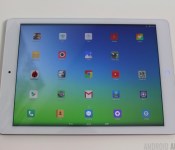
Onda V919 3G Air review
brightcove.createExperiences();
The Bottom Line
- Dual-boot
- Better than HD display
- Good price
- Battery life
- Sensitive home button
- Underutilized internal storage
If you need a tablet which can run your Windows programs and your Android apps then this tablet is an interesting option for you. The display is nice, the processor performs well, however the battery life might not be good enough for some.
(function($)
$(document).ready(function()
$(“#aa_bottom_line .aa_bl_pros_cons”).each(function()
var aa_bl_pc=$(this).find(“.aa_bl_pc”);
var aa_bl_pros=$(this).find(“.aa_bl_pros”).height();
var aa_bl_cons=$(this).find(“.aa_bl_cons”).height();
if(window.innerWidth > 480 && aa_bl_pros != aa_bl_cons)
if(aa_bl_pros > aa_bl_cons)
aa_bl_pc.height(aa_bl_pros);
else
aa_bl_pc.height(aa_bl_cons);
)
);
)(jQuery);
Buy Now
One of the things that seems to polarize people, and start flame wars in general, is how to answer this question: what is the best mobile operating system? Some say Android, others say differently. In the real world we often mix and match our operating systems. For example, although I use an Android smartphone and an Android tablet, I still use a Windows PC. Microsoft’s OS is primarily found on systems with Intel compatible processors (although that is changing). Intel and Microsoft have been trying hard to boost their tablet market-shares, and both companies basically give away stuff to make devices that use their products cheaper. Intel effectively gives away Atom processors and Microsoft makes “Windows 8.1 with Bing” free for certain classes of tablet.
Related – Best Cheap Android Tablets / Best Android Tablets
This has given rise to a surge in the number of Intel powered tablets that run Windows. Since Intel processors can also run Android it was really only a matter of time before an OEM released a tablet which can run both Android and Windows. One such tablet is the Onda V919 3G Air.

Design
Like many Chinese OEM tablets, the Onda V919 Air is clearly trying to mimic the iPad Air. The dimensions are almost exactly the same as the iPad Air and its overall look is very similar to the iPad Air, even down to the bottom speaker grills that flank the micro USB port.

The power button and volume rocker are on the right hand side, just like the iPad Air, and on the front panel there is a circular home button, again just like the iPad.
On the back there is a plastic cover which when opened reveals slots for the SIM card, the SD card and some metal strips, presumably for the antenna. Again the placement of the cover on the top edge, next to the rear facing camera, is very similar to the iPad.
However there are of course some significant differences. First the Onda V919’s shell is made of plastic, second the device is slightly thicker than the iPad Air, and third the processor in the V919 Air isn’t an ARM based processor like the iPad or even the Nexus 9, it is an Intel chip. The result is that the Onda V919 can run both Android and Windows 8.1, but I will talk about that some more later.

One problem I did find with the design is that the circular home button is very sensitive. It only requires the lightest of touches for it to activate. What this means is that when holding the tablet in landscape my thumb kept touching the button and taking me to the home screen. This is can be very annoying. At first I thought that the tablet software was unstable and that apps kept crashing and dumping me back into the home screen. However I eventually worked out that my thumb was to blame. Adjusting how I held the tablet finally solved the problem, however even though I am conscious of how I need to hold the device, I still find that my thumb gets too close to that home button.
#gallery-1
margin: auto;
#gallery-1 .gallery-item
float: left;
margin-top: 10px;
text-align: center;
width: 33%;
#gallery-1 img
border: 2px solid #cfcfcf;
#gallery-1 .gallery-caption
margin-left: 0;
/* see gallery_shortcode() in wp-includes/media.php */


Display
The Onda V919 has a 9.7 inch display with a QXGA resolution, in other words 2048 x 1536. This means it has 4:3 screen ratio, just like the iPad, and also the Nexus 9. That translates to a pixel density of 264 ppi.
Now some people prefer tablets with a 16:10 screen ratio, because more of the display is used when watching widescreen movies, however the 4:3 display ratio is certainly a popular alternative.
The Onda uses an IPS display which yields good viewing angles. The color reproduction is good, and the screen is bright. However one disappointment is that the tablet doesn’t have a light sensor which means there is no automatic brightness option available.
Performance
As I mentioned earlier, at the heart of the Onda V919 3G Air is an Intel processor, not an ARM based processor as found in the majority of Android devices. In this particular case it is an Intel Atom Z3736F, a quad-core processor which runs at 2.4GHz and includes an Intel HD Graphics GPU.
In terms of usability the performance of the V919 3G Air was good. The UI always reacted quickly and games like Epic Citadel were able to achieve at least 50 frames per second. Video playback is smooth and I didn’t experience any lags or annoying pauses while using the device.
As for the individual benchmarks, the tablet scored 892 on Geekbench’s single core test, 2113 on its multi-core test, and an unverified 33413 on AnTuTu. Using 3DMark the device scored 7449 on Ice Storm Extreme and it managed 50 frames per second in Epic Citadel in High Quality mode.
GameBench testing confirmed the Epic Citadel score and showed that for simple 2D games the device can easily hit 55 fps.

Hardware
The Onda V919 has a 6200 mAh battery. It is hard to theorize about the battery life from just the raw mAh number. But for comparison, the Nexus 9 has a 6700 mAh battery while the iPad Air and the iPad Air 2 have 8820 mAh and 7340 mAh batteries respectively. Unfortunately it looks like the battery life in the V919 isn’t great. My testing showed that you can stream YouTube videos for around 4 hours on a single charge. Alternatively a single charge will let you play intensive 3D games for around 2.7 hours or simpler 2D games for around 3.7 hours.

Overall these numbers are a little disappointing and it seems to me that the software needs to be correctly optimized for the hardware and Intel processor. If I fully charged the battery and then rebooted the tablet, so that no extra programs were running, the device loses over 30% of its charge in 11 hours while asleep. According to the battery chart, over 50% of the battery was consumed by the “Android system.”
The speaker on the V919 is nothing special, it does its job in that it produces sound, however don’t expect anything amazing. Also the speaker grills don’t seem to have any relation to the actual speaker, as covering both grills only reduces the sound marginally.
The tablet has built in support for 3G on 850, 1900 and 2100MHz. The last number is the common 3G frequency and should work in most places around the world, however a lot of carriers also use a secondary 3G spectrum range. In Asia and South America this is often 850MHz, but in Europe it tends to be 900MHz.
The device might work on AT&T in the USA as it uses 850 and 1900 MHz, however I haven’t tested it. For other networks in the USA standard GSM calls should work. You need to check with your carrier to ensure compatibility or if you trust Wikipedia then the List of UMTS networks page could have the information you need. As you would expect the tablet also supports Wi-Fi 802.11 b/g/n and Bluetooth 4.0.
The V919 comes with 2GB of RAM, which is the most supported by the Intel processor, and either 32GB or 64GB of storage depending on which model you buy. My test unit has 32GB.

One thing to remember is that this device actually has two operating systems pre-installed, Android and Windows 8.1. The internal storage is divided up between Android and Windows, with some space being used for the operating systems themselves and the remaining divided up as usable storage between the two environments. Under Android the 32GB model has around 6GB of space for installing apps and for storing your own files. Under Windows the free space on the “Disk C:” is about 8.5GB. This means that the rest is used to hold the OSes. However, the numbers don’t seem to add up and I am left with the feeling that a large chunk of flash memory is being underutilized.
In terms of what is missing, this tablet is very short on sensors of any kind. It has an accelerometer and that is about it. There is no GPS, no NFC, and no magnetometer. For most people this probably isn’t a problem, however many 3G enabled tablets come with at least GPS, so it would have been a nice addition.
Camera
The cameras on the V919 are very basic. The rear facing camera has a 5MP sensor and the front facing camera has a 2MP sensor. Personally I find the front facing camera the most important on a tablet as it is useful for video conferencing with Skype.
The rear camera is good considering this is a tablet and it is only a 5MP sensor. The color reproduction is fairly faithful and the camera works well enough indoors as well as outdoors. Having said that, you aren’t going to win any photo competitions with it. Unfortunately the front facing camera is terrible. The colors blur easily and indoors there is lots of noise.
The bundled camera app is very simple and offers little more than the very basic operations. If you do use the camera more than occasionally then you would probably want to install a third party camera app.
Here are some sample shots so you can judge for yourself:
#gallery-2
margin: auto;
#gallery-2 .gallery-item
float: left;
margin-top: 10px;
text-align: center;
width: 25%;
#gallery-2 img
border: 2px solid #cfcfcf;
#gallery-2 .gallery-caption
margin-left: 0;
/* see gallery_shortcode() in wp-includes/media.php */


Software
The key selling point of the Onda V919 3G Air is its dual-boot ability. The device comes pre-installed with Android 4.4.4 KitKat and Windows 8.1 with Bing. Each OS has a way to make the device to reboot into the other operating system. Under Android there is a “OS Switch” icon on the notification blind, and on Windows there is the DualOSSwitcher program, which is on the toolbar by default.

The supplied version of Android is fairly vanilla, except for the launcher. Onda has included its own launcher which doesn’t include an apps draw. Like the iPad, all the icons are on the home screens and you need to organize everything into folders. The Onda launcher also includes a theme switcher which allows you to pick one of 5 pre-installed themes including Funny Board and Childhood dream! If you don’t like the launcher, then the good news is that since this is Android, you can easily replace the launcher with one of your choice.

There are also a few bundled apps including a neat Wi-Fi configuration program and the LPAL configurator for Intel’s always listening technology. You are meant to be able to set a trigger that allows you to wake your tablet using your voice, however I couldn’t get it to work!
As for Windows, the installed version runs as expected. I won’t talk too much about how hard Windows 8.1 is to use without a mouse and keyboard, but that isn’t the fault of Onda. If needed you can use a mouse and keyboard via a micro USB to OTG converter (and a small USB hub), but you will need to buy one separately.
I was able to install programs like Chrome and VLC without any problem and the default Windows camera app worked reasonably well with the rear-facing camera. There wasn’t a toggle to switch to the front facing camera, however Skype found the front-facing camera without any problems.

One problem with the provided version of Windows is that some bits of the UI keep appearing in Chinese. Having fiddled with the regional settings etc., I thought I had set everything to English, but still from time to time I would get a window with Chinese writing!
The tablet comes with an micro SD card slot and the card is shared between Windows and Android. This means that files copied onto the card in one OS is available under the other. I was able to install Windows programs on the micro SD card (by installing them under D:), however there is no option under this build of Android to move apps to the SD card.
Price and Conclusion
The concept of a dual-booting tablet is an interesting one and Onda certainly has made it a viable option. Overall the screen is good, the processor seems to perform well enough and both OSes run as you would expect. The battery life is less than I would have wanted and the over-sensitive home button can be annoying. But these weaknesses might be forgivable if you really like the idea of a dual-boot tablet.
You can get an Onda V919 3G Air from Geekbuying.com for just $225 for the 32GB model, and $240 for the 64GB model. The 64GB model is currently in pre-sell and will be available from February 25th. However the 32GB model is available now.
 AIVAnet