



TestFlight now lets developers organize testers into groups

Apple has announced a change to TestFlight, its beta distribution platform, that allows developers to designate specific groups for testing. With this change, developers will be able to push specific builds and instructions to different groups of testers.
From Apple:
Now it’s easier than ever to manage external testers in TestFlight. Organize your testers into groups to quickly send specific builds, provide separate instructions on where to focus, and apply an action to several testers at once in TestFlight.
This change should make it easier for developers to pinpoint and assign testing of certain issues to specific groups of testers.
Source: Apple

Windows Phone apps to help you survive Valentine’s Day

Windows Central Roundup: Windows Phone Apps for Valentine’s Day
In case you’ve forgotten in all the excitement over the release of the Windows 10 Technical Preview for phones, Valentine’s Day is this Saturday. If you have completely forgotten about this special day, we have a few Windows Phone apps that might keep you out of hot water with your significant other. There’s no guarantee that these apps will save your kiester but may make the difference in showing up empty handed or having to wait at the restaurant without a reservation.
These Windows Phone apps may also help those who have already planned for Valentine’s Day add a little something, something to help make the day more special. We’ll toss out our choices and if you have any to add to the list, jump in and toss out your recommendations in the comments below.
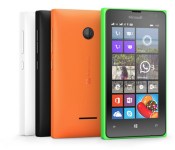
NewEgg is now selling the Lumia 435 in the US for $109.99

NewEgg has apparently become the first US retailer to sell the unlocked Lumia 435. It’s official website has the low-end Windows Phone from Microsoft available for the price of $109.99.

Galaxy Note 4 Safe Mode: What you need to know

Safe Mode is a useful tool, provided you know how you got there in the first place
Safe Mode is one of those “features” that you’re more likely to stumble across accidentally than seek out and use on purpose, but in either case it’s important to know what it’s all about. It’s a very helpful troubleshooting tool to diagnose when you’re having problems with your phone, letting you temporarily turn off user-installed apps. But even if you don’t end up needing it for its intended purpose, knowing how to get back from an accidental boot into Safe Mode is also a helpful bit of knowledge to have.
Let us show you the ins and outs of Safe Mode on the Galaxy Note 4.

Apple rolls out two-step verification to iMessage and FaceTime

Apple has rolled out two-step verification to the company’s iMessage and FaceTime. That allows you to combine your password with a token to help protect your accounts from unauthorized access. That way, even if someone finds or figures out your password, they still won’t be able to get into your account without the second step.
Apple originally enabled two-step verification for iCloud accounts back in March of 2013, but the the feature was restricted to making account changes and signing in on new devices. No, FaceTime and iMessage will benefit directly from the additional security.

Microsoft adds PIN and pattern support to Next Lock Screen

Microsoft has updated its Android-exclusive Next Lock Screen in the Play Store with some new features. The big addition is that users can now lock their smartphone with a PIN or pattern for the first time.

Video hands-on with Windows 10 for the Lumia 830

Earlier today, Microsoft suddenly decided to push out the long-awaited Windows 10 for phone preview. Although it is currently limited to just a subset of Lumia phones one of them is the Lumia 830 (AT&T).
After a good hour of setting up the Insider app, downloading, installing and then playing around we finally have our hands-on video. We’ll go through and show you what’s new and include our initial thoughts.
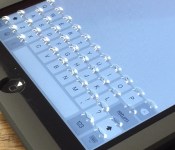
‘Phorm’ Case Adds Morphing Tactile Keyboard to iPad Mini
For the last several years, Tactus Technology has been working on displays that take advantage of microfluidic technology, with buttons that raise up and disappear on demand for a superior touchscreen typing experience.
As of today, the company is ready to unveil its first product to the world, an iPad mini case called “Phorm.” An all-in-one case, keyboard, and screen protector, Phorm can dynamically add and remove tactile buttons on the iPad mini’s screen to add texture to the on-screen keyboard.
As seen in the video above, sliding the bar on the back of the Phorm case to the right causes small fluid-filled physical buttons to pop up on the screen protector portion of the case, giving users a tactile typing experience while still allowing them to use the default iOS keyboard. Shifting the bar to the left causes the buttons to disappear again, allowing the touchscreen to be used as normal.

Here’s how it works: there are a series of small channels filled with fluid behind an elastomeric panel (aka the screen protector portion of the case) and when activated by the slider, pressure is introduced, causing the fluid to come up through the channels and into holes, where it presses against the elastomer, physically changing and morphing the display portion of the case to create buttons. In the opposite slider position, the pressure is released and the buttons disappear as the liquid is dispersed back into the channels.

According to Tactus Technology CEO Craig Ciesla and CTO Micah Yairi, who spoke to MacRumors ahead of Phorm’s launch, the case uses a tiny amount of fluid that poses no harm to an iPad should it be dropped or damaged in some way. In fact, the Tactus team extensively tested the Phorm, performing drop tests, scratch tests, and more, and found that the case and its protective front panel provide solid protection for an iPad and can potentially keep the glass from shattering if dropped.
Ciesla and Yairi said that usability was one of the most important aspects Tactus considered when developing the Phorm case. In internal and third-party testing with people aged 19-70 with a wide range of hand sizes, 70 percent preferred the Tactus solution to a touchscreen.

The Phorm case is meant to stay on an iPad all the time, alleviating the need to switch cases and accessories regularly to accommodate different tasks. As Ciesla and Yairi pointed out, the Phorm offers several benefits over a Bluetooth keyboard — there’s no battery drain, there’s no need to charge it, and it provides access to all built-in iOS keyboard features like word prediction and spell correction, with the addition of tactile feedback for faster typing.
“We built Phorm so tablet users will never again have to choose between thin stylish devices with touchscreens and amazing usability,” said Dr. Craig Ciesla, CEO and co-founder of Tactus. “Typing on a flat touchscreen is still a really unnatural user experience. Adding a tactile dimension to an otherwise flat surface changes the way we will interact with all the screens in our lives. This is just the beginning.”
The Phorm case for the iPad mini can be pre-ordered today from the Phorm website for the introductory price of $99, and orders are expected to ship in the summer of 2015. There are two colors available — slate gray, designed for the space gray iPad mini, and sky gray, designed for the silver iPad mini.
Currently, Phorm is only available for the iPad mini, but the Tactus Technology team has plans to launch an Phone 6 Plus Phorm case in the near future. Phorm cases for iPad Air 2 and iPhone 6 are also in the product pipeline.

Insider Hub app will be added in a future preview version of Windows 10 for phones

Microsoft will add the Insider Hub app that’s part of the current desktop preview of Windows 10 in a future build of the phone version. The first build of the Windows 10 phone preview was released earlier today, but did not include the Insider Hub.

Use this shortcut to quickly launch the Windows 10 Feedback App on your phone

The Windows 10 Technical Preview for phone is now available, at least for some people. One of the most important things about using this early release is giving feedback back to Microsoft. After all, you are partly responsible for the future direction of this operating system.
Windows 10 for phones, like the desktop version, has a Feedback App built in. One way that you can quickly access the application anytime is to use this simple trick.
 AIVAnet