


Google Docs update brings new features to Office Compatibility Mode

Google Docs for Android scored a small update today that brings a couple of new, minor features. Coming along for the ride is support for cutting, copying, and pasting text, images, and tables in Office Compatibility mode. Additionally, you’ll now have the ability to insert links into Google documents
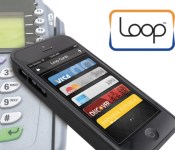
Samsung Acquires Apple Pay Rival LoopPay
Samsung today announced plans to purchase LoopPay, in an effort to compete with Apple’s Apple Pay payments service. The two companies were in previously talks over a potential partnership in December for a payment system that would rival Apple Pay.
LoopPay’s technology stores payment information from a credit or debit card’s magnetic stripe, transmitting payment details to card readers in lieu of a physical card. Because it works over a magnetic field, LoopPay is compatible with 90 percent of existing card readers and does not require merchants to support NFC as Apple Pay does.

Currently, LoopPay works through an app and a standalone hardware device (a case is one of the company’s most popular LoopPay offerings), but Samsung may build the technology directly into phones in the future. With LoopPay’s technology, upcoming Samsung devices may be able to replace credit cards much in the same way Apple Pay does, with Samsung customers able to wave their phones at payment terminals instead of swiping a card.
According to Samsung, LoopPay will provide the company’s customers with a “seamless, safe, and reliable” mobile wallet solution. LoopPay already markets itself as an alternative to Apple Pay, and it’s likely Samsung will build upon the technology to create a payment service that even more closely mirrors Apple’s offering.
“This acquisition accelerates our vision to drive and lead innovation in the world of mobile commerce. Our goal has always been to build the smartest, most secure, user-friendly mobile wallet experience, and we are delighted to welcome LoopPay to take us closer to this goal,” said JK Shin, President and Head of IT and Mobile Division at Samsung Electronics.
The current version of LoopPay doesn’t have the same security features that Apple Pay offers, like tokenization, but it does have some benefits, including the ability to store IDs, loyalty, and membership cards along with payment cards.

Project Cars delayed again, now launching in April

Sadly for highly anticipated racer, Project Cars, the hype over its launch has been dominated by a series of delays. Today the developer, Slightly Mad Studios, has announced yet another that sees the European launch of the title for Xbox One, PC and PS4 pushed back by another 2 weeks. Having been originally slated for November 2014, the title was bumped to March 20 this year. Now, the latest release date is pegged at April 2.
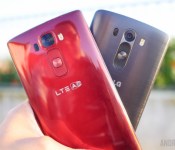
LG G Flex 2 vs LG G3
brightcove.createExperiences();
LG unveiled its latest curved smartphone, the LG G Flex 2, at CES 2015 last month. We’ve already unboxed the device, and given you our first impressions. While we are in the midst of testing the device for our full review, we thought we’d take a look at how it compares to LG’s 2014 flagship, the G3. We’ll take a look at design, software, camera and more, and see how these two devices stack up against one another in this comprehensive look at the LG G Flex 2 vs the LG G3.
Read more: LG G Flex 2 unboxing and first impressions
Design

To begin, it’s quite obvious where these devices differ on the design front. The curved screen on the G Flex 2 gives the device a unique look and feel, though what once was the size of the G Pro series now fits squarely in the realm of the G3’s territory. The G Flex 2 has been shrunken down to the benefit of many users who thought the larger 6-inch original was just too big. The curve of the G Flex 2 still goes from top to bottom, and like the original G Flex, LG claims that the curve results in a more resilient device all around. The curved phone has a self-healing back that is supposed to make scratches on the back disappear after some time. Additionally, there’s the benefit of an overall flexible device that can take some pressure when flattened.

It’s no secret that LG is testing the waters on a few unique features with this handset, and they all offer some benefits to the user that aren’t as gimmicky as you’d expect. Both devices offer a removable back panel, but steering away from the glossy plastic finish of the G Flex 2, the G3 offers a sleek brushed design without the benefit of self-healing properties.
LG’s now iconic button layout found on the back of most of the company’s handsets is present on both smartphones. The back of the devices house the power/standby key and volume buttons sit under the camera optics that includes laser autofocus technology. There are no buttons on the sides of either device, which means both handsets can be kept pretty thin. Moving to the front, both devices offer 5.5-inch screens with very limited bezel on both devices.

Thanks to its curved screen, the G Flex 2 almost literally sits perfectly in-hand, while the G3 is just a plain slab-shaped smartphone we’ve come to expect from most OEMs. The Flex’s self-healing back adds quite a bit of extra grip to the device compared to the smooth feel of the G3. While size has a lot to do with the handling, we give the ergonomics badge to the G Flex because the curve does make “hand gymnastics” easier to perform.
One aspect many people have worried about is fitting the G Flex 2 into a pocket. We can assure you that it is quite comfortable, but we should warn that if you wear jeans with extremely tight or small pockets, the G Flex 2 may be a tad uncomfortable. Either way, we’re looking at very attractive devices that show LG has really made strides in their design language, especially with their signature back button layout.
Display

Each of these devices feature a 5.5-inch display, but the G Flex 2 sports a lower-res display due to its curve. The LG G3’s screen was one of the first to sport Quad HD or 1440p resolution, bringing high powered display experiences into the mainstream. However, there have been a few reports of some compromises with the G3’s high-res screen. A bit of over smoothing could be seen in mostly text-heavy areas, especially in the browser. And with so much pixel power to emote, certain elements might have a slight stutter in place of completely smooth movements. Such claims, at least in my experience, proved to be fairly rare. Though the power of a Quad HD display might not be noticeable without a keen eye, I still thoroughly enjoy mostly media consumption on the higher resolution screen.

As was the case with the original G Flex, we learn in the 2nd iteration that the lower resolution is fine and just as enjoyable. The G Flex 2 has a 1080p screen which benefits from the curve, giving the user a more immersive media consumption experience. The screen will often not be as close to your face for the curve to fully make sense when it comes to talking, but the feature is mostly used to benefit durability and handling.
We have noticed that the G Flex 2’s 1080p panel doesn’t stutter quite as often as the G3’s, which makes the case that super high pixel densities could indeed impede general performance.

If anything, both IPS displays work very well where they should. Brightness is good in broad daylight and colors have the vibrancy that makes all media look great. Ultimately, this comparison makes it even clearer that our tried and true resolutions are still viable in today’s cutting edge environment. You just have to pick which enhancement you want: the subtle bump up via higher resolution or the unique and fresh feeling effect of a top to bottom curve.
Performance

LG has once again given us an incredible feature set in both of these devices. We give the company credit for keeping each new release fresh by keeping the processing packages updated, even if the G Flex 2 is not necessarily supposed to be considered a flagship device. Indeed, the new iteration of LG’s smartphone lines sports the latest and greatest – the Snapdragon 810 – backed by the Adreno 430 GPU and up to 3GB of RAM.
While performance has been great during in-app tasks and gaming on this device thus far, LG’s G UI runs into a few issues on the G Flex 2. Though our testing has not fully completed yet, we do believe the problems come from not only a lack of optimization in this Lollipop edition of LG’s interface, but also the sheer amount of bloatware that you typically get in devices made for the Asian market. We’ll need to reserve judgment on the Snapdragon 810 until we get our hands on a device meant for the US market.

The LG G3, on the other hand, has what is now almost considered old technology – the Snapdragon 801 – alongside the Adreno 330 and up to 3GB of RAM. Performance on the G3 has remained reliable despite how fast the market has been changing, and with updates to the G UI up until now, getting through the elements feels smoother despite what little stutters I mentioned before due to the Quad HD resolution.
Obviously the cutting edge is a place where many of us power users want to be, but while the Snapdragon 810 is pretty big deal, more variables might be skewing its performance experience in this very first crop that includes a Lollipop build that could use some updates.
Hardware

The G Flex 2’s main differentiator on the design front is obviously the curved display, but it doesn’t stop there with the unique features. The self-healing back, if it is anything like on the G Flex 1, will remove superficial scratches over some time, but anything more than that will likely leave permanent marks on the device. This is something we’ve already seen in preliminary testing. Removing the back of the G Flex 2 doesn’t allow you access to the battery, but the microSD and SIM card slots are still exposed underneath.
Speaking of the battery, we have yet to conclude longevity tests in just the couple days that we’ve had this phone thus far, but we can give you an example of one day’s power usage. Ten hours was what it took to get the G Flex 2 to go into its critical power saving mode, resulting in a total of around 3.5 hours of screen-on time. The 3000mAh battery unit likely won’t go the long distance, but it should be able to get you through a full day with a little more frugal usage.

The battery of the G3, on the other hand, is replaceable and packs the same capacity. Our original review of the G3 put the battery life on par with its main competition, despite its higher resolution screen. We haven’t seen a huge change in battery performance from our full review, though the option to replace the battery easily gives it a bit of an edge in the long haul. Otherwise, the G3 doesn’t really benefit from any unique hardware features, but it still does sport a microSD card slot and all of the regular fixings for connectivity. Moreover, both devices still have the Knock On capability enhanced with Knock Code, which you can use as a customized way of unlocking the phone.

It’s important to note that our G Flex 2 does not work on US carriers for LTE connectivity, and our testing will be relegated to WiFi and 3G internet. With that said, call quality has been about as standard for the G Flex 2 as it was for the G3.
Camera

The laser auto focus was definitely the focus of the LG G3, and brought very fast focusing atop optical image stabilization and a camera app that kept things really simple. The G3’s camera experience was very well-received by us and thus it should come as no surprise that the experience on the G Flex 2 is largely the same.
Right down to the apps themselves, the experiences in shooting with the LG cameras are largely the same. You get simple elements for picking resolution or changing from the decisive number of modes that include HDR, panorama, and dual shooting. However, magic focus seems to have been left out of the Flex.
Both cameras have 13MP resolutions on their rear-facing cameras, and both include video modes including 4K recording and slow motion through 120 frames per second. What made the G3 camera experience so enjoyable was the fast point and shoot capability. While using the minimal camera interface, you just tap a point and the lasers focus on it very quickly, snapping the shot in very little time. And actually, the G Flex 2’s camera seems to be a bit faster at focusing than the G3. Where as the focus might jump a little before settling on the G3, autofocusing on the G Flex 2 was pretty spot on and direct in the first go. This isn’t the biggest improvement, but one that was easy to notice when shooting side by side.

Picture quality takes on a pretty similar affair in the G Flex 2, as these quickly shot photos (shown in the gallery below) show good color reproduction to the scene. There isn’t a high level of saturation in the post processing that you might now be accustomed to in competitor’s cameras, though it is something the photographer will have to decide is a true benefit or detractor, as more vivid photos tend to be preferred by users.
HDR modes do add a little more color to photos, though its main function of lightening darks and clarifying blown out areas may not be particularly strong. The sometimes overly-aggressive noise reduction in the G3 seems to have returned, however, which is a trade-off. Sometimes the pictures are just softened a little too much and fine details can suffer.
What does prove itself well is OIS+, helping shaky hands capture clear photos and helping video keep from getting too jittery. Self portraits have been made easier with a new gesture allowing you to review the picture you just took with a natural downward angle movement – the 2.1 megapixel front facing camera is still just a standard performer, however.
LG G Flex 2 Camera Samples


LG G3 Camera Samples
We’re still testing the G Flex 2’s camera, though it’s clear so far that these two camera experiences are very similar.
Software

When it comes to software, the G Flex 2 is running LG’s G UI on Android 5.0 Lollipop, and the G3 is still running Android 4.4 KitKat, though the G3 Lollipop update has already started rolling out to some users. Snce our G3 hasn’t been updated yet, the main differences you’ll notice in the G3 is the older softkeys, the older recent apps switcher, and the notification dropdown.

But from there, not much more has changed in G UI, as many of the elements take on LG’s typical style. The Settings screen is still a tabbed layout and the quick settings above the notifications are still a little too crowded for comfort. The Smart Notice widget does get a few more capabilities on the G Flex 2, but the most enjoyable Smart App experience is still the keyboard, which is just a blast to type with on the Flex. It has a customizable height and extra button layout with number keys up top, making it one of the most enjoyable OEM keyboards on which to type. The only real addition to the Flex interface is a peeking feature that is triggered by swiping down on the turned-off screen, which is basically a quick way to check the time and the notification bar.

Just like the the version of LG’s UI found on the G3, the G Flex 2’s UI is still a little too cluttered for its own good, as our early performance issues seem to prove. Lollipop was a needed move forward for Android, but LG kept things looking and feeling mostly the same in the G Flex 2, which might not be a good thing for everyone.
Gallery
Pricing and final thoughts

The LG G Flex 2 has launched in Korea, and will be available for pre-order on February 27th in Singapore. AT&T, Sprint and US Cellular have announced their plans to eventually carry the device sometime in the spring, though no exact date has been given. It will also launch on Vodafone in the UK, and will make its way to Australia, though there’s no timeframe for its availability. The phone has been rumored to launch at around €599.99 off-contract (~$600 US), but we’ll need to wait and see the exact price when the launch date gets closer.
The LG G3 has been out for quite some time, so you can pick up the device in a number of different places. All four major US carriers have the device, as well as multiple UK carriers, Korean carriers, and many other parts of Europe and Asia. Nowadays, you can grab the phone with a two-year contract anywhere from $0-$149.99. Off-contract prices vary, reaching anywhere from $479.99-$549.99.
These are definitely the two top dogs in the LG camp and it should come as no surprise that they are very similar.
And so, there you have it, our look at the LG G Flex 2 versus the LG G3. These are definitely the two top dogs in the LG camp and it should come as no surprise that they are very similar. The higher resolution display of the LG G3 is its marquee feature, but if you’re looking for something more unique, the G Flex 2 has already impressed us with its looks and very nice in-hand feel. What points we do give to the G Flex 2 for its noticeably faster camera experience are taken away a bit by the new Lollipop edition of LG’s UI that seems to lack the optimization needed to meet Snapdragon 810 expectations. That said, we thoroughly enjoy the G Flex 2 so far, and that basically means we still enjoy all that the G3 offers – it’s just that the Flex is trying to bend the rules – making it a marginally more intriguing choice.
Related Videos
.rvs_wrapper
width: 335px;
.rvs_wrapper.align_left
float: left;
.rvs_wrapper.align_right
float: right;
.rvs_wrapper.align_center,
.rvs_wrapper.align_none
width: 100%;
.rvs_wrapper.align_center
text-align: center;
.rvs_wrapper.align_center.cbc-latest-videos ul li
float: none;
display: inline-block;
vertical-align: top;
.rvs_wrapper.cbc-latest-videos:not(.align_none) ul li:nth-child(2n+1)
clear: both;
.rvs_title
font-weight: 600 !important;
margin: 0 !important;
.rvs_wrapper.align_right .rvs_title
padding-left: 20px;
.rvs_title a
font-family: ‘Roboto Condensed’;
color: #3a3a3a;
.rvs_wrapper.cbc-latest-videos ul
padding-top: 10px;
.rvs_wrapper.align_left.cbc-latest-videos ul li,
.rvs_wrapper.align_none.cbc-latest-videos ul li
padding: 0 15px 0 0;
.rvs_wrapper.align_right.cbc-latest-videos ul li
padding: 0 0 0 15px;
float: right;
.rvs_wrapper.align_center.cbc-latest-videos ul li
padding: 0 7px;
.rvs_wrapper.cbc-latest-videos ul li > a
font-weight: 400;
.rvs_wrapper.cbc-latest-videos ul li > a .yt-thumbnail
margin-bottom: 0;
@media only screen and (max-width : 480px)
.rvs_wrapper
width: 100%;
text-align: center;
#page .rvs_wrapper.cbc-latest-videos ul li
padding: 0 7px;
display: inline-block;
float: none;
vertical-align: top;


12 best Android horror games

Not everyone likes the horror genre because it never seems to do well enough to scare them or they just plain hate being scared. Others are exactly the opposite and enjoy the adrenaline rush that comes with being scared. As it turns out, there are actually some decently scary horror games on mobile. Here are the best Android horror games.
 Curse Breakers: Horror Mansion
[Price: Free]
Curse Breakers: Horror Mansion is a point-and-click puzzle game. The premise is you are a curse breaker and you must explore a haunted mansion to uncover its secrets and deal with the paranormal. It’s not as in-your-face scary as others but it’s a great casual game with horror elements. It’s also a very rare free game with no in app purchases. The only caveats are that it’s simple and short but it is totally free so it’s hard to be too judgmental.


 Dead Space
[Price: $6.99]
The hit shooter Dead Space is on a lot of horror game lists because of its great graphics and creepy story. The controls are simple and were designed that way so you could focus on what’s going on in the game rather than worrying about control. Dead Space sits in the horror sci-fi genre and reviewers have lauded its truly creepy story line and shocking cut scenes. It’s a tad expensive and it is buggy for some people, so do test it out before the two hour refund cut off time.
 Dead Trigger 2
[Price: Free with in app purchases]
Dead Trigger 2 takes place in a post apocalyptic world fraught with danger which will have you constantly turning around to see what’s behind you. It’s not scary in the Exorcist sense, but the game does a great job of keeping the tension up as zombies crawl out of seemingly everywhere to try to surround and kill you. It’s a first person shooter with great graphics and it’s free to play.
 Dungeon Nightmares
[Price: Free / $0.99]
Before Five Nights At Freddy’s took the title of Android’s scariest game, the nomination frequently went to Dungeon Nightmare. This dark game has you crawling around tight spaces in the dark and coming into contact with all manner of scary beings. Even the premise is scary: every night you dream about being in an endless dungeon from which there is no escape. There are candles available to help you get through the labyrinth but there are points where it hurts as much as it helps. It’s a good experience for horror fans.
 Eyes – The Horror Game
[Price: Free / $0.99]
Eyes – The Horror Game is a first-person treasure search game where you must raid an abandoned house that is haunted by a horrifying ghost. The graphics in this one are actually pretty good and play well with the atmosphere overall. While you’re exploring the house, the word “RUN!” will appear on the screen and if you look around, you can see the face of the ghost as it chases you. Your goal is to get away, collect more valuables, and escape before it kills you. Do note: the free version is pretty much a demo with ads. Get the paid version for the best experience.
 Five Nights at Freddy’s 1 and 2
[Price: $2.99 each]
Five Nights at Freddy’s 1 and 2 were released in 2014 to massive critical acclaim. There’s a reason why and it’s because these games are truly terrifying. You play as a security guard who must watch over possessed animatronics. When you watch them, they don’t move but when you’re back is turned, they start coming after you. If they make it to the security room, you’re pretty much toast. It features truly creepy characters and is very likely the scariest game on Android.
 Into the Dead
[Price: Free with in app purchases]
Into the Dead is a zombie survival game that is also an infinite runner (similar to Temple Run). Instead of running away from a monster trying to eat you, you’re trying to survive the zombie apocalypse. The game does a great job of providing a gritty and dark environment that is fraught with constant zombie danger as you blast a path through to save yourself. It’s also one of the most popular horror games available on Android.
 Murder Room
[Price: Free with in app purchases]
Murder Room is a lesser known horror game but it’s still pretty creepy. In this puzzle game, you must escape confinement. Many of the visuals are quite disturbing and when you finish the main story, you can buy part two of the game as an in app purchase. It is worth noting that this game is very hard. So hard that it’s elicited negative reviews from users before. Other than that, it’s an enjoyable title with some clever and scary twists.

 The Room 1 and 2
[Price: $0.99 and $2.99 respectively]
The Room 1 and 2 are world renown puzzle games that have you searching for things inside of things and then there are more puzzles inside of those things. Aside from its extremely clever puzzle style, the game itself has a truly arcane story line that involves alternate time lines, plenty of skeletons, and tinkering with dark forces beyond one’s control. It’s a little more subtle than others, but there’s a feeling of dread hovering around. These are masterpieces.
 The Slender Man and Slendrina series
[Price: Free with in app purchases / $1.45 / $1.54]
One of the earliest horror games on Android was the Slender Man series. The premise is that you’re exploring some places that you ought not be exploring. The result being that you end up being stalked and eventually killed by Slender Man or Slendrina depending on which title you’re playing. All of the games in the series have the same basic premise so you can go with any of them. The free versions are ad supported while the paid versions have no ads.
 Twisted Lands: Shadow Town and Insomniac
[Price: $0.99 and $2.99 respectively (both have free versions as well)]
The Twisted Lands games are horror where you play as Mark and Angel who get stranded on the worst island ever. Every place is haunted and that includes the beaches, water, woods, buildings, and everything. It’s a hidden-object game where you must solve puzzles and survive so you can escape. Both games look and play in similar ways so you can play either one and will get to enjoy more or less the same kind of content. Of course, you could always just play both as well.
To get Twisted Lands: Insomniac, click the button below. To pick up Shadow Town, click here.

 The Walking Dead Season One and Two
[Price: Varies]
While the TV show is more of a drama than a horror show, there is a fair share of scary content in both the show and the video game. In the game, you play as a girl named Clementine who must survive in a world overrun by the walking dead. It features great graphics, a gripping story, and the decisions players make will affect how things happen in future parts of both games. It won many, many awards in 2014 for its brilliant story telling and great atmosphere. It’s not the scariest but it’s a survival game which means you’ll find some tense moments.
Wrap up
If we missed any great Android horror games, let us know in the comments!
To see our complete list of Android apps and games lists, click here!
Things the Google Play Store could improve: Part 1 – The top charts

Editor’s note: this is the first post in our new series discussing Play Store flaws and what Google could do to improve user experience. Feel free to join the discussion and suggest new topics.
The Google Play Store top charts are an amazing tool for consumers. It shows a quick glance of the popular and trending applications that everyone else is using which kind of allows consumers to curate their own experiences. The idea is amazing but far from perfect. Games seem to run the place and there exists only moderate continuity between the web and mobile platforms. Let’s dig in and talk about the problem.

The Main Top Charts in both Apps and Games are actually just two charts for games
To show what we mean, we decided to go through the top apps charts to show you just how few apps you can actually find in the top apps categories. We had no need to do this for the games because the top games charts were, predictably, all games.
Here’s the breakdown:
- Top Free in Android Apps
In the Top Free in Android Apps section of the Google Play Store, we took a look at the top 50 apps. Of those, 29 were games and 21 were apps. - Top Paid in Android Apps
In the Top Paid in Android apps section, we again looked at the top 50 apps. Of those, 35 were games and 15 were apps. - Top Grossing Android Apps
You can see where this is going. Out of 50, 48 were games and 2 were apps. - Top New Paid Android Apps
Out of 50, 26 were games and 24 were apps. - Top New Free Android Apps
Out of 50, 43 were games and 7 were apps.
When you don’t take duplicate apps into account, the top 250 apps across five categories are actually 181 game entries and 69 apps. In other words, 72.4% of the apps you’ll find in the top Android apps charts are actually games. When you add in the 250 top games across the same categories on the Games side, that means across ten categories and 500 apps, 431 are games and 69 are apps.
Now let’s count duplicates!
Let’s go a step further. I took a close look at the top 50 apps and games listed over the ten top charts across both apps and games. Here are some observations.
- Total number of duplicates
In the top 500 apps listed in the top charts, 160 apps/games were listed at least twice. Of those, 12 of them were listed three times, 12 were listed four times, SimCity BuiltIt was listed five times, and Trivia Crack was listed an astounding six times. - There are less than 300 unique apps in the top 500
The total number of applications and games actually listed in the top 50 of each of the ten top charts categories is 290. Only 130 of those are listed just one time. - Games win again!
Of the 160 apps and games listed multiple times, 159 were games. Pandora Internet Radio is the only application listed twice.
If you need to see these numbers for yourself, I’ve compiled a nifty spreadsheet that you can view here. The bottom line is the top charts don’t really show much variety and give games a heavy spotlight by allowing them to invade the Top Apps charts, despite having a whole set of charts specifically for games.
Most of the duplication takes place between the same charts on Apps and Games. For instance, Clash of Clans tops both Top Grossing charts and that’s really unnecessary. Further duplication takes place when newer games hit the top spots on the new games and apps charts and then become popular enough to make it on to the regular top apps and games charts. Back in January 2015, this happened to Trivia Crack, which appeared on six different charts.
Note: The spreadsheet was put together in January, 2015. The top charts do change periodically and while the numbers may not be exactly the same, the ratios should remain consistent.

The website and mobile apps don’t work the same
Now that we’ve discussed the front pages, let’s dig a little deeper. On the mobile app, going to any app category gives you a range of lists to look at based on Google’s recommendations for you and just some general lists as well. You can then swipe over and see the top charts for those apps. It’s a fairly simple layout that makes sense and exposes people to a wide variety of recommendations and top apps in each category. No problems there.
On the website, however, none of these things are true. There is zero access to top charts unless you Google Search them directly. This is especially confusing considering the UI. The white bar that houses the category name is otherwise left totally blank and there seems to be more than enough space to put links to the top charts there. After all, they do exactly that on the front apps page and on the front games page. Furthermore, it doesn’t make sense not to link to them because Google has these webpages. They already exist. Why not give us a link to find them more easily?
To their credit, the recommended content and specialized lists (e.g. the top apps for teachers in Education) remain the same in both the web and desktop versions.

What can be done to fix it?
Thankfully, these shortcomings could be easily fixed:
- Remove games from the top apps: This is fairly obvious. There is a whole section in the Google Play Store specifically for games. It seems incongruous to put games in the top apps categories while maintaining a totally separate section dedicated solely to games. This would also cut down dramatically on the number of duplicate entries resulting in a wider variety of apps to choose from.
- Graduate top new free and paid to actual top paid and top free: Many of the duplicate listings take place on the top new free and top new paid in both games and apps. If a game or an app is so popular that it makes the regular top paid and top free charts, would it not make sense to remove them from the new paid and new free to make room for the next generation?
- Put the top charts links back into the website version: That white bar at the top isn’t being used for anything else anyway. Plus, the top charts for each category actually do exist and Google does maintain them. There seems to be no reason not to put a link there.

Wrap up
There are two sets of charts that you really can’t do anything about and they are Trending and Top Grossing. Changing Top Grossing in any way would compromise the integrity of the information. That means some duplication will invariably take place. Trending is a whole different story. I’m not entirely sure what that chart actually is, what it does, how it’s calculated, or if there’s anything actually wrong with it.
With the proposed solutions in place, there should be a wider variety of apps for consumers to choose from. With maintenance on the top new paid and free charts, new developers and new apps have a greater and more frequent chance of being noticed. It may also coax those who long ago abandoned the top charts to revisit with the promise of newer, more varied content.
That should also help with the app discovery problem and expose more people to more new content more often. With the links restored in the website version, Google will achieve more continuity between the desktop and mobile experience which will make both platforms easier to understand for consumers.
Of course, we’d love to know what you think. Are there any other solutions you would suggest to fix this problem or are we way off base with any of ours? Sound off in the comments!
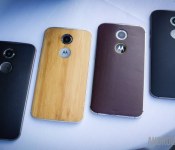
President of Motorola counters Jony Ive’s criticism of Moto Maker

In a recent interview, Apple’s Senior Vice President of Design, Jony Ive, criticized Motorola’s Moto Maker program. Now, Ive didn’t exactly use the name Moto Maker, but he did elude to the program and asked for the company name to remain private in his interview. Specifically, Ive told the New Yorker magazine:
Their value proposition was, ‘Make it whatever you want’. You can choose whatever colour you want. And I believe that’s abdicating your responsibility as a designer.
Rick Osterloh, President of Motorola, caught wind of this interview and fired back:
Our belief is that the end user should be directly involved in the process of designing products. We’re making the entire product line accessible. And frankly, we’re taking a directly opposite approach to them [Apple].
Osterloh continues, this time commenting on Apple’s pricing and availability structure:
We do see a real dichotomy in this marketplace, where you’ve got people like Apple making so much money and charging such outrageous prices. We think that’s not the future. We believe the future is in offering similar experiences and great consumer choice at accessible prices. The mobile phone industry’s greatest failure is also its greatest opportunity: to make really good, affordable devices for people who don’t want to spend a lot of money. A great smartphone, and a great mobile internet experience, shouldn’t be an expensive luxury. It should be a simple choice for everyone.
Motorola offers thousands of different color, inscription, and boot animation variations on their Moto X handsets through the Moto Maker platform. And while Apple only offers a few different color choices and two different sizes for their most recent handset, the companies may not be too far off from one another. It should be noted that while their latest handset isn’t customizable at all, the new Apple Watch is set to launch with three different watch variations, multiple different sizes and numerous watch strap options.
And when it comes to pricing, obviously there’s a big difference in the way Motorola and Apple operate. But one thing is for certain: Apple’s pricing structure is working to their advantage, since the company just posted their largest profit in history. Even so, we still wouldn’t mind if the majority of companies adopted Motorola’s business structure – offering relatively affordable, customizable handsets – while not skimping on the premium features.
What’s your take on the exchange between Osterloh and Ive?
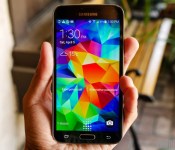
T-Mobile rolling out Android 5.0 Lollipop to the Galaxy S5

A number of US carriers have been pushing out Android Lollipop updates to their branded Samsung Galaxy S5s over the past couple of weeks and T-Mobile has now also begun doing the same.
From today, T-Mobile Galaxy S5 owners can grab the 900MB Android 5.0 Lollipop update OTA or via the Samsung Kies software package. The update contains the tweaked Material Design-esque Touchwiz UI, new notification and lockscreen features, and performance and the battery life improvements that we have seen with previous Galaxy S5 Lollipop updates.
As usual, you can manually check for the update through Settings > About phone > Software updates or by connecting your phone to your PC and using Samsung Kies. Alternatively, you can manually flash the firmware with Odin, if you so desire.
It’s great to see that carrier branded handsets are also receiving Lollipop in good time.
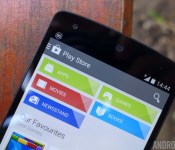
Things the Google Play Store could improve: Part 1 – The top charts
Editor’s note: this is the first post in our new series discussing Play Store flaws and what Google could do to improve user experience. Feel free to join the discussion and suggest new topics.
The Google Play Store top charts are an amazing tool for consumers. It shows a quick glance of the popular and trending applications that everyone else is using which kind of allows consumers to curate their own experiences. The idea is amazing but far from perfect. Games seem to run the place and there exists only moderate continuity between the web and mobile platforms. Let’s dig in and talk about the problem.
The Main Top Charts in both Apps and Games are actually just two charts for games
To show what we mean, we decided to go through the top apps charts to show you just how few apps you can actually find in the top apps categories. We had no need to do this for the games because the top games charts were, predictably, all games.
Here’s the breakdown:
- Top Free in Android Apps
In the Top Free in Android Apps section of the Google Play Store, we took a look at the top 50 apps. Of those, 29 were games and 21 were apps. - Top Paid in Android Apps
In the Top Paid in Android apps section, we again looked at the top 50 apps. Of those, 35 were games and 15 were apps. - Top Grossing Android Apps
You can see where this is going. Out of 50, 48 were games and 2 were apps. - Top New Paid Android Apps
Out of 50, 26 were games and 24 were apps. - Top New Free Android Apps
Out of 50, 43 were games and 7 were apps.
When you don’t take duplicate apps into account, the top 250 apps across five categories are actually 181 game entries and 69 apps. In other words, 72.4% of the apps you’ll find in the top Android apps charts are actually games. When you add in the 250 top games across the same categories on the Games side, that means across ten categories and 500 apps, 431 are games and 69 are apps.
Now let’s count duplicates!
Let’s go a step further. I took a close look at the top 50 apps and games listed over the ten top charts across both apps and games. Here are some observations.
- Total number of duplicates
In the top 500 apps listed in the top charts, 160 apps/games were listed at least twice. Of those, 12 of them were listed three times, 12 were listed four times, SimCity BuiltIt was listed five times, and Trivia Crack was listed an astounding six times. - There are less than 300 unique apps in the top 500
The total number of applications and games actually listed in the top 50 of each of the ten top charts categories is 290. Only 130 of those are listed just one time. - Games win again!
Of the 160 apps and games listed multiple times, 159 were games. Pandora Internet Radio is the only application listed twice.
If you need to see these numbers for yourself, I’ve compiled a nifty spreadsheet that you can view here. The bottom line is the top charts don’t really show much variety and give games a heavy spotlight by allowing them to invade the Top Apps charts, despite having a whole set of charts specifically for games.
Most of the duplication takes place between the same charts on Apps and Games. For instance, Clash of Clans tops both Top Grossing charts and that’s really unnecessary. Further duplication takes place when newer games hit the top spots on the new games and apps charts and then become popular enough to make it on to the regular top apps and games charts. Back in January 2015, this happened to Trivia Crack, which appeared on six different charts.
Note: The spreadsheet was put together in January, 2015. The top charts do change periodically and while the numbers may not be exactly the same, the ratios should remain consistent.
The website and mobile apps don’t work the same
Now that we’ve discussed the front pages, let’s dig a little deeper. On the mobile app, going to any app category gives you a range of lists to look at based on Google’s recommendations for you and just some general lists as well. You can then swipe over and see the top charts for those apps. It’s a fairly simple layout that makes sense and exposes people to a wide variety of recommendations and top apps in each category. No problems there.
On the website, however, none of these things are true. There is zero access to top charts unless you Google Search them directly. This is especially confusing considering the UI. The white bar that houses the category name is otherwise left totally blank and there seems to be more than enough space to put links to the top charts there. After all, they do exactly that on the front apps page and on the front games page. Furthermore, it doesn’t make sense not to link to them because Google has these webpages. They already exist. Why not give us a link to find them more easily?
To their credit, the recommended content and specialized lists (e.g. the top apps for teachers in Education) remain the same in both the web and desktop versions.
What can be done to fix it?
Thankfully, these shortcomings could be easily fixed:
- Remove games from the top apps: This is fairly obvious. There is a whole section in the Google Play Store specifically for games. It seems incongruous to put games in the top apps categories while maintaining a totally separate section dedicated solely to games. This would also cut down dramatically on the number of duplicate entries resulting in a wider variety of apps to choose from.
- Graduate top new free and paid to actual top paid and top free: Many of the duplicate listings take place on the top new free and top new paid in both games and apps. If a game or an app is so popular that it makes the regular top paid and top free charts, would it not make sense to remove them from the new paid and new free to make room for the next generation?
- Put the top charts links back into the website version: That white bar at the top isn’t being used for anything else anyway. Plus, the top charts for each category actually do exist and Google does maintain them. There seems to be no reason not to put a link there.
Wrap up
There are two sets of charts that you really can’t do anything about and they are Trending and Top Grossing. Changing Top Grossing in any way would compromise the integrity of the information. That means some duplication will invariably take place. Trending is a whole different story. I’m not entirely sure what that chart actually is, what it does, how it’s calculated, or if there’s anything actually wrong with it.
With the proposed solutions in place, there should be a wider variety of apps for consumers to choose from. With maintenance on the top new paid and free charts, new developers and new apps have a greater and more frequent chance of being noticed. It may also coax those who long ago abandoned the top charts to revisit with the promise of newer, more varied content.
That should also help with the app discovery problem and expose more people to more new content more often. With the links restored in the website version, Google will achieve more continuity between the desktop and mobile experience which will make both platforms easier to understand for consumers.
Of course, we’d love to know what you think. Are there any other solutions you would suggest to fix this problem or are we way off base with any of ours? Sound off in the comments!

Google’s fifth Science Fair rewards teens for saving the environment

Google’s Science Fair competition regularly leads to clever inventions from teens, and this year’s event (the fifth ever) is giving junior pioneers an extra incentive to strive for a prize. On top of familiar rewards, including $100,000 in scholarships and trips to the Galapagos or Virgin Galactic’s spaceport, there’s a Community Impact Award that honors efforts tackling environmental or health issues — kids who clean up the planet or save a life may get special recognition. Teachers will also get their due through a new Inspiring Educator award. Young creators have until May 18th to submit their finished projects to Google, and you’ll hear about the winners at a finalist event starting on September 19th.
Source: Google Official Blog
 AIVAnet