


How to upgrade your MacBook Air with more storage

One of the best ways to get more life out of an aging Mac is to upgrade the storage. In some cases you’ll want to go faster. In other cases, you’ll want to go bigger.
I carried a MacBook Air for two years but gave up on it in favor of a Retina MacBook Pro with beefier SSD storage, and haven’t regretted it. The MacBook Air is still with us, in the hands of my college-aged son. It’s time for a storage upgrade to get him a couple more years with it. Here’s how.
Apple changed the architecture of the MacBook Air’s flash storage interface with the mid-2013 models. If you have a MacBook Air older than that, like mine, you’ll find storage upgrade kits readily available from both Other World Computing and Transcend. The capacity and performance of your flash storage upgrade will vary depending on your MacBook Air and which upgrade you choose.
For my son’s MacBook Air, doubling the available storage capacity is going to give him plenty more space to help get through the next couple of years. We’re replacing the 120 GB of available storage with a 240 GB drive instead. Transcend lent us a JetDrive 500 kit to show you how it’s done.
The kit includes a 240 GB replacement SSD for the MacBook Air, two screwdrivers with different tips to disassemble the MacBook Air and remove the existing SSD, and an external USB 3.0 enclosure which fits the original SSD I’m removing from the MacBook Air.
The only thing the kit doesn’t include that I’d consider mandatory is an anti static strap, which will cost you $6.99 from Amazon.com. An anti-static strap reduces the likelihood you’d damage the sensitive electronics you’ll be handling. What’s more, you can save it and reuse it the next time you need to take your Mac or other device apart.
Back up!
Before you do anything else, back up your Mac. Use Time Machine or another backup method to make sure that your Mac is completely backed up. You don’t want to screw something up only to find that your data is gone for good.
This MacBook Air is no longer eligible for AppleCare coverage. If it were, I’d think twice about doing this upgrade. Apple’s warranty covers original parts only; a third-party SSD upgrade isn’t something that would be covered if something goes wrong.
Build a USB drive

- Install the replacement SSD in the external enclosure using the supplied screwdrivers.
- Connect that drive to an open USB port on your Mac.
Clone your Mac
The Transcend kit included all the physical tools I needed to install a new SSD in the MacBook Air and a handy USB 3.0 enclosure to stick my old drive in, so I can recycle it as a 120 GB external drive. A carrying pouch for the drive is also included.
Before that, though, put the bigger SSD into the enclosure included with the kit and use the Mac’s Recovery System (command-R on boot) to run Disk Utility to format the new drive and copy the contents of the Mac’s internal drive to it. Instructions to do so are included with the kit.
I prefer to use cloning software whenever possible. I find cloning the Mac’s SSD is the fastest and most direct way of duplicating its contents onto the bigger new one I’m installing. It’s also a good habit to get into to create a bootable backup drive.

I used Bombich Software’s Carbon Copy Cloner ($40, free 30-day trial download available). Shirt Pocket’s SuperDuper is another excellent disk cloning option (free, $27.95 unlocks additional features).
Install the drive
Installing the new drive is actually quite simple: Just remove the screws from the bottom of the MacBook Air’s case, then remove the screw holding the SSD in place. Slide the new one into place, then reverse the procedure. I’d recommend storing the screws from the bottom of the MacBook Air in a small cup or plastic storage container so they don’t roll away.

From start to finish, it should take you about half an hour to physically install the drive. The amount of time it’ll take you to cloning or copying the hard drive depends on the amount of data you’re moving.
Transcend makes JetDrive kits for older MacBook Airs and older MacBook, MacBook Pro and Retina MacBook Pro models, MacBook and Mac mini models too. Instructions vary depending on model, so visit their web site for more details.
- $169.99 – Buy now from Amazon.com

The Lumia 635 with 1GB of RAM appears to be real

Recent talk has suggested that the popular Lumia 635 Windows Phone was in line for a popular hardware upgrade. One of the biggest limitations to the Lumia 635 (despite being one of the first Windows 10 preview phones) is the 512MB of RAM, meaning some apps just won’t install. Various sightings of a 1GB version have started appearing across the web, but now it appears that the phone is somewhat official having been listed on Microsoft’s own website.

Spinballs for Windows Phone – nice concept but the execution falls a wee short

Spinballs is a Windows Phone game that hit the Store shelves earlier this month. The puzzle game has you shooting a ball across a wooden puzzle where it should eventually land in a basket. We were tipped on this game, it looked interesting and we took the plunge to see what it was all about.
The puzzles have trap doors, re-directs and other twists to add some degree of challenge to the game. The concept is decent but glitches with the graphics and a few other factors noticeably holds this Windows Phone game back. It is available for low-memory devices.

How to use travel times with Calendar for iPhone and iPad

Have a lot of appointments and meetings to juggle? Would it make your life a little easier to be able to easily see how long it will take you to get from one place to another? Apple’s Calendar can use location information to figure out just that, and best of all, it’s easy!
How to get travel times with Calendar for iPhone and iPad
- Launch the Calendar app on your iPhone or iPad.
- Tap on the event you’d like to calculate a travel time for or create a new one.
- Tap on Edit at the top right.
- Tap on Travel Time.
- Turn On travel time.
- Tap on Starting Location and tell Calendar your starting location either by entering an address or the name of a place or business.
- Tap on Based on location for either driving or walking directions.
- Tap on Edit Event at the top.
- Tap Done.
- Look for travel time under the date area.



Next-generation Pebble smartwatch with color screen found on company’s servers

This might just be what the next-generation Pebble smartwatch will look like. The render of the smartwatch was found on the company’s servers, hidden away with its wider design and color screen. Pebble is expected to officially announce the device Tuesday, February 24, at 10 am Eastern time, which is when the current countdown on their website reaches “zero”.
The render would appear to confirm earlier rumors that the next generation Pebble will have a color display but maintain the same four-button control scheme of the current devices. The image also shows what looks like a bigger bezel than the current Pebble design. We expect that we’ll be learning a lot more about the new Pebble tomorrow.
Source: Pebble; Via: 9to5Google

Apple to bolster iTunes editorial content with latest job opening

A job positing has been spotted for a position at Apple, to work at the company’s London offices. What makes this post rather interesting is the successful applicant would be tasked with editorial content on Apple’s music service. Think back to Apple’s acquisition of Beats Music. An editorial producer with experience across pop culture and music journalism is desired. According to the job posting on Apple’s website:
“This full-time position is split between editorial and producing duties. The editorial duties focus on writing, editing, managing a sea of freelancers, and working collaboratively with business and content heads to shape and define editorially driven merchandising promotions.”
It’s strange to see Apple seeking such talent, simply because we’re most likely talking about music curation. Apple has also managed to snap up DJ Zane Lowe from BBC Radio 1 in the UK, who will head to the US to work with the iTunes team. We’ll have to see what Apple plans for its service relaunch, but with current positions filling up (and being advertised), the company is going big.
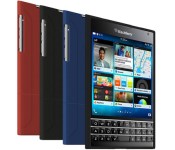
Our most popular BlackBerry Passport hard case is only $19.95 today!

The SURFACE Case by Seidio is the ultimate low-profile BlackBerry Passport hard case; combining a super-slim design with a protective outer shell. The exterior features a custom soft coating that provides additional grip, too. Get yours in black, blue, red or gold today and save 33%
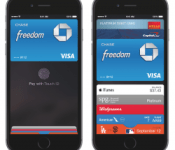
Visa to Launch Tokenization in Europe in Mid-April for Mobile Payments [iOS Blog]
 Visa announced on Tuesday that it will be rolling out tokenization in Europe, an essential technology that allows for secure and convenient contactless payments using various technologies (via The Next Web). The tokenization service will be available to financial institutions in mid-April and helps pave the way for the launch of Apple Pay in Europe.
“This is an exciting time to be in the payment industry. We believe that 2015 will be the year that mobile payments will be in the hands of consumers across Europe,” said Sandra Alzetta, Executive Director, Core Products for Visa Europe. “Tokenisation is one of the most important technologies to emerge in digital payments and has the potential to start a whole new chapter in the kinds of products that are developed.”
Visa, MasterCard and American Express were among the credit card companies that launched tokenization in the United States ahead of the launch of Apple Pay last October. The technology replaces your credit card information with a randomized series of numbers during payment authorization to secure your account details when you tap your smartphone on a contactless payment terminal.
Apple Pay remains limited to the United States, although an international expansion could start with Canada as early as March. The NFC-based mobile payments service requires an iPhone 6 or iPhone 6 Plus, and will also be compatible with the iPhone 5s, iPhone 5c and iPhone 5 when paired with an Apple Watch.

Windows 10 will make more languages look beautiful with new text shaping engine

Microsoft has created a new shaping engine for text that it says will help Windows 10 display more languages correctly. The details of the new Universal Shaping Engine have now been published for font developers to access so that their creations look right when used on Windows 10.
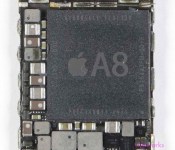
Apple reportedly entices processor engineers away from Samsung

Apple has reportedly been successful in luring away a number of employees away from Samsung. Many of these hires are apparently technicians and engineers coming from Samsung’s chip division. Apple is also reportedly giving these new employees increased independence, according to The Korea Times:
“Those former Samsung workers are given greater independence to proceed with their tasks. Apple prefers to use Samsung’s chip experts because they are very diligent, mission-oriented and are prepared to acquire new knowledge,” said another official.
Apple has a history of hiring chip experts away from Samsung, snapping up AMD veteran Jim Mergard from the company in late 2012. In addition to chips, Apple is also said to be trying to hire battery experts from Samsung, possibly for work on the rumored Apple Car.
Source: The Korea Times
 AIVAnet
