


Microsoft donates $1 million to help fund a tech exhibit at the US Diplomacy Center

Microsoft has donated $1 million to help fund the construction of a high-tech interactive exhibit at the US Diplomacy Center (USDC), which is set to open in Washington DC in 2017. The center itself will serve as a next-generation museum and education resource that will showcase areas surrounding American diplomacy.

Weekly photo contest: Trees

After last weeks more technical challenge, this week we’re going back to a more simple topic for the weekly photo contest; trees. But even the simplest of topics can produce some incredible shots. The one up top, for example, isn’t a particularly fancy setting, but it’s one of the first outdoor shots I’ve been able to take using Rich Capture on the Lumia 830.
So, that’s this weeks task. And a little heads up that we’ll still be closing it down in the usual time frame, but we’ll be skipping a new contest next week on account of being at various shows around the world. But before all of that, who won last weeks, Tilt Shift, inspired contest?
Line gets a timeline feature in latest update
Messaging service Line received an update today that sees the introduction of a timeline feature, through which you can share texts, images and videos with your friends.

Here’s how Lollipop 5.0.2 looks on the Galaxy Tab S 8.4 and 10.5

Given the flagship tablet status Samsung bequeathed onto last year’s pair of Galaxy Tab S devices, it’s a bit sad to see their being relegated to “second rate” status with respect to Lollipop updates. Perhaps it’s simply a matter of numbers (as in smartphones sell better) or else the Magazine UX took longer than expected to coat with the new touches.
Thankfully, SamMobile has obtained a working build of the software which showcases the somewhat subtle changes that have been made. Take a look, and be sure to admire the awesome background setup:
As mentioned in the video, the changes are somewhat minimal, with the animations receiving a slight alteration, and various toggles (such as the volume slider) adopting the Lollipop look. Multi-user support has been added directly to the drop-down notification shade. Additionally the carousal recent apps list can be seen as well as lock screen notification cards.
Perhaps the greatest addition, however, is the fact that Samsung has left the original sound profile settings as is on the notification shade: Sound/Vibrate/Mute are all there, something that Google has infuriated countless users with having removed them from the stock AOSP Lollipop build.
Unfortunately no information is given as to what build is running on the device (near final? beta?) nor is there any release date information provided. According to leaks from earlier this year, Samsung was allegedly going to be updating its tablets after all the flagship phone releases were complete. Hopefully within the next few weeks the update will be finalized and deployed to eager owners, at least in terms of the Wi-Fi and SIM-unlocked variants go. Carrier branded models? That’s another story.
Assuming the recent rumors surrounding a Galaxy Tab S2 series go, will it have the same UX build as the one pictured here? Or will Samsung try and unveil a significantly redesigned Lollipop experience?

Google+ mobile web experience refreshed with new design and improved sharing options

Google has announced an update to Google+ for the web that brings a new design that has a few Material Design influences. The updated design includes a new hamburger-style slide-in drawer, bold styling in the form of a bright red bar at the top and a new composition window that is accessible from the red floating action button at the bottom.

Watch Batman try to regain control of Gotham in latest Batman: Arkham Knight trailer
Rocksteady’s critically acclaimed Batman: Arkham series is coming to a close this year with Batman: Arkham Knight. The latest trailer for the game offers a glimpse at the multitude of villains that The Dark Knight has to go up against, including Two-Face, The Penguin, the Riddler, the Arkham Knight, Harley Quinn, Poison Ivy and Scarecrow.

Help beta test Flock for Windows Phone

Flock is a free messaging app that is designed to facilitate group messaging within small teams and businesses. Available for Android, iOS, PC and Mac, the app is set to launch next month on Windows Phone. The developer behind the app is actively seeking beta testers to iron out the bugs and get feedback from the community, so if you’re interested in checking out what the messaging utility offers, head here to register.

Motorola video shows why you should choose to start with the new affordable Moto E
Motorola has released a new video to highlight the launch of its second generation Moto E. The affordable, yet powerful Android smartphone is priced for those who are simply seeking a rock solid, yet affordable experience or are new to the platform altogether. The 2015 model ensures the Moto E keeps up with the times.
Lumia 920 starts receiving Lumia Denim update in several countries
It looks like the Lumia Denim update for the Lumia 920 is rolling out to several countries around the globe. We’re received tips from our readers stating that the update is now available in Greece, Netherlands, Norway and the UK.
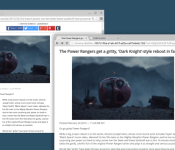
DOM Distiller now available for all channels of Chrome, mobile included

Document Object Model (DOM) Distiller for Chrome is now available for all channels of Chrome, including your Chrome browser on your smartphone or tablet. This feature is basically “reader mode” and it modifies a webpage to bring you the meat-and-potatoes of that page’s content front-and-center.
In a Google+ post, Chrome developer Francois Beaufort talks about the new addition to Chrome, as well as how to enable it on your devices. Click after the break to read the post in its entirety.
The DOM Distiller is an exciting open-source project created by the chromium team whose goal is to provide a better reading experience by distilling the content of the page. Yes, we’re talking about Reader mode here: a mobile-friendly viewing mode for Chrome mobile but not only.
If you’re on Mobile, you can already open Chrome on your mobile device, turn on the Reader Mode flag at chrome://flags#enable-reader-mode-toolbar-icon, relaunch and tap on the “Reader mode” icon in the toolbar to try it out.
If you’re on desktop, playing with it is as easy as running chrome with the –enable-dom-distiller switch. Once it’s done, you’ll notice a new “Distill page” menu item.
For info, the internal debug page is chrome://dom-distiller. And since you’re still there, open your JS console and give a try to some themes with useTheme(‘sepia’)or useTheme(‘dark’).
If you’re not sure how to enable a command-line switch in Chrome, here is an awesome link to Ghacks.com that walks you through the process.
Source: Francois Beaufort
Come comment on this article: DOM Distiller now available for all channels of Chrome, mobile included
 AIVAnet