


Samsung’s latest 128GB UFS 2.0 storage is all set to power next-generation flagships
Samsung has announced its latest flash storage module based on the Universal Flash Storage 2.0 standard, with modules available in variations of 32, 64 and 128GB.

Microsoft shares its vision of the future with thinner displays and cool gadgets
Microsoft has released a new video on its work oriented account to share its vision of the future. It’s all about massive, thin displays, holograms and cool, connected gadgets. There’s even a tablet device shaped like a book.

Why are my lock, keyboard, and camera sounds not working?

Ever typed on your keyboard and noticed you weren’t hearing any keyboard clicks? Or taken a photo and didn’t hear the shutter go off? Maybe you locked your iPhone or iPad and didn’t hear the closing sound? That’s a question we get frequently after iOS updates, and it’s the question we’re tackling today:
Hi guys. My wife just installed 8.1.3 on her new iPhone 6+, and she noticed that her keyboard stopped making the usual sounds. When she shut the phone off, it didn’t click, and also the camera doesn’t click. All the other sounds are working fine. Anyone have a fix for this? Thanks.
I’ve experienced this issue going back to iOS 7. The good news is, there are a few things you can try in order to get your lock, keyboard, and camera shutter sounds in working order again!
This how-to is part of our iOS Help feature, where every week I try and help you fix the problems you’re having with your iPhones and iPads. If you have a question or need help with something iOS related that you just can’t figure out, I encourage you to drop a question in our iMore forums, no registration required!
1. Toggle your vibrate switch on and off
Aside from making sure your iPhone or iPad isn’t on vibrate — hey, it happens to all of us! — you should also make sure the switch is functioning properly before going any further. Toggle the switch a few times and make sure other kinds of sounds are coming through correctly. If they do, you can rule out a hardware issue with the switch itself.
2. Make sure keyboard clicks and lock sounds are enabled
The next step is to make sure these kinds of system sounds are enabled. You can’t edit or change the camera shutter tone so if you’re having issues with that as well, continue on to the next section after completing these steps:
- Launch the Settings app on your iPhone or iPad.
- Tap on Sounds.
- Scroll all the way to the bottom and make sure both Lock Sounds and Keyboard Clicks are turned to On.
- You can even toggle them off and on again just to make sure.
- Reboot your iPhone or iPad.

If the sounds still aren’t working after a reboot, continue on.
3. Check for an iOS update
If you haven’t updated iOS in a while, be sure you check to make sure you’re running the most current version of iOS. Most of the time updating will bring back keyboard sounds. If you lost them during a recent update, continue to the next section.
If you aren’t sure how to update iOS, you can follow our guides:
- How to update your iPhone or iPad OTA using Software Update
- How to update your Phone or iPad using iTunes
4. Reset all settings
Resetting all settings won’t result in actual data loss but it will reset all default settings for iOS itself. In other words, if you made little tweaks like turning on the battery percentage meter, or changed the orders of certain menus that are customizable, you’ll have to redo all that. It’s much less hassle, however, than a full restore.
- Launch the Settings app on your iPhone or iPad.
- Tap on General.
- Tap on Reset, it’s all the way at the bottom.
- Tap on Reset All Settings.
- Enter your passcode if prompted.
- Confirm you’d like to reset all settings.
- Wait for your iPhone or iPad to reboot.


After your iPhone reboots, your lock, keyboard, and camera shutter sounds should all be working properly again. If they’re not, continue on.
5. Restore your iPhone or iPad
If your sounds still aren’t working after trying everything above, a restore is your last is your last, best hope.
- How to create an iCloud backup on iPhone and iPad
- How to wipe your iPhone or iPad without a computer
- How to restore your Phone or iPad from an iCloud backup
If you prefer to use iTunes, you can restore over USB as well.
What worked for you?
Hopefully your system sounds are now all functioning properly. If they are, let me know in the comments what step worked for you. And if they aren’t, let me know that too. And as always, feel free to drop a question in our forums, which is another great way to get instant help with any problem you may be having!
Motorola’s Turbo Charger will be available in the UK mid-March for £24.99
The Motorola Turbo Charger – based on Qualcomm’s Quick Charge 2.0 technology – is all set to make its debut in the UK for £24.99 ($39), with sales set to commence mid-March.

Track Your Bills with Mint Bills
Mint Personal Finance is an excellent app that keeps track of your spending, create budget, receive bill reminders and save more money. Mint Bills: Bill Pay and Money is an award-winning app that helps you stay on top of your bills & money. So what happens after you download this app?
Once you create an account, it takes you through a wizard – by asking you to input your zip code, select the companies you pay bills to, then has you either manually set up your bills payment or have the app login to your account. Pretty simple if you only have a few bills. If you have quite a few bills, give yourself some extra time to input all that information in. It might be easier to just input all that information on it’s website, and then let the app do the job.


This app is really excellent in the job that it simply does what it says. There are still quite a few bugs here and there as some companies that will not allow you to log in and may come back with an incorrect login message. That is why it is great that it has a manual setup. Just for added protection, one can set up a security question, passcode lock, or email verification if you’re worried about unauthorized eyes looking at your account.
There is a minor annoyance with push notifications but that is only if you have tons of bills on different days. But hey, that’s part of the job. You can pay for your bill via this app, thus taking away the need to jump online, enter your login information, and then pay. You can just simply set up auto pay and that will be one less stressful thing to be reminded of. Another feature that is great is that it has a calendar so you could take a look and plan ahead if you need to.
Give this app a try.
The post Track Your Bills with Mint Bills appeared first on AndroidGuys.
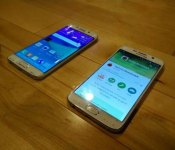
New images show Galaxy S6, S6 Edge, and a glimpse of a familiar TouchWiz
Samsung did a slightly better job keeping the Galaxy S6 under wraps, but just like HTC, the Korean giant is now seeing its surprise ruined by revealing last-minute leaks.
Yesterday, an XDA user began posting images of what seems to be the Galaxy S6 – the device in the images features a metallic frame, a glass back, and the same camera and flash modules we’ve seen in numerous leaks so far.
Now the same source provided two images that show the Galaxy S6 and its curved screen variant, the Galaxy S6 Edge, side by side.

From these shots alone, it seems that the two edges of the Galaxy S6 won’t be as pronounced as that on the Note Edge. The primary role of the curved sides seems to be to offer a unique design twist, rather than to add functionality like on the Note Edge. Notice how there is no side panel like on the Note Edge, though Samsung may take advantage of the sides in other ways.

The images also give us a brief glimpse at the user interface of the Galaxy S6 and Galaxy S6 Edge. It looks like Samsung opted to keep the familiar aesthetic of TouchWiz, at least when it comes to the home screen. It remains to be seen if there are more significant changes in other areas of the UI. Samsung reportedly drastically cut down the number of pre-loaded apps on the new Galaxy S6, and worked to speed up and optimize TouchWiz.
Unless the XDA leaker puts out a more detailed look at the new Galaxy S6 and Galaxy S6 Edge, we may have to wait until Sunday for more details. We’ll keep an eye on the thread, but meanwhile, tell us what you think of these shots.

New Watch Urbane model offers LTE, NFC, but no Android Wear

LG just took the wraps off a new version of the Watch Urbane (itself a version of the G Watch R), but this time changes are more than skin deep. The new Watch Urbane LTE runs LG’s “all new Wearable Platform” OS instead of Android Wear, and offers voice calling, thanks to the integration of LTE.
Watch Urbane LTE looks similar to the “regular” Watch Urbane, with the biggest difference being the presence of three buttons on the side, instead of one, like on the Android Wear model. The top button offers quick access to settings, the middle button switches between the watchface and the app launcher, while the bottom one acts like a back button. Long pressing this last button can be set to trigger a call to a certain number and to send out the wearer’s location coordinates. This safety beacon feature is similar to the one on the kids-focused LG Kizon.

Thanks to cellular connectivity, you can use the Watch Urbane LTE to make phone calls and the device even works in walkie-talkie mode, where Push-To-Talk services are available. Another cool feature of the device is NFC – LG says you will be able to pay for things like movie tickets or transit fares by waving your wrist against an NFC reader, though details are lacking for now.
To accommodate the power-thirsty LTE function, LG packed a 700-mAh battery on the new Urbane, which is significantly larger than the 410-mAh unit on other models. No details were offered, but the Watch Urbane LTE should be good for “long talk and use times and can go for days in standby mode.”

Other than the larger battery, the Watch Urbane LTE features the same specs as the Watch Urbane and G Watch R.
- Chipset: 1.2GHz Qualcomm® SnapdragonTM 400
- Operating System: LG Wearable Platform
- Display: 1.3-inch P-OLED (320 x 320 / 245ppi)
- Network: LTE
- Memory: 4GB eMMC / 1GB LPDDR3
- Battery: 700mAh
- Sensors: 9 Axis / Barometer / PPG / GPS
- Connectivity: WiFi 802.11 b, g, n / Bluetooth 4.0LE / NFC
- Color: Silver
- Other: Dust and Water Resistant (IP67) / Speaker / Microphone
LG is very vague about it, but the Wearable Platform OS powering the Urbane LTE seems to be a version of webOS. In fact, the smartwatch seems very similar to the mystery LG webOS smartwatch that an Audi representative showed to the press at CES. We look forward to see this new incarnation of webOS in action, probably at MWC.
No info yet on price and availability, but we should learn more next week.

Smartphone chips are about to get better at Gaming, Twitter and Netflix

There’s been a lot of talk about how phones from certain manufacturers can sense when you’re running benchmarking software and will artificially inflate its performance accordingly. It’s been a problem for some time now, but the industry appears to be finding its own ways of dealing with the issue. ARM, the outfit that designs the bulk of the smartphone industry’s chips, has teamed up with British startup GameBench to make benchmarks not only more honest, but also a lot more understandable.
When we talk about benchmarks, we usually mean an arbitrary number that’s been cranked out by Vellamo or SunSpider. This number has some value when you’re comparing two devices against each other, but tells you very little about how a specific device would run, say, Asphalt 8 in the real world. GameBench’s approach is to benchmark devices around real-world scenarios, like the frames-per-second you’ll get on the aforementioned title, or how many hours of Netflix you’ll get before you need a recharge.
Now that ARM has licensed GameBench’s source code it, along with its partners, can use the information to make chips more efficient. The hope being that future handsets can be tweaked to perform these common, real world tasks better and avoid the need to cheat a benchmark. Hell, maybe we can even imagine a world in which mobile benchmarks and hardware specs are replaced with more meaningful information. Maybe we’re but a few years away from a day when you’ll decide your next purchase based on how many episodes of House of Cards you can watch in a single sitting.
Filed under: Cellphones, Tablets, Google
Source: GameBench

Samsung has an ultra high speed 128GB UFS 2.0 storage module ready for smartphones

Think about the last smartphone you purchased. Consider the cost. Surmise the storage. Chances are, the device was a pretty penny and yet contains only 16/32GB on-board disk space if it’s a flagship, or 8/16GB if it’s a lower-end model. While many smartphones now have expandable storage via microSD, wouldn’t it be nice to get a lot more for your dollar? Samsung might have just the ticket.
Korea’s largest OEM has just announced the world’s first 128GB smartphone storage module that makes use of Universal Flash Storage (UFS) 2.0, a cutting-edge technology that allows for blazing fast data access speeds. It makes use of “Command Queue”, which involves accessing SSDs via a serial interface and has allowed Samsung to make 19,000 I/O operations per second in random reading. This is approximately 2.7 times faster than the standard 8-bit-parallel-interfaced eMMC (5.0) currently deployed for smartphones.

In random write-to-storage tests, the UFS format had 14,000 I/O per second making it 28 times faster than a standard external memory card. This will greatly add to the list of achievements flagship smartphones can perform as it will allow things such as seamless Ultra HD video playback while simultaneously multitasking.
Rounding out the feature-fest, Samsung promises a 50% reduction in power consumption which would make these tiny storage modules a theoretical match made in heaven for the increasingly demanding app array and multitasking that power users throw at their phones.

Could the upcoming Galaxy S6 or Galaxy S Edge be the first devices to make use of the amazing new storage chip?
While 128GB is the largest storage option, 64GB and 32GB variants will also be available. The goal is to see that all flagship smartphones begin to make use of the new UFS technology chips and relegate eMMC to standard-affair, budget and mid-range products.
While Samsung is now mass-producing these chips, it remains to be seen as to if next week’s Galaxy S6 will, in fact, use such technology. Due to supply constraints or timing issues, it’s possible we won’t see them until the Galaxy Note 5 later this year, or even the rumored Galaxy Tab S2 line. Given that Samsung is the world’s largest producer of SSD/NAND flash storage modules in the world, this latest development is just another milestone in the company’s pursuit of the future of technology.
The full press release follows.
Samsung is now mass producing the industry’s first 128-gigabyte (GB) ultra-fast embedded memory based on the much-anticipated Universal Flash Storage (UFS) 2.0 standard for next-generation flagship smartphones. The new embedded memory’s UFS 2.0 interface is the most advanced JEDEC-compliant, next-generation flash memory storage specification in the world.
“With our mass production of ultra-fast UFS memory of the industry’s highest capacity, we are making a significant contribution to enable a more advanced mobile experience for consumers,” said Jee-ho Baek, Senior Vice President of Memory Marketing, Samsung Electronics. “In the future, we will increase the proportion of high-capacity memory solutions, in leading the continued growth of the premium memory market.”
UFS memory utilizes “Command Queue,” a technology that accelerates the speed of command execution in SSDs through a serial interface, significantly increasing data processing speeds compared to the 8-bit parallel-interface-based eMMC standard. As a result, Samsung UFS memory conducts 19,000 input/output operations per second (IOPS) for random reading, which is 2.7 times faster than the most common embedded memory for high-end smartphones today, the eMMC 5.0. It also delivers a sequential read and write performance boost up to SSD levels, in addition to a 50 percent decrease in energy consumption. In addition, the random read speed is12 times faster than that of a typical high-speed memory card (which runs at 1,500 IOPS), and is expected to greatly improve system performance.
In the future, Samsung anticipates that UFS will support high-end mobile market needs, while eMMC solutions remain viable for the mid-market, value segments.
For random writing of data to storage, the blazingly fast UFS embedded memory operates at 14,000 IOPS and is 28 times as fast as a conventional external memory card, making it capable of supporting seamless Ultra HD video playback and smooth multitasking functions at the same time, enabling a much improved mobile experience. Samsung’s new UFS embedded memory comes in 128GB, 64GB and 32GB versions, which are twice the capacity of its eMMC line-up, making it today’s optimal memory storage solution for high-end mobile devices.
In an attempt to provide more design flexibility to global customers, Samsung’s UFS embedded memory package, a new ePoP (embedded package on package) solution, can be stacked directly on top of a logic chip, taking approximately 50 percent less space.
Over the next several years, Samsung will continue to set the pace for memory solutions that combine truly high-performance with high capacity.
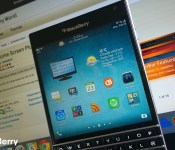
Stock prices get added to Home Screen Plus with its latest release

If your the type of person that likes to keep an eye on stocks while you’re on the move, then the latest update to Home Screen Plus may well be of interest. It’s only been a month since the last update, which introduced resizable widgets, but the developer, ShaoSoft, has been hard at work to bring a new unique experience to the already popular BlackBerry 10 app.
 AIVAnet