


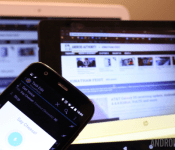
Android customization – voice activated camera control using Tasker and an Android Wear smartwatch

Last week on our Android customization series we rounded up a handful of apps that not only push your SMS from your Android device over to your PC or tablet, but allow you to respond to messages as well. Sending and receiving SMS without having to pull your phone out of your pocket is pretty slick, let’s see what else can be done remotely.
Today, we would like to begin a multi-week project, the goal is to learn more about using Tasker, Pushbullet, a new app called Tasker Now for Android Wear and more, and we will be doing so by creating voice controlled and remote camera controls between two Android devices, between your Android device and Android Wear device and between your Android device and a PC. It sounds like a lot, but it will be worth it, if only to learn more about using the services.
We’ll start with some of the ground work today, let’s look at building the Tasker Task to fire the camera, another Task to accept voice command, then we’ll look at the new app Tasker Now that runs on your Android Wear smartwatch.
Before we begin
 To follow along today you will require a copy of both Tasker and Tasker Now installed on your devices. Tasker is $2.99 in the Google Play Store, but if you’ve been following along previous Android customization posts, you already know that.
Tasker Now is an Android Wear app, it is free in the Google Play Store, but has a $1.19 in-app upgrade to a pro version that unlocks more than just the most basic of functionality. Sorry to say, you are probably going to need the pro version to follow along today.
Use Tasker to take a photo
We took a look at using Tasker to take a photo in a previous tutorial, at that time we focused on discreetly using the front camera to capture an image of any person accessing your device without your permission. To take a full quality photo from the rear camera is very similar in procedure, just a few differing settings.
Create your new Tasker Task to take a photo, I called mine “QualityPhoto.”

Tap the “+” button to add an action.
Select Media.
Select Take Photo.
Leave it set to Rear.
Add a base Filename, I’ll put “TaskerPhoto.”
I like to change Naming Sequence to Chronological, but you can choose another option if you wish.
The above two settings will result in a file name in the format “TaskerPhotoFeb4_2015_160255.jpg.” It will be a little different than that, but it will take your base Filename and append the date and time down to the second.
It is up to you if you would like to leave Insert in Gallery turned on, I will.
I will leave Discreet turned off, meaning the screen will display the photo as it is being taken.
Change Resolution to the quality you desire, I want mine as high quality as possible. Tap the magnifying glass icon on the right hand side, choose your photo resolution. My camera is only capable of 3280×2460, but that should be good enough for most needs.
I recommend leaving the remaining settings on Auto. We can always come back here later to edit the settings if the photos just are not working out.
Tap the system Back button to save and exit. That is all for this Task, feel free to hit the play button to see how things work, or just tap that system Back button again to save and close the Task.
Create voice command input
We are going to do a few things in this Tasker Task. First, we will collect voice input, next we will validate the input and either halt the Task or proceed if the right words are spoken. Finally, we’ll need to trigger the “QualityPhoto” Task created above. Let’s do it.
Start a new Task, name it concisely and uniquely, I’ll call mine “VoicePhoto.”

Tap the “+” button to add your first action.
Choose Input.
Choose Get Voice.
The default settings are just fine, tap that system Back button to save and exit.

Tap “+” for the next action.
Choose Task.
Choose Stop.
Tap the + button beside If.
Enter %VOICE in the first field, or tap the label icon to find Voice Results from the long list of available variables.
Tap the center comparison button and choose Doesn’t Match. It will change the text on the button itself to “!~”.
In the right hand text field, enter the word or phrase that you would use to trigger the photo capture. I’ll keep it simple, I am entering the word “cheese“.
Tap the system Back button to save and exit.

Tap the “+” button one last time.
Choose Task.
Choose Perform Task.
Tap the magnifying glass icon to the right of the Name field.
Choose your photo capture Task, mine was called “QualityPhoto.”
Tap the system Back button to save and exit.
One last thing before we call this Task complete, tap the icon button in the very bottom right of the screen to add an icon to this Task. You can skip this if you wish, it will ask you to input one later if you try to use the Task as a widget.

That’s it for the creation process. I highly recommend testing things out before you move on, just in case. If things don’t seem to be working, try adding an Alert->Flash after the initial Get Voice above, put %VOICE as the popup message. This will show you what the microphone is picking up. Chances are, it will be a collecting the word “cheese” in lower case, and failing to match if you entered the Task->Stop validation as a capitalized “Cheese”.
You could now consider placing the VoicePhoto Task as a Widget on your Homescreen. This gives you one tap access to the voice command controlled photo capture. If you are thinking that this is a little silly aside from testing purposes, don’t worry, our next step is to create realistic and functional triggers.
Tasker Now
Tasker Now is a newer Android app designed for your Android Wear powered devices. Specifically, you’ll do best to run it on a smartwatch. The app serves just one purpose, to collect your voice input from your Android Wear device and fire it over to your connected Android phone or tablet to be interpreted by Tasker, which will fire off an action on your device.

As you might imagine, this gives you the power to perform any Tasker command on your device all by a quick tap and talk into your smartwatch.
I don’t know about you, but if you’ve ever tried to use your Android device to take a group photo, and be in the photo yourself, having to tap the camera button and try to run to your position in frame within the 10 seconds it gives as a delay time, can be tough. Wouldn’t a remote shutter control be awesome? Of course it would.
Start a Tasker Profile to accept the Tasker Now input, call it something appropriate, like “TaskNowCamReceiver.”

Choose Event.
Choose Plugin.
Choose Tasker Now.
Tap the pencil icon to configure the input.
Enter your statement to be matched. In the free version you will only be able to enter a 4 character phrase, and it will be locked to requiring an Exact Match. Pro users can input a full text string, more important, they can choose from a handful of Matching rules, including searching the collected voice input for one specific word, an exact match, starting words, ending words and more.
I have entered “take the picture” and stuck with the Exact match rule.
Tap the Done button in the top right to save and exit.
Tap the system Back button to save and exit out of the Profile editor.
Now, you do not want to choose your voice input Task created above, that would just make you have to talk again. Instead, choose your “QualityPhoto” Task.
Go ahead and give it a try now.

What’s next
We created a Task to take a picture, it should work pretty good by default, but I do urge you to head back into the Task itself and play with the settings, you can control the flash, scene mode and more. Find the right combination for your device and environment.
From there, if you find that the photos are not in focus, try heading into Tasker’s main Preferences settings menu, in the Action tab you’ll find a Camera Delay setting. The value is set in seconds. Newer devices work just fine at as low as 1 second, but older devices may need 3 or 4 to gain focus before the photo snaps.

We also created a Task that accepts voice input, validates it, and fires off the above picture taking Task. This was a great exercise, but I will fully admit that it serves little purpose when run on the same device as the photo taking Task. I am hoping you can think of other things, besides a Christmas count down timer, to use this voice input procedure.
Finally, we needed an effective way to trigger the camera taking Task from a distance, so we used the Android Wear app called Tasker Now. But what if you do not have an Android powered smartwatch? No worries folks, we’ll get you hooked up next week.
Next week
Android Wear users may be all ready to roll after today’s Android customization post. Next week we’ll explore methods to fire off the camera remotely without the need for a smartwatch. I’ll give you a little hint, Pushbullet will be on the list.
Aside from selfies and group photos, how will you use a remote trigger to take photos on your Android device?

HTC One M7 Unlocked and Developer Editions receiving Lollipop update

We’ve already seen the update to Android 5.0 Lollipop roll out to Sprint and Google Play Edition variants of the HTC One M7, but if you’re the lucky owner of an Unlocked or Developer Edition M7, you should be getting the update as we speak. HTC’s Mo Versi took to Twitter to announce that the two variants would see the update today.
HTC One (M7) Unlocked and Dev owners! Enjoy the Lollipop update! OTA has been released. #HTCAdvantage
— Mo (@moversi) February 5, 2015
Less than a week ago, HTC announced that they wouldn’t hit their promised 90-day goal to bring Lollipop to carrier variants of the M8 and M7. This disappointed quite a few users, though HTC did have a valid reason for the delay. We don’t have any information as to when other carrier variants will see the update, but we’d imagine it should roll out sometime soon.
The HTC One M7 is almost two years old, though many would still consider it a great Android device. If you’d like to pick one up for yourself, you can grab one off-contract for as low as $149.99.
Much to everyone’s surprise, Lollipop hasn’t actually rolled out on too many devices quite yet. In the latest Android distribution numbers, Lollipop is only on 1.6% of Android devices so far. So, if you’re the lucky owner of an Unlocked or Dev. Edition M7, consider yourself lucky!

RadioShack files for bankruptcy as Sprint eyes its stores

As expected, RadioShack filed for Chapter 11 bankruptcy today. The electronics store has had 11 unprofitable quarters in a row that apparently even Weird Al and a drone, concept stores and Arduinos couldn’t turn around. We’ve seen many electronics retailers fade out over the last few years, but most don’t have a 94-year history behind them. In the immediate future, Reuters reports the company has a deal with its largest shareholder, Standard General to sell between 1,500 and 2,400 of its 4,000 stores. In turn, Sprint has an agreement to expand to about 1,750 of those stores, taking up about one-third of the space. TechCrunch posted a copy of the filing, and right now it’s expected that the remaining stores will be closed, assuming the store’s lenders approve of the deal — leaving us with one fewer place to go when need a battery right now.
[Image credit: Joe Raedle/Getty Images]
Filed under: Cellphones, Mobile, Sprint

RadioShack files for Chapter 11 bankruptcy, Sprint moving into some stores

After struggling to find any sort of success in recent years, RadioShack has officially filed for Chapter 11 bankruptcy. The entire process includes plenty of moves and changes for various parties. General Wireless, a subsidiary of Standard General, will absorb most of RadioShack’s assets and existing leases for retail stores. Most notably, Sprint has agreed to move into approximately 1,750 stores across the country. It will allow Sprint to have a store-within-a-store setup. The agreement provides Sprint with around a third a retail space within the co-branded stores. While Sprint, Boost Mobile, and Virgin Mobile have primary branding on marketing materials, other carriers and products will continue to be sold.
The addition of 1,750 stores would build upon the existing 1,100 stores owned by Sprint. Marcelo Claure, the CEO of Sprint, said that the agreement allows “Sprint to grow branded distribution quickly and cost-effectively in prime locations.”
What do you think about Sprint’s decision to make a push into RadioShack stores? Let us know in the comments.
Here is the full press release:
Sprint Signs Agreement with RadioShack’s Lender to Expand Branded Stores
OVERLAND PARK, Kan. (BUSINESS WIRE), February 05, 2015 – As part of RadioShack’s recent bankruptcy filing, Sprint (NYSE:S) and General Wireless Inc., a subsidiary of Standard General LP, RadioShack’s largest shareholder, have agreed in principle on terms that would allow Sprint to expand its branded store distribution by approximately 1,750 stores. The proposed transaction is part of the sale of a portion of RadioShack’s assets and assignment of certain leases to General Wireless Inc. Once the transaction is finalized and approved by the bankruptcy court, Sprint and General Wireless Inc. would establish co-branded stores that will exclusively sell mobile devices across Sprint’s brand portfolio as well as RadioShack products, services and accessories.
“We’ve proven that our products and new offers drive traffic to stores, and this agreement would allow Sprint to grow branded distribution quickly and cost-effectively in prime locations,” said Sprint CEO Marcelo Claure. “Sprint and RadioShack expect to benefit from operational efficiencies and by cross-marketing to each other’s customers.”
Under the terms of the new agreement, Sprint would effectively operate a store within a RadioShack store, occupying approximately one third of the retail space of each location. Sprint employees will sell mobile devices and plans on all Sprint brands including Boost and Virgin Mobile. The stores will be co-branded with Sprint being the primary brand on storefronts and in marketing materials.
Sprint currently has more than 1,100 company-owned retail stores, which would more than double if the transaction is approved.
The transaction is expected to be finalized in the coming months and is subject to approval by a Delaware bankruptcy court and to a closing period.
SAFE HARBOR
This release includes “forward-looking statements” within the meaning of the securities laws. The words “may,” “could,” “should,” “estimate,” “project,” “forecast,” “intend,” “expect,” “anticipate,” “believe,” “target,” “plan,” “providing guidance,” and similar expressions are intended to identify information that is not historical in nature. All statements that address operating performance, events or developments that we expect or anticipate will occur in the future — including statements relating to the agreement with RadioShack and its pending bankruptcy, as well as statements expressing general views about future operating results, brand distribution and efficiencies — are forward-looking statements. Forward-looking statements are estimates and projections reflecting management’s judgment based on currently available information and involve a number of risks and uncertainties that could cause actual results to differ materially from those suggested by the forward-looking statements. With respect to these forward-looking statements, management has made assumptions regarding, among other things, the ability to operationalize the anticipated benefits from the RadioShack transaction, including the approval thereof by the bankruptcy court, as well as anticipated efficiencies of the agreement. Sprint believes these forward-looking statements are reasonable; however, you should not place undue reliance on forward-looking statements, which are based on current expectations and speak only as of the date when made. Sprint undertakes no obligation to publicly update or revise any forward-looking statements, whether as a result of new information, future events or otherwise, except as required by law. In addition, forward-looking statements are subject to certain risks and uncertainties that could cause actual results to differ materially from our company’s historical experience and our present expectations or projections. Factors that might cause such differences include, but are not limited to, those discussed in Sprint Corporation’s Transition Report on Form 10-K for the period ended March 31, 2014. You should understand that it is not possible to predict or identify all such factors. Consequently, you should not consider any such list to be a complete set of all potential risks or uncertainties.
About Sprint:
Sprint (NYSE: S) is a communications services company dedicated to delivering the best value in wireless. Sprint served 55 million customers as of September 30, 2014 and is widely recognized for developing, engineering and deploying innovative technologies, including the first wireless 4G service from a national carrier in the United States; leading no-contract brands including Virgin Mobile USA, Boost Mobile, and Assurance Wireless; instant national and international push-to-talk capabilities; and a global Tier 1 Internet backbone. Sprint has been named to the Dow Jones Sustainability Index (DJSI) North America for the last four years. You can learn more and visit Sprint at http://www.sprint.com or http://www.facebook.com/sprint and http://www.twitter.com/sprint.
Come comment on this article: RadioShack files for Chapter 11 bankruptcy, Sprint moving into some stores

Microsoft’s Lumia 535 lands in Brazil for R$599

There’s some good news tonight if you live in Brazil: Microsoft’s Lumia 535 is now for sale in the country for R $ 599.00 ($218 USD) — lining up with pricing that leaked late last month.
Sunrise Calendar gets a tablet layout, more app integrations in newest update

Sunrise Calendar, one of our favorite calendar apps for Android, is receiving a version 2.0 update today in the Play Store.
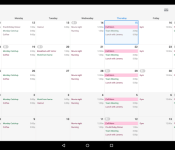
First of all, the version 2.0 update brings an improved tablet layout. The app didn’t have one in previous iterations, so its nice to see that addition finally make its way to the app. Also added in this update is integration for two new applications: Google Tasks and EventBrite. Now, you’ll be able to keep track of certain events and all of your tasks from inside the Sunrise app. Additionally, Sunrise now offers over 25,000 calendars for holidays, sports teams, birthdays, week numbers and many more. Once you log into the app for the first time, you’ll be prompted to choose from the thousands of different calendars to add to your personal list.
In Sunrise’s blog post announcing the update from earlier today, they began the post by saying, “Today, we’re excited to announce our … new Android app for tablets!” This is likely hinting at their rumored Microsoft acquisition from yesterday. So, it seems as though we’ll need to wait a bit longer for any word on if the rumors are correct.
If you haven’t tried Sunrise Calendar yet, now is a good time to do so. You can download the app for free in the Google Play Store.
Download Sunrise Calendar from Google Play

Shout! Factory’s free video service is a cult movie and TV fan’s dream

Grab some popcorn and settle into your favorite couch groove, nerds. Shout! Factory, a company best known for bringing cult shows and films to home video, is getting into the streaming video game with Shout Factory TV. The new ad-supported service (also accessible through a Roku app) will be the online home for over 2,500 TV episodes and movies, including Mystery Science Theater 3000, Home Movies, and The Weird Al Show. For the most part, the site is just rounding up content already available on Hulu and YouTube, but the new Roku app should at least make all that content more couch friendly. Shout! Factory says it’s also working on bringing the service to more devices soon.
[Photo credit: Ludie Cochrane/Flickr]
Filed under: HD
Source: Shout! Factory
Nexus 6 for Verizon has Big Red’s logo stamped on the rear

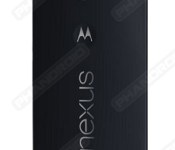
Branding is very important for carriers in the United States. They feel that putting their name and logo everywhere and anywhere will help sell the device. Among the nation’s four largest carriers, Verizon has been the worst with branding. So people are worried that the Nexus 6, when released through Verizon, will have excessive branding that takes away from the Nexus experience. Well, we have good news. Big Red will only place its logo at the bottom of the back panel on the Nexus 6.
At this time, we know nothing about the bloatware coming to Verizon’s Nexus 6. It is expected that some Verizon services such as MyVerizon and Visual Voicemail appear.
In all, it should not be too bad considering where Verizon’s branding strategy once lied with devices. Remember the Galaxy Note II? Yep, times have changed since then.
Source: Phandroid
Come comment on this article: Nexus 6 for Verizon has Big Red’s logo stamped on the rear

Android 5.0 Lollipop soon expected for multiple Sprint devices
This is some great news for Sprint customers out there. A few of HTC, LG, and Samsung’s most popular devices are receiving updates for Android 5.0 Lollipop on the network.
The update for the HTC One M7 was confirmed via Twitter by Mo, the Vice President of Product Management at HTC. Its OTA update started today. He notes that Lollipop is coming to other devices as well.
Android Central said that Lollipop is also coming to the HTC One M8 and One M8 Harmon Kardon edition on February 13th and to the LG G3 on February 16th. Although, this could be subject to change.

You can also see in the image that the Galaxy S5 should have also started receiving the update earlier today. That appears to be true based on confirmation directly from Samsung.
Congrats to all the Sprint owners out there. Hopefully, the other characters will quickly follow with updates for these and other devices.
(function() var script = document.createElement(‘script’);script.src = ‘https://stacksocial.com/widget.js?publisher=androidguys&type=editorial_post_widget_preferences’;script.async = true;var entry = document.getElementsByTagName(‘script’)[0];entry.parentNode.insertBefore(script, entry);)();
http://www.androidguys.com/pubgalaxy/728×90.html
The post Android 5.0 Lollipop soon expected for multiple Sprint devices appeared first on AndroidGuys.
Microsoft fixes download issues with the Windows 10 touch-based Office apps

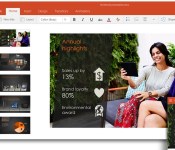
If you had problems downloading the newly launched touch-based Word, Excel and PowerPoint apps for the Windows 10 preview on Wednesday, you might want to try getting them now. Microsoft is reporting that those issues have now been fixed.

