


Bring the Quick Charge 2.0 experience to your car with this 4-port 51W turbo charger
I am always on the hunt for curiously cool or interesting gadgetry. Sometimes those things are earth shattering, but they are still important to myself or end users in one way or another. In this case I was it is a relatively new car charger from the likes of CHOETECH. The car charger isn’t your […]
The post Bring the Quick Charge 2.0 experience to your car with this 4-port 51W turbo charger appeared first on AndroidSPIN.
Dell takes aim at Lenovo, sort of, with new 180 degree hinged Chromebook 11 for students
Dell has announced a new Chromebook today aimed squarely at the education sector of the operating system with the new Chromebook 11. I know, not that original of a name. As the name would suggest, it carries a 11-inch screen with a resolution of 1366 x 768. Under the hood we find the usual suspects […]
The post Dell takes aim at Lenovo, sort of, with new 180 degree hinged Chromebook 11 for students appeared first on AndroidSPIN.

Google publishes new Dunk-A-Thon ad

To promote the launch of a new NBA themed update for its Androidify app, Google has today published a brand new ad over on its Android YouTube channel entitled “Dunk-A-Thon”. In the video, various Droid’s jump around wearing the latest basketball tops whilst taking shots at the hoop. One Droid even uses a cannon to make the drop.
Hit the break below to see the video.
Click here to view the embedded video.
Come comment on this article: Google publishes new Dunk-A-Thon ad

Paranoid Android and OxygenOS team up: What to expect
The OnePlus team has announced some information today regarding their upcoming OxygenOS custom ROM that’s being prepared for the OnePlus One and future OnePlus phones.
The team of developers they announced includes a total of eight people, five of which are developers for Paranoid Android, including it’s co-founders Aaron and Jesús. OnePlus says Paranoid Android co-founder Jesús Agudelo is currently working on a “headline feature” for OxygenOS, meaning it’ll be something that hopefully stands out as a selling point for OxygenOS in the future.
The team behind OxygenOS is a very diverse one, with members in the United States, Canada, India, Italy, Colombia, Lebanon and Spain.
Specific details about OxygenOS are still vague, but OnePlus says the software will be designed to be bloat-free, and valuing battery life and hardware efficiency. They want to build an OS that provides useful, non-obstructive features that users will grow to love. They also stated that the tap-to-wake feature in CM 11S will indeed be present in OxygenOS, as well as customizable navigation buttons.
“OxygenOS is built with the same focus on quality and community-driven design that you’ve come to expect from our hardware, and the simplicity of our new logo extends to the software itself. We care about providing our users with the best experience, and we will never differentiate just for the sake of differentiation. We promise that any additional features will be non-obtrusive and extremely useful (tap-to-wake and customizable navigation buttons, for example). With OxygenOS, we want to build something that works for users and gets out of their way. And, that’s exactly what we are doing.” –OnePlus stated on their blog.
With some of Paranoid Android’s strongest team members present in this project, we’ll be sure to see features standing out from other custom ROMs, which is what the Paranoid Android ROM is so popular for. As for the future of the Paranoid Android ROM itself, we shouldn’t have to worry, as OnePlus stated themselves in the post that OxygenOS team member Carlos, from Italy, is still contributing to Paranoid Android, and an alpha ROM was released last week as Paranoid Android 5.0 Alpha 1.
OnePlus says a fully stable beta version of OxygenOS is being tested right now, and that we’ll see it soon.

(function() var script = document.createElement(‘script’);script.src = ‘https://stacksocial.com/widget.js?publisher=androidguys&type=editorial_post_widget_preferences’;script.async = true;var entry = document.getElementsByTagName(‘script’)[0];entry.parentNode.insertBefore(script, entry);)();
http://www.androidguys.com/pubgalaxy/728×90.html
The post Paranoid Android and OxygenOS team up: What to expect appeared first on AndroidGuys.

Miami cops enter false data into Waze as revenge for revealing locations

Waze is a pretty handy tool for drivers, allowing users to share information about traffic accidents, road closures, and even cops lurking behind billboards with speed cameras. It is the latter which caused a bit of a stir a few weeks ago, when Sheriff Mike Brown of Bedford County, speaking at the National Sheriffs’ Association meeting, called for the police reporting feature to be removed.
After polite requests for Google to remove the feature, it seems that Miami police officers have chosen to take the law into their own hands. Hundreds of offices have signed up to the service and flooded it with false data to enact some small vengeance on Waze, according to a report from NBC 6 in Miami. The aim seems to be to pollute accurately reported data with misinformation about police locations and other reports.
Some officials have been concerned that making police locations publicly available puts law enforcers and the public at additional risk, be it from targeted attacks or by criminals more easily circumventing efforts to clamp down on crime. However, this view isn’t shared by all law enforcers. Broward County Sheriff Scott Israel suggests that that serious criminals don’t rely on Waze.
“If someone is suffering mental illness and they want to commit a heinous crime or hunt a deputy or a police officer; they don’t need Waze to do that,” – Broward County Sheriff Scott Israel
Waze does not appear too concerned about the possible risks, instead the company believes that the service helps act as a deterrent by highlighting any local police presence.
“Police partners support Waze and its features, including reports of police presence, because most users tend to drive more carefully when they believe law enforcement is nearby.”-Waze
Whether or not you view Waze’s feature as useful or irresponsible, surely there are better ways to resolve this contentious issue than by wasting time entering false data? Where do you stand on Waze vs the police?
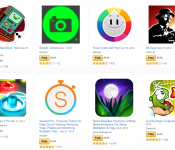
Get 37 apps worth $140 with Amazon’s latest free bundle

Amazon has this nice little tradition where it gives away bundles of free apps every now and then. Sometimes these bundles are themed around productivity applications or games, and sometimes they include a little something for everyone.
Today’s bundle would cost you $140 if you bought each app by its own, and includes games, music apps, fitness apps, productivity apps, utilities and more. It’s definitely worth a look.
Here’s what’s inside the goodie bag.
- 80 Days
- A Scientific and Financial RPN Calculator
- Back to Bed
- Bag It! (Ad-Free)
- Battery HD Pro
- Buy Me a Pie! Grocery List Pro
- Caveman Feast
- Cut the Rope: Experiments
- Delicious – Emily’s True Love
- DoggCatcher Podcast Player
- Doodle Jump
- Food Substitutes
- Glow Hockey 2 Pro
- Guitar Pro
- Hidden Object – Be My Valentine
- Listure
- Longman Dictionary of Contemporary English 5 – Audio Edition
- MeteoEarth
- Monsters Ate My Condo
- mSecure
- OfficeSuite Professional 8
- Pocket Yoga
- Relax Melodies Premium
- Runtastic PRO
- Shazam Encore
- Simple Camera
- Ski Safari: Adventure Time
- Sleep as Android
- Smart RAM Booster Pro
- SmoothSync for Cloud Calendar
- Sorcery! 2
- Speed Reading Trainer Full
- Stellarium Mobile Sky Map
- Sworkit Pro
- Travel Interpreter
- Trivia Crack (Ad Free)
- Tunable
While some of these apps are recurring in Amazon’s free bundles, there are some new faces as well. Check out the bundle page on Amazon to get your fill.

NBC Launches Extensive ‘SNL’ App Ahead of 40th Anniversary Special [iOS Blog]
NBC Entertainment today launched a “Saturday Night Live” app which allows fans to browse a catalog of the show’s entire forty season-run, eventually learning each user’s particular tastes and favorites and subsequently curating videos and sketches for them to view (via Entertainment Weekly).
The app launches a few days before the show’s big 40th season premiere this Sunday, and NBC promises the impressive app contains nearly every single sketch the show has done over the decades it’s been on the air, amounting to about 5,500 sketches from 800 episodes. The network also says it’ll keep the app updated beyond the 40th season premiere with new skits and moments from the newest episodes being uploaded to the app following each new episode of the season.

Perhaps the most impressive aspect of the app is that, once it gets a feel for the kind of sketches, music videos, and parody commercials a user enjoys watching, it’ll begin personalizing the experience for each user. Those wanting to search for particular sketches, actors, or characters can do just that, too, if looking for a particular aspect of the long-running sketch comedy show.
One of the current cast members, Kyle Mooney, voiced behind-the-scenes support of the app, telling Entertainment Weekly the cast and crew plans to use the app to more efficiently research past sketches when working on new material for the show. As a plus, the SNL app also comes with a keyboard that, when granted access within an iPhone’s General settings tab, allows users to send SNL-themed emojis to friends.
SNL can be downloaded from the App Store for free. [Direct Link]

Samsung starts pushing out Lollipop update for the Note 4 in South Korea

Samsung has today begun pushing out the much-anticipated Lollipop update to all unlocked models of its flagship phablet, the Note 4, located in South Korea.
For those in need of a refresh, the Lollipop upgrade brings support for multiple accounts, improved notifications, a smoother multitasking experience, Ambient Display, smarter internet connections and the recently-announced Material Design guidelines.
To start the update, make sure you’re connected to a Wi-Fi network. Then, from the home screen, press the Menu key, followed by Settings. Scroll to the bottom and tap ‘About Device’, followed by ‘Software Update and ‘Update Now’.
Come comment on this article: Samsung starts pushing out Lollipop update for the Note 4 in South Korea

Galaxy S6 to have user un-installable bloatware, Material Design improvements, and more

Touchwiz’s biggest critics have been waiting years for Samsung to get with the program, in terms of better optimizing the UI and removing extra “junk”. In the past few years we’ve heard more than one rumor about how Samsung will slim down Touchwiz, only to walk away disappointed in the end. Could things be different this time around with the Galaxy S6? We hope so.
In addition to rumors suggesting that Samsung is going to be optimizing Touchwiz to give “Nexus-like” levels of performance, about two weeks ago now a report from SamMobile suggested that Samsung would also be removing much of the bloatware. Instead, those wanting the removed apps could simply install them from the Samsung store or even Google Play. Now SamMobile is back with even more details about what to expect from the Galaxy S6’s hardware, and it’s looking pretty impressive so far.
Beyond simply decoupling many apps from the Touchwiz experience, Samsung is reportedly making it so nearly all pre-installed Samsung apps can be uninstalled by a user
Beyond simply decoupling many apps from the Touchwiz experience, Samsung is reportedly making it so nearly all pre-installed Samsung apps can be uninstalled by a user without special permissions or access to root. For all that it’s removing, it also seems that Samsung is introducing quite a few new pre-installed apps to the picture including a number of Microsoft apps such as OneNote, OneDrive, Office Mobile and Skype. More than likely this could have to do with the recent agreement Samsung and Microsoft reached, relating to their previous patent dispute.
It’s not just the apps that are changing, SamMobile’s “insider source” also claims that the much faster TouchWiz/Lollipop experience will have numerous Lollipop animations and effects, more colorful designs for Samsung apps and several other changes as highlighted n the list from SamMobile below:
• Samsung’s default keyboard app supposedly looks more like a mix between the keyboard on the Galaxy Tab S and the iOS keyboard.
• More theming options are available
• You can select between 4×4, 4×5 and 5×5 icon layouts for the app drawer
• The app drawer no longer supports endless cycling through the list of apps (meaning you can’t go back from the last page to the first without going back through the previous pages).
• The music app still runs in full-screen mode at all times
• The dialer app looks “green as grass”, or that’s what we were told.
It’s important to remember that all of this comes from a source we can’t independently confirm, and so we’d take this news with a grain of salt. After seeing Samsung promise big and deliver much more modest changes with each new phone, it’s hard not to remain skeptical at this point — though perhaps slowing sales have finally given Samsung the push it has (arguably) been needing.
What do you think, excited by the Galaxy S6 and the rumored Touchwiz changes? How likely do you think these changes are, or will most of them prove to be nothing more than rumors or exaggerations?

HTC updates its Zoe app with a new engine, effects, transitions and more!

HTC today has pushed out a pretty big update to its standalone Zoe app, which lets you stitch together images and video clips into seamless highlight reels.
The app’s got a new highlight engine, which brings along with it some new themes, transitions and effects. (But don’t worry, Islandia is still there.) It also makes it easier to download and save Zoes, discover new content from other Zoe users, and it’s increased support for Android 5.0 Lollipop. You’ve also got the prerequisite bugfixes and performance enhancements as well.
Anecdotally, the update definitely has give the app a smoother and much more native feel to it. If you’ve yet to give Zoe a try, it’s definitely worth looking at. The update’s available now in Google Play.
 AIVAnet