


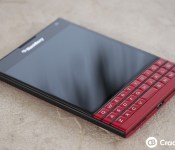
Amazon matching ShopBlackBerry sale prices on the BlackBerry Passport

Earlier we let you know that ShopBlackBerry had posted up their Valentine’s Day sale on the BlackBerry Passport, but it seems as though that’s not the only place to get the deal. If you live in the U.S. and would prefer to order your device from Amazon, you’re in luck. They’ve now matched the pricing on Amazon.com, so you have the option of ordering from ShopBlackBerry or Amazon.
Sadly, it seems it only applies to Amazon.com though, Canadians still have to use ShopBlackBerry. Both the black and the white versions of the Passport are on sale for just $499, while the red version is currently $599 during this event.
BlackBerry India hosting BlackBerry Passport giveaway
If you live in India and want a chance to win a brand new BlackBerry Passport, you now have a chance to do so thanks to BlackBerry India. All you have to do is follow @BlackBerryIn on Twitter and answer a simple question they’ve set up via a Google Docs form and you’re all set. You’ll be entered to win a brand new BlackBerry Passport. Giveaway ends on Monday and is only open to India residents only.

Valentine’s Day Sale: 20% off all BlackBerry accessories!

Love is in the air this weekend and so is the scent of sweet savings on all the hottest BlackBerry accessories here at ShopCrackBerry.com.
Why not give your significant other a nice sync/charge pod this year? Or, maybe the crystal-clear quality of the latest Bluetooth headphones to spice up their daily workouts. If you’re feeling indecisive, protection is always a safe bet—for their BlackBerry device, that is. Just take a look at our extensive selection of cases for the perfect fit.
When you’re ready to take things to the next level, use coupon code: SWEET2015 at checkout to apply 20% off to your entire cart. There’s also FREE shipping for any order over $50 in case you want to pick up a little something for yourself, too.
Don’t wait until it’s too late because this offer is only valid until midnight, February 16.

Valentine’s Day Sale: 20% off all iPhone and iPad accessories!

Love is in the air this weekend and so is the scent of sweet savings on all the hottest iPhone accessories here at iMore.
Why not give your significant other a custom car mount this year? Or, maybe the crystal-clear quality of the latest Bluetooth headphones to spice up their daily workouts. If you’re feeling indecisive, protection is always a safe bet—for their iPhone, that is. Just take a look at our extensive selection of cases for the perfect fit.
When you’re ready to take things to the next level, use coupon code: SWEET2015 at checkout to apply 20% off to your entire cart. There’s also FREE shipping for any order over $50 in case you want to pick up a little something for yourself, too.
Don’t wait until it’s too late because this offer is only valid until midnight, February 16!
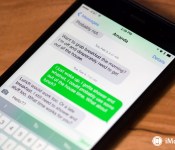
iOS Help: Why can’t I send or receive regular SMS text messages on my iPhone 6 or 6 Plus?

Have an iPhone 6 or iPhone 6 Plus that is only letting you send iMessages but not regular green bubble SMS messages? If so, you aren’t alone. This week our iOS help question comes from our iMore ask a question forum and deals with just that:
I have an iPhone 6 and can not send or receive regular SMS messages, I am only receiving and sending iMessages. Why isn’t my regular SMS working?
This issues relates specifically to VoLTE, and seems to be affecting people that live in areas where it is being actively expanded. It’s a common problem for not only iPhone owners, but Android, Windows, and BlackBerry users alike that have VoLTE capable devices. Luckily, there’s a simple fix that seems to be working for most iPhone 6 and 6 Plus owners!
This how-to is part of our iOS Help feature, where every week I try and help you fix the problems you’re having with your iPhones and iPads. If you have a question or need help with something iOS related that you just can’t figure out, I encourage you to drop a question in our iMore forums, no registration required!
How to fix issues with regular text messages over LTE on your iPhone 6 or 6 Plus
- Launch the Settings app on your iPhone.
- Tap on Cellular.
- Tap on Enable LTE.
- Tap on Data Only.
- Reboot your iPhone.

The steps above are specific to the iPhone 6 and 6 Plus but if you have a similar option on your Android or Windows smartphone that supports VoLTE, I’d assume it’d work for you as well. If you have an option, it should be somewhere in your cellular settings menu.
Hopefully this worked for you. And as always, let me know in the comments if it did or didn’t. If you had this issue and found a different way of resolving it, let me know that too!
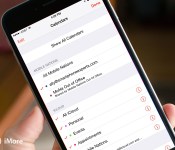
How to hide calendars in the Calendar app for iPhone and iPad

Some calendars are a necessary evil, even if we don’t necessarily want them cluttering up our Calendar app. Perfect examples of these are shared work calendars that contain lots of pertinent information, but you may not need to see that information all day, every day. That’s where hiding calendars comes in handy: You can tuck away calendars you don’t need often and quickly toggle them back on when you do. Here’s how!
Hiding calendars is different from deleting calendars: You’ll still receive any notifications you have set up, you just won’t see that calendar unless you unhide it. It makes this trick a great solution for super-busy calendars that cast a shadow over everything else.
How to hide a calendar in the iPhone and iPad Calendar app
- Launch the Calendar app on your iPhone or iPad.
- Tap on Calendars at the bottom.
- Tick Off the calendar you want to hide.
- Tap Done at the top left.
- The calendar should now be hidden. To unhide it, just perform the same steps again.


Latest Subway Surfers update lands the team in Hawaii

As part of the Subway Surfers World Tour, the gang have travelled to Hawaii in the game’s latest release. Players are tasked with surfing the new tracks, avoiding obstacles including massive mountains and rivers of lava. Simply put, it’s going to be a blast.
Here’s the full list of changes in the latest version:
- Travel to fantastical Hawaii with the Subway Surfers World Tour
- Surf the Subway tracks surrounded by huge mountains and rivers of lava
- Join the weekly Top Run race and compete for more shiny medals
- Take Izzy, the happy hula boy, on exciting surfer adventures
- Pick up mysterious Tiki masks in the Weekly Hunts to earn great prizes
The update is not yet listed on the App Store, but is readily available on Windows Phone and Android. Give the servers some time to propagate and you’ll be good to go.
- Free – Download Now

This durable spring clip holster for BlackBerry Passport is only $18.95 today while supplies last

This spring clip holster keeps your device clipped in tight, no matter the hustle and bustle. Just snap it to your belt, pants or bag and pop in your device! The top spring clip is extremely tough and ensures the safety of your BlackBerry Passport while providing quick-release access when you need to answer a call, text or email.
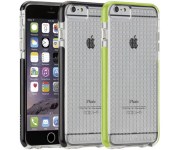
Save 49% today on these clear hard cases for iPhone 6 Plus

This tough case can absorb serious impacts thanks to its dual-layer design that combines a shock absorbing silicone bumper and a strong transparent, textured exterior plastic shell. The shell provides additional grip, making those accidental drops a thing of the past. Your today for just $17.95!

ESPN app gets revamped with full support for iPad and iPhone 6

The ESPN Sportscenter app for the iPhone and iPad got a major revamp today, as the cable TV network has updated it with not just a new design but a new name; it’s now called just the ESPN app. The new design includes full support for the larger screens for not just the iPad but also for the iPhone 6 and iPhone 6 Plus.
Here’s the rather entertaining change log for the 4.2 version of the ESPN app:
- NEW: Support for iPad! The app takes advantage of the iPad’s gorgeous screen to show you scores and news at the same time. Your favorite teams follow you throughout the app. Simply tap the team icons in the lower right for quick access.
- NEW: The ESPN App now looks beautiful on your iPhone 6 & 6+.
- We pulled a Puff Daddy and changed the name. Say hello to the ESPN App.
- Introducing ESPN Now. Swipe right from the news section to access up to-the-minute ESPN photos, videos and social media content.
- Cricket World Cup support, including video clips and scores.
- Like Lebron, we took some time off in Miami to speed things up and fix nagging bugs.
Of course, you can still customize the ESPN app so you can follow all of the scores and news alerts from your favorite teams.
- Free – Download now
 AIVAnet