



Snapchat finally adds the ability to record video while playing music

Snapchat scored an update on iOS today that finally brings the ability to snap while playing muisic and other audio from your phone. This is sure to be a welcome change for many, as avid Snapchatters will no doubt be aware of the frustration that occurs when the app cuts all audio coming from your phone the second you press that record button.
Other than the ability to play music and snap at the same time, there isn’t much in this update other than bug fixes. You can hit up that store link below to snag the update and finally start annoying your friends with snaps of you lipsyncing Mariah Carey songs (just me?).
- Free – Download
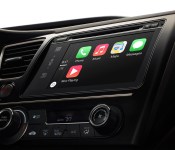
Could an Apple user-experience win the car fight?

Whether we’re talking about existing products like Apple’s infortainment intermediating CarPlay, or rumored products like a full on Apple Car, they’ll be competing for attention and usage with other software companies like Google and Android Auto, and with manufacturers and their own in-car offerings. Apple’s usual strategy is to fight on the experience level — to make a product that solves real problems and engenders real delight. Could that same strategy win inside the car, or inside the car industry? Sam Abuelsamid:
It’s all about the total user experience and overall Apple has executed that better than anyone else in the markets in which they have chosen to compete. They aren’t perfect by any means, but they have an amazing track record.
So we have an industry where user experience is critically important but the incumbent players have done a decidedly haphazard job of executing. On the other hand, we have a company that believes that executing on user experience is an absolute necessity to maximizing profitability.
Now Apple wants to enter this entirely new field of endeavor at the same time that the market is changing in a way that may well make its entire user experience-centered model, utterly irrelevant.
Sam worries, rightly, that cars-as-a-service — and their ride-share apps on our screens — will commoditize the industry to the point where Apple will see little to no value in entering it. What place is there for Apple in world of ubiquitous, potentially autonomous Uber- and Zipcar-like services?
Right now, at least, Apple seems to be gearing up for a future where their customers enjoy the best experience regardless of who owns — or rents — the screen.

How to take a screenshot on the LG G Flex 2

Like the G3 before it, there are a couple of ways to capture what’s on the G Flex 2’s curvy screen
<!–*/
<!–*/
<!–*/
.devicebox
background-color: #B2C369;
border: 1px solid #E2E9EB;
float: right;
display: block;
margin: 0 0px 10px 10px;
max-width: 350px;
overflow: hidden;
width: 50%;
.devicebox h3
background: #79ABB8;
color: #fff;
font-family: “Vitesse Medium”,Helvetica,Arial,sans-serif;
font-size: 20px;
margin-bottom: 0;
margin-top: 0;
padding: 0;
text-align: center;
.devicebox h3 a
display: block;
line-height: 30px;
padding: 0 10px;
.devicebox h3 a:hover
background: #608893;
text-decoration: none;
.devicebox .video
margin: auto;
border: 0px;
.devicebox p,
.entry-content .devicebox p > img,
.devicebox img
margin: 0px;
padding: 0px;
.devicebox,
.devicebox a,
.devicebox a:active,
.devicebox a:hover,
.devicebox a:link,
.devicebox a:visited,
.devicebox p,
.devicebox ul,
.devicebox ul li,
.devicebox li
color: #fff;
.devicebox a:hover
text-decoration: underline;
.devicebox p,
.devicebox ul,
.devicebox ul li,
.devicebox li
border-width: 0px;
font-family: “Vitesse Light”,Helvetica,Arial,sans-serif;
font-size: 16px;
padding: initial;
.devicebox ul
margin: 0;
padding: 0.5em 1em 1em 30px;
.devicebox ul li
display: list-item;
.devicebox ul,
.devicebox ul li,
.devicebox li
line-height: 24px;
list-style: disc outside none;
.devicebox ul li:before
display: none;
.devicebox ul + p
padding: 0px 15px 15px;
line-height: 1.25;
.field-items p:last-of-type + .devicebox,
.slide p:last-of-type + .devicebox,
.article-body-wrap p:last-of-type + .devicebox
float: none;
margin: 0 auto 30px;
max-width: 700px;
min-height: 225px;
position: relative;
width: 100%;
.field-items p:last-of-type + .devicebox .video,
.slide p:last-of-type + .devicebox .video,
.article-body-wrap p:last-of-type + .devicebox .video
bottom: 0px;
left: 50%;
position: absolute;
right: 0px;
top: 30px;
.field-items p:last-of-type + .devicebox .video_iframe,
.slide p:last-of-type + .devicebox .video_iframe,
.article-body-wrap p:last-of-type + .devicebox .video_iframe
height: 100%;
padding: 0px;
.field-items p:last-of-type + .devicebox ul,
.slide p:last-of-type + .devicebox ul,
.article-body-wrap p:last-of-type + .devicebox ul
width: 43%;
.field-items p:last-of-type + .devicebox h3 + p,
.slide p:last-of-type + .devicebox h3 + p,
.article-body-wrap p:last-of-type + .devicebox h3 + p
bottom: 0;
left: 50%;
position: absolute;
right: 0;
top: 30px;
.field-items p:last-of-type + .devicebox h3 + p img,
.slide p:last-of-type + .devicebox h3 + p img,
.article-body-wrap p:last-of-type + .devicebox h3 + p img
height: auto;
min-height: 100%;
min-width: 100%;
@media all and (max-width: 500px)
.devicebox
float: none;
margin: 0;
max-width: 100%;
width: 100%;
.field-items p:last-of-type + .devicebox .video,
.slide p:last-of-type + .devicebox .video,
.article-body-wrap p:last-of-type + .devicebox .video
left: 0;
position: relative;
top: 0;
.field-items p:last-of-type + .devicebox .video_iframe,
.slide p:last-of-type + .devicebox .video_iframe,
.article-body-wrap p:last-of-type + .devicebox .video_iframe
padding-bottom: 56.25%;
.field-items p:last-of-type + .devicebox h3 + p,
.slide p:last-of-type + .devicebox h3 + p,
.article-body-wrap p:last-of-type + .devicebox h3 + p
left: 0;
position: relative;
top: 0;
.field-items p:last-of-type + .devicebox ul,
.slide p:last-of-type + .devicebox ul,
.article-body-wrap p:last-of-type + .devicebox ul
width: auto;
/*–>*/
/*–>*/
/*–>*/
Like the majority of Android handsets, taking a screenshot on the LG G Flex 2 is a simple enough affair. It’s just a matter of knowing the right button combinations and menu items. Then — boom — your screen’s image is saved for posterity in the related folder within the Gallery app.
What’s more, there’s also a secondary way to grab a screenshot and annotate it, using the built-in QMemo+ application. Let’s take a look at both after the break.
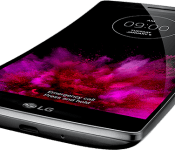
Sprint to offer LG G Flex 2 on March 13

Sprint on Thursday announced the upcoming availability and pricing for the LG G Flex 2. Announced at CES in January, the phone features a 5.5-inch HD P-OLED display, a 13-megapixel rear camera, and 3,000mAh battery. Running the show we have a 2.0GHz 64-bit ocata-core (Snapdragon 810) processor and Android 5.0 Lollipop. The big draw, of course, is the curved body and display.
According to Sprint, both the Platinum Silver and Volcano Red versions will be available, however the latter color is exclusive to the carrier.
The LG G Flex 2 will go on sale on March 13 with an all-in cost of $504. Customers who opt for EasyPay can spread payments out at $21/month over 24 months. Preorders begin on February 20 through sprint.com/flex2.
(function() var script = document.createElement(‘script’);script.src = ‘https://stacksocial.com/widget.js?publisher=androidguys&type=editorial_post_widget_preferences’;script.async = true;var entry = document.getElementsByTagName(‘script’)[0];entry.parentNode.insertBefore(script, entry);)();
http://www.androidguys.com/pubgalaxy/728×90.html
The post Sprint to offer LG G Flex 2 on March 13 appeared first on AndroidGuys.

Forget bloatware, Lenovo is installing adware on new PCs

If you bought a Lenovo computer recently, chances are it may have come with factory-installed adware. The world’s largest PC manufacturer was found to install an adware called Superfish — which injects third-party ads on Google search results and other websites — on new machines.
LG Watch Urbane: First pre-order pricing emerges
UK retailer Expansys has started pre-orders for LG’s all-metal Watch Urbane. Both silver and gold variants of the smartwatch are available for pre-order, with the pricing set at £299 ($462).

SHAREit version 1.4 lets you share files over Windows Phone hotspots

SHAREit is a file sharing app for Windows Phone that has just been bumped to version 1.4. This latest release introduces some handy features for those who wish to quickly share files between devices, but don’t have an active cellular or Wi-Fi connection. It’s now possible to share files over a hotspot created by a Windows Phone.

Asus Zenfone 2 with 4GB RAM goes up for pre-order in China

Asus announced the next-generation Zenfone 2 — one of the first devices to boast 4GB RAM — at CES earlier this year, and now the device is up for pre-order in Chinese retailer Alibaba’s marketplace AliExpress. There are two variants of the device available for choosing: a version with 2GB RAM that is priced at $299, and the 4GB model, which is on pre-order for $439.

Gold-framed Oppo R5 set to launch in India on February 20 for Rs. 29,990

The Oppo R5 — one of the thinnest smartphones available today — will be available in a limited edition golden-trim in India from February 20 for Rs. 29,990 ($482). The standard variant of the device has been on sale in India for some time now, and joins the likes of Gionee’s Elife S5.1 and Vivo X5 Max in the country.
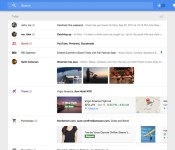
Inbox by Gmail is now available for your iPad

Google has released its Inbox app for iPad. The invite-only email client for tablets is already available for Android, promising to provide a new way for consumers to interact with incoming mail. It’s not for everyone, but should you be on the hunt for a new client on iOS, the new Google Inbox may be worth checking out.
The app listing itself isn’t new (since it’s already out for iPhone), but the company has bumped it to version 1.2, offering an optimized interface for iPad users. It’s an interesting way to use email for sure, having Google sort through email and prioritize messages the service feels are more important to you.
- Free – Download Now
Via: TechCrunch
 AIVAnet