Serious talk: What is the next Nexus smartphone going to be named?
The Nexus 6 is a great, but flawed, device. It had every hallmark of being a standout, but lack of availability has relegated it to the realm of guilty pleasures. For Google, it appears that the Nexus 6 filled a logical hole in its Nexus device line-up, perching its new ‘phablet’ device squarely between the […]
The post Serious talk: What is the next Nexus smartphone going to be named? appeared first on AndroidSPIN.
Ingress for Android Wear is going to be a thing starting next month, says Niantic Labs
Gaming on Android Wear, as a whole, is pretty much non-existent. Whether you think games should be on wearable devices or not, it’s disappointing to see that not more developers have had a stab at innovating and appropriating games for smartwatches, but it appears Niantic Labs has already been busy behind the scenes. Ingress for Android […]
The post Ingress for Android Wear is going to be a thing starting next month, says Niantic Labs appeared first on AndroidSPIN.
All the wallpapers: Seven more HTC One M9 wallpapers are available for download
March 1st is so close that we can almost taste the new announcements at MWC 2015, and the announcement of the HTC One M9 is one that many of us are waiting on with bated breath. To help deal with waiting, HTC leaker LlabTooFeR has been leaking out HTC One M9 wallpapers for the last […]
The post All the wallpapers: Seven more HTC One M9 wallpapers are available for download appeared first on AndroidSPIN.

Uber data breach compromises IDs of 50,000 drivers

An Uber database containing the names and driver’s license numbers of 50,000 current and former drivers was accessed by an outside party in 2014, the company announced today. Uber discovered the breach on September 17, 2014, and an investigation revealed one instance of unauthorized access on May 13, 2014. This means the information has been in the wild for nearly a year, though Uber drivers haven’t reported anything fishy and the database is now secure, the company said.
Uber began notifying affected drivers of the breach today and is offering a free year membership with an identity protection company. Of the 50,000 compromised names, 21,000 were based in California, prompting Uber to also notify the California attorney general, the LA Times says. Additionally, the company has filed a “John Doe” lawsuit in an effort to gather more information about the third party.
“Uber takes seriously our responsibility to safeguard personal information, and we are sorry for any inconvenience this incident may cause,” Uber said.
The data breach comes one month after Uber’s security protocols received a clean bill of health as part of an external privacy audit, though that was spurred by high-profile missteps with information about Uber’s passengers, not its drivers. In that report, the investigating agency recommended Uber start training its workforce in security issues and it further restrict access to data among employees.
“At Uber, protecting the personal information of riders is a core responsibility and company value,” CEO Travis Kalanick said at the time. “Delivering on that value means that privacy is woven into every facet of our business, from the design of new products to how we interact with riders, drivers and the public at large.”
Source: Uber

TypeSnippets offers visual text expansion for iPhone and iPad
TypeSnippets is a new keyboard for iOS 8 that makes text expansion visual. Instead of typing your email address or phone number over and over again, TypeSnippets lets you create shortcuts that you only need to tap to activate.

Where tools like TextExpander allow you to simplify text entry by creating small, text-based snippets for commonly-used phrases or pieces of information, TypeSnippets takes that simplicity a step further by making your snippets visual and tappable.
You can build your snippets in the TypeSnippets app. Tap Create a Snippet to get started, then add things like your name, an email signature, and more. When you use the TypeSnippet keyboard in any iOS app, all you’ll need to do is tap your desired snippet and you’re done. While using the keyboard, you can elect to create a new snippet from your iOS clipboard.
TypeSnippet is free to download, but with a $2.99 in-app purchase to unlock unlimited snippets and the full feature set. You can download TypeSnippet from the App Store now.
- Free – Download Now

6tag gets improvements for cropping, geolocation, and passwords in new update

Late last night, 6tag 4.0.0.1 returned to the Windows Phone Store after a caching bug prevented the app from updating on some phones. Today, Huyn has pushed out another update bringing the version to 4.0.1 and with it, a few new improvements and fixes.
The update is live now in the store and here is the full changelog.

Fifteenth wallpaper for HTC One (M9) posted online

Online leaker LlabTooFeR has taken to his Twitter page yet again to share with us another wallpaper from the upcoming HTC One (M9) before its release on March 1. Just like the fourteen others we’ve already seen, the fifteenth stock background appears to have been designed with the same blurred landscape theme in mind.
Hit the break below to see the fifteenth wallpaper in all its glory.

Come comment on this article: Fifteenth wallpaper for HTC One (M9) posted online

Leaked Galaxy S6 apps point to a new, subtler design language

It’s not uncommon for upcoming devices to see their wallpapers, apps and other resources leaked to the web ahead of their official launch. With that in mind, it’s no surprise to see that a few leaked apps allegedly from the Galaxy S6 and S6 Edge have now hit the web, thanks to the machinations of XDA Developer user, Albe95.
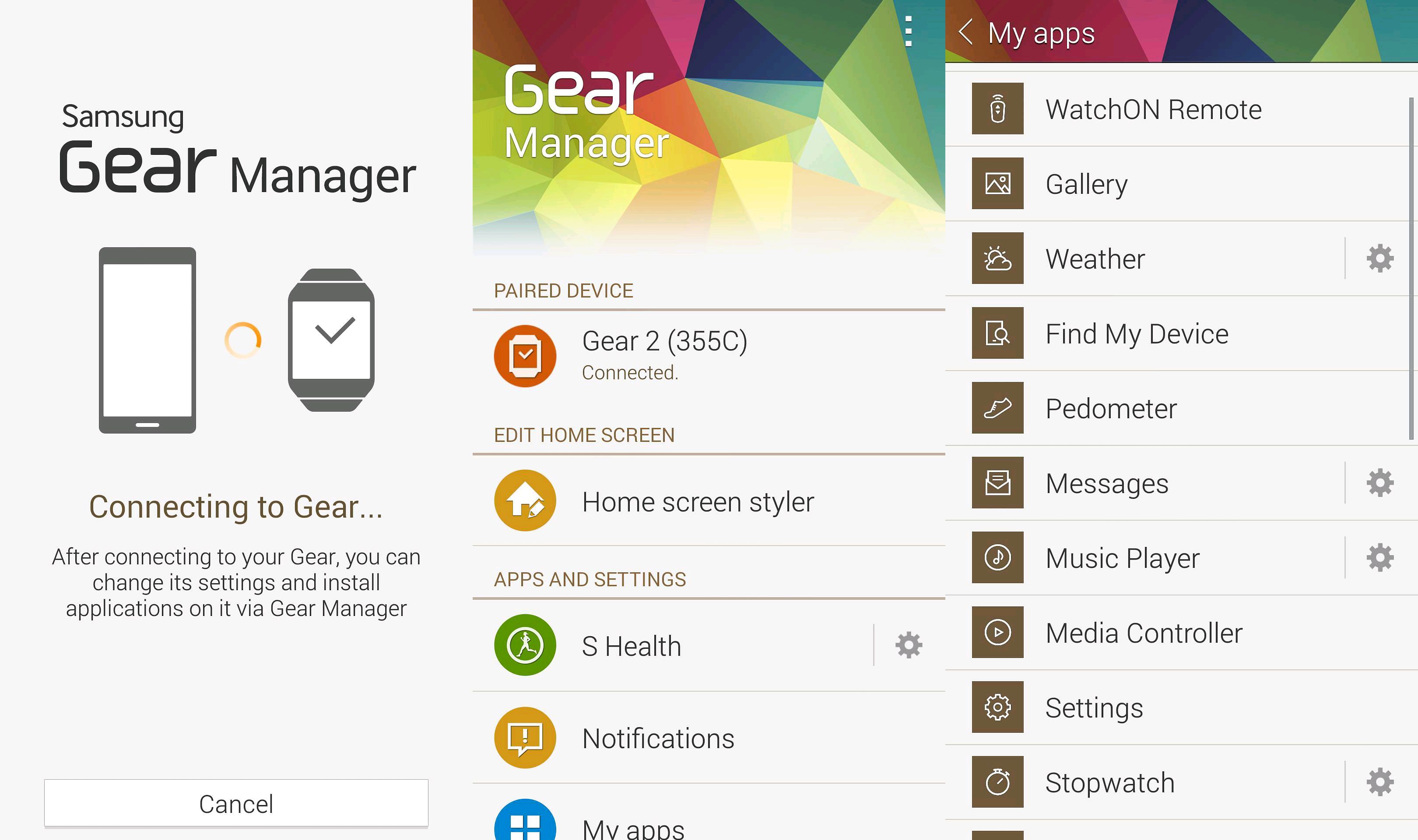
The main thing to note here is the much more simplified, refined presentation given to these applications. The Gear Manager in particular has seen a significant overhaul, to the extent of almost coming across as a totally different product. For comparison, have a look at the new version:
 Now take a look at the current build running on compatible Samsung devices, as seen in the image directly below. Notice that everything from the font to the background to the coloring has changed. The new version is relatively subdued, to say the least.

This same toned down style is finding its way into the other leaked apps as well. (From left to right the Optical Reader, Kids Mode, and Geo)
#gallery-1
margin: auto;
#gallery-1 .gallery-item
float: left;
margin-top: 10px;
text-align: center;
width: 33%;
#gallery-1 img
border: 2px solid #cfcfcf;
#gallery-1 .gallery-caption
margin-left: 0;
/* see gallery_shortcode() in wp-includes/media.php */


Please note that all of these applications can actually be downloaded via links provided at the XDA Developers source below, however given that we don’t know just where/how Albe95 was able to obtain these, it’s something that is to be done at your own risk. Even device compatibility could be an issue.
Any thoughts? Do you like the new approach to app design, or is there a certain sense of charm lost on this new aesthetic path?

Youtube app now lets you easily trim your videos

In the past, if you had a long video and only wanted part of it to actually go up on YouTube using your Android device, you really had only one option: you had to edit it through a 3rd party app before uploading to the video sharing network. Thankfully, that’s no longer the case. Starting today, the Android app now supports the ability to quickly trim off parts of your videos that you don’t want to share with the world.
How it works is pretty simple. You start uploading your video and you will be presented with a timeline that lets you set a beginning and end point for a video. The precision here is also pretty amazing, offering 1/30th of a second precision, ensuring only the exact moments you want are captured. Obviously this feature is more aimed at those of us taking quick videos with our phones that we want to share with our friends and family, and not necessarily the pro Youtubers out there. Nonetheless, this is a very welcome feature that could come in handy.
As already mentioned, the new feature is going live today. And no, you don’t need to do anything to enable it. Apparently the feature is enabled through the backend, so no need to update the Youtube app to get in on the action.
Pebble SDK 3.0 now available with Pebble Time support

Pebble has just announced that the developer preview for the Pebble SDK 3.0 is now available. Developers can now begin crafting their new apps for the Pebble Time with support for new hardware features like a color screen and a built-in microphone. The resolution for the Time hasn’t changed (144×168), though the available app memory has been increased to 64kB in the new SDK.
Here are some additional features Pebble has laid out for us:
- Support for 64 colors which all have a name!
- A brand new animation framework
- PNG and Animated PNG support in the SDK
- Detecting which platforms you are building for at compile time
- Much more to come!
The Pebble team has also announced that all current Pebble apps will work on the Time, with only a few minor changes needed.
If you’re just hearing about the Pebble Time for the first time, it’s a new color-screened watch from the makers of the original Pebble that just launched on Kickstarter the other day. At the time of writing this, the Pebble Time has racked up over $11 million with over 50 thousand backers with 28 days to go in their Kickstarter campaign. The Pebble Time features a new color e-paper display, a new version of the Pebble OS, and boasts up to seven days of battery life. For more information on the Kickstarter, head to their official campaign page here.
For those of you who want to take advantage of the new Pebble SDK 3.0, head to the source links below for more information.
 AIVAnet