



Unannounced Huawei Watch exposes itself in Barcelona

This weekend will see the the arrival of new phones, tablets, wearables, and more as hardware manufacturers head out to Barcelona for MWC 2015. Spotted inside Barcelona Airport by incoming press members is the advertisement seen above. It shows an unannounced smartwatch belonging to Huawei promoted for everyone to see. That’s right, Huawei has exposed its own product prior to any sort of official announcement.
The advertisement displays what is called the Huawei Watch and the following tagline: “Timeless design. Smart within.” Below that, Huawei offers an explanation of both adjectives. The Huawei Watch is timeless because of its classic design while being smart due to Android Wear.
The device does look very classic and stylish, so it will be interesting to see where the Chinese company sets its price. Also, the watch faces seen in the advertisement match the class of the Huawei Watch’s design.
Source: Android Central
Come comment on this article: Unannounced Huawei Watch exposes itself in Barcelona

Mad Catz announces mobile game and media controllers

There are two new controllers announced available for pre-order today from Mad Catz. The company unveiled the L.Y.N.X.3 and S.U.R.F.r controllers for consumers that want optimal gaming and media consumption controllers for their mobile devices. Mad Catz provides plenty of buttons controls while keeping the hardware compact.
For mobile gamers, the L.Y.N.X.3 is the ideal controller as it mimics the design of a standard gaming controller. There are two analog sticks, shoulder buttons, four action buttons, and a directional pad. The L.Y.N.X.3 itself looks so unique because of its ability to fold and fit into tight spaces. The analog sticks fold inward and the clip comes over the entire controller to confirm its closure. Mad Catz ported over the PC, Mobile Game, and Multimedia modes from the bigger L.Y.N.X.9, too. An app available in the Play Store allows gamers to assign controls to specific genres.

Being that it has a full QWERTY keyboard, the S.U.R.F.r acts as the perfect accessory for media consumption. This controller works with various platforms and services such as Android TV and Amazon Fire TV. In addition to a full keyboard and media buttons like any other remote, the S.U.R.F.r has dual analog sticks. And, for some gaming, it has makeshift shoulder and action buttons as well as a directional pad.
Both products will be available for demonstrations at Mad Catz’s booth at MWC 2015. The L.Y.N.X.3 sells for $69 and the S.U.R.F.r’s price is $79.
[L.Y.N.X3 – Pre-order Link] [S.U.R.F.r – Pre-order Link]
Come comment on this article: Mad Catz announces mobile game and media controllers
Huawei Watch looks awfully premium in leaked ad
Till now, Huawei‘s contribution to the smartwatch market has only included some fitness-oriented devices like the TalkBand B1, but if these leaked ads are to be believed, the Huawei smartwatch that is able to be announced at MWC 2015, apparently called the Huawei Watch, could be a more conventional form factor and actually pretty gorgeous. […]
The post Huawei Watch looks awfully premium in leaked ad appeared first on AndroidSPIN.
VAIO smartphone to be announced on March 12th
We heard a rumour just before the new year that VAIO was going to develop its own smartphones to be announced at CES 2015. While that didn’t eventuate, it appears that March 12th has been marked as a new date for when a VAIO smartphone could be announced. If you’re a little confused as to […]
The post VAIO smartphone to be announced on March 12th appeared first on AndroidSPIN.

MixRadio to suspend in-app music purchases in March

In an email sent out to users today, the team behind the popular Lumia-only music streaming app MixRadio said that it will be dropping support for purchasing music through the app in March.

AT&T will offer open enrollment for mobile insurance until March 31st
![AT&T logo [aa] (4)](https://i0.wp.com/cdn02.androidauthority.net/wp-content/uploads/2012/11/ATT-logo-aa-4.jpg?resize=640%2C390)
Did you neglect to sign up for insurance when you bought your AT&T smartphone? Usually customers only have a 30-day window from the time the phone is purchased to sign up for their mobile phone insurance plan. If you’re looking to sign up for insurance, even after your 30 days are up, AT&T might have a promotion for you. From now until March 31st, AT&T is offering open enrollment outside of the regular eligibility window of 30 days. So, if you bought your device 6 months ago, you can now sign up for insurance.
AT&T is offering a few different pricing tiers for mobile insurance with this new promotion:
- AT&T Mobile Insurance: $6.99 a month per device. The insurance includes coverage for loss, theft, accidental damage and out-of-warranty malfunctions for an eligible phone or tablet.
- AT&T Mobile Protection Pack (MPP): $9.99 a month for an eligible phone or tablet. MPP includes AT&T Mobile Insurance plus access to technical assistance with enhanced support. The Mobile Locate app is also included and lets you lock and erase a lost device, secure content and more.
- AT&T Multi-Device Protection Pack (MDPP): $29.99 a month. This program provides protection and support for up to three eligible devices, including smartphones, tablets (Wi-Fi and cellular), and laptops.
So, $6.99 per month will get you the baseline mobile insurance and will allow you two claims per consecutive 12-month period. For $9.99 per month, you’ll have all of the features available in the first tier, access to the carrier’s Mobile Locate app, plus access to AT&T’s tech support. For $29.99 per month, you can protect up to three devices (smartphones, tablets and laptops) and share six claims between the devices per consecutive 12-month period. As long as one of the devices is connected to AT&T’s network, the other two devices can be your own, even if they have no tie to the carrier whatsoever.
This promotion ends March 31st, so if you’re thinking about signing up, you can head to AT&T’s website to do so. What do you think? Are AT&T’s insurance prices good enough to sign up?

MLB At Bat app prepares for the 2015 season with Material Design

In time for the 2015 season, the MLB At Bat app has a brand new look that follows the recommended design guidelines provided by Google. The core of the app remains unchanged but its appearance certainly has. MLB At Bat, which now features Material Design, features a smooth look and fluid animations due to the update. Pages for all thirty teams and the app’s scoreboard have been redone on phones. Tablet users will likely see those changes in a coming update, but for now they can still enjoy Material Design’s aesthetics.
MLB At Bat allows users to read news, track stats, and watch live games from around the league. Premium features are available for $2.99 per month or $19.99 per year. Subscribers of MLB TV receive premium features at no extra cost.
Hit the break for the gallery and download links.


Come comment on this article: MLB At Bat app prepares for the 2015 season with Material Design
Lenovo Yoga Tablet 2 10-inch review
Lenovo’s newest tablet is finally here and is very much a tablet we’ve seen before. Every year Lenovo takes its tablet and gives it some incremental upgrades that help improve the experience and this year’s edition is no different.
The last tablet that I reviewed from Lenovo was the Yoga Tablet 10 HD+. Throughout this review I’ll be referencing the previous a bit, so if you want to check it out, you can view it here.
Hardware
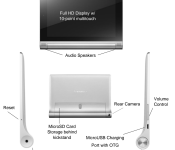
The Yoga Tablet 2 looks like just its predecessors. The only real visual difference is that now there is no longer a Lenovo logo on the bezel. I don’t recall prior versions having this, but there’s a grippy plastic piece on the back, which while plastic, makes it a bit easier to hold and grip the device. The volume rocker was moved to the other side of the device, now above the power button and the port for the USB cable.
In terms of other changes to the hardware, the biggest changes include the screen, the processor and a new feature with the kickstand. Starting with the display, while the Yoga Tablet had an HD screen with a 1280 x 800 resolution, Lenovo upped its game this year with a 1920 x 1200 resolution display. Just to note, the HD+ that we reviewed in July had a display with a1920×1080 resolution, so the HD plus bests that tablet as well. The colors on the display seem more true and it has much better viewing angles than the previous models. Moving on to the processor, the Yoga Tablet sported a MediaTek quad-core processor then the 10HD+ a Qualcomm Snapdragon 400 processor. The new tablet has a quad-core Intel Atom Processor Z3745 (2M Cache, up to 1.86 GHz), featuring Intel Burst technology that dynamically matches processing power depending on what you are doing to maximize battery life. Even with the new display and processor, the tablet still has excellent battery life. Lenovo claims you can get 18 hours of battery life, but if using at 40% screen brightness and using Wi-Fi, you should get almost 13 hours out of it. Overall, the tablet is very snappy and has handled all the games that I’ve tried with it with no real issues such as Modern Combat 5, Hearthstone, Goat Simulator and Star Wars Knights of the Old Republic. As I mentioned earlier, the tablet has a new mode with its kickstand. While previously you could either use it in stand, hold or tilt modes, now you can use it in “hang” mode, basically rotating the stand until it’s flat and then there’s a hole in it so that you can hang it anywhere such as in your kitchen, bedroom , office, etc.I’d just be sure to use a hook that is securely in the wall before hanging, you don’t want to break you brand new $300 tablet.
A few other highlights of the hardware upgrades is an improved rear-facing camera, now up to 8 megapixels from 5 megapixels, larger front-facing chamber speakers with Dolby Audio surround sound and Wolfson Master Hi-Fi audio processing. I forgot to mention but it also has 2 GB of DDR3 RAM as well as 16 GB of built-in storage that is expandable, supporting MicroSD cards up to 64 GB.
Software
Moving on to the software, the Yoga Tablet 2 is running Android 4.4.2 KitKat, just like the 10 HD+ was and has a slightly different version of the Lenovo LauncherHD.
The launcher still doesn’t have an app drawer, so it has an iOS feel to it, but I think this is Lenovo’s way of trying to make the UI their own and simplify the experience. If you read my last review, you may remember that I mentioned a Smart Side Bar that could be accessed by swiping from the bezel onto the screen on either side. This side bar gave you quick access to your videos, photos and books, recently used apps and sound and visual modes. It is now nowhere to be found. The closest thing to it in the software is called the “Bottom Switch.” This can be accessed with a swipe upwards from the bottom and it gives users the ability to quickly turn various functions on or off as well as access to advanced settings. You can also access Lenovo Smart Switch to change different display and audio modes, as well as access the camera, take a screen shot and and lock your screen. Although it doesn’t give you quick access to your movies, photos and books like the previous iteration had, I think it that it has to and this actually is a nice experience. It seemed like previously it was trying to do too much and you no longer have that.
Aside from these changes, there is really nothing else different about the software. You can still run apps in multiple windows and the way to close apps is reminiscent of MIUI, also telling you the amount of available memory.
Overall
I still think that the Yoga Tablet 2 is a good choice for the general consumer. It may not be a powerhouse like the NVIDA Shield Tablet or the Nexus 9, but it’s not trying to be. The Yoga 2 excels where it always has and that’s offering a great user experience, a unique design and a decent price tag. I think that the kickstand adds a lot of it since you don’t need a case to stand it up to watch a movie or tv show or to prop it up on your lap to type. If you wanted to have it hanging on your wall, you could possibly make it like an interactive calendar or an easily accessible computer in the kitchen to play music while cooking or to display recipes.


The post Lenovo Yoga Tablet 2 10-inch review appeared first on AndroidGuys.
PhotoMath comes to Android, uses camera to solve math equations

If you’re taking a mathematics course at the high school level or below (or you’re being presented with some equations you’ve long forgotten how to do…), at one time or another you’ve probably come across one of those “gotcha” math problem that you just cannot solve. It can also be especially frustrating when you can’t figure out how to type it into Wolfram|Alpha or Google search correctly.
Fret not, text recognition start-up, Microblink, maker of the popular PhotoMath app on Apple and Windows smartphones, has finally released the app onto the Play Store. This app will use your smartphone’s camera to analyze a math equation and give you the answer to it, but more importantly than that (or it should be), it’ll walk you through on how to solve the problem.
In an interface similar to what you can find with Google Goggles, PhotoMath scans the image fed to it from your camera and identifies math equations. The only caveat at the moment is that the equation must be typed, but Microblink has promised that support for handwritten equations will be coming in the future.
The app is free, so if you’re tired of digging through Google search results and begging people on Yahoo Answers, you might give PhotoMath a shot! See below for a gallery of screenshots plus a video, as well as a link to the app’s Play Store page.


Click here to view the embedded video.
Come comment on this article: PhotoMath comes to Android, uses camera to solve math equations

Did the new Galaxy Tab 4 Lite 7.0 just pass through the FCC?

Earlier today, an unannounced Sony-branded tablet passed through the United States of America’s official certification authority — the FCC. Information included in the brief filing documentation reveals that we could be looking at the new Galaxy Tab 4 Lite 7.0 LTE.
Unfortunately, the paperwork doesn’t reveal anything about the internals of the device, but we do know that the slate is set to pack a variety of different connectivity options, including support for 4G carrier bands (2 and 5), GSM, WCDMA, Bluetooth Class 1 (Version 4.0, LE+EDR), 802.11b/802.11g/802.11n Wi-Fi, NFC and GPS.
If you wish to view the full FCC filing – just click the source link below.
Source: FCC
Come comment on this article: Did the new Galaxy Tab 4 Lite 7.0 just pass through the FCC?
 AIVAnet