Lytro to focus on VR and video with $50 million investment

Lytro — maker of “shoot now, focus later” cameras — is diving into the virtual reality and video market, following an investment of $50 million led by GSV Capital. The market shift means Lytro will lay off 25 – 50 of its 130 employees, and at the same time hire new folks with expertise in VR and video. Lytro is best known for its tubelike, selective-focus cameras released in 2012, though its newest model, the Illum, is a high-end SLR-style device. The company has been feeling out its target market for a while, and while we thought the new camera was better than its predecessor, VR might turn out to be a better fit for Lytro overall.
Virtual reality is all the rage in the tech world, and its recent explosion at the Sundance Film Festival demonstrated its serious mass-market appeal. But, so far, no one company has jumped to the front of the pack when it comes to VR video. Capturing real-life worlds for 360-degree, multi-focus film presents a number of challenges to movie makers. Lytro CEO Jason Rosenthal tells Re/code, “Light-field is really the perfect solution for this.”
Lytro still plans on releasing its third-generation camera next year, a device that we noted “should be pretty intriguing,” considering the technological advances and ergonomic missteps of the Illum.
Source: Re/code

AT&T Moto X (2nd Generation) receiving Lollipop OTA now

If you’re on an AT&T plan and own a 2014-edition Motorola Moto X, you’ll be happy to know that Lollipop is rolling out now in an over-the-air (OTA) update. This update will bring your current version of Android to 5.0.2.
Motorola recommends that your device has at least a 50% charge and is connected to WiFi.
If you want to know what you can expect to see in your Android update, check out the source link below for Motorola’s synopsis of Lollipop.
Source: Motorola
Come comment on this article: AT&T Moto X (2nd Generation) receiving Lollipop OTA now
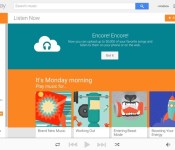
Google Expands Free Google Play Music Storage to 50,000 Songs [iOS Blog]
Google today announced an update to its Google Play Music service, expanding the amount of available storage. Users can now store 50,000 songs in the cloud at no cost, up from 20,000.
Content stored within Google Play Music can be played on computers via Google’s Music Manager app, on iPhones and iPads via the recently redesigned Google Play Music app, through a Chrome extension, through Chromecast, and on Android devices.

Google’s Google Play Music storage does not require a subscription to Google Play Music to use it, making it free for all users.
Those interested in using Google’s free music storage can access it by going to the Google Play Music website, skipping the subscription offer, and going straight to the music interface where there’s an option to upload music. Content can be uploaded directly from an iTunes library or from any folder.
Google, of course, hopes users will opt-in to its $9.99 per month subscription music service when signing up for free music storage, which offers on-demand access to millions of songs much like Spotify or Beats Music.
With the boost in free storage space, Google Play Music gains a bit of a competitive advantage over Apple’s iTunes Match service. iTunes Match costs $25 per year and allows users to store up to 25,000 songs in iCloud, but it gives users the benefit of accessing 256-Kbps AAC DRM-free quality music for any uploaded song that’s also available in the iTunes Store.
For those in the Apple ecosystem, it’s arguably easier to access songs on any device through iCloud using iTunes Match, but Google Play Music is a viable alternative as the company now has apps for the Mac, iPhone, and iPad available.
Google is testing real-time Hangouts chats with businesses through Search

Google is now testing a messaging feature that allows you to chat with businesses in real time through Hangouts. When searching for a business in Search, whether it be a restaurant or a bookstore, a new link under the information section will tell you whether or not a business is currently available for a quick chat. Clicking the link opens up a Hangouts chat (on the desktop or mobile), allowing you to message the business questions about store hours, menu options, or anything else you can think of.
Chat availability will show on the same information card where you can find the company’s address, hours and contact information. If the company has an available status, the Hangouts message thread will tell you the average amount of time it takes the business to usually reply to a query. This feature could be particularly helpful if you’re wondering about a certain ingredient in a restaurant’s menu item or parking information in a crowded part of town.

TechCrunch has confirmed from Google that they are in fact testing this feature, but there’s no telling whether or not it will become mainstream. Just like we saw with Google Helpouts, no service is guaranteed to stick around.
This feature only works in Google Search results for now, but it will probably come to Google Maps in the future. While this live chat feature is still in the very early testing stages, this is a smart way to bring functionality to Search while also getting more users on the Hangouts platform.
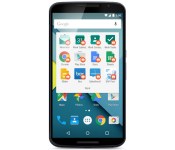
Android for Work is ready to make your phone office-friendly

Remember Android for Work, Google’s big effort to make your smartphone safe for business? It’s finally ready for prime time. The officially launched initiative lets you keep work-related accounts and app info separate from personal affairs while maintaining security — you don’t have to worry that higher-ups will peek at (or worse, delete) your vacation photos. You’ll only get full flexibility if you’re using Android 5.0 Lollipop, which lets you create work profiles, but an app will grant you access to corporate-approved tools if you’re running Android 4.0 or later.
The launch is getting help from a mix of app and hardware providers, including Box, Citrix, VMware, HTC, LG and Sony. Even BlackBerry is helping out with Android for Work support in its latest management tools. Developers of paid apps can even get in the mix, by opting-in to make their apps available for bulk purchase. However, Samsung isn’t pitching in to the same degree that was promised last year. While Samsung is still a partner, Google tells Recode that it didn’t end up using the Korean tech firm’s Knox technology to lock things down. Whatever’s under the hood, you now have a better chance of using your personal phone for office duties without enduring the hassles and security risks of the past.
Filed under: Cellphones, Internet, Mobile, Samsung, Google, Blackberry
Source: Android Official Blog, BlackBerry

The best weather radar apps for American users

For more than just ‘is it raining?’
Most weather apps come with radar, but it can leave something to be desired, especially for those who are a little more dependent on the weather’s wicked wiles. For storm chasers, meteorologists, and weather enthusiasts looking for more advanced radar on their Android devices, we’ve looked through the cream of the crop with KXXV-TV Meteorologist Conley Isom and we’ve arrived at the best three for your Android. And just our luck, each one suits a particular niche for a particular type of user.
A note on location before we begin: due to the differences in meteorological services between countries and continents, we’ve limited this article to Level 3 radar apps for the United States. Our apologies to our international readers.

Microsoft researches talk about the latest Microsoft Band update in new video
Microsoft has released a new video today in which some of the developers and researchers behind the Microsoft Band give some background on the features included in the wearable’s most recent update released earlier this week.
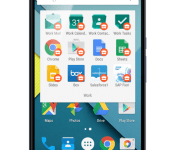
Google launches ‘Android for Work’ with work profiles and a separate Play Store

Google has just announced the new Android for Work program, which brings together all the essential work tools meant for business to streamline their workflow. This will also have its very own Play Store app with productivity related apps, so it’s a pretty neat addition to Google’s productivity repertoire.
Android for Work will be supported by major Android OEMs like Samsung, HTC, LG, Sony, Motorola, Lenovo and the likes. There are a wide range of applications and networking options as well, which will be ideally suited for a workplace like atmosphere.

This program essentially ensures that people who use Android as their personal device can seamlessly merge it with their work environment as well.
Google mentions that Android for Work has four components:
- Work profiles – We’ve built on the default encryption, enhanced SELinux security enforcement and multi-user support in Android 5.0, Lollipop to create a dedicated work profile that isolates and protects work data. IT can deploy approved work apps right alongside their users’ personal apps knowing their sensitive data remains secured. People can use their personal apps knowing their employer only manages work data and won’t erase or view their personal content.
- Android for Work app – For devices running Ice Cream Sandwich through Kitkat, or that don’t run work profiles natively, we’ve created the Android for Work app. The app, which delivers secure mail, calendar, contacts, documents, browsing and access to approved work apps, can be completely managed by IT.
- Google Play for Work – Google Play for Work allows businesses to securely deploy and manage apps across all users running Android for Work, simplifying the process of distributing apps to employees and ensuring that IT approves every deployed app.
- Built-in productivity tools – For everyday business tasks, we’ve created a suite of business apps for email, contacts and calendar, which supports both Exchange and Notes and provides document editing capabilities for documents, spreadsheets and presentations.
Source: Google for Work
Come comment on this article: Google launches ‘Android for Work’ with work profiles and a separate Play Store
How to connect the Microsoft Band with HealthVault & other services
The Microsoft Band is not widely available, but lucky owners got treated to an update earlier this week. Some of the new features include the Bike Tile, virtual keyboard, Quick Read, and much more. It also lets Microsoft Band users integrate their data with two additional services: HealthVault and MapMyFitness. The Microsoft Band originally included just two integrated services: RunKeeper and MyFitnessPal. We’ll show you how to integrate your Microsoft Band with these services.

Deal: Last chance to pre-order the Limited Edition Code Black Drone + HD Camera for 55% off

Back in November we told you about the Limited Edition Code Black Drone + HD Camera deal, which is a great starter drone experience with a small price point. If you have yet to pre-order one of these drones, you’re running out of time! The AA Deals Store only has the pre-order deal going on for one more day, so you may want to hurry if you’d like to save some money.
What does this drone have to offer? The Limited Edition Code Black Drone + HD Camera is easy to fly and perform complex maneuvers with, thanks to its 6-axis flight system and simple remote control. Plus, it packs a built-in HD camera to capture every second of your flight. While flying in the air, the drone can flip four different ways (left, right, forward and backward), and you can record all of it with the 720p camera that comes with.
If you’d like to save some money on the Code Black Drone, you head to the Android Authority Deals Store to grab a pre-order for only $89… that’s 55% off the retail price! After tomorrow, the pre-order price goes back up to $99. Units will now ship in 1-2 weeks, and shipping is free to the Continental US. Head to the link below if you’re interested in this deal.
 AIVAnet