



Euroimpianti will use the QNX Neutrino to power its next-gen autonomous robots

Euroimpianti, a global leader in automated warehouse solutions, will use the latest release of the QNX Neutrino OS to power the realtime control systems and human machine interfaces (HMIs) of its next-generation autonomous warehouse robots. Until recently, Euroimpianti used another OS for the HMIs of its operator panels and recently re-assessed this approach after evaluating the HMI capabilities of the QNX Neutrino OS 6.6 and the new QNX SDK for Apps and Media, and now plans to use QNX Neutrino in the HMIs, as well as in the control systems, of its future products.

QNX Wireless Framework brings smartphone-caliber connectivity to Embedded Systems

This week, at Embedded World 2015, QNX Software Systems will showcase its latest product developments for embedded developers but they’ve already got the news rolling. Following up on their QNX Hypervisor announcement, they’ve now announced the QNX Wireless Framework, which enables rapid cellular and Wi-Fi integration and faster time to market for embedded system applications.

Sony injects LTE connectivity into the E4, announces the Xperia E4g

Sony has unveiled the Xperia E4g, which is essentially a marriage between the recently announced Xperia E4 and LTE connectivity. Think of this announcement much like how Motorola handled the Moto G and its LTE variant. The Xperia E4g will ship in April for €129.

Out This Week on Xbox One: Resident Evil: Revelations 2, Dragon Ball Xenoverse, and more!

The last week of the month is here faster than any of us would expect. But before we start thinking about what March has in store, we need to take a look at what games are coming out this week for the Xbox One.
We have three big titles coming out this week, with Resident Evil: Revelations 2 – Episode 1 being the biggest of them. Then, later in the week we have an ID@Xbox game making its splash onto the console. So continue reading to get the full rundown on what’s out this week.

How to use your iPhone or iPad hands-free with ‘Hey Siri’

“Hey Siri” lets you use your iPhone or iPad hands-free.
As long as it’s plugged in and within range of your voice, all you have to do is say the magic word and Siri will wake-up and wait for your question or command. It’s great for the iPhone when you’re in bed or in the car, or the iPad when you’re cooking in the kitchen or wondering around the house. It’s voice activation for your voice control!
How to enable Hey Siri on your iPhone or iPad
- Launch the Settings app on your iPhone or iPad.
- Tap on General.
- Tap on Siri.
- Turn On the option for Hey Siri.

How to use your iPhone or iPad hands-free with Hey Siri
- Make sure your iPhone or iPad is plugged into a charger.
- Say Hey Siri.
- Use Siri just as you normally would!


Google steps up anti-malware initiatives with updates to Chrome and Search

Google already shows a warning message when you attempt to download malicious software, and the search giant is now expanding its efforts with the SafeBrowsing initiative to protect you from visiting websites that are flagged for malware. Chrome has been updated to display a new warning message to users visiting a website flagged by Google, and Google Search’s ranking signals now feature the ability to automatically identify whether a site has malicious content.

Sleeping Dogs and Assassin’s Creed IV Black Flag named in this week’s Deals with Gold

Microsoft has kicked off this week’s Deals with Gold promotion, which sees Sleeping Dogs Definitive Edition and Assassin’s Creed IV: Black Flag on sale for $24 (£16) and $25 (£12) respectively. Looking for some new games for your Xbox One? Now would be the time to check these titles out.

Google commences Lollipop rollout to Android One handsets in India

Google has announced that it is rolling out the Lollipop update to Android One handsets in India. The OTA update will be arriving in stages and will be delivered weekly, which means that not all users will receive the update at once.
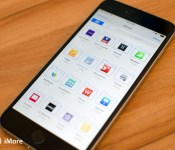
Files.app for iOS 9 — because we’re halfway there!

You knew this was coming, right?
For years and years and years and years and years and years now I’ve begged and pleaded for two things — a Files.app repository and DocumentPicker API from Apple to make iOS file management easier. Last year, with iOS 8, Apple provided the DocumentPicker as part of iCloud Drive. This year, with iOS 9, I hope they finally provide Files.app as well.
Last year I called the lack of Files.app and DocumentPicker “one of the biggest, most frustrating holes remaining on Apple’s mobile operating system, and all the more so because it seems like a model for fixing it has been in successful use for years already.”
A lot of that had to do with “app jails”, or files locked within specific apps, inaccessible any other way. DocumentPicker solved that, making files available to any app that called it up the iCloud Drive interface.
The problem now is that we still need an arbitrary app to call up the iCloud Drive interface.
What we have now is analogous to Photos.app and ImagePicker, sans Photos.app. Instead of being able to open a single app and browser all our pictures, we have to go find an App Store app that’ll let us browse them.
It’s fine if your brain only ever works in an app-centric way. “I wrote my article in TextEdit, I am going to go to TextEdit and open my article”. It’s less fine if your brain works in a file-centric way. “I wrote my article, I’m going to go to my article and open it in whatever app will let me open it… Hey, TextEdit!”
Both are valid mental models, and supporting both makes files more accessible for everyone.
In a world with Files.app, that’s what I could do. I could go to TextEdit, open DocumentPicker, and choose my article. I could also go to Files.app, search for my article, and then use “Open in…” to pick TextEdit or any other text editing app.
Or, you know, just search in an updated Spotlight that can see into DocumentPicker.
It’s not a filesystem any more than Photos.app is a filesystem. It’s a repository, a view, a way to sanely and safely present all documents in iCloud Drive in a way that empowers people.
Apple, rightly, prides itself on privacy and security. Every app exists in a sandbox and every file exists in the sandbox of the app that created it. In order for iCloud Drive and DocumentPicker to work, the system carefully and considerately moves data between apps.
Files.app would be an Apple app, however, which could ensure a high level of privacy and security for files. A “Do you want to grant NewApp permission to access your files?” could further ensure both and and make any openings in the sandbox the result of direct user interactions, the same way Camera Roll access is handled today.
Thanks to Extensibility, you could also share directly from Files.app to any app or service that supports it. So if all you know is you have to get file A to destination B, you know you’re only ever one Files launch and couple of taps away. That’s remarkably less mental overhead.
It wouldn’t be a file system because it would avoid the hierarchy and complexity of the traditional file system. It would also avoid the complexity of not having a file system.
It would be a repository, much like Photos, much like Passbook, much like Health. And it would be important to a great many people, personally and professionally, and they need and deserve time and attention on iOS.
We’ve gotten our redesign. We’ve gotten our functionality increase. The iPhone and the iPad are light and powerful beyond our dreams. They are becoming our primary computer platforms. They are the glass through which we are viewing the connected world.
iOS 8 got us part of the way there. It gave us DocumentPicker and iCloud Drive. It made it so that our iPhones and our iPads are no longer terrible at something as important as file handling.
Now we just need iOS 9 to get us the rest of the way home. We just need iCloud Drive surfaced in a consistent place so we can get to it, and our documents, whenever we want or need to.
We just need Files.app
This feature request has been submitted as a feature request to Apple as rdar://19933856.

Kazam continues mobile onslaught with six new devices in the Trooper series

British manufacturer Kazam – created by ex-HTC staffers – has announced six new models in its Trooper range. All devices run Android 4.4 KitKat out of the box, and are aimed at the budget segment. Kazam is differentiating the series by offering LTE as well as 3G-only connectivity options.
 AIVAnet