



Beam is an Android-powered projector that fits into a light socket

We’ve certainly seen some awesome projectors in the tech world lately, but none quite like this. The Beam smart projector is powered by your Android device, and has a ton of functionality like waking you up in the morning with the latest news, showing you your social updates when you come home, and much more. But that’s not the most interesting aspect of this projector. Beam can screw into any size light socket so you can view your media wherever you’d like. Of course, you can use the included power cable to plug it into any wall outlet, but what’s the fun in that?
Why would you want a projector that screws into your light socket? The crowdfunding page has a few insights for you:
With Beam you can watch TV on your bedroom ceiling, play games using your phone or a Bluetooth controller, project recipes on your kitchen counter, stream content from your network drive, listen to music through its speakers, play projected board-games on your dining table, show a presentation or even use it in a restaurant to show the menu and turn the walls into digital paintings.
If you aren’t sold on this idea yet, Beam also runs Android. You can download any app from the Google Play Store to use on the projector, and it can all be controlled by your Android or iOS device. The projector is also borrowing a few functionality traits from the popular IFTTT service, allowing you to set up certain rules for the projector to follow. Take a look at the examples shown below:

Beam isn’t the beefiest projector we’ve seen on the market. It has a max brightness of 100 lumens, an 854 x 480 resolution, two 2-watt speakers, 8GB of storage, along with Wifi and Bluetooth capabilities. The company behind Beam will add a version with 16GB of storage if the product reaches $800K, new colored cables if it reaches $900K, a new Beam color if it reaches $1 million and the company will include Beam colored LED lights with the software control kit if it reaches $2 million.
Even for the specs, you’ll have to spend a pretty penny if you want to get your hands on one. Since all of the early bird specials are gone, you’ll have to pledge $399 to get yourself a Beam. They’ll even throw in a Beam hoodie if you spend $450.
This projector has been doing quite well so far. It’s already surpassed its goal of $200K with 31 days to go. If you’re interested in this smart projector, head to the Kickstarter page below for more info.
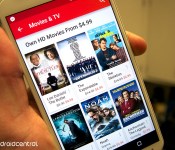
Google Play promotion offers up tons of hit movies for only $5 each

If you’re looking for a good way to spend your Friday night, you might want to check out Google Play‘s most recent movie promotion. Currently, you can score a number of hit movies from the storefront, such as Inception, Anchorman, and Looper, for a cool $5.

Sony Mobile’s Decline? | The Friday Debate Podcast 005

Sony recently announced that it would take less risks in the mobile and television divisions, bringing focus more to the Playstation brand. Our guys have seen Sony grow and iterate often in the past couple years, but this news brought the gang together for a very spirited discussion about why Sony Mobile might be going by the wayside. Their discussion gets nostalgic with memories of Sony’s past, shifts to some Playstation talk, and then even moves into some talk about gaming! This might be our most packed episode yet, so fire it up and start listening!
The Friday Debate Podcast – dissucssing topics in Android every week.
Links to Podcast
RSS Feed
iTunes
Stitcher
Direct Download
Relevant Links
Sony’s shift for 2015-2017
Sony Xperia Z3 Review
Sony Xperia Z3 Compact Review
Follow our Hosts

Joshua Vergara
Twitter | Google+


Andrew Grush
Google+

Jonathan Feist
Twitter | Google+
Recorded on February 18, 2015 – Hosted and Produced by Joshua Vergara
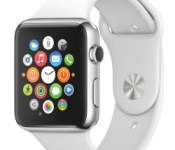
An In-Depth Look at Apple Watch Band Options and Potential Pricing
 Daring Fireball‘s John Gruber today published a piece going in-depth on what he believes Apple’s upcoming Apple Watch wearable will sell for, how the various accessory bands will be sold at retail, and just how much the all-gold Apple Watch Edition could possibly cost.
Taking a step back from the tech industry, Gruber looked at the upper tier of the fashion accessory market and decided to revisit his early fall guess that the lowest price the Apple Watch Edition could sell for would be $5,000. He began asking “friends who might know” whether they thought that estimate was too high.
The answer has always been “No”. But the way I’ve been told “No” has given me the uneasy feeling that I’ve been asking the wrong question. I should have been asking if $5,000 is too low.
I now think Edition models will start around $10,000 — and, if my hunch is right about bands and bracelets, the upper range could go to $20,000. I was off by a factor of two, and my friend Vincent, I think, nailed it back on the day Apple Watch was introduced.
Due to Apple’s decision to remain silent on many details of Apple Watch pricing structure so far, Gruber, like many others, assumed the interchangable bands shown off at last September’s reveal event would be able to be purchased separately. Watch wearers could, in essence, dress up a Sport Edition with a Milanese Loop, or exchange a nice leather band of a higher-tier model with a Sport band. Gruber now notes, however, that this does not appear to be the case, with band options for each watch version being limited.
He points to a list of bands available for the mid-tier stainless steel Apple Watch model. As presented on Apple’s site, the list starts with the Sport band and ends with the higher-quality Space Black Stainless Steel with Link Bracelets. Besides differences between each band’s 38mm and 42mm sizes, Gruber argues this ordering is an indication of price from least to most expensive.
So I’m thinking the regular Apple Watch will come in at least five pricing tiers:
1. Entry: Sport Band, black or white.
2. Regular leather: Classic Buckle, you’ll get it in black and you’ll like it.
3. Milanese Loop.
4. Deluxe leather: Modern Buckle for 38mm models, Leather Loop for 42mm models. Each with a choice of three colors.
5. Link Bracelet.You’ll pay a premium for color straps and advanced clasp mechanisms, and you’ll pay even more for the Link Bracelet.
He isn’t sure the same ordering rules will apply to the expensive Apple Watch Edition, however, with a small list of six variations, he thinks their placement on the website “almost certainly does not correspond to price.”
Gruber’s full piece is well worth a read, as it offers a thorough analysis of the various band options and how they will likely pair up with the various watch collections. With three different watch collections, two casing sizes, and a number of different bands that will likely vary substantially in price, the Apple Watch appears set to be available at a wide range of price points starting at the base price of $349 and quickly ramping up from there.
News and rumors about the Apple Watch and all of its editions have been building since Tim Cook announced the device’s launch window sometime in April. Most recently it was reported that Apple is allowing select third-party developers to visit the company’s Cupertino headquarters to help them put the finishing touches on their various Apple Watch apps before the big launch. It remains unclear, however, just how long Apple will wait to announce full details on pricing and availability.

Here’s everything we know about Apple’s electric car project
Apple’s rumored to have hundreds of employees working on an electric car, which could come to market as soon as 2020. Read our full roundup on Apple car

How could Lenovo miss its Superfish security hole?

Until mid-day yesterday Lenovo thought the biggest problem with Superfish VisualDiscovery was the annoying ads it caused to pop up on customers’ laptops. SuperFish was supposed to analyze images on the web and “help” consumers find similar products, but the information security world was learning that it (apparently unintentionally) does quite a bit more.Facebook engineer Mike Shaver tweeted Wednesday night about how the preloaded adware performs a man-in-the-middle (MITM) attack on supposedly secure connections, and by Thursday morning security researcher Rob Graham showed how it could be used to spy on the encrypted communications of anyone running the software. At that point, Levono CTO Peter Hortensius still referred to resulting security problems as “thoretical” but moves today from Microsoft and the US government — and his comments in an interview with Engadget — show that they’ve realized the threat is very real.
Now, Lenovo admits to the gravity of the problem (even if the company behind Superfish does not, as shown by a spokesperson’s comments to Ars Technica) and is working with others in the industry to fix it. Still, the question remains — how did a security hole this problematic get there in the first place? As Hortensius told me, that’s the question he and his team will be trying to answer over the next week or so.
How to make Superfish go away

The first priority is making sure that Superfish disappears and the security hole is closed, and there’s several ways to make sure your PC is secured. Browser test pages (Filippo.io, LastPass) can tell you if you’re affected and give tips on removal. Lenovo has its own list of uninstallation instructions, and as of today Microsoft’s Windows Defender scanner has been updated to remove Superfish and its security certificate. You can expect for other scanners to get a similar update soon, and of course Lenovo is working on an uninstall program of its own that could be available later today.
Why is Superfish such a big problem?
Superfish’s security problems are worsened by practices researchers have uncovered over the last day or so: not only is its security certificate easily extracted, as Rob Graham discovered, it uses the same one on every computer. It appears that Superfish (and others) used technology from a company called Komodia to pull off its hamfisted intervention, and all of them are equally vulnerable. Even worse, beyond the initially discovered MITM vulnerability and weak encryption, the Komodia package can be easily tricked into accepting any certificate as valid. According to CloudFlare security team member Filippo Valsorda, that means it’s easy to intercept encrypted traffic from anyone with Komodia-powered software on their system.
What is Lenovo doing about it
While we wait to find out the next way this will get worse, Lenovo says it is taking steps to turn things around. Of course, as security researcher Kenn White asked, after the company ignored respected security researchers “activating the Batsignal”, restoring its public trust will be tricky. The software appeared on computers beginning in September, and posters on Lenovo support forums were asking questions that should’ve raised alarms for months.
This is not a level of maintenance like changing oil; this is whether your headrests will sprout spikes in an accident.
– MuninrepeeK eroL (@munin) February 20, 2015
According to Hortensius, Lenovo does security checks for software that it preloads, but apparently Superfish bypassed those even with this glaring security hole. He says “If we knew then what we know now, we’d never have shipped this”, and that security practices, even the ones the company will institute going forward can never be 100 percent. He says that information with real substance is coming, that will detail how Lenovo plans to avoid getting caught out like this again, which will be key. Patching the software is relatively simple — filling in this hole in the company’s reputation may not be so easy.
[Image credit: (shark) Martin Barraud, (Windows Defender scan) Filippo Valsorda]
HTC tweet about new device is confusingly cryptic, but probably referring to the HTC One M9 Plus
For me, HTC‘s marketing over the years is pretty hit-and-miss. Some attempts like the Serious Technical Considerations videos were on point and entertaining, while some like its “Here’s to change” ads left a little more to desire. A tweet that has been posted on the HTC USA Twitter page falls somewhere between as they try […]
The post HTC tweet about new device is confusingly cryptic, but probably referring to the HTC One M9 Plus appeared first on AndroidSPIN.
More HTC One M9 wallpapers abound as number 4 and 5 get leaked out
Renowned HTC leaker, LlabTooFeR, is on a tear at the moment. Boldly claiming that he would release a wallpaper from the new HTC flagship device everyday until March 1st, LlabTooFeR has so far followed through on his word with a total of five HTC One M9 wallpapers so far leaked out. Our previous post on the wallpapers […]
The post More HTC One M9 wallpapers abound as number 4 and 5 get leaked out appeared first on AndroidSPIN.

New Sprint Family Share Pack plan offers 12GB of data on up to 10 lines for $90 per month

Sprint has just introduced a new tier into their Family Share Pack plans, which gives customers 12GB of high-speed data, unlimited talk and text, which can be shared between up to 10 lines for $90 per month. Each tablet added to the plan will cost an extra $10 per line, and each mobile broadband device added to the plan will cost an additional $20 per month.
Sprint explains:
Sprint is reducing the data access charge on the $90 Family Share Pack plan from $25 to $15 for handsets. For customers switching their number to Sprint from another carrier, Sprint is waiving the access charge for handsets, tablets and mobile broadband devices on 12GB or higher data allowances for up to 10 lines for one year.5 All devices must be purchased through Sprint Easy Pay, Sprint Lease or the Sprint iPhone for Life Plan. A family of four will save $720 in data access fees for the year.
Also, for customers who are porting their numbers over from another carrier and are planning to activate on this new plan, Sprint will give you an American Express Reward Card up to $350 for each line to help you buyout your old contract. This entire promotion will only last until March 12th.
Considering the price of other similar data tier plans throughout AT&T, Verizon and T-Mobile, this might be a good option if you have more than a few people willing to switch.
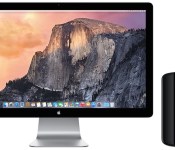
Mac Pro Buyer’s Guide: Which Model to Choose [Mac Blog]
Apple’s Mac Pro is quite an impressive machine. It doesn’t look like any other computer; it’s a work of art with its sleek, cylindrical body. It’s fast, fast, fast. And it’s expensive.

The Mac Pro isn’t for everybody, and not just because it’s Apple’s highest-priced computer. It is made to excel with a certain type of app: professional software that uses multiple processing cores, like software commonly used by videographers, photographers, animators, designers, scientists, and musicians. If that describes what you do on a daily basis, then you’ll benefit from a Mac Pro — you’ll make your money back in time saved.
This guide takes a look at the Mac Pro’s specifications, design, and performance. If you’re in the market for a Mac Pro and you’re not sure which model to buy, this guide will help you sort it all out.
Specifications
Apple offers two standard configurations. You can pick one of the standard configurations, but the Mac Pro is all about custom configurations. Think of the standard configurations as a starting point, and you can then customize your order to better suit your needs.
 The $2999 Mac Pro:
- 3.7GHz Quad-Core Intel Xeon E5 processor
- 12GB 1866MHz DDR3 ECC memory
- Dual 2GB AMD FirePro D300 graphics cards
- 256GB PCIe-based flash storage
The $3999 Mac Pro:
- 3.5GHz 6-Core Intel Xeon E5 processor
- 16GB 1866MHz DDR3 ECC memory
- Dual 3GB AMD FirePro D500 graphics cards
- 256GB PCIe-based flash storage
 Apple offers the following upgrades for the Mac Pro:
- 3.0GHz 8-core processor or 2.7GHz 12-core processor ($500 to $3,500 extra)
- 16GB, 32GB, or 64GB of RAM ($100 to $1,300 extra)
- 512GB or 1TB of flash storage ($300 to $800 extra)
- Dual 6GB AMD FirePro D700 graphics cards ($1000 extra)
As you can see, building a fully-loaded top-of-the-line Mac Pro can get expensive. Based on the add-ons you choose, your Mac Pro could cost up to $9,599.
Read more 
 AIVAnet