



OneNote for Mac lets you find and copy text in images

Microsoft OneNote for Mac has received support for optical character recognition (OCR) in its latest update. OCR allows users to find text in images in OneNote, and comes alongside other helpful improvements, such as reducing clutter while viewing shared notebooks, and the ability to close a window without quitting the app.
In addition to finding text, you’ll be able to use OneNote’s OCR to copy text found in images, allowing you to bring it right into your notes and edit it if needed. For now, OneNote will use OCR to let you find text in new images in your notebooks. Microsoft expects to add OCR support for existing images in a future update.
As for the other changes in OneNote 15.7.1, you can now hide author initials from the View tab when looking at a shared notebook. You can also now close the OneNote window without quitting the app.
The latest version of OneNote for Mac is now available for download from the Mac App Store.
- Free – Download Now

Review: Star Sports app is a great app to watch live sports action on your phone

A few months ago, the official Star Sports app was launched for Windows Phone devices. Along with the television network, Star Sports is also an online destination that brings live sports action on Web and mobile for Indian viewers.
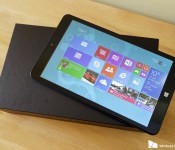
Hands-on with the Eve T1: A well priced 8-inch Windows 8.1 tablet from Finland

Finland has produced some fine devices over the years, of course, being the home of Nokia. This latest one isn’t from a name you’d necessarily recognize, but it is interesting. The Eve T1 is an 8-inch, Windows 8.1 tablet with an affordable price point. The Windows tablet space is becoming increasingly crowded, so to stand out you need to have a quality product.
The announcement of this one generated a bit of interest, so we’ve got one in to take a look at it. Is this the 8-incher for you? Read on for some first impressions.

Taylor Swift is giving iTunes a little Wonderland

Shake off that snub, iTunes: You’re finally getting a little wonderland in the form of Taylor Swift’s previously Target-exclusive bonus tracks.
When the pop icon first released last year’s mega-hit 1989 last October, Swift partnered with Target in the U.S. to include a few exclusive bonus tracks and content — in hopes of encouraging fans to go and pick up a physical CD over digital track, no doubt. (Internationally, the tracks were made available online.) Now, Swift is changing her tune. Via 9to5 Mac:
This morning, Swift released the first bonus track, “Wonderland” on iTunes, with two more still to come. “You Are In Love” is the next bonus track on the album and was produced by Jack Antonoff of Bleachers and ‘fun.’ fame. The third bonus single still to come is entitled “New Romantics.”
Coupled with some teasing from the Beats Twitter account, it seems as though Apple’s music acquisition department is working double-time to make deals with some of the industry’s hottest talent. The Swift bonus tracks are a U.S. coup, especially considering Swift’s general distaste for the payment models from streaming and digital music services.
Each digital track is being released as a separate iTunes single, rather than as an add-on to 1989, so you’ll have to pony up a little bit extra for each bonus song. (I will say, as someone who doesn’t normally like pop music but loved 1989, “Wonderland” is more than worth it.)

BlackBerry hosting App Wrapping and Secure Work Space on BES12 webcast

Following up on their BES12 Application Infrastructure webcast, BlackBerry has now sent out notifications for their App Wrapping and Secure Work Space on BES12 webcast that will take place on Thursday February 26, 2015 at 2:00 pm – 3:00 pm EST. The webcast will teach you everything you need to know about Secure Work Space on BES12, including what the Secure Work Space cross-platform solution is, how to fully protect corporate data, how you can wrap your applications, and much more.

Android Studio v1.1 hits the stable channel

During Google I/O 2013 we were first introduced to Android Studio, though it would be two years before it would leave beta. Android Studio 1.0 arrived last December, but Google is wasting no time in pushing the platform forward now that it is out of beta. With that in mind, Android Studio 1.1 is now hitting the stable channel after two months of cooking in the background.
So what’s new here? As the change-log mentions, the theme of the update is addressing “many, many bug fixes”, but there’s also a few other minor improvements as mentioned in the full log:
- Support for version 1.1 of the Android Gradle plugin (now available as a release candidate)
- Improved support for unit testing. For more details, see this document.
- Many new lint checks. These are detailed in the Preview 1 and Preview 2 announcements.
- Android Wear watch face templates (Preview 1)
- Mipmap launcher icons and a migration quickfix (Preview 1)
- Preliminary support for BCP 47 language tags
- Many, many bug fixes
Android 1.1 is available now for all users, regardless of the channel you were coming from (beta, canary, stable, etc). To grab the update, you simply need to hit the “Check for updates” button. Of course, for those that like living on the edge, Android Studio v1.2 isn’t too far behind, though it has yet to enter the Canary channel, it has been in development now for several weeks. For what it is worth, 1.2 is also said to bring much bigger changes with it than 1.1.
For those developers out there, do you prefer using the latest stable builds, or do you like experimenting with the latest and greatest — stability be damned? For more details on v1.1, you’ll want to head over to the Android Tools Project site.

New Sony Xperia smartphone spotted on benchmark sites, sports 5.2-inch display and mid-range specs

A few hours ago we learned that Sony may exit both the smartphone and television markets in a bid to return the Japanese tech company back to profitability. While the Sony CEO, Kazuo Hirai, said that he would not “rule out considering an exit strategy”, this would not be a quick process if Sony were indeed to quit making smartphones. In the meantime though, a new Sony smartphone has been seen being put through its paces at both the GeekBench and GFXBench sites. The details of which are below.

As you can probably tell from browsing the specifications, this newly spotted Sony smartphone with model number E2303 is of the mid-range variety.
- 5.2 Inch display with 720 x 1280 resolution
- Octa-Core Snapdragon 615 clocked at 1.5GHz (64-bit capable)
- Qualcomm Adreno 405 GPU
- 2GB of RAM
- 4GB Internal storage
- 12MP Rear-facing camera
- 5MP Front-facing camera
- Android 5.0 Lollipop
It would be a great loss to the world of Android if Sony left the smartphone business, so here’s hoping that the next batch of Xperia smartphones can do the business and gain Sony some much-needed market share and profits.

Come comment on this article: New Sony Xperia smartphone spotted on benchmark sites, sports 5.2-inch display and mid-range specs

Dropbox will soon let you open shared links right into its app

Dropbox is now in the process of rolling out a new feature for mobile users that will let you open shared Dropbox links from an email or in a browser right in the mobile app for iOS and Android. Opening a link directly in the Dropbox app allows you to get rich previews of documents and images and easily save files.
Opening shared links in the Dropbox app is fairly straightforward. On your iPhone or iPad, tapping the link will give you the option to “Open in app”. If the shared link is for a Microsoft Office file, it’s a simple matter to start working on them, according to Dropbox:
If the file was already saved to your Dropbox, we’ll take you right to it in the app so you can do more with it — like move the file, rename it, or favorite it for offline access. And if it’s a Microsoft Office file like an Excel spreadsheet or Word document, you can edit the file right from the Office apps on your device.
The feature will roll out to users over the course of the next few days.
Source: Dropbox
- Free – Download Now

Flipkart for Windows Phone updated with improved search, combos, and more

Flipkart for Windows Phone has been updated to version 2.2. This update adds a new interactive search, a way to find better deals on products that you can buy together, and more.

Apple anticipation is wilder than Apple itself

Over the last couple of weeks, rumors of an Apple Car project have gained a lot of attention. Reaction to the rumors has covered the gamut: We have “Apple will absolutely make a car” on one end, “Apple would never make a car” on the other, and lots of jokes in-between. Often these reactions come from people who at one time famously — or infamously — also said “Apple will absolutely make a television” or “Apple will never make a watch”. Both miss the most urgent lesson history has been trying to teach us all — with Apple and future product categories, it’s best not to speak in absolutes.
Following the introduction of the iPhone, there were rumors of Apple making a tablet. Following the introduction of the iPad, there were rumors of Apple making a television or a watch. Following the introduction of the Apple Watch, there were rumors of Apple making a car. Whenever we get the new big thing, we humans invariably turn our attention to the next big thing. Doesn’t matter if it’s a gadget or a cupcake, the future is always more compelling than the present. Apple anticipation is greater than Apple itself.
Dreams are boundless: An unannounced Apple phone or tablet or watch or car can be anything we imagine it to be. The possibilities are endless. An announced Apple phone or tablet or watch or car is what it is — grotesque or magnificent to the beholder. And we humans tend to have loose opinions, strongly held. “Apple would never call it the iPhone 5!” still echoes across the internet, as does “Apple would never make a watch!”
But Apple, being a company we do not control, ultimately gets to do whatever they would like to. They’re the most successful company in the history of successful companies. And Apple is very good at focusing on only a few things at a time. In part, this the tension that’s helped them become so successful.
That’s why insisting Apple must do something or would never do something is folly (or attention baiting). The long arc of time has proven it so, over and over again.
Apple can explore tablets, switch over to making a phone, then switch back to making a tablet. Apple can look into making televisions and watches, but ultimately go ahead with the watch. Apple can check out stylus pens and cars and any number of other, logical things, and then carefully, strategically choose which product the company will put its weight behind — and when.
There’s a short list of products which would be negligent for Apple not to consider, and there’s an even shorter list that’s being particularly considered. Some of those products will end up on the market as new hardware, some will be new services like Apple Pay, or whatever comes after iTunes Radio. And some of those will remain forever locked in the vaults of Infinite Loop.
Instead of thinking about what Apple must or would never do, think like Apple does: What problems exist that the company is uniquely positioned to solve? Where can Apple make a great product that makes a significant contribution, and also increases the overall value of existing products? Whatever product best answers those questions is the product you should expect to see from the company.
And eventually, Apple will hold an event for that product and announce it, we’ll all blast the internet with our thoughts and opinions… and a very short time later, a new round of rumors will captivate the world — about what comes after this “next” product, of course.
 AIVAnet