TravelCard wallet-friendly slim charger, $29

Is your phone always dying? Are you afraid to hit the town for the day because you’ll be unreachable 4 hours into your trek? No matter what your lifestyle, an extra boost of power is …




Looking to score some new wallpapers for your Android? Why not start with something from one of the most anticipated smartphones of the year, the HTC One M9?
We’ve gathered up what purports to be the images that come from the forthcoming handset. Thanks, thus far, to @LlabTooFeR, we see the photos offer a 2160×1920 resolution and figure to spruce up any device.
NOTE: We will update this gallery as more wallpapers become available.
(function() var script = document.createElement(‘script’);script.src = ‘https://stacksocial.com/widget.js?publisher=androidguys&type=editorial_post_widget_preferences’;script.async = true;var entry = document.getElementsByTagName(‘script’)[0];entry.parentNode.insertBefore(script, entry);)();
http://www.androidguys.com/pubgalaxy/728×90.html
The post Download wallpapers from the HTC One M9 appeared first on AndroidGuys.
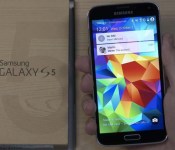

Samsung has at last started rolling out the eagerly-awaited and much-anticipated Lollipop update to all unlocked models of its flagship smartphone, the Galaxy S5, in Germany. This upgrade transports the latest version of the Android operating system, together with a multitude of new features, bug fixes and stability improvements.
The full changelog can be seen below:
To start the upgrade, make sure you’re connected to a Wi-Fi network. Then, from the home screen, press the Menu key, followed by Settings. Scroll to the bottom and tap ‘About Device’, followed by ‘Software Update and ‘Update Now’.
Come comment on this article: Unlocked Galaxy S5 now receiving Lollipop update in Germany


Maybe having a quick-charging car charger won’t change your life. But it makes plugging in during a 20-minute commute so much more useful.

I’m used to maybe getting 10 or 15 percentage points on my way to or from the office while using my old, standard charger. It’s not a long commute really, about average, according to the US Census bureau. But after taking a look at a few Quick Charge 2.0 for the car, I’m that much more excited about this tech that’s finally hitting the mainstream in 2015. The short version: The charger and your phone work together to safely allow more juice to flow, then slow down the charge after that initial burst. So you’ll go from dead to, say, 60 percent much faster, then slow the rate to finish the job.
And in the car, when you might just have a quick drive and a short amount of time to juice up, that makes a big difference. So let’s take a quick look at two car chargers from a couple of respected accessory manufacturers.
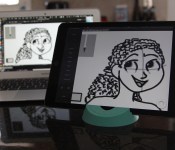
The iPad’s made great progress in the sketching world, but it’s still been hampered by imprecise screen mapping and styluses that can’t perfectly replicate pressure. The solution from Astro HQ’s Astropad is to map the iPad to a different screen entirely — that of your your Mac.
Astropad does for creative pros what Duet Display did for second-screen enthusiasts: Not only does it provide a high-quality, high-framerate mirrored display on your iPad that you can draw on, but Astropad goes a step further and integrates with three of the iPad’s top-selling pressure-sensitive styluses to offer you full pressure support in your Mac app of choice.
It may not be a true Wacom Cintiq experience, but it sure comes close to fooling me.
When I first heard about Astropad, I took it with a fair grain of salt: mirroring a display on the iPad is hard enough already; mirroring wirelessly a step above that; and doing so at a framerate that doesn’t impede creative professionals almost impossible. After all, before Astropad, I’d tried using Duet Display to sketch, and while it sort of worked, it clearly wasn’t designed for creative pros.
Astropad is — and that makes all the difference.

The companion iPad and Mac apps get such impressive results thanks to Astro engineers Matt Ronge and Giovanni Donelli’s Liquid technology, which they claim renders 2x faster than AirPlay and clearer than the highest-quality JPEG. Though I was skeptical reading this on paper, in practice I was blown away. Astropad feels seamless, with no lag or artifacting occurring during the drawing process.

Astropad does this by emphasizing sketching tools over traditional mirrored or second-screen display. There are two different modes: Draw and Move & Zoom; the former allows you to interact with either the screen or your canvas, while the latter is focused entirely on panning and zooming the selection of your screen you’ve chosen.
When in Move & Zoom mode, the screen intentionally artifacts and drops transparency, assuming that you’re readjusting your canvas rather than truly needing to do much else with the screen. (Presumably, that’s what your Mac is for.) Moving windows in Draw mode, too, produces temporary artifacting and rendering — but it’s done on a per window basis, so you can move parts of your screen freely without worrying about delayed frame rates covering up the screen.

Drawing, though, never has artifacting, though the canvas itself isn’t rendered at Retina resolution. It’s done smoothly, with no lag or pixel offset, and you can use either your finger, a capacitative stylus, or one of three supported pressure-sensitive options (Wacom’s Creative Stylus, Adonit’s Jot Touch, and the Jaja Hex3, with support for FiftyThree’s Pencil coming soon).
And that’s all on a wireless connection. Make the connection wired, and the resulting experience on your iPad is better, faster, clearer. It’s an incredible feat — and moreover, one that doesn’t destroy either your laptop or iPad’s battery.
The most important part of an app like Astropad is the drawing experience, and I’m happy to say it doesn’t disappoint. I did a quick couple of sketches and colorations using Astropad — both using my finger and the Jot Touch stylus — and each time it got a bit easier to control and work with.
Astropad by default has a lovely sidebar designed to work with all major drawing apps (like, for instance, Adobe Photoshop): From there you can toggle quick adjustments like brush size; switching from the brush to eraser tool; undo and redo; zooming in and out on the canvas; as well as access to settings, keyboard modifiers, and switching between Draw and Move & Zoom mode.

You can also use two two-finger gestures to either zoom or pan your canvas, though I found those slightly harder to implement when not using a pressure-sensitive stylus. It’s also worth noting that they’re primarily designed for in-app canvas manipulation, not panning across your display screen.
Sketching may not be as controlled as using a Wacom tablet, but it’s miles beyond any previous mirrored-screen experience, and it feels a lot more precise, to me, than working within an iPad app. That may in part be the zoom levels I’m able to get on Photoshop in contrast with a mobile app, or that I’m more comfortable with the app’s tools — but I’ll take it. And being able to use pressure-sensitive tools in Photoshop via an iPad? It’s an embarrassment of riches.
Wired, Astropad is gorgeous; but it’s the wireless aspect that truly makes me love working with it. (The video above is a quick example of wireless sketching and coloring in Photoshop using Astropad.) I was able to do two of my test sketches while sitting on the couch, no power cords needed for either my iPad nor my Mac, and it felt comfortable in a way drawing with a Cintiq never has.
Astropad probably won’t replace a Wacom Cintiq at your studio, but it’s an incredible tool for working on the go or travel, and may work perfectly if you’re more dabbler than pro artist. In short: If you’re a digital artist with an iPad, you need to give Astropad a try. Lucky for us, Astro HQ offers a free seven-day trial for the Mac software (the iPad app is free to download); after seven days, you’ll hopefully have a better idea of whether the $50 app fits into your workflow. I know I’m incredibly excited to have it in my tool bin.
Astropad works with any iOS device running iOS 8 or later (though I had the best luck with the iPad Air 2), and all Macs running OS X 10.9 or later.
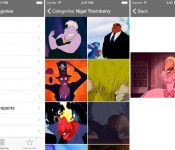
GIF Finder creator Matt Cheetham today announced that his popular GIF curating app will be pulled from the App Store following a lengthy back-and-forth with Apple. Cheetham faced stonewalling from the company thanks mostly to a few copyright issues of Disney-related characters within the app.
Begun by Cheetham as a side project a few summers ago, the app used Tumblr and Imgur’s APIs to discover and curate a collection of GIFs and images and distill them into categories or as search results for users to browse. It launched in 2012 and had nearly 90,000 downloads in the years since.
 Image via iDownloadBlog
A recent update caused the app to crash on the iPad version when sharing a GIF, so Cheetham submitted an update to fix the issue. Instead of the usual okay from Apple, on January 25 he received a rejection notice for the update because the app “includes content or features that resemble various well-known, third-party marks, including Disney characters.”
Thank you for your response. However, in order to proceed with your application, we require documentation demonstrating your right to use the images included in your app and/or metadata, specifically addressing your right to copyrighted images.
Otherwise, if you believe you can make the necessary changes to your application and/or metadata so that it does not infringe the rights of a third party, we encourage you to resubmit your revised application and/or metadata.
Cheetham pointed out that he doesn’t directly own the images and proceeded to offer copyright, disclaimers, and links to the Tumblr and Imgur terms of service, but he admitted it “all has fallen on deaf ears.” He ultimately relented, pulling the crash-prone app from the storefront upon Apple’s repeated requests for documentary evidence of his ownership of the content.
At this point, I don’t have the time or knowledge on how to fight this any further. I can’t have an app in the store that I cannot support (and that crashes when attempting to use it’s main function!), so today I am removing GIF Finder from sale and calling the project dead.
There’s lots of other really great GIF Finding apps out there that are packed edge to edge with content from various API’s. I wish them all the best with their next update and only hope they can continue to slip them in under the radar as I appear to have done for the last 3 years.
Apple and Disney’s history is well-known, especially Steve Jobs’ hand in the now Disney-owned Pixar Animation Studios, but Apple’s crackdown on GIF Finder is unusual. GIF Finder has been in the App Store for three years without rousing attention and there are several other similar GIF apps in the App Store.
Apple has recently been enforcing App Store policies that it’s been lenient about in the past, rejecting a number of apps that included screenshots of violence or guns, causing developers to modify the shots or remove the imagery all together before being able to update or release their apps at all.


Learning to code can be very difficult, especially if you’re trying it for the first time. So, why would you pay hundreds of dollars to try something you might not like? That’s where the Pay What You Want: Learn To Code Bundle comes in. This coding bundle offers up eight great courses, and all you need to do is beat the average price. At the time of writing this, the average price is only $15.07. It’s going to be really difficult to beat that price anywhere else you look.
So, what do you get with the Learn To Code Bundle? You’ll get lifetime access to eight different courses, including over 800 lectures and 80 hours of quality content. Here’s the full list of courses offered in this bundle:
Oh, and this deal gets even better: 10% of the profits from your purchase will go to Creative Commons, a non-profit organization who develops, supports, and stewards legal and technical infrastructure that maximizes digital creativity, sharing, and innovation. Make sure you don’t miss out on this deal! Head to the Android Authority Deals Store and start coding!

Is your phone always dying? Are you afraid to hit the town for the day because you’ll be unreachable 4 hours into your trek? No matter what your lifestyle, an extra boost of power is something we could all use. What if you don’t spend enough time in your car to achieve a full-charge from your vehicle adapter? If you don’t have the extra room to carry around portable power packs on your person, your only hope — until now — was an expensive and bulky recharging case. However, like Spiderman swinging in to save the day, TravelCard is here with a credit card sized recharging option that’s as powerful as it is sleek.
At only 3/16th of an inch thick, TravelCard packs up to 40% of reserve power thanks to its 1500mAh battery. Slim and wallet-friendly, the built-in microUSB cable ensures a proper fit with any modern Android device. This charger is lightweight and easy to transport and is certain to keep you connected when it matters most. AndroidGuys readers get $10 off the retail price and can take it home for just $29!
See more at deals.androidguys.com
Is your phone always dying? Are you afraid to hit the town for the day because you’ll be unreachable 4 hours into your trek? No matter what your lifestyle, an extra boost of power is …

There are plenty of reasons for one to want to keep their internet connection private. It’s possible that you have a dose of distrust for your government and want to ensure your sense of …

Today is the last full day to get your entries in for a chance at winning the Choose Your Own Smartwatch Giveaway. Entries will no longer be taken after 12PM (PST) on 2/17 and you can’t win …

In today’s world it’s almost a social prerequisite to have a fundamental understanding of Adobe’s suite of products. Whether you’re a journalist that needs to superimpose …
(function() var script = document.createElement(‘script’);script.src = ‘https://stacksocial.com/widget.js?publisher=androidguys&type=editorial_post_widget_preferences’;script.async = true;var entry = document.getElementsByTagName(‘script’)[0];entry.parentNode.insertBefore(script, entry);)();
http://www.androidguys.com/pubgalaxy/728×90.html
The post TravelCard wallet-friendly slim charger, $29 appeared first on AndroidGuys.


It’s increasingly common to find supercars, laptops and other gadgets clad in strong-yet-light carbon fiber, but scientists may have a better (if decidedly stranger) solution: sea snail teeth. The University of Portsmouth has determined that a fibrous mineral structure found in limpet teeth is so strong that it could be used for the shells of race cars and many other devices where a strength-to-weight ratio is important. It’s even stronger than spider silk, the previous natural strength champion, and the tooth’s structure doesn’t become more fragile as it gets larger.
This is just a study, so any production plans are a long way off. However, researchers believe it’s possible to copy the fiber-like structures and produce composites that could be useful for human-sized products. Don’t be surprised if one of your future cars or computers is that much lighter thanks to some rather unassuming sealife.
Filed under: Transportation, Science
Via: Washington Post
Source: University of Portsmouth


As we all know, smartphones and tablets contain thousands of components that make them the miniature computing devices that they are. In the race to one-up each other in terms of specs for all these components, manufacturers often focus on the latest processor technology in an effort to speed up what can be processed and how many items can be processed at once. With processors becoming so fast and powerful, that introduces the potential for other bottlenecks to surface. One of those potential clogs is in the memory included in our devices as those chips try to handle all of the data going into and out of the processor. To address that, a new standard for memory – eMMC 5.1 – has been established and Samsung has announced they are ready with new products that capitalize on the standard.
Samsung’s new product line based on the eMMC 5.1 standard includes chips with 64GB, 32GB and 16GB densities. Samsung notes that the 64GB solution can achieve up to 11,000 input/output operations per second (IOPS) and 13,000 IOPS for reading and writing operations respectively. For comparison, current external micro SD cards typically run at 1,500 IOPS and 500 IOPS, so the improvements are quite impressive. Samsung also says the 64GB version is capable of sustaining a maximum speed of 250 MB/s for sequential data reading and 125 MB/s for sequential data writing.
Samsung says they have improved the ability of their chips using this new standard to multitask activities, including the streaming and playback of Ultra High Definition video content. They think this will help OEM manufacturers take advantage of a growing wave of UHD content that consumers will want to view on their mobile devices.
Samsung also includes a new “Secure Write Protection” security protocol that can be used to limit access to secured areas of the eMMC to designated users.
According to Samsung, this new, faster eMMC will join Universal Flash Storage in the marketplace as a solution for manufacturers who need fast memory in their mobile devices. Samsung plans to be a player in the UFS market as well, so they should be positioned to supply manufacturers no matter which option they choose to employ.
source: Samsung
Come comment on this article: Samsung ready with new eMMC 5.1 compliant memory

Two banks based out of the United Kingdom – Royal Bank of Scotland and NatWest – yesterday announced incoming support of Touch ID in their iOS-based apps, allowing customers to gain access to their accounts without needing to input a user name and password (via BBC News).
Customers of each bank will need to activate the Touch ID feature with their existing security information within each respective app before being able to gain access to their banking statements via their finger. After three failed Touch ID login attempts, each bank said the app will revert to the traditional user name/password protected log-in request before needing to re-establish the Touch-ID features.

BBC reported that a few “security experts” voiced concern over the new fingerprint security feature given reports of specialized fake fingerprint hacks. Speaking to BBC, Ben Schlabs, of SRLabs, a German hacking think tank, said, “The security implications are the same, it is just as dangerous… I think it has been shown that it is pretty easy to spoof it and the risks aren’t fully understood.” There have, however, been no reports of such hacks being successfully used for malicious purposes.
With the recent surge of online and app-based banking solutions, both RBS and NatWest are confident the new feature will continue to offer their customers the level of security and accessibility they expect from the banks.
Stuart Haire, managing director, RBS and NatWest Direct Bank, said: “There has been a revolution in banking, as more and more of our customers are using digital technology to bank with us.
“Adding TouchID to our mobile banking app makes it even easier and more convenient for customers to manage their finances on the move and directly responds to their requests.”
Both RBS and NatWest are owned by the same parent company, Royal Bank of Scotland Group, so many of the same features and options will be similar between each app. Each bank also promised that existing processes that required additional verification of identity, like money transfers, will continue to do so even if users choose to opt-in for the Touch ID features.
 AIVAnet