



Get these BlackBerry Passport screen protectors today for only $9.95!

These BlackBerry Passport screen protectors utilize the highest grade materials and cutting edge technology to provide a film worthy of protecting your device. Each protector is precision-cut to ensure an exact fit and an advanced silicone adhesive technology allows for simple, water-free installation and removal of air bubbles. Includes 2 per package

30 days later — a Clash of Clans for Android follow-up

As many people noted in the comments during our Clash of Clans series, I haven’t been playing for very long. While we were winding down yet another crazy CES coverage day I noticed Phil pick up his Nexus 9 and furiously tap to collect a few resources, and when he caught my gaze he explained that his little girl was obsessed with this game so he picked it up. A quick look at my Google Play account confirmed that I had installed this game for my son a while back, but really didn’t know anything about the game.
Today, I sit before you a changed man. It has been 30 days since I installed Clash of Clans, and it is now the game I play the most on all of my devices.

Samsung Galaxy S6 hinted to support multiple wireless charging standards

Wireless charging is awesome. There’s no doubt about it. The removal of cables and fiddling with ports is a thing of the past for many, but Samsung has revealed the company will release hardware that supports all available wireless charging standards at some point later this year. The move will help eliminate the issue consumers have today of choosing between wireless charging standards. What’s more is we could see this new tech in the Galaxy S6.

This Nexus 6 spring-clip holster is on sale today for only $16.95
 The Nexus 6 spring clip holster keeps your device clipped in tight, no matter the hustle and bustle. Just clip it to your belt, pants or bag and pop in your device. The top spring clip is extremely tough and provides quick-release access when you need to answer a call, text or email.
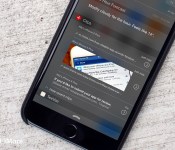
Clips: The best way to copy, paste, and re-use text snippets on your iPhone and iPad

Clips is a simple app with one main purpose: to make copying, pasting, and re-using text snippets as simple as possible. Unlike keyboard shortcuts, Clips can import anything on your clipboard with just a swipe and a tap. You can also activate the keyboard and action extension to access your snippets in even more places.
- Free with IAP – Download Now
When I discovered Clips in the App Store a few weeks ago, I was intrigued by the idea of having frequently used blocks of text available to me via Notification Center. At first I had to train myself to remember to use them, but once I did, Clips immediately became a necessary part of my workflow.
Anytime I need to use a canned email response, I just swipe down in Notification Center and copy the text I need. And if I need to copy a huge block of text for later use — whether that’s a code snippet, links, or plain text — Clips instantly recognizes what I’ve got on the clipboard and lets me import it with one tap.

If you frequently work with links and embedding images, Clips supports both. With links, you can choose many different formats including Markdown syntax and many different title plus URL formats. You can even share images with Clips for easy access. I’ve found this convenient for images that go with articles I want to share more than once on social media, for example. Once I’m done, I can remove it from Clips. You can even be slightly evil and save your favorite memes for convenient reuse. GIF files, however, are touch and go and sometimes showed up as blank for me.

I haven’t found it necessary to use the keyboard that comes with Clips, preferring the Notification Center widget. If you prefer the keyboard method, however, you’ve got that option too, and need only activate it in Settings to get started. Aside from a quick shortcut panel, you also have a nicely laid out dark-themed keyboard at your disposal. I personally prefer the stock iOS keyboard, but this one isn’t a bad option, either.
Last but certainly not least is Clips’s action extension: It lets you share multitudes of content in just two taps. Clips will show you a preview and if everything looks okay, you can save it for later use and it’ll instantly be available in Clips everywhere. It doesn’t get much easier than that!
The good
- Multiple ways to share snippets to and from Clips: keyboard, Notification Center, and the app itself
- Supports multiple types of media
- Automatically formats Markdown links for instant use
- iCloud sync for multiple devices (requires additional in-app purchase)
The bad
- Currently no way to edit existing clips without re-doing them (unless I’m overlooking something obvious)
- GIFs don’t seem to save well in Clips, if at all
The bottom line

Clips is currently the best way to manage text snippets for anyone running iOS 8 and above. With multiple ways to access content, the possibilities of what you can do with Clips are virtually endless.
For anyone who has ever had to type the same thing more than once and found themselves wishing there was an easier way than standard keyboard shortcuts, Clips is for you.
- Free with IAP – Download Now




Save 45% today on this rugged hybrid case and holster for iPhone 6

Shield against damage with this durable CONVERT Combo for your iPhone 6! With this package you get a thin hard case on the inside, surrounded by a shock absorbing skin and plastic exoskeleton with kickstand. A rugged holster is included for snapping it all into on your belt or pocket. Comes in black or blue for just $29.95 today
 AIVAnet