



Foursquare can recommend places even if you don’t sign in

A new Foursquare update completely eliminates the need to make an account, letting anyone use it to find a decent place to eat or somewhere to spend time without having to log in or even to create an account. And you know what? It makes perfect sense, since Swarm has taken over its check-in capabilities anyway. According to Foursquare product manager Jonathan Crowley, the only reason it took time to nix that requirement is because it wasn’t easy changing the app’s framework. If you think back to the time you’ve registered, you’ll recall that signing up for Foursquare is quite tedious: it doesn’t only ask you to choose “tastes” (types of food and places) you like, it also wants you to link your other social media accounts. Now, both the iOS and Android app can just recommend establishments based on location, making them more akin to local directory services such as Yelp. The good news is that you can still add your preferences (without having to log in) later on if you want more personalized results.
Filed under: Misc
Via: Techcrunch
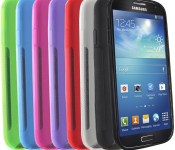
These Samsung Galaxy S4 skin cases are only $2.95 today
 The Mobi S-Line skin case is a slim, form-fitting TPU cover that wraps around your Galaxy S4 to protect against drops and scratches while providing a better grip. It sports a unique “S” design on the back, giving it a personalized look.
12 simple statements: How to tell that you’re addicted to smartphones
Many of us are probably a little addicted to smartphones and even fewer will admit to it. But have no fear, because there is a list of 12 statements that you can ask yourself, or someone you suspect is addicted to smartphones, to find out if you are truly an addict or not. Before we dive into the list, […]
The post 12 simple statements: How to tell that you’re addicted to smartphones appeared first on AndroidSPIN.

Nexus 9 International Giveaway #5
Welcome to the Sunday Giveaway, the place where we giveaway a new Android phone or tablet each and every Sunday.
A big congratulations to last week’s winner of the LG G3 Nikos P. (Greece).
brightcove.createExperiences();
This week we are giving away a Nexus 9 Android tablet!

Latest winner: Nino shows off his LG G Watch R that he won at Android Authority
Released in November 2014, the Nexus 9 built by HTC is a 8.9″ inch Android tablet that comes loaded with the latest Android 5.0 Lollipop.
You might like: Nexus 9 official cases review | Nexus 9 Tips & Tricks
You can earn entry tickets into the giveaway by completing the following tasks in the RaffleCopter widget located below.
- [1 Ticket] 1 Free entry!
- [1 Ticket] Follow AA on Google+.
- [1 Ticket] Follow AA on Twitter.
- [1 Ticket] Download the AA App.
- [10 Tickets] Refer friends to the giveaway. You will be given a unique URL to share with your friends or social networks. You will receive 1 bonus entry (up to 10 max) for every person who you refer to the giveaway using your unique URL.
Join Now!
a Rafflecopter giveaway
Terms & Conditions
- The giveaway is an international giveaway (Except when we can not ship to your Country.)
- If we can not ship to your country, you will be compensated with an online gift card of equal MSRP value to the prize.
- We are not responsible for lost shipments.
- You must be age of majority in your Country of residence.
- We are not responsible for any duties, import taxes that you may incur.
- Only 1 entry per person, do not enter multiple email addresses. We will verify all winners and if we detect multiple email addresses by the same person you will not be eligible to win.
- We reserve all rights to make any changes to this giveaway.
- The prize will ship when it is available to purchase.
Full terms & conditions and FAQ | Past giveaway winners [Gallery]

Comic: You say “accident,” I say “reprieve”
Happy Saturday, iMore! Because Rich is awesome, he’s letting us run some of his Mac-themed comics from the Diesel Sweeties archive on weekends. Bonus comics, woo! Today: Why email is still the best.


Read more comics from the Pixel Project on iMore.com.

Microsoft’s imaging tech is (sometimes) better than you at spotting objects

Many computer vision projects struggle to mimic what people can achieve, but Microsoft Research thinks that its technology might have already trumped humanity… to a degree, that is. The company has published results showing that its neural network technology made fewer mistakes recognizing objects than humans in an ImageNet challenge, slipping on 4.94 percent of pictures versus 5.1 percent for humans. One of the keys was a “parametric rectified linear unit” function (try saying that three times fast) that improves accuracy without any real hit to processing performance.
You aren’t about to get many keen-sighted artificial intelligences just yet. Microsoft is quick to note that its vision system (like others) excels in tests like these, where there are subtle distinctions that flesh-and-bone observers can’t always see. Computers are more likely to goof up with simpler recognition tasks, like identifying barnyard animals. Still, it’s noteworthy that software emerged victorious in the first place. Besides leading to smarter photo software that’s better at organizing your vacation shots, the improved detection should help autonomous robots and other devices that need to make snap decisions based on what they see.
Filed under: Science, Internet, Software, Microsoft
Via: GigaOM
Source: arXiv.org, Inside Microsoft Research

PlayStation charity gives you a chance to play with superstars

Think that downloadable game content is normally a waste? Sony will soon give you a good reason to splurge on those virtual goods. It’s launching PlayStation Heroes, a PlayStation 4 app that encourages you to contribute to charities like Make-A-Wish, the USO and the V Foundation for Cancer Research. Pay between $1 and $15 to buy a dynamic game theme (or $20 for a four-theme bundle) and you’ll not only donate to a good cause, but get one or more chances at playing games with a superstar. In March, you could win a shot at partnering with snowboarder Shaun White in Destiny; other celebs in future months will range from Snoop Dogg to Dodgers center fielder Yasiel Puig. Heroes won’t go live until February 24th, but you can pre-order the app now to get ready.
Source: PlayStation Blog
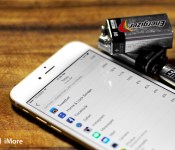
Secret power-saving shortcuts: Six tricks to extend your iPhone battery life

The iPhone gets great battery life and the iPhone 6 Plus gets really great battery life. Apple has done a lot to make everything from their chipsets to their software management extremely power efficient. Yet every feature you use, you ultimately pay for with battery life. Most times it’s not a problem. If you start running low on power, you can simply plug into USB or an adapter and recharge really quickly. If we’re going to be away from energy for a long period of time, however, there are a few tricks you can use to extend your battery life just a little bit longer. They’ll cost you some fun and convenience, but they’ll get you as far as you can possibly go.
1. Lower light

The iPhone is LCD, not OLED, so it doesn’t matter much what color is being displayed, it matters if the LED backlight is on, how intensely, and for how long. To keep energy output to a minimum, go to Settings > Display & Brightness, turn Auto-Brightness off, and drag Brightness as low as you can tolerate.
Bonus: How to dim your screen brightness further than Control Center allows
2. Pause the push

Push Notifications not only light up the Lock screen, they light up the Wi-Fi or cellular radios as well. For anything that doesn’t urgently require your attention, go to Settings > Notification Center > and turn Show on Lock Screen, or even Allow Notifications, to off. (I only allow Phone, Messages, and VIP Mail).
3. Boot the background

Apple does a lot to coalesce background updates so the radios don’t light up any more than they have to. But if you don’t need an app updating in the background, got to Settings > General > Background App Refresh and make sure it doesn’t. You’ll have to wait for messages or media to refresh when you open the app, but if you don’t open it often, the power savings can be worth it.
Bonus: Facebook is historically a good candidate for background refresh removal.
4. Lockout location

GPS takes a lot of power. Apple uses a bunch of tricks to keep location access to an absolute minimum, but like notifications and background, if you don’t need an app to know where you are, go to Settings > Privacy > Location Services and select Never.
5. Toss tasks

Apps that provice VoIP and turn-by-turn navigation can be much harder on multitasking cycles and GPS. If you’re not using them, you can double click the Home button and close the app completely by tossing its card away. That’ll shut down VoIP and navigation and start saving power on the spot.
Bonus: Skype is historically a good candidate for the kill switch.
6. Minimize the Motion

Animating transitions and blurring backgrounds has become more efficient, and is certainly visually fun. If you don’t want or need all the effects, however, you can turn them off and save a tiny amount of processing. Go to Settings > General > Accessibility > Reduce Motion, and turn it on.
Bonus: take the built-in Clock app, and it’s GPU-activating second hand, and hide it in a folder.
7. Nuclear options

If your iPhone is hot or your battery is almost drained and you absolutely need to get more time, you have a couple of options:
- Kill any apps you think might have gone rogue. Even good apps can experience bad processes.
- Turn off any radio that are having problems connecting. A lower signal means a higher power output.
- Reboot. It’s a terrible cliche but it’s a terrible cliche for a reason.
- Go into Airplane mode. Save your power for when you need it.
8. Your best battery savers?
I typically only use these tricks when I’m traveling. In other words, when there’s no power, poor signal, or both. Otherwise I prefer to use my iPhone as much as I can and charge it as much as I need to. I do keep notifications and location to a minimum, because I consider my attention and position to be valuable, but otherwise I like using my devices.
If you have some great battery saving tips, however, I’d love to hear them. I could always use a few extra cycles at airports, conferences and more!
<!–*/
.imageleft
float: left;
margin: 0 25px 0 0;
.imageright
float: right
margin: 0 0 0 25px;
.screenshot-16×9
height: auto;
width: 88.97%;
.screenshot-16×9.imageleft,
.screenshot-16×9.imageright
width: 50%;
.screenshot-4×3
height: auto;
width: 66.66%;
.screenshot-4×3.imageleft,
.screenshot-4×3.imageright
width: 50%;
/*–>*/

Have fun Cooking with SideChef
There’s an app for just about everything these days and teaching someone to cook is no different. SideChef is an app developed to help give a detailed way to cook a variety of dishes from Quick & Easy, to Main Entrees, and Desserts. Are you a vegetarian? No problem. Simply select the vegetarian category and you are on your way to become your own restaurant quality chef without having to attend culinary school.
First, you are taken to the home menu in which you can select what food item you want to cook. From the home menu, there are tabs you can select so if you have less than 30 minutes to cook and prep, you might want to visit the Quick & Easy. If you’re looking for a specific dessert, select that tab. You can also click on the magnifying glass on the top right hand to do a search, or to narrow your choices even further.
Let’s say we want to make a Short Rib Ravioli. As you click on the picture of the ravioli, you are treated to an overview of the ravioli. The author of the recipe leaves of a comment or a short introduction of the dish you are about to make. It lists the time it will take to prepare and make. In this case, leave about 5 hours for it to completely cook. Next, it lists all the ingredients one must have. If you don’t already have it in your kitchen, you can simply email yourself a shopping list of items you may need to purchase. Don’t feel like cooking it today, you can bookmark this page and come back another time.


Each step it takes to prepare a dish includes a pic of the food item of what it looks like during this particular stage. For food items that need to be timed, there’s a timer that is included just in case you don’t have one already. Since we all love to take pictures of our food, no problem and share with the rest of the users. Want to ask questions about something you’re not sure about? Email the author or leave a comment as someone will reply to you.
Want to make food for just one person or for a party of 5 or more? No problem. You can adjust the serving size and the recipe will change the measurements accordingly.
I like the interface of this app because it provides a clear visual of all the food items you are looking to prepare. It almost makes me hungry just looking at some of these pictures. You want to share a recipe with others? No problem.
While there are many cooking apps out there that pretty much do the same thing as any other cookbook, this one is absolutely fantastic. Best thing about it, FREE! Any in-app purchases? None that I can see so far. Don’t be surprised if it shows up in any future updates just in case the developers decide to add any extra features. For now, enjoy it. If you want to learn how to make that special something for that special someone, what a perfect way to start learning to cook.
(function() var script = document.createElement(‘script’);script.src = ‘https://stacksocial.com/widget.js?publisher=androidguys&type=editorial_post_widget_preferences’;script.async = true;var entry = document.getElementsByTagName(‘script’)[0];entry.parentNode.insertBefore(script, entry);)();
http://www.androidguys.com/pubgalaxy/728×90.html
The post Have fun Cooking with SideChef appeared first on AndroidGuys.

BBC Radio DJ Zane Lowe Joining Apple’s iTunes Radio Effort
Noted DJ Zane Lowe, who has headed up BBC Radio 1’s popular evening new music show for over a decade, is leaving the broadcaster next month to join Apple, reports BBC News. Lowe has won a number of awards for his radio show and other work over the years, and was nominated for a Grammy Award this year for his role in writing and producing Sam Smith’s album “In The Lonely Hour.”

Zane said: “I want to thank everyone at Radio 1 for their support and friendship. “The station has allowed me to share incredible music with the country’s best music fans.”
During his time on the station, the New Zealand-born DJ has become well known for championing emerging talent and many acts have made their breakthrough after having one of their tracks named as “hottest record in the world” on Zane’s show.
While Lowe has apparently not publicly stated what role he will take on at Apple, The Guardian says it will involve the company’s iTunes Radio streaming music service.
Lowe’s role will likely include more than iTunes Radio at some point, however, with Apple currently working toward a revamp of the Beats Music subscription streaming service it acquired last year. Part of the plan reportedly involves folding Beats into the iTunes brand and integrating it with OS X and iOS.
As a result, there may be some changes in store for iTunes Radio, which has reportedly seen a lukewarm reception and has only expanded to Australia since its U.S. launch in late 2013, despite rumors of a number of other countries receiving access by early 2014.
 AIVAnet