


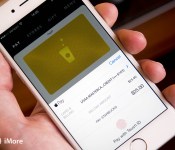
Your Starbucks card can now be reloaded with Apple Pay
Users of the Starbucks app now have an additional option when it comes to reloading their digital Starbucks card: Apple Pay. Starbucks previously support credit and debit cards as well as PayPal accounts. But both depended on storing your information in the app. Apple Pay, obviously, doesn’t do that, instead generating a unique one-time-use card number for each transaction.

Here’s what all is new in the latest update:
- You can now use Apple Pay to quickly reload your Starbucks Card. Touch ID makes it faster than ever.
- By popular demand, the menu is enhanced. When you browse our menu you’ll now find additional calorie information on menu items.
There’s just one caveat to the Apple Pay integration: it only works with manual reloads. Since Apple Pay is tightly integrated with Touch ID and requires your authenticated fingerprint to permit payment, Starbucks’s automatic reload of cards won’t work. But for those that have opted to go the manual route, you’ve now got one more option topping off your card before you top off your caffeine.
- Free – Download Now

LaCie Mirror Review: Hands-On With LaCie’s Latest Designer Hard Drive [Mac Blog]
At this year’s Consumer Electronics Show, Seagate-owned hardware company LaCie debuted its newest design-focused hard drive, the $280 USB 3.0 LaCie Mirror Portable Hard Drive, which has recently become available for purchase. MacRumors met up with LaCie at CES, and we managed to get our hands on one of the company’s new hard drives to share with our readers.
LaCie has a history of producing “Extreme Design” products that are aimed at people looking for an attention-catching desk accessory that also performs a useful function, which last year resulted in the LaCie Sphere, a silver-plated sphere that housed a 1TB hard drive. This year’s LaCie Mirror follows in the footsteps of the Sphere, offering a 1TB hard drive in a mirrored enclosure, albeit with a slightly more traditional shape.
What’s in the Box?
As a premium product, the LaCie Mirror ships in a premium box, which folds out in two tiers to unveil the hard drive in a padded compartment, a cord to connect it to a computer, and a wooden stand.
There’s also a carrying pouch for keeping the Mirror free from scratches during transport, a cleaning cloth for removing fingerprints from the surface and a Quick Install Guide for getting the hard drive set up right out of the box. The hard drive itself ships covered with adhesive plastic screen protectors, so make sure to remove those before use.

Design
The LaCie Mirror was designed by French designer Pauline Deltour, who has created a range of modern furniture and home accessories, including several pieces that are sold by Alessi and MUJI. The Mirror is similar to much of Deltour’s previous work, with a simple, clean look that’s able to fit in with any office design, from opulent to minimalistic.
Read more 

Google reaches out to Yezz to make modules for Project Ara

We’ve heard a lot from Google in the past few months regarding the modular smartphone, Project Ara. And in a new report from CNET, Google has apparently invited Yezz, the Miami-based hardware manufacturer, to make modules for the project. The first modules built by Yezz will be shown off at Mobile World Congress 2015 in Barcelona.
Luis Sosa, CEO of DDM Brands and co-founder of Yezz, told CNET:
(Google) approached us, mainly because Yezz has been growing not only in Latin America, but also in the US and Europe. But there is more: Yezz is a product for the masses, and that is what Google is aiming at with Ara… I believe modular phones will transform the smartphone business in the same way apps transformed the world of smartphones.
Sosa also says that the company has already manufactured roughly 100 different module prototypes in factories in the US and China. There is a dedicated Yezz/Ara collaboration website already up, but it only shows a countdown to MWC, which officially begins March 2nd. DDM Brands is focused on creating contract-free, dual-SIM phones aimed at emerging markets. The company has released Android-powered devices like the Andy line, Windows-powered devices called Billy, and even Firefox OS devices called Foxy.
Google’s Project Ara pilot program will launch in Puerto Rico later this year, following an update to the Spiral 3 prototype device that should be on its way in the coming months. The first Ara device will be sold through food truck-style vendors, allowing customers to choose exactly what they want without the need to track down vendors. Moreover, when the device launches in the mainstream, Google plans to let you customize your device using an Ara Configurator app.

Top 6 podcast apps for Android [February 2015]

Although Android has come a long way over the past few years, there’s still no dedicated podcast application on the platform. This means that users have to rely on third party sources to get podcasts on their devices.
Fortunately for us Android users, there’s no scarcity of decent podcast applications on the Google Play Store. We’ve mentioned a bunch of them in our list from October 2013 and we figured it was about time we refreshed it for 2015. Here are our picks.

Pocket Casts: Touted as one of the best podcast apps on Android, Pocket Casts has come a long way since its original launch. It comes highly recommended by a large number of users.
The UI is easy to use and lets you manage content accordingly. You can add stuff from other URLs or import podcasts manually as well.
The app also has features like cloud syncing and the ability to discover new content for you based on your listening preferences. There’s support for the Google Chromecast if you’re looking to stream content onto your large screen. The combination of all these features makes it the best podcast application you can download on Android.
You will have to shell out $3.99 for the app, which isn’t a large sum considering what it brings to the table.

BeyondPod: This application has been around for quite a while now and has lacked the visual appeal of most competitors around. But it still gets the job done thanks to multiple updates that it has received over the past several months.
The app comes with the ability to import content from various sources, which is a prerequisite for podcast applications. And just like Pocket Casts, you will get cloud syncing so you will know exactly where you left off from any device. You can download the app and enjoy the free trial period of 7 days, and after that, you will be asked to shell out $6.99.
Sure it’s not one of the cheapest available options, but considering the features it has, it is a worthy investment.

Player FM: Amidst the sea of podcast applications available out there, Player FM stands out for its modern UI and a flurry of other user-friendly features.
One of the crucial features of the app is its ability to cleverly discover content based on your interests. The app can find and tailor stuff based on your preferences, which is always good if you’re in the mood to discover new content.
Player FM is compatible with Android Wear smartwatches too, where you will get a set of toggles to control playback and move forward. This is a free download and can be had from the Play Store below. You can only have up to 20 subscriptions from the app, but a new gold version of the app will lift those restrictions.

Stitcher for Podcasts: Stitcher is renowned as a radio streaming service, but many are not aware that it also has a podcast application on Android. The app comes free from the Play Store and has a handy set of controls letting you get exactly what you want from a podcast application.
You can also set playlists and favorites for repeated listening at your convenience.

Podcast Addict: This application doesn’t come with the fancy UI that most podcast apps that you find today, but much like BeyondPod, it more than makes up for it with its feature set.
In addition to acting as an excellent podcast application, it can also manage your news feeds and YouTube subscription handsomely.
The application is free to download but is littered with ads. You can get the ad-free version of Podcast Addict for just $2.99.

TuneIn Radio: This is yet another free to download podcast application with a large number of stations available.
It’s slightly unconventional in the sense that it doesn’t rely on other servers for podcasts and comes with its own library packed with content.
While it might not be as convenient as adding a custom URL to get the feed you need, the fact that it already supports most popular stations out there is more than decent. There are over four million podcasts that you can choose from.
Do you think we missed out on something? If you have another favorite that you would like to add to this list, make sure you let us know in the comments section below.
Come comment on this article: Top 6 podcast apps for Android [February 2015]
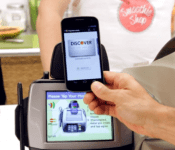
Google Plaso could be new voice-activated mobile payment system

A new report from The Information indicates Google has started testing a new mobile payment solution called “Plaso”. The system apparently relies on a voice-activated method for security that involves users saying their initials when they are at the cash register. This trigger helps the hardware at the cash register identify and connect to the correct smartphone to accept payment. Since they were mentioned specifically, it appears Google may have been testing the new system with Papa John’s and Panera Bread as they look for ways to take mobile payments in a new direction.
The need for a change from the current methods that involve tapping phones on terminals seems to have been triggered by Apple’s entry into the mobile payment space with their Apply Pay platform last year. That new entry has put pressure on the Google Wallet solution which had been Google’s standard bearer for payments made from Android phones. To try to not only encourage further adoption of mobile payment systems, but distinguish Android based solutions from their competitors, it looks like Google is searching for ways to make the payments even easier.
source: The Information
via: 9to5Google
Come comment on this article: Google Plaso could be new voice-activated mobile payment system
Droid Unlatch Reveiw
If you are like me and have multiple devices or are just not good at remembering passwords this is a must have app. Droid unlatch is the best solution for people who just can not remember their device password. Let’s face it security in a mobile world is becoming more and more important. Our phones are becoming our livelihood and tablets replacing or computers. Unfortunately you can not leave you device unattended without someones wandering eye gathering information about you. This leads to a predicament for the mobile user. Surely you do not want every device to have the same pattern, pin, or password. If you have one and someone figured it out now they have access to everything from personal pictures, accounts, wallets, messages, social media accounts, ect.
Android will lock a phone after several incorrect password attempts. This forces you to take the phone to the carrier and or manufacturer to unlock the device. Typically the unlock method is a factory data reset meaning starting back over. Most users have a vast majority of there devices customized and countless hours in apps and settings getting it to there liking. To start all over is a daunting task requiring multiple downloads and time getting everything back in your order.
Droid unlatch avoids this completely by providing a master pin via email and messaging. Forget the pass code three times and instead of aggravation your phones code has been changed to the master pin. The app works with or without a connection. Input the master pin and your phone is free to use again. With droid unlatch there is no more worry of forget a complicated password. It also allows the user to use more challenging pins or passwords providing more security for your device.
I attempted this on my daily phone to up the stakes as high as it would go. Without my phone for even short periods of time is devastating. First wrong pin, second wrong pin, third wrong pin “sweating heart rate elevating” enter and droid unlatch comes up. Still worried I input the master pin and like magic the device is unlocked. The app is very simple to set up with a simple set up. Warning make sure you have set up droid unlatch before trying once you lock the phone there is no going back. Another point is that after droid unlatch has saved the day you must go in setting and change the pass code. If you have not set it no worries your new pin is the master code until you change it. The is a must have for the power user with many devices or the forgetful.
(function() var script = document.createElement(‘script’);script.src = ‘https://stacksocial.com/widget.js?publisher=androidguys&type=editorial_post_widget_preferences’;script.async = true;var entry = document.getElementsByTagName(‘script’)[0];entry.parentNode.insertBefore(script, entry);)();
http://www.androidguys.com/pubgalaxy/728×90.html
The post Droid Unlatch Reveiw appeared first on AndroidGuys.
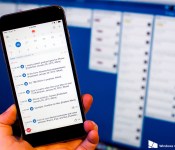
Microsoft confirms its purchase of Sunrise via a video interview with its co-founder

Microsoft has now confirmed earlier reports that it has acquired the Sunrise calendar app. The company did this via a video on its YouTube channel which has since been set as “private”. It shows Pierre Valade, the co-founder of Sunrise, being interviewed by Microsoft’s “chief storyteller” Steve Clayton. The video also features Javier Soltero, the co-founder of another company Microsoft recently acquired, Acompli, which created the new Outlook email app for iOS and Android.

In the clip, Valade said that the goal in making the Sunrise calendar app was to create something much more useful in a product category that they felt was “underestimated” in some quarters. He feels that such an app could be used for every part of a person’s life, rather than just for work.
Earlier reports claim that Microsoft paid about $100 million for Sunrise, but the company has not confirmed those estimates, nor has it issued any kind of official press release.
Source: Microsoft (YouTube); Thanks to Stelios Pat for the tip!

Facebook helps online services warn each other about security threats

Malware frequently strikes multiple targets, but online services rarely do a great job of warning each other about related threats; your data could be at risk simply because your favorite social network didn’t get a heads-up in time. Facebook is clearly sick and tired of this problem, as it just launched a hub that designed to mount a coordinated defense. Its new ThreatExchange web platform lets services both look up existing threat info and share their discoveries with as many sites as they see fit. If Facebook reels under a botnet attack, it can let others know what to do to protect themselves.
There aren’t many early participants in ThreatExchange, but you’ll likely recognize them: Bit.ly, Dropbox, Pinterest, Twitter and Yahoo (including Tumblr) are all onboard. Facebook is also pushing for more partners, so it won’t be surprising if this alliance grows. The move might not stop rapidly-spreading viruses, and it certainly won’t render them invulnerable. However, it might just help your favorite online destination thwart a data breach that it wouldn’t otherwise catch in time.
[Image credit: AP Photo/Jeff Chiu]
Filed under: Internet, Facebook
Source: Facebook

Limbo, the creepy adventure game, has made its way to Google Play
Limbo, Playdead’s black-and-white 2D-scroller, has finally come to Android through the Google Play Store. The game was originally released for the Xbox 360, PlayStation 3 and PC a few years ago, and was then ported to iOS in June 2013. But don’t worry, the Android version is just as scary as its iOS and console counterparts.
You play as a young boy, searching for his lost sister who wakes up in ‘Limbo’ and has to make his way through a dark and dreary forest. You’ll need to dodge all kinds of obstacles on your way, all while avoiding terrifying monsters and creatures that are out to get you. The controls are simple: swipe in the direction you’d like to move. Swiping up makes the boy jump, swiping right makes him move right, etc. The visuals are arguably the most interesting part of the game. Though it’s only a 2D-scrolling game, the graphics are still one-of-a-kind. Limbo is set in a completely monochromatic world that captures gruesome and terrifying intricacies.
Limbo is now available in the Google Play Store for $4.99. Some users may think this is too expensive, but I’m here to tell you, it’s not. This game is addicting, frightening and beautiful, and is worth every penny. We’d wager that this will be one of the best Android games you’ll play this year. If you’re interested, head to the Google Play link below and start playing!


Flipboard arrives to a computer near you

Flipboard, the social network aggregation app that puts all of your feeds and places them in a magazine-style format, is venturing off of your smart devices and onto your computer’s big screen.
Utilizing a responsive design, Flipboard.com now provides a very similar experience to what you get on your app.
Flipboard had the following to say about the release:
You’ll see that Flipboard.com has its own look and feel. As with developing for iPhone, Android and Windows, the team builds on a platform’s unique attributes while still retaining the heart and soul of Flipboard. For example, Flipboard on the Web has responsive layouts for different screen sizes…
If you’re curious how your personal magazine will look on the web, Flipboard has provided a YouTube video covering the release, which you can view below.
Click here to view the embedded video.
There had been some discussion that Flipboard may be bringing its Android app to Chromebooks, including an article Talk Android ran back in November of 2014, like other companies have been doing lately. With its new Flipboard for the web, that brings into question whether or not that will occur.
Source: Flipboard
Come comment on this article: Flipboard arrives to a computer near you
 AIVAnet