



Apple invests in a solar farm that can power 60,000 homes

Apple makes much ado about using clean energy sources to power its buildings these days, and it just put its money where its mouth is… a lot of money. The company is investing a whopping $848 million in a First Solar plant in California’s Monterey County that, according to Apple chief Tim Cook, should generate enough electricity to power 60,000 homes. Apple will get a 130-megawatt supply from the solar farm to light up buildings such as its future spaceship-like campus, while the remaining 150 megawatts will go to Pacific Gas & Energy’s grid. Reportedly, this is the largest commercial deal to date in the solar industry — it certainly eclipses many of the other green energy initiatives we’ve seen in tech, which tend to “only” require tens of megawatts.
Filed under: Misc, Household, Apple
Source: First Solar

Tim Cook Speaking at Goldman Sachs Conference Today, Apple Providing Live Audio Stream
Apple CEO Tim Cook will be speaking at the annual Goldman Sachs Technology and Internet Conference this afternoon, beginning at 12:30 PM Pacific Time. While Cook was not present at last year’s conference, he has attended many times in the past.

Cook is not likely to make product announcements during today’s session, but previous conferences have seen him divulging details on Apple’s philosophies and business practices. In 2013, for example, he spoke about Apple’s cash usage, innovation, design choices, retail strategy, iPhone growth, and more.
Streaming audio of the Goldman Sachs conference will be available beginning at 12:30, and MacRumors will also provide highlights and coverage on what Cook has to share this year.

Tim Cook: Our Objective With Apple Watch is to Change the Way People Live Their Lives [iOS Blog]
Apple CEO Tim Cook spoke at the annual Goldman Sach’s Technology and Internet Conference today, where he covered a range of topics from Apple’s dedication to the environment, the major products the company launched in 2014, and his thoughts on the Apple Watch.
When asked by Goldman Sachs COO Gary Cohn what makes the Apple Watch different from other smart watches on the market, Cook recalled the MP3 industry.
If you think about the MP3 industry, we weren’t the first company to make an MP3 player, there were lots of companies in this. They weren’t used very much. They were fundamentally hard to use — the user interface was bad and you almost needed a PhD to use them. They’re not memorable. […]
I see the smart watch category very much like that. There are several things that are called smart watches, but I’m not sure you could name any. There hasn’t been one that changed the way people live their lives. At Apple, that’s our objective. We want to change the way you live your life.
Cook went on to say that he believes the Apple Watch will do just that, impact people’s lives in a meaningful way. He says that one of the major surprises will be the breadth of what the Apple Watch can do, and he expects that everyone will find something in the Apple Watch that they can’t live without.

Cook highlighted the many design options for the Apple Watch, its “fantastic” look, and the innovative ways of communication that it will enable. Cook says that he “constantly” uses Siri on his Apple Watch, and that he uses it when working out to measure activity.
He also pointed out the feature that pings people when they’ve been sitting for too long, which he sees in use on a daily basis at Apple. During meetings, he says, towards the end of the hour, people will begin standing up as their Apple Watch alerts them to do so. “A lot of doctors believe sitting is the new cancer,” he said. “Arguably, activity is good for all of us.” Cook says that he is “super excited” about third-party apps that are being developed for the Apple Watch.
I think everyone’s going to have their favorite thing, just like when the App Store came out. Remember the saying ‘there’s an app for that? There’s an enormous number of things it will do.
Earlier this month, Tim Cook confirmed that the Apple Watch is still on track to launch in early 2015, with shipments that will begin in the month of April. Pricing will start at $349 for the lower-end version of the device.
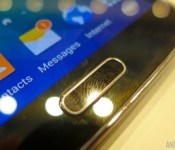
Biometric sensor developer CrucialTec patents touchscreen fingerprint sensors

CrucialTec, a South Korean biometric sensor developer, has announced on Tuesday that it has completed a patent to install fingerprint sensors under smartphone display panels. The company filed for the patent back in 2012, and has since been developing and conducting trials for the technology. A CrucialTec official tells The Korea Herald:
The technology, which removes the necessity of hardware buttons for fingerprint authentication, will allow more leeway for smartphone manufacturers in product design.
CrucialTec’s announcement follows recent reports that Apple has filed a patent to move its fingerprint scanner from the home button to underneath the touchscreen.
Of course, this differs from current biometric technology we see in smartphones nowadays. Samsung’s Galaxy S5 has a fingerprint sensor in its home button that is activated by a swiping motion. Apple has “TouchID”, which allows users to place their registered finger on the home button, automatically granting access to the user. CrucialTec’s new fingerprint scanning technology could no doubt bring major technological advancements to smartphones. Eliminating the home button may be something that both Samsung and Apple would like to do in the future, and this new fingerprint tech will let that become a reality.
This isn’t all CrucialTec has been developing, though. Last June, the company announced that they’ve been working on a small area-type fingerprint scanning sensor, similar to what we seen on Apple’s TouchID. CrucialTec has supplied biometric technology to global OEMs like Huawei and OPPO in the past, and after these new patents have surfaced, we could only imagine the company has a bright future ahead of them.
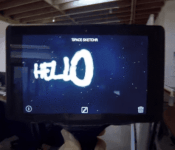
New app for Project Tango shows off 3D drawing and depth capabilities
 Project Tango still has a long road before it will be publicly available, but thanks to some early development units we can see just how developers and apps can take advantage of the hardware. The hardware on Google’s project includes two computer vision processors, plus depth sensors and motion trackers, which Left Field Labs took advantage of to create a drawing app called Space Sketchr.
Space Sketchr lets you create drawings on a Project Tango tablet, which doesn’t sound that impressive. But the unique twist here is that it fully utilizes the depth capabilities that Project Tango offers, so you can create different images at different points in space, then rotate your view around to see your creation. In reality, the “drawing” really turns out more like a sculpture, but it’s very, very cool to see.
This is just one of the few apps that we’re seeing on the new platform, but it is available on the Play Store, if you happen to have a Project Tango tablet.
source: Gizmodo
Come comment on this article: New app for Project Tango shows off 3D drawing and depth capabilities
3D Robotics announces Android flight control app
It’s amazing how just a few years ago Android was but a gleam in the eye of Google. Today Android can be found in everything from our smartphones to automobiles. There seems to be no end to the uses for Android. A great example of this is 3D Robotics new Tower flight control app announced today. The Tower flight control app is a free app, intended to help users control drones from Android tablets and smartphones.
The Tower flight control app is based on Android and is completely open source. While 3D Robotics created the app and will be maintaining it, they are also encouraging others to adapt the app to their own needs. This should be a boon to the hobbyist drone crowd. While the flight control app sounds pretty full featured, especially for a free app, the fact that it is open source could make for some interesting additions.
If you are interested in the details I’ve included the press release below. If you want to download the Tower flight control app, you can find it right here.
Drone Maker 3D Robotics Releases Open-Source, Customizable TowerSM Flight Control App
Free App for Smartphones and Tablets Has Everything Pilots Need to Plan, Fly and Track
Any 3DR-Powered Drone; Open-Source Code Allows Programmers to Build or Alter Features
BERKELEY, CA – (February 10, 2015) – 3D Robotics (3DR), North America’s largest consumer drone manufacturer, today announced the availability of its open-source TowerSM flight control app for drone copters and planes. Downloadable at no cost from the 3DR website, the product not only gives users a simple, feature-rich flight experience but also, thanks to its open programming interface, offers the ability to build new features into the app or customize existing ones.
Tower is fully supported and maintained by 3D Robotics, creator of the app. While 3DR is the major contributor to the product, it encourages drone users to use their programming creativity in order to further the power, usability, and fun inherent in drones.
“3D Robotics is a big believer in imaginative uses of drones for business and pleasure, as well as in ways that benefit society. By opening up our Tower programming interface to the public, we’re giving enthusiasts and entrepreneurs the ability to impact those uses in a very positive manner,” said Colin Guinn, 3D Robotics Chief Revenue Officer. “We’re excited to see how people use their talents to improve and innovate on Tower.”
Tower is suited to first-time pilots as well as experts. Available under the GNU Public License v3, the app provides transmitter-free operation of 3DR-powered copters and planes from any Android powered smartphone or tablet. Tower is accessible through the new 3DR Services—the app store for drones. 3DR Services can guide you to Tower and other 3DR apps, as well as third-party drone apps.
With Tower, users can create flights by drawing the paths on their tablet or by dropping waypoints. Over ten different types of waypoints, as well as other functions, make it possible to plan a flight for a specific purpose:
- Fly in smooth curves with spline waypoints
- Use Circle waypoints to orbit an object while keeping the camera pointed at it
- Region of Interest (ROI) points allow flyers to keep the camera centered on a subject regardless of flight path
- Survey will automatically generate the flight pattern needed to fully cover a region of the map
- 3PV™ Follow Me keeps the camera centered on the user while the drone follows the user’s movement. Drone position can also be adjusted as it follows the user.
- An Automated Building Mapper makes 3D scans of large structures
- The Dronie function makes one-of-a-kind “selfies,” revealing surrounding scenery as the drone flies back and away from the subject
Several new features are also available for Tower including Mission Editor, for easier insertion or reordering of elements; and new integration with Droneshare via the user’s Google or Facebook account (available February 15, 2015), enabling users to track and share their flights online or compare pilot rankings with friends.
The Tower open-source community is located on GitHub at https://github.com/DroidPlanner/droidplanner. To download the free Tower drone control app, go to (https://play.google.com/store/apps/details?id=org.droidplanner.services.android ).
About 3D Robotics
3DR is committed to helping people see their world from above. As North America’s largest personal drone company, 3DR is a pioneer in making advanced, easy-to-use drone technology accessible to consumers for a wide range of everyday exploration and business applications in data analysis, mapping, surveying, 3D modeling and more for agriculture, construction, infrastructure, search and rescue and ecological study. Founded in 2009 by Chris Anderson, former editor-in-chief of Wired Magazine and founder of DIYDrones.com, and Jordi Muñoz, an engineering prodigy from Ensenada, Mexico, 3DR is a VC-backed startup with over 200 employees in North America and more than 30,000 customers worldwide. 3DR is headquartered in Berkeley, CA with facilities and offices in San Diego CA, Austin TX and Tijuana, Mexico. For more information, visit www.3drobotics.com.
Source 3D Robotics
(function() var script = document.createElement(‘script’);script.src = ‘https://stacksocial.com/widget.js?publisher=androidguys&type=editorial_post_widget_preferences’;script.async = true;var entry = document.getElementsByTagName(‘script’)[0];entry.parentNode.insertBefore(script, entry);)();
http://www.androidguys.com/pubgalaxy/728×90.html
The post 3D Robotics announces Android flight control app appeared first on AndroidGuys.

Xposed Framework for Android 5.0 Lollipop coming very soon
For those holding onto KitKat to make use of the Xposed Framework and avoiding upgrading to Lollipop will be pleased to learn that the developer has indicated it should be ready very soon.
Over in the XDA thread, the developer has managed to get Xposed running on a Nexus 5 with Android Lollipop.
Soon…
Working very well already.
The reason for the delay is that Xposed was developed on Dalvik runtime, and since Android Lollipop uses ART, it needed to be adapted.
No exact date is set for release, but it shouldn’t be too long.
(function() var script = document.createElement(‘script’);script.src = ‘https://stacksocial.com/widget.js?publisher=androidguys&type=editorial_post_widget_preferences’;script.async = true;var entry = document.getElementsByTagName(‘script’)[0];entry.parentNode.insertBefore(script, entry);)();
http://www.androidguys.com/pubgalaxy/728×90.html
The post Xposed Framework for Android 5.0 Lollipop coming very soon appeared first on AndroidGuys.
Google I/O 2015 scheduled for May 28-29 in San Francisco
The biggest Google event of the year just got scheduled for May 28th and 29th, 2015, and is being held at the Moscone Center West in San Francisco.
Registration for Google I/O 2015 is scheduled to kick off on March 17th at 9:00am PT/12:00pm ET.
Google says that I/O 2015 will be “two days of hands-on interaction with the latest technologies, inspirational talks and a few surprises in between.”
Keep the calendar free!
(function() var script = document.createElement(‘script’);script.src = ‘https://stacksocial.com/widget.js?publisher=androidguys&type=editorial_post_widget_preferences’;script.async = true;var entry = document.getElementsByTagName(‘script’)[0];entry.parentNode.insertBefore(script, entry);)();
http://www.androidguys.com/pubgalaxy/728×90.html
The post Google I/O 2015 scheduled for May 28-29 in San Francisco appeared first on AndroidGuys.
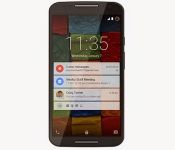
6 reasons your next phone should be from Motorola
Motorola has had quite the career. For a long time they were really the only name in telecommunication devices, from radios to cell phones and so on. However, when smartphones started taking over the market, Motorola suffered greatly. Then Google bought Motorola, and the world waited to see what would come out of the renewed company. In August of 2013, they released the Moto X. The phone proved that a smartphone was not all about specs, but about a good user experience. Then, in November they revealed the Moto G. Another cheap smartphone, but one that worked. From that point forward, Motorola has been playing a whole new ball game.
Being an owner of a Moto phone myself, I’m here to convince you that buying a Moto phone will be the best smartphone decision you’ll ever make. This can be any new Motorola phone (and most of the reasons below apply to them), but I’ll specifically highlight the in-house phones: the Moto X (flagship), the Moto G, and the Moto E. Here are 6 reasons why.

1. Near-stock Android gives a swift user experience
A common misconception among casual smartphone buyers is that the Android UI (user-interface) on Samsung smartphones is the same Android UI as on LG phones or any other Android phone. However, the UI you see on Samsung, LG, HTC, or most other Android phones are customized versions of Android made by the respective companies. Which is the best is up for debate, but what most Android aficionados can agree on is that stock Android is the fastest. Stock Android is the unadulterated version of Android that was made by Google before being changed by manufacturers.
Well, Motorola uses near-stock Android. What is added are features unique to Moto phones, but more on that later. Otherwise, Android on Moto phones is only what Google has made. This allows the phones to work fast, and feel smooth, even on a lower spec phone. The Moto E, while considered a budget phone, works better than most mid-range phones from other companies because the Android version on it is light.
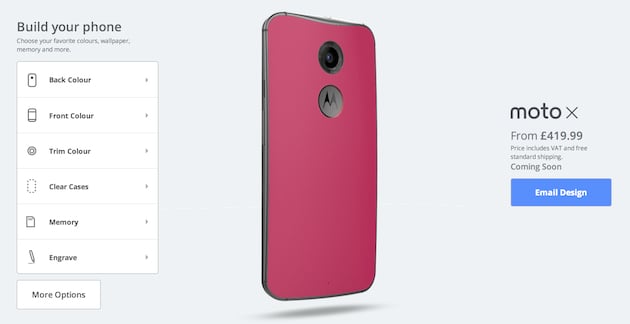
2. Customization beyond compare
When the first Moto X was announced, one of the most touted features was the ability to customize your phone (almost) completely. This still exists with the new Moto X. You can choose the color of the back, with choices from a normal back, to a wood back, a leather back, and if buying from Verizon, a football back. You can choose the front plate from black or white, and you can choose the accent color of the metal on the power and volume buttons. You can also get something etched on the back, choose the wallpaper that’s set on the phone, and choose a custom phrase that appears when you power on the phone.
Even if you don’t get a Moto X, both the Moto G and Moto E have a plethora of back plates you can choose to change your phone, with the choice of adding a flap that covers the screen as well.
If nothing else, choice is at the forefront of Moto phones. I mean, why shouldn’t you be able to make your phone your own?

3. Added features that are actually useful
Motorola does add things to stock Android to keep it from being completely stock. However, the features that are added actually make the phone better. When you get a Moto phone, there aren’t 20 bloatware apps that take up space that you’ll never use. In fact, the features that are added on the Moto X can all be accessed from one app, aptly named Moto.
Starting with the Moto X, you have Moto Voice which allows you to interact with your phone without ever touching it. Yup, you can activate it and then command it without having to press the power button. This can be useful in a variety of situations, like driving or cooking. Adding on to customization, you can even have a custom launch phrase. Someone on AndroidGuys calls his “chalupa.” So if he wants to know what the weather is going to be during the weekend, but doesn’t feel like picking up his phone, all he has to say is “Hey chalupa, what’s the weather going to be like this weekend?”
Next is Moto Display, which uses the AMOLED screen on the Moto X to only power specific pixels needed to display notifications on the screen without powering it on. With the combination of four IR sensors on the front, all you have to do is wave your hand over the face of the phone and you can see, and then even interact with notifications you’ve received. This helps save battery so that you don’t need to power on the display just to dismiss a notification you don’t need.
Having a Moto X, I can tell you that having those features on my phone has completely changed the way I’ve used it, for the better. I don’t think I can ever get another phone that doesn’t have these features.
“However, the features that are added actually make the phone better.”
The last notable feature is Moto Assist, but this is available on the Moto X, G, and E. Moto Assist allows you to not have to worry about your phone during certain things throughout your day. It’s four modes, Meeting, Driving, Sleeping, and Home, all put your phone into a state that helps you in those situations. Meeting mode uses your calendar to automatically put your phone into a vibrate or silent mode whenever you have an event so that your phone doesn’t accidentally go off in the middle of an important meeting. Driving detects if you’re driving using GPS, and if your phone is connected to an aux jack or Bluetooth car stereo, it will automatically start playing music, and then if you get a text or phone call, the phone will launch into a voice controlled state and read out the message or the name of who’s calling you, and ask if you want to reply or answer the call, or just cancel. Sleeping will automatically set your phone on silent during certain hours you’ve set. Home detects when you’re home using GPS, and puts the phone in a similar state as driving so that you can be un-tethered from your phone while with your family. All of these have options to customize the settings, and if you don’t want a particular mode you can just turn that mode off completely.
 4. Software updates are quicker than any other company
One of the biggest problems that plague the Android OS is getting timely software updates. As mentioned earlier, companies all have their own UI they slap on to Android, so that when a new version of Android comes out they have to completely build their UI onto that new version.
However, one of the many benefits to having a phone with near-stock Android is that process of fixing a new Android version is a lot simpler. So, when KitKat was released to the companies in November 2013, Motorola upgraded their Moto X within two weeks. Some users with a Moto X received their update before Nexus users, which are the phones that usually get new versions of Android first! The new Moto X with Android 5.0 Lollipop was no different, with Motorola releasing the update 9 days after release of the OS to the companies. Up until this point, that was unheard of in the Android domain. The Moto G and E followed quickly with updates as well.

5. Prices that are competitive
When Motorola announced the Moto G in November 2013, the Android community was shocked. Here was a phone that had mid-range level specs, but cost the same as many budget phones at $179 off-contract. Even crazier, when reviewers started releasing their reviews, they had nothing but good things to say. All other phones of this cost gave Android a bad rep (because comparing a $150 Android phone to a $700 iPhone makes total sense), but the Moto G was a great example of Android at its finest in a cheap package.
The Moto G isn’t the only phone that’s worth talking about. Then even cheaper Moto E does something similar: provides a great Android experience for $129 off contract. Even the flagship, the Moto X, is cheaper than other flagships, starting at $500 off-contract. Most other Android flagships run for more like $650 off contract.
To top it all off, Motorola frequently runs discounts. Like right now, you can get a Moto X for $399 off contract until February 14, or $35 off a purchase of $249 or more. This won’t be the only one either. As the year goes by, there will likely be a half a dozen more sales, at least. Not to mention when they’re close to announcing a new flagship, the 2014 Moto X will likely get a deep price cut. Before the Moto X 2014 was announced, the Moto X 2013 was on sale for $349 off contract.
 6. Customer Service is known to be a positive experience

When something happens to a device, it’s hard enough to deal with the stress of having to get it replaced or fixed, let alone the dread of calling customer service to figure out your next steps. What makes it worse is when the customer service is rude or just says there is nothing they can do.
Motorola, however, is known for having good customer service. I often see on social media someone be pleased after interacting with Motorola customer service. They also are more likely to replace a broken device than most might think. I know of one circumstance when a user got their old Moto X replaced with a new Moto X. If having good customer service is important in a company for you, then Motorola has that covered.
Honorable mentions
Active on social media
Motorola is known to be active on social media. This isn’t really a reason to buy a device from them, which is why its an honorable mention, but its worth acknowledging because not only are they “hip” with social media, but they typically respond quickly to those who mention them on social media. If you don’t want to call them or email them, social media is another way to contact them to deal with an issue. Also, if for some reason you do have a bad customer service experience, pointing it out on social media should get you the attention you deserve. Motorola also does some fun giveaways on social media as well.
Based in the U.S.
Now before you get out your torches and pitchforks, hear me out. Motorola being based in the U.S. brings out some positives in a company. The quality of the service you get is more likely to be better. It’s a matter of quality vs quantity. I am aware that Motorola no longer produces devices in the U.S., but their employees are still heavily in the U.S. I know that there are great companies that come from other countries, but you cannot deny that U.S. based companies have a higher service expectation.
Overall, you are likely to get a better user experience from Motorola than any other company. Sure, there are other companies that have their positives, and make great devices. But at the end of the day, I’m arguing for the user experience, and there’s no denying that Motorola provides a great one.
(function() var script = document.createElement(‘script’);script.src = ‘https://stacksocial.com/widget.js?publisher=androidguys&type=editorial_post_widget_preferences’;script.async = true;var entry = document.getElementsByTagName(‘script’)[0];entry.parentNode.insertBefore(script, entry);)();
http://www.androidguys.com/pubgalaxy/728×90.html
The post 6 reasons your next phone should be from Motorola appeared first on AndroidGuys.
Blinkist: Insight and self-improvement in a nice mobile package
In today’s day and age, life moves at a very fast pace. There isn’t much time for self-improvement and learning, because we need to get to our next engagement. Blinkist looks to help you squeeze in time for you, by taking non-fiction books and squeezing the information into bite-sized pieces.
They say: “Essential insights from nonfiction book bestsellers – made for mobile reading”
We say: Blinkist allows you to pool together interests you have in learning and self-improvement, and pools together bestselling books related to those topics, and then allows you to choose from those books to add to a list. Then, you can open a book to read in “blinks”: short snippets with ideas from the book that take a few moments to read. After a few swipes, you’ve garnered everything the book has to offer and can walk away knowing more. It does all of this in a good-looking app. You start with a free 3-day trial, but then need to pay $79.99 for a year of access with a premium account, or $49.99 for a year of access with a plus account. Considering you get unlimited reading for a ton of these books, that’s not a bad deal!
(function() var script = document.createElement(‘script’);script.src = ‘https://stacksocial.com/widget.js?publisher=androidguys&type=editorial_post_widget_preferences’;script.async = true;var entry = document.getElementsByTagName(‘script’)[0];entry.parentNode.insertBefore(script, entry);)();
http://www.androidguys.com/pubgalaxy/728×90.html
The post Blinkist: Insight and self-improvement in a nice mobile package appeared first on AndroidGuys.
 AIVAnet