


Engadget giveaway: win an iPhone 6 and 5TB of cloud storage courtesy of MediaFire!

Finding enough space to house your worldly possessions in a place like New York City can be a bit pricey, but unlike a hulking vinyl collection, stashing digital files is more affordable than ever. MediaFire currently offers a free cloud storage option (15GB) and its Pro (1TB) and Business (up to 100TB) accounts are currently 50-percent off, making it a simple and affordable way to organize your digital self. Those files are readily accessible through the MediaFire website or its dedicated desktop and mobile apps. You get unlimited downloads as part of the service, too, so you can share files to your heart’s content. The company wants to get two lucky Engadget readers started right away, so it’s provided an iPhone 6 and a 5TB (for life!) MediaFire account for each of them. Plus, five additional winners will each get a Pro account with one full year of cloud storage. Just make your way to the Rafflecopter widget below for up to three chances at winning one of Apple’s latest and some online acreage for all your digital stuff.
- Entries are handled through the Rafflecopter widget above. Comments are no longer accepted as valid methods of entry. You may enter without any obligation to social media accounts, though we may offer them as opportunities for extra entries. Your email address is required so we can get in touch with you if you win, but it will not be given to third parties.
- Contest is open to all residents of the 50 States, the District of Columbia, and Canada (excluding Quebec), 18 or older! Sorry, we don’t make this rule (we hate excluding anyone), so direct your anger at our lawyers and contest laws if you have to be mad.
- Winners will be chosen randomly. Two (2) winners will each receive one (1) iPhone 6 (AT&T, MG4P2LL/A, Silver, 16GB) and a 5TB MediaFire cloud storage account for life. Five (5) additional winners will each receive a 1TB MediaFire Pro account for one year.
- If you are chosen, you will be notified by email. Winners must respond within three days of being contacted. If you do not respond within that period, another winner will be chosen. Make sure that the account you use to enter the contest includes your real name and a contact email or Facebook login. We do not track any of this information for marketing or third-party purposes.
- This unit is purely for promotional giveaway. MediaFire and Engadget / AOL are not held liable to honor warranties, exchanges or customer service.
- The full list of rules, in all its legalese glory, can be found here.
- Entries can be submitted until Feb 11th at 11:59PM ET. Good luck!
Filed under: Announcements, Apple

Inateck BK1003E keyboard review
Our good friends over at Inateck have just sent us one of their great new keyboards for review and I must say I am impressed. Keyboards are not something that most people think about when they are purchasing a smartphone or tablet and unless you spend a considerable amount of typing you are probably not going to spend a lot of money when you do decide to get a new one. That is where the Inateck BK1003E comes in. When you open the box you are greeted with the keyboard itself and a charging cable, which is a great plus for me since that means you will not have to buy any batteries. Budget keyboards are not something that garner much attention due to the fact that cuts have to be made somewhere to be able to offer the device at such a discount. The BK1003E though proves that you do not need to spend a fortune to be able to get a quality product.
Design

Let start with the design of the BK1003E. As you can see from the image above, the keyboard has a brushed stainless backside that just feels great when you have to pick it up and move it and also provides great protection since it is a Bluetooth keyboard and is most likely going to be used on the go. The silicone non slip grips are also very sturdy and during my review period the keyboard did not move, not even a centimeter from the glass and wood surfaces that were used. Switching over to the top you are greeted with a matte black finish that just feel great to type on. Overall design of the BK1003E is on par with keyboards much higher priced than it and that shows when you get to use it.
Functionality

The BK1003E functions as any good keyboard should providing a nice “click” sound whenever you type and key strokes were registered immediately. I paired the keyboard on my HTC One M8 smartphone and I will say it did take it a bit to register on my phone but when it did the connection was flawless and it provided a great typing experience. Software wise, nothing really has to be done other than turn the keyboard on using the switch on the back, press “Fn” and “C” to start the Bluetooth discovery on the keyboard and then find the BK1003E on your device. When your Bluetooth-enabled device locates the BK1003E then all you have to do is pair them and that is all there is to it. The BK1003E truly is a universal Bluetooth keyboard.
Final Thoughts
The BK1003E is a terrific keyboard and well worth the money. If you need a keyboard for that new tablet you got during the holidays or even if you are looking to replace the one you have right now the BK1003E is definitely a must buy. With a modern and sleek look, great functionality and just overall ease of use, the BK1003E is on par with keyboards costing much more. Amazon currently has the BK1003E at 26.99 but if you head over now for a limited time only you can use promo code UCDKD237 to get an additional $5 off. That bring the cost to $21.99 and for that price there is no reason not to give the BK1003E a try and you can do so using the link below.
(function() var script = document.createElement(‘script’);script.src = ‘https://stacksocial.com/widget.js?publisher=androidguys&type=editorial_post_widget_preferences’;script.async = true;var entry = document.getElementsByTagName(‘script’)[0];entry.parentNode.insertBefore(script, entry);)();
http://www.androidguys.com/pubgalaxy/728×90.html
The post Inateck BK1003E keyboard review appeared first on AndroidGuys.
HB7003 Portable 7-Port USB 3.0 HUB review
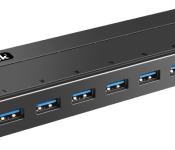
The HB7003 is our latest product review from the fantastic team over at Inateck. This time around they sent over a 7-port USB 3.0 hub that, like the previous items we have reviewed from them, does not disappoint. If you are anything like me, you probably have a dozen items scattered around your desk that need to be hooked up to your computer or a power outlet to be of any real use. The HB7003 does a good job in assisting with that all the while keeping a low profile and not getting in the way.
Design

There is not a whole lot to say about the design of the HB7003 other than it looks what you might expect a USB hub to look like. It is finished in matte black with the company logo on top and the blue USB ports on front. On the back you have the USB port to connect to your computer, the port where the power cord plugs in and the on and off button. As you can see from the image above the HB7003 is a modern looking USB hub that is slim and will add to your work environment instead of taking from it.
Functionality

You can connect up to seven devices to the HB7003 for data transfer, charging or a mixture of both. From my testing on the device, the data transfer speeds were what USB 3.0 speeds should be and my device charged at the normal speed as if I had plugged it into its dedicated charger. One of the things that I really liked about the HB7003 was the fact that I did not have to hook it up to my computer for it to be of use to me. That means that I can use it exclusively as a charging station for my devices by just plugging it into any outlet. I connected up to 6 devices and the device performed brilliantly with all of them. The speeds did slow down some as I added more devices but that is too be expected. The difference was not enough to take away from the overall value of the device.
Final Thoughts
The HB7003 is a fantastic little USB hub that does what it is meant to and not much else. That is not a bad thing though because it shows that Inateck focused on making a great product that works and did not try to add any gimmicks that usually do not meet expectations and drive up the cost. If you have been meaning to get a USB hub or you have a multitude of devices than the HB7003 is a must have and for the price there is no reason not to get one. You can head over to Amazon using the link proved to purchase the HB7003.
(function() var script = document.createElement(‘script’);script.src = ‘https://stacksocial.com/widget.js?publisher=androidguys&type=editorial_post_widget_preferences’;script.async = true;var entry = document.getElementsByTagName(‘script’)[0];entry.parentNode.insertBefore(script, entry);)();
http://www.androidguys.com/pubgalaxy/728×90.html
The post HB7003 Portable 7-Port USB 3.0 HUB review appeared first on AndroidGuys.
Next-Generation iPhone Said to Feature Upgraded Touch ID With Reduced Errors
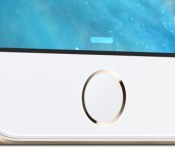
KGI Securities analyst Ming-Chi Kuo, who has provided reliable information about Apple’s upcoming product plans in the past, claims that Apple’s next-generation iPhone will feature an upgraded Touch ID module with reduced reading errors for an improved and safer Apple Pay experience. 
“We think the new iPhone,expected to launch in 3Q15, will be equipped with an upgraded Touch ID module, with which Apple (US) intends to offer a better and safer Apple Pay user experience with reduced reading errors. We therefore raise our 2015F shipments of Touch ID module by 12.4% to 262mn sets, boosted by Apple Pay and new iPhone models.”
Kuo wrote in a note to investors that he expects the next-generation iPhone to ship in the third quarter of 2015, lining up historically with past releases of iPhones in September. 
[Deal] Spend 2 minutes completing Google’s Security Checkup and receive 2 GB of Google Drive storage

Did you know that today is Safer Internet Day? To celebrate, Google is giving you a chance to grab 2 GB of extra Google Drive storage, and it will only cost you 2 minutes of your time. More importantly, you will secure your account in the process
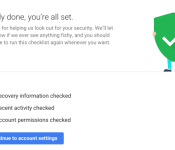
All you have to do is complete Google’s Security Checkup, which basically confirms your recovery information, apps and devices that have access to your account information, and lets you check your most recent sign-in activity.
What could be easier than that? After completing the Checkup, don’t expect the extra storage to show automatically. Google will add the 2 GB of extra storage to everyone around February 28, and you will get an email when completed. Unfortunately this deal won’t work for Google Apps customers, but they recommend going through the Safety Check anyway.
Hit the source link to get started.
source: Google / Google Security Checkup
Come comment on this article: [Deal] Spend 2 minutes completing Google’s Security Checkup and receive 2 GB of Google Drive storage
New Xperia E4 may offer a hint at the upcoming Z4’s design

The Xperia line of smartphones may win the praise of camera enthusiasts and Sony aficionados around the world, but for a variety of reasons, their sales aren’t providing much of a boost to the company’s bottom line. This may be largely due to marketing (or lack thereof) or a design that is overly squared and has seen little change over the past couple of years. Word on the street is that the upcoming Xperia Z4 will feature a new design language and a longer lasting period of pertinence.
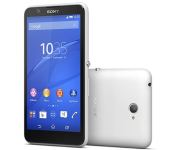
We now have the first official images of the Xperia E4 and, while nothing is for sure, if this is a hint of the design language Sony plans to use in this year, things may become interesting indeed. Featuring a curved design that’s more than a little reminiscent of a certain Microsoft married phablet, the E4 won’t be very appealing to spec seekers. The smartphone features a 5-inch qHD (960 x 540) screen, a quad-core 1.3GHz MediaTek CPU, 1GB of RAM, 8GB of on-board storage, a 5 megapixel rear camera, dual-SIM, Android 4.4.4 and a “stamina” battery mode that allows up to 2 days of usage.

Nokia Lumia 1320 — for better or worse, Sony’s new design language seems a bit… inspired at best. Though change is certainly what the doctor may have ordered!
The Xperia E4 follows in the footsteps of the E3, which was announced in September of last year, and, at least according to its name, is the first generation in Sony’s 4th-gen Xperia family. It remains to be seen whether Sony will keep the 6-month cycle for the Xperia Z4, or more towards a longer lifespan, as rumors suggest.
#gallery-1
margin: auto;
#gallery-1 .gallery-item
float: left;
margin-top: 10px;
text-align: center;
width: 33%;
#gallery-1 img
border: 2px solid #cfcfcf;
#gallery-1 .gallery-caption
margin-left: 0;
/* see gallery_shortcode() in wp-includes/media.php */


The Xperia E4 will become later this month in select countries; at least for now, the US is not one of the markets getting it. Also unclear is the price of the device, but what we do know for sure is that the Xperia E4 will face some strong competitors.
While it’s safe to say most people will not give the E4 more than a passing glance at best, the device may be the world’s first window into what the upcoming Z4 will look like. Any thoughts?

Xposed Framework for Android 5.0 Lollipop coming “soon”

The popular Xposed Framework, which allows for a wide range of customization tweaks to Android, sadly is not yet working with Android 5.0 Lollipop. Developer, rovo89 had previously commented about issues with development time and adapting the software to various new Lollipop features, but it looks like a release may finally be nearing.
Commenting briefly on the XDA Forum, rovo89 indicates that Xposed for Lollipop could be ready “soon” and that it is already “working very well”. Previously, it was not even clear if bringing all of the features over to Lollipop would be possible, but fortunately it seems that development has come along well and is working on his own Nexus 5, as shown in the screen-shot below.
Previously, compatibility issues with the ART run time, SE Linux security and a lack of time to commit to the project had been holding back a Lollipop version of the software.

We still don’t have a date set for release, but this is a much more upbeat outlook for Xposed fans than there appeared to be towards the end of last year. Hopefully it won’t be too long until Lollipop users can resume tinkering with Xposed Framework.
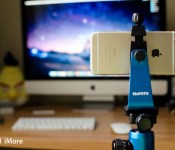
The MeFoto RoadTrip tripod takes your iPhone photography to the next level

MeFOTO makes an entire array of colorful tripods equipped to tackle any terrain you may need to travel. The MeFOTO RoadTrip tripod is a nice compromise in weight and size and also converts into a monopod — or selfie stick for those who are into that kind of thing. By itself, it’s capable of holding mid-size to smaller full frame DSLR cameras. Add the SideKick360 attachment, and you’ve got yourself a tripod setup that works great with your iPhone, too!
Editor’s note: I picked the MeFOTO RoadTrip tripod because it fit my weight and size requirements, both expanded and folded. However, most of this review should apply to most MeFOTO tripods since they’re of the same construction. There are small differences between tripods, though, so make sure you research those before choosing a model.

It sounds silly, but the first thing that stuck out to me about MeFOTO’s line of products was the bold colors of the tripods. Picking out a tripod is usually pretty dull business, but when I saw the wide array of colors MeFOTO offered, it caught my attention. I had always heard good things about them, so I figured I’d give one a try. After narrowing down my selection, I ultimately chose the RoadTrip model in aluminum. MeFOTO offers many of their tripods in carbon fiber as well, which makes them a hell of a lot lighter. Just be prepared for a drastic price difference — that weight differential is worth a pretty penny.
The RoadTrip comes with an extra set of metal legs that are great for rugged or rocky terrain. The rubber legs that come already screwed into the tripod are good for grip. For instance, if you need to prop one leg on a lamp post or side post, the rubber will definitely hold itself up without having to worry about your camera taking a tumble. You also get a nice carrying bag with an adjustable strap. I carried this particular tripod through 4 countries alongside my Lowepro Passport Sling III and found it to be comfortable and lightweight. I imagine the carbon fiber model must feel like carrying a feather around.

What drew me to the MeFOTO, aside from its fancy colors, was its construction. Simply turn the legs and they’ll expand. You can lock legs and different angles as well to accommodate for tough-to-shoot terrain and cramped quarters. What really set the MeFOTO apart from any tripod I’ve ever owned was the ballhead itself: MeFOTO says it’s an Arca-Swiss style, and while that means very little to me, it’s the smoothest tripod I’ve ever used while panning. I’ve yet to find an angle I wasn’t able to get by adjusting the ballhead. I’ve even used it to level a photo — because I’m too lazy to re-adjust the legs. And mainly because it’s that smooth and easy to manipulate. And for anyone wondering, the RoadTrip does feature a recessed hook, so you can add extra weight for stability.
The RoadTrip also converts into a monopod with a nice foam grip when you remove the other two legs. You can use the monopod with the standard mounting plate, or you can purchasing a SideKick360 attachment for your iPhone. MeFOTO also released a SideKick360 Plus that’s the same price but accommodates larger phones such as the iPhone 6 Plus.

The good
- High quality aluminum and carbon fiber
- Easy to assemble and disassemble, a common pain point with many tripods
- Ballhead is super smooth and allows for super fine adjustments on the fly
- Two sets of legs for two different kinds of terrain
- Easily converts to a monopod (or selfie stick if you will)
- Lots of bold and beautiful colors to choose from
The bad
- Carbon fiber model is quite steep at over $300
- I’ve had the legs come unscrewed in the travel bag, not a deal breaker but slightly annoying
- To use the monopod as a true selfie stick, you’ll need to buy a bluetooth remote
The bottom line

If you want a high quality tripod that offers no-fuss assembly and disassembly, travels light, and offers a smartphone attachment with just as much versatility as a traditional well-built mount, the RoadTrip definitely fits the bill. You can always buy a generic attachment for your iPhone, but the SideKick360 offers a great grip and lets you rotate and straighten on the fly without any compromises. Not to mention you get a GoPro-style monopod all in one.
The price point may not fit everyone’s budget, but if you take lots of photos with both your DSLR and want to take your iPhone photography to the next level, MeFOTO’s lineup of tripods is the place to look.

Shell petrol stations to let you pay with your phone using PayPal

Those of us in the know are patiently waiting for QR code technology to take off, as it inevitably will, but Shell and PayPal aren’t willing to stand by and end up falling behind the curve. Pouncing on the flourishing standard, the two have shaken hands on a deal that’ll soon let patrons at Shell petrol stations pay for fuel using only their phones, PayPal details, and some well-placed QR codes. Having successfully trialed the mobile payment method way back in 2013, it’s ready to roll out to the “vast majority” of Shell garages in April, though will initially be reserved for members of Shell’s Drivers’ Club programme before randoms can get involved later this year. “Using a debit or credit card to pay at the pump simply isn’t convenient enough,” a fictional spokesperson commented, adding that booting up the Android/iOS Shell Motorist or Paypal apps, and pairing with a pump via a QR code so your PayPal credentials can be charged is the stuff futuristic nightmares dreams are made of. A receipt of the transaction will also be sent to your phone when you’re done, confirming you’ve successfully completed the process and not screeched off with a full, free tank.
Filed under: Cellphones, Transportation, Mobile
Via: Pocket-lint
Source: Shell
Accessory of the Day: 6ft MicroUSB cable $4.79
Always a good thing to have on hand, this MicroUSB cable from AmazonBasics has thousands of 5-star reviews. This is a perfect combo with a wall or car charger or to just keep on hand for file transferring. Supporting 480Mbps transfer speed, these cables are a wonderful deal at only $4.79 (Prime eligible).
Join Prime and get this deal with FREE two-day shipping!
Also worth checking out:
(function() var script = document.createElement(‘script’);script.src = ‘https://stacksocial.com/widget.js?publisher=androidguys&type=editorial_post_widget_preferences’;script.async = true;var entry = document.getElementsByTagName(‘script’)[0];entry.parentNode.insertBefore(script, entry);)();
http://www.androidguys.com/pubgalaxy/728×90.html
The post Accessory of the Day: 6ft MicroUSB cable $4.79 appeared first on AndroidGuys.
 AIVAnet