



AC editors’ apps of the week: Ping, Flight Board, Capitaine Train and more

Our weekly app picks
Another Appday Sunday and we’re back with a handful of our favorites to share. We’ve got apps to make life easy, apps to make you healthy, and apps that help you get where you want to go. And of course a game, because Jerry.
Give these a look and then take a minute to tell us all about the apps you are using and love so we can give them a try. We all find some of our favorites right in the comments on these posts!
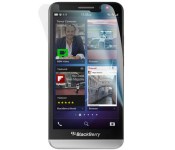
Save big on these BlackBerry Z30 anti-glare screen protectors today—now $9.95!

Tru Protection has utilized the highest grade materials and cutting-edge technology to create a screen film worthy of protecting your BlackBerry Z30. Equipped with a high-gloss crystal finish that’s specially formulated for the display, installation is simple with an innovative static cling adhesive and a precise die-cut fit.

Apple Debuts Music-Themed iPad Air 2 Ad Ahead of Grammy Awards
Ahead of tonight’s telecast of the 57th annual Grammy Awards, Apple has debuted a new music-themed iPad commercial titled “Change” featuring Swedish singer Elliphant, Los Angeles-based producer Gaslamp Killer, and English DJ Riton.
The ad shows the three musicians composing a remix to Elliphant’s “All Or Nothing” entirely on an iPad, from initial songwriting, production, recording, and more. Apps shown throughout the add include Apple’s GarageBand for songwriting, iMPC Pro for production, Serato Remote for live performances and Manual Camera for filming video.
Billboard also reports that Apple CEO Tim Cook and SVP of Internet Software and Services were the focus of much attention at a pre-Grammy party held by record producer Clive Davis. Apple is estimated to have paid upwards of $2 million for its Grammy ad.
The new iPad ad follows rumors of a revamped Beats Music subscription service, with a report last week noting that Apple would be charging $7.99 per month for access on OS X , iOS, Apple TV, and Android. Apple is expected to relaunch Beats Music later this year, possibly at June during the company’s annual Worldwide Developer’s Conference.

Ancestry site won’t let you borrow its UFO records

You wouldn’t think that genealogy websites would have much need to defend copyrights, but they’re apparently quite zealous — so long as you’re interested in alien spaceships, at least. Ancestry.com has forced enthusiast site The Black Vault to take down legions of declassified US records on UFO research because some of them were taken from its Fold3 subsidiary. While the documents are public domain, their digital copies supposedly aren’t — Black Vault has to either get permission or digitize the records itself in order to post this content online, a spokeswoman says.
Black Vault owner John Greenwald maintains that Ancestry.com abused the Digital Millennium Copyright Act (DMCA) and otherwise acted in bad faith. It reportedly asked him to take down everything through an “evidence-less” claim that assumed his guilt, even when it involved material that wasn’t on Fold3. Also, it was only going to let him keep images if he paid to become an affiliate; that’s not very practical for an enthusiast site.
Some of Greenwald’s arguments are tenuous (linking to image sources doesn’t always give you a free pass), but an attorney speaking to Motherboard says that Ancestry.com might not have a leg to stand on. Whether or not Fold3 scanned these flying saucer files, they’re still reproductions of public material — the site may have a hard time claiming exclusive rights over what amounts to a set of photocopies. Greenwald hasn’t signaled an intention to fight the takedown in court, but he might have little to worry about if he reposts his extraterrestrial material.
[Image credit: Joe Raedle/Newsmakers]
Filed under: Internet
Via: Motherboard
Source: The Black Vault

Weekly poll results: which Android weather app do you use?

Weather apps are like weather conditions: they’re different everywhere
We’ll be digging into weather apps in a few weeks, but before we do, we wanted to get a feel for what apps our readers are currently using. And of the over 9000 of you — what, 9000?! — there were a few resounding conclusions.
Google Play Store 5.2 released, paving the way for an update focused on enterprise and vouchers [APK Download]

Google has released the next version of the Play Store, version 5.2, that is mainly about squashing bugs.
There are a few extras included in the APK that does seem to indicate that 5.2 is setting the stage for a much larger, future update.
In looking at the details of the APK, you’ll notice the Google store is adding some things to its Enterprise services. This is mainly centered around companies having the ability to host private apps that only employees can see. Now companies will be able to not only restrict who can see the apps, but what networks they are downloadable on or are able to be updated on.
Additionally, Talk Android reported on the quickly posted and removed Chrome for Work app a few weeks ago. It may be possible these types of apps will be making their debut when Google launches a real refresh to the Play Store.
There’s also a curious bit about vouchers. It appears that Google will be rolling out a program soon that would allow the giving of vouchers in specific sections of the Play Store, like Movies or Newsstand.
APK Mirror: APK Download for Google Play Store
Come comment on this article: Google Play Store 5.2 released, paving the way for an update focused on enterprise and vouchers [APK Download]
Schools ban watches from exams to keep cheats off your wrist

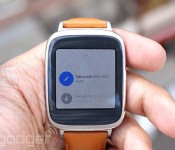
If you think your school is overly cautious when it makes you ditch your phone before a big test, you haven’t seen anything yet. BuzzFeed News has learned that multiple universities have issued blanket bans on all watches during exams in case students are wearing smartwatches they could use to cheat. According to London’s City University, it “wouldn’t be practical” to have proctors checking every watch to make sure it’s analog — it’s easier to make you write with bare arms. The move is unfortunate if you’re used to glancing at your watch to gauge your progress, but it does make sense given how easy it is to get memos, text messages and other unfair advantages on your wrist. Whether or not you think smartwatch cheating represents a major problem, it’s probably a good idea to leave that Pebble or ZenWatch at home during your mid-terms.
Filed under: Wearables
Via: SlashGear
Source: BuzzFeed News

Top SMS apps for Android
One of the beauties of Android is the option of choice, and not having to stick with a certain app or ability that comes with the phone. Whether you use your phone’s stock messaging app or Google’s preferred Hangouts app, there are many more options in the Google Play Store. Let’s check out our favorites.
 EvolveSMS

Evolve stands out as one of the best apps to utilize Google’s Material Design principles the best. The slide-out bar to the left is very convenient for those who want to access other contacts quickly, and switching between different contact messages is as easy as swiping left or right on your messages thread. Colors of your navigation and notification bar will change depending on what theme color you want throughout the app, or you can turn that off in the settings for either a transparent white look or the default black bars. The app also lets you choose a custom background for message threads from your gallery if you want. Evolve also includes an amazing feature of pop-up messaging to allow you to read and reply to messages on top of another app. With the speed it offers, as well as the customization and features you won’t find in most messaging apps, Evolve is a must try.
 Textra SMS

Textra focuses on speed and simplicity, and does that by offering a very fast way to get in and out of text messages without the hassle of navigation. Textra also offers the pop-up notification, similar to Evolve SMS, that you simply tap for a small window to open up on top of your current app, and you can swipe the window out of the way if you want to get rid of it. Textra gives you a theme color chooser and a number of other customization options including text size, dark mode, Emoji styles and more. This SMS app is perfect for people who want a fast, eye-appealing alternative to their stock messaging app.
 Chomp SMS

Chomp comes from the same developer as Textra, and for the most part it’s a very similar app. It lacks a couple Material Design implementations that Textra offers, but one feature I’m fond of which some people may really like, is the more advanced Quick Reply Popup which you can customize heavily, including the ability to awake your phone, quick add a contact’s number or quick reply right from the popup. Chomp also gives you the option of creating a Quick Compose Shortcut, allowing you to create a shortcut either by holding your search button (if you have one) or placing the option in your notification drawer to create a new message fast. Custom background are included in the app as well and the theme color of the user’s choice.
 hello
hello

Hello is an SMS app that stands out to me more than others because of its trademark tabs page you’ll find on the left side of the interface. It makes switching between threads incredibly easy instead of having to swipe around or having to press the back button a few times. Hello is also heavily geared towards people who are big into sending a lot of picture messages, as it gives you a very quick and easy way of capturing pictures right from your messaging thread if you have hellocam on, but leaving this feature on can be quite a battery drain since the messaging app will always be using your camera. Hello is also more than just an SMS app, as it wants your friends to use the app too. If they do, you can message them with data rather than SMS. Dark Mode is also present in Hello, a feature that absolutely needs to be seen in all SMS apps.
 HoverChat

One of the first apps to give us the ability of floating chat heads is HoverChat, formally known as Ninja SMS. When a new message arrives, it will come in the form of a Hover Head on your screen where ever you are, and by tapping it you can open a small window for viewing and replying. HoverChat lets you customize many aspects of the app, including the shape and size of the Hover Heads, and you can get new ones at their own HoverChat Store. Full Android 5.0 optimization has not come to HoverChat yet, so there aren’t any Material Design qualities present, but rest assured, this is one of the most advanced SMS apps out there.
 Messenger

Facebook’s Messenger app just got a whole lot more popular ever since the social media giant made it mandatory to install the app to message friends on the go, but that’s not necessarily a bad thing. Messenger is a very polished app full of nice animations, sounds and style to make you want to keep using it. It’s full of great features and abilities that make group and picture messaging fun and easy. The app supports MMS and SMS if you’re contacts aren’t on Facebook. Messenger can take some getting use to, however. There’s the annoyance of logging into Facebook just to text people and contact synchronization can be a very unwelcomed pain. Facebook’s chat heads are extremely nice, but there seems to be one small thing that needs to be fixed when dragging chat heads out of the way, and that’s the awkward gradient that ends right on top of everyone’s transparent navigation buttons. Regardless, Messenger is a fantastic app.
 GoSMS
GoSMS

The development team behind the series of “Go” apps also has a very popular SMS app. GoSMS has tons of customizable features, and a huge store that holds the most amount of themes than all the other SMS apps. GoSMS has the Popup ability as well for messaging on top of other apps. Messaging stickers, themes, fonts and more can be downloaded at the store, so you know this app can be suited just the way you want it.
I did not include Google’s Messenger or Hangouts on here because they are the default app for many Android phones, but let us know in the comments if you agree or disagree with these apps and which ones you prefer!
(function() var script = document.createElement(‘script’);script.src = ‘https://stacksocial.com/widget.js?publisher=androidguys&type=editorial_post_widget_preferences’;script.async = true;var entry = document.getElementsByTagName(‘script’)[0];entry.parentNode.insertBefore(script, entry);)();
http://www.androidguys.com/pubgalaxy/728×90.html
The post Top SMS apps for Android appeared first on AndroidGuys.
British universities ban smart-watches, more likely to follow

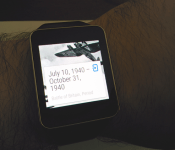
It’s pretty obvious that this day would come, and like their smartphone parents, smart-watches are appearing on the blacklist of items you cannot take with you into exams.
Cheaters beware, test proctors have their eyes on your wrists!
City University of London recently spoke with Buzzfeed about it joining other British universities in outlawing the smart timepieces, in a move to thwart stumped students looking to get some answers to arbitrary questions.
The more interesting part is that these universities are planning on eliminating all watches from exams. To remove any doubt for proctors, any kind watch will not make it past the doors to your classroom during test days.
City University reported the following to Buzzfeed:
Students are already asked to place mobile phones in a plastic wallet under their desk, so we adopted the same procedure for watches. Students either don’t wear them to an exam venue, or they remove the watch in the venue and place it in the plastic wallet.
We also increased the number of large wall clocks available in the examination venues, bought small desk clocks for any student who requests one as well as a small quantity of RNIB-approved desk clocks for use by any student who needs one.
We regularly review exam procedures to ensure that no student has an unfair advantage over any other student. We are really pleased that our students have adopted this new policy so readily.
I’ve yet to see a similar policy put into place at my local universities, but I imagine the day is coming! What about you: do you attend a school that has smart-watches banned during testings?
Source: Buzzfeed
Come comment on this article: British universities ban smart-watches, more likely to follow
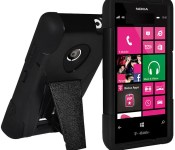
Don’t miss your chance to snatch a Lumia 521 dual-layer case for just $8.95 today!

This Nokia Lumia 521 hybrid case provides serious protection against drops and scratches while sporting a built-in kickstand that can be used for watching movies and more. The inner-most layer is made of a shock absorbing silicone that sits underneath a thick plastic exterior.
 AIVAnet