


Top Windows Phone games from Gameloft

While we will see a few complaints here and there, for the most part the Windows Phone Store is full of quality gaming titles from independent developers and the larger software companies. One of the more popular companies is Gameloft.
Gameloft’s gaming portfolio contains over forty gaming titles, most of which are rated at four stars or better. Sure, you have some flops like Captain America: TWS but for the most part Gameloft’s titles are worth having in your Windows Phone gaming library.
For this week’s roundup, We’ve plucked four of the gaming titles from Gameloft’s collection that include a war game, city builder, a puzzle game and a Medieval sports game. We’ll also toss out a few honorable mentions for good measure and as always, we have the comments ready and waiting for your recommendations.

Comic: Big wheel keep on turnin’
 Happy Saturday, iMore! Because Rich is awesome, he’s letting us run some of his Mac-themed comics from the Diesel Sweeties archive on weekends. Bonus comics, woo! Today: Classic is tired of being housebound. (If you’re buried under snow in the northeast, we’re sure you can relate.)


Read more comics from the Pixel Project on iMore.com.
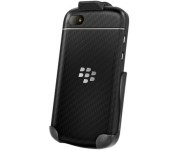
Today this quick-release holster for BlackBerry Q10 is only $14.95!

The Seidio Spring Clip Holster holds your BlackBerry Q10 securely in place, and then lifts for quick access. Both the felt liner and the face-in design protect your screen from scratches, too. The rear clip can be rotated in both vertical and horizontal positions for optimal comfort. Get yours today and save 50%
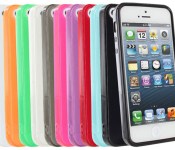
Grab a glossy skin case for your iPhone 5/5S on the cheap today—only $4.95

The TPU gloss finish abridges your iPhone 5’s subtle contours, giving you the sleek look of a hard case and the shock absorption of a soft case. This skin case is fashioned from multiple thermoacrylics forming a cover that’s highly elastic and resistant to oil, corrosion and abrasions.
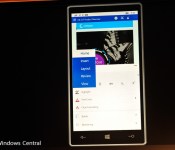
Cortana for Office on Windows Phone becomes a reality in these new leaked screenshots

Some screenshots that reportedly show the recently revealed Work Assistant app for Windows Phone in action have surfaced. The app, which first appeared in the Windows Phone Store in December, is currently an internal Microsoft project that is supposed to add Cortana voice integration features for Office users.

Today only: Save 47% on this textured hard case for Lumia 920

It’s textured, solid and slim enough to keep everyone appreciating the original design of your Lumia 920; the Snap-On Case from Amzer gives you protection you can count on. The back sports a unique texture that enhances your grip. Get yours today for only $7.95!

Carphone Warehouse selling the Lumia 535 with exclusive green color in UK

The Lumia 535 has been on sale in the UK from some retailers, including Argos, for a little while. Now Carphone Warehouse has begin selling the budget-priced Windows Phone for £109.99 without a contract, and is apparently the only place in the UK to get the phone in an exclusive green color.

How to type special characters and symbols on your iPhone or iPad

What you see when you first glance at the iPhone or iPad keyboard are the regular letters, numbers, and symbols you’re most likely to use in everyday communication. There’s a whole lot more, however, lurking just beneath the surface, including accented (diacritic) characters, ligatures, extended punctuation, and special symbols.
Accents include acute, grave, circumflex, caron/wedge, double acute, and double grave, dots and rings include umlaut and over ring, strokes include macrons, overlays include crossbars and slashes, curves include breve and tilde, and subscript curls include cedilla. Letters include eszett, Special symbols include degree, en dash, em dash, bullet, Euros, Pounds, Yen, and Won. Punctuation includes ellipses, carets, and more.
How to insert special characters and symbols on your iPhone or iPad
- Tap the letter, number, or symbol that contains the alternative you want to access
- Wait for the popup selector to appear
- Slide up and onto the special character or symbol you want to insert
- Let go

List of special characters and symbols available on iOS
Here’s a list of all the currently supported special characters and symbols on the iOS English language keyboard.
- e: è é ê ë ē ė ę
- y: ÿ
- u: û ü ù ú ū
- i: î ï í ī į ì
- o: ô ö ò ó œ ø ō õ
- a: à á â ä æ ã å ā
- s: ß ś š
- l: ł
- z: ž ź ż
- c: ç ć č
- n: ñ ń
- 0: °
- -: – — •
- /:
- $: € £ ¥ ₩ ₽
- &: §
- “: ” ” „ » «
- .: …
- ?: ¿
- !: ¡
- ‘: ‘ ‘ `
- %: ‰
Note: Some apps include additional inserts. For example, if you touch and hold . in Safari, you’ll get options for .com, .org, and regional domains.
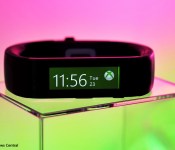
unBand unleashes the Microsoft Band for PC users with custom backgrounds, data export

The Microsoft Band fitness device is a cool piece of technology, but it can also be limited if you don’t have a Windows Phone. A new third party app called unBand is now available that allows desktop PC owners to unlock some hidden functions of the Microsoft Band, including Me Tile images and data export.

Camera360 won’t go to Windows 10 as Camera360 Sight takes its place

The developers behind Camera360, the popular photo app for Windows Phone, have just announced that the app won’t be updated to support Windows 10 when it is released later this year. However, the more advanced Camera360 Sight, which officially launched in December, will continue to be updated as expected.
 AIVAnet