



From the Editor’s Desk: Two legs, four legs …

Google’s latest Android commercial brings a very swift and different reaction — but why?
It’s funny how those of us with two legs respond to those with four in a very different way than we do each other. That’s not exactly a new thought, and I don’t think I’m having it just because we got a new addition to our home last week. (That’s Max and my wife, Shannon, above.)
Google’s put out three compelling commercials in the past few months. October saw the Andrew WK-themed “And You” spot. At the same time we also got the much more subdued “Be Together. Not the Same.” spot. A couple of moving spots, to be sure, and they very much hit me in the feels at the same time. Those commercials, however, also came with a pretty immediate response from those who couldn’t stand the sight of same-sex couples for 2 seconds in each 1-minute video and decided to email us about them, thinking we were Google. (We’re not alone in that phenomenon.) They petered out around 18, I believe.
The reaction to the latest “Android: Friends Furever” commercial was even more immediate. Animals of all sizes and breeds, hanging out. Playing. Wrestling. It’s a great commercial and a fun watch for anyone. The Alan-A-Dale-penned “Oo-de-lally” soundtrack is perfect. And, again, we immediately began receiving emails.

Trivia Crack: Top tips, hints, and cheats you need to know!

Trivia Crack is an insanely addicting trivia game that lets you compete against your friends and other random opponents to see who really is smarter. You’ll answer questions across six different subjects in order to be the first to collect all six crowns. Along the way you can use challenge mode to steal crowns away from your opponent. The victorious winner will then receive coins and other prizes. These are our top tips, hints, cheats, and strategies to come out on top in Trivia Crack rankings every time!
- Free with ads – Download Now
- $2.99, ad free – Download Now
1. Tackle your weakest subjects first

When choosing a crown, it’s always a good idea to tackle your weakest crowns first. This way, you may get lucky the first try. Also, if your opponent answers the question correctly, you have a chance right from the beginning to try and steal that crown. Obtaining the subjects right from the beginning that you aren’t particularly good at means the rest of the game is typically a breeze.
2. If you’re going to buy anything, buy unlimited lives

Sure you can buy coins or free spins but honestly, if you have unlimited lives there really isn’t a reason. Maybe $24.99 is a bit to steep for some folks but it’s one time and you can play all you want.
I would normally tell you to bypass something like this if changing the date and time in settings worked like it does in so many other games. Sadly, Trivia Crack is immune to this kind of exploitation so if you want unlimited free lives, you’re going to have to pony up some real cash.
3. Help rate questions to gain a slight advantage

In the menu section you can choose to help Trivia Crack out by rating questions. Not only does this feed more questions into the general pool a lot quicker, it gives you a sneak peek at what’s coming. So next time you’re out of lives, skip paying $0.99 to refill them and rate some questions instead. You’ll most likely see them later so it serves as good practice and is almost as fun as playing in the first place.
Not to mention, you’re also helping weed out horrible questions from showing up.
4. Use challenges as a way to complete weak areas

If your opponent already has a crown that you need and it’s a sore subject for you, take every opportunity you can to steal it when given the chance. Otherwise you’re just depending on odds of landing on that trophy and getting it right. Increasing your chances in your weak subjects is always the best route.
5. The Airplane mode cheat
The Airplane mode cheat has mixed results for me and many others but feel free to give it a try. The theory is that if you follow these steps, a wrong answer won’t be counted and the question will repeat itself allowing you to answer correctly after seeing the answer:
- Let question load
- Swipe up Control Center and toggle ON Airplane mode
- Answer question and see the correct answer
- Trivia Crack doesn’t record the answer since you aren’t connected to the internet
- Now that you know the correct answer, turn OFF Airplane mode
- Open Trivia Crack again and the same question should repeat, answer it correctly this time
Keep in mind that this pretty much takes the fun out of the game. So if you’re desperate to win a particular game, take a stab at it. Otherwise, this kind of negates the point of playing if you do it with every question.
6. Screenshot particularly difficult questions for review

If you have a difficult question come up that you know you won’t remember in the future, screenshot it. Repeat this with questions you don’t think you’ll remember. Now create an album on your iPhone or iPad with Trivia Crack screenshots. When you’re bored, head into that album and read over those questions. Questions eventually repeat in Trivia Crack so just like anything, memory recall is important.
7. Turn Lock screen notifications off

Trivia Crack alerts you of pretty much any little thing. Turn off Lock screen notifications if you don’t want your battery to take a hit. You can still swipe down from Notification Center and see all your alerts and you’ll still see banner notifications while you’re using your iPhone or iPad. But doing this will save you some major battery. You’ll thank me later.
Your Trivia Crack tips, hints, and cheats?

If you’re as addicted to Trivia Crack as we are, what are some good tips, hints, cheats, or general strategies you can share? Let me know in the comments!
<!–*/
.imageleft
float: left;
margin: 0 25px 0 0;
.imageright
float: right
margin: 0 0 0 25px;
.screenshot-16×9
height: auto;
width: 88.97%;
.screenshot-16×9.imageleft,
.screenshot-16×9.imageright
width: 50%;
.screenshot-4×3
height: auto;
width: 66.66%;
.screenshot-4×3.imageleft,
.screenshot-4×3.imageright
width: 50%;
/*–>*/

Bing’s Cricket World Cup coverage includes predictions, polls and more

The 2015 Cricket World Cup in Australia and New Zealand is almost upon us and Bing will be giving you some great coverage of the tournament. Searching for “ICC World Cup 2015″ on the Bing homepage will bring up the content shown up top where you’ll get match predictions, standings, stats, polls and trivia on a day by day basis as the competition progresses.
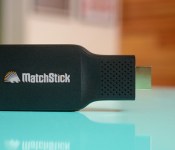
Matchstick delays its Firefox OS media stick to include Netflix streaming

I hope you weren’t in too much of a hurry to snag Matchstick’s Firefox OS-based streaming media dongle. The fledgling company has delayed its namesake device to August in order to not only upgrade the hardware (to a quad-core processor and better WiFi), but to add support for anti-piracy protection. As the team explains, Netflix and other “premium” services won’t work unless you have some kind of digital rights management (DRM) — it’s hard to sell a media stick that can’t deliver the most popular content. The setback won’t please you if you’re an early backer (or see DRM as a blight on open standards), but it will make Matchstick’s $25 device more useful to viewers who’d otherwise pick up a Chromecast to get their online video fix.
Filed under: Home Entertainment, Peripherals, HD
Via: GigaOM
Source: Kickstarter

Nexus 9 gets official CyanogenMod 12 nightlies

Google’s latest tablet, the HTC built Nexus 9, is proving to be a great device for many users. It comes with Google’s vanilla flavor of Android, now up to Android 5.0.2 Lollipop, but there is now another option out there for you. Cyanogen Inc. has released CyanogenMod 12 nightlies for the Nexus 9.
The official support for the Nexus 9 is a welcome addition to the available custom ROMs out there. Of course, as we’ve discussed a few times in the last couple weeks, CyanogenMod 12 nightlies are the alternative ROM maker’s beta stream, a stable release of CM 12 is still not available. You should expect to see a few hiccups here and there, but we understand things are running fairly well at this point.
CM 12 is based on Android Lollipop as well, meaning that flashing to this new OS should not be a drastic change from your current stock Android 5.0.2 Lollipop experience. Do remember that you’ll need an unlocked bootloader and a custom recovery to continue. Luckily, Nexus devices are well supported for this sort of stuff, if something goes wrong, flashing back to stock is rarely a difficult task.

Cyanogen has been shaking things up lately, they have all but split ways with OnePlus, the manufacturer of the self proclaimed flagship killer OnePlus One handset. Then they go ahead and throw their gloves to the ice to take on Google themselves, seeking to launch a Google apps free Android experience. Microsoft is said to be getting into this mess as well, throwing a bit of cash at Cyanogen.
With all of these changes, we almost wondered if pushing CM 12 to the Nexus 9 is a move to attack Google. But then we remember, Cyanogen has been rocking their OS on most high end devices around the globe already, no need for theatrics, CM 12 on the Nexus 9 is just business as usual.
Head on over to the CyanogenMod 12 nightlies page to grab your copy of the new system image, and get ready for your new daily updates.
Nexus 9 owners, will you be flashing CM 12 nighlties on your tablet?
Why we won’t be seeing Google Glass for awhile and why it’s going to look different next time around
Google Glass has had an interesting run, to say the very least. It was the toast of the tech industry when it was announced in 2012, featuring in all kinds of mainstream media (even The Simpsons), but the honeymoon ended much too early. Rumours that the wearable device would be available commercially soon were shot when […]
The post Why we won’t be seeing Google Glass for awhile and why it’s going to look different next time around appeared first on AndroidSPIN.

UK government reveals its hacking guidelines

It’s no secret that numerous countries see hacking as a viable security strategy, but the British government has been reluctant to admit as much. Ask it about GCHQ’s ability to mess with communications, for example, and it will only say that whatever it does is legal and necessary (even if it isn’t). The nation’s leaders just got a little more honest, however: the UK Home Office has published the guidelines that law enforcement and spies follow when using “equipment interference” (read: hacking) to get into phones and PCs. The rule set largely deals with high-level issues such as proportional uses of hacks, data retention and the validity of warrants, but it’s a rare acknowledgment that these digital intrusions even take place. It goes so far to mention that the UK intercepts and bugs gadgets it wants to spy on, much like its American counterparts. Minister James Brokenshire claims that the government is being “as open as it can be” about its security policies by publishing the documents, and this is certainly a milestone given earlier secretiveness.
With that said, this is as much a defensive move as it is an olive branch. The Home Office is quick to note that the publication “does not confer new powers,” but it does try to justify those powers. It’s reportedly “vital” that security agencies have these permissions to stop terrorists and other major threats. Officials want to reframe their hacking activities in more favorable national security terms, rather than leaving the discussion to whistleblowers and other critics who see government hacking as a violation of privacy.
[Image credit: Matt Cardy/Getty Images]
Filed under: Internet
Via: Eric King (Twitter), Mashable
Source: Gov.uk

High-tech Japanese hotel to employ human-like robot staff

Going to Japan? Here’s a bit of advice: if you’re absolutely terrified of eerie human-like robots, think very hard before visiting Nagasaki prefecture’s Henn-na Hotel that’s slated to open its doors in July. Why? Because the high-tech hotel will employ 10 robots, three of which are multilingual gynoids that look like they were shipped straight from Uncanny Valley. Kokoro, the robots’ manufacturer, calls them “actroids,” and yes, you’ve seen us feature them in the past. Thankfully, they’re stuck behind the check-in counter as receptionists, so you can just get that part done as fast as possible. Or, you can try to flirt for a room upgrade if that’s your thing, since they can apparently establish eye contact and respond to body language.
Once you’re done checking in, an industrial robot similar to the one found in Yotel New York will stash your luggage. The remaining robots in the staff list, on the other hand, will take care of your other needs, such as making your coffee, cleaning your room or delivering your laundry, among many other tasks. Other than the robots themselves, the hotel’s high-tech features include the use of facial recognition tech to open guest rooms, a system that detects body heat to auto-adjust room temperatures and the use of tablets to call for room service. Henn-na (Henn means “strange” or “change;” feel free to pick a translation) will also use solar power and implement energy-saving methods to keep costs and room rates low.
This hotel, by the way, is located within Huis Ten Bosch, a Nagasaki theme park made to look like The Netherlands. It’s a two-story structure with only 72 rooms, that’s why you’ll have to bid for the right to stay during peak periods. The good news is that bids are capped, so the rates really aren’t that bad, especially for Japan: single occupancy rooms begin at $60 per night, while the highest possible price for a triple room is $153. In 2016, 72 more rooms will be available once the second phase of construction is done, and they’ll most likely be launched with even more robotic employees.
Those who prefer to interact with human hotel staff will be glad to know Henn-na will open with 10 employees made of flesh and blood. Its developers are hoping that machines can run 90 percent of the hotel’s operations in the future, though. They also want to build 1,000 similar hotels worldwide, hopefully after we’ve already found a way to make sure AIs never ever turn into Skynet.
[Image credit: Henn-na Hotel]
Via: Washington Post, Telegraph, Japan Times, CNN
Source: Nikkei, Japan Tourism National Organization, Hen-na Hotel

What would you change about Apple’s Calendar app?

Calendar was one of the original apps on the original iPhone. It started off simply but over the years it added Exchange support, landscape mode, a week view, a year view on iPad, the ability to touch and drag events around, and more. Apple renamed iCal on the Mac to Calendar to match the iPhone and iPad. And, after an era of heavy design, Calendar also got a clean, crisp makeover as part of the overall iOS redesign last year.
That’s what Calendar is, but we want to know what you’d like it to be?
- Natural language text entry
- Calendar extensions for third-party apps
- Unified Calendar/Reminders app
- Increased gesture support
- Integrate with online services
- Easier Calendar subscriptions
- Dark theme
- Integrated weather
- Attachment support
If Apple asked you what you wanted in Calendar for iOS 9, what would you tell them?

This Galaxy Note 3 case packs 2 layers of durable protection and is only $9.95
 With this Note 3 hybrid case you get serious protection against drops and scratches and a built-in kickstand that can be used for watching movies! The inner-most layer is made of a shock absorbing silicone that sits underneath a thick plastic exterior. Get yours today and save 50%
 AIVAnet