


HTC closes last year’s final quarter with small profit, still maintains growth

While HTC did finish the final quarter of 2014 with a profit, the amount was not very much. The company published its Q4 2014 report this morning and it shows that HTC generated $1.5 billion in revenue before retaining just $15.9 million. It did prove to be HTC’s third consecutive quarter with a profit, so things are starting to look up for the Taiwanese company. And year-on-year growth for revenue was up 12%.
The following is what CEO Peter Chou had to say regarding the performance:
HTC finished the year with a third consecutive quarter of profitability, and is well-positioned to build on that solid platform in the year ahead by ensuring our portfolio is highly targeted and our message clearly communicated. Key to our improved performance was our ability to offer tailored product mixes at suitable price points within the regions, which enabled us to closely address the needs of specific markets.
Last year was certainly a step forward for HTC. Three critically acclaimed devices launched throughout the year: HTC One (M8), HTC Desire EYE, and RE Camera. Rather than flooding the market with devices, HTC has decided to target specific consumers. The One (M8) was the flagship handset for a bigger audience. The Desire EYE was targeted for a crowd that has an interest in photography/selfies. The RE Camera was a versatile tool for snapping photos and recording videos. In its report, HTC says that they embarked on a strategy in the quarter to extend its reach in mobile lifestyle.
Source: HTC (PDF)
Come comment on this article: HTC closes last year’s final quarter with small profit, still maintains growth
Corning’s ‘Project Phire’ takes on sapphire with super scratch-resistant, durable displays

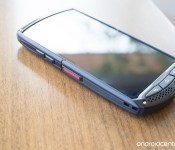
It looks like displays on future Android phones are about to get a whole lot more resistant to scratches. Corning announced today that it is working on a new type of glass for screens that is almost as scratch-resistant as sapphire displays (such as that on the Kyocera Brigadier, pictured above), while retaining the durability of its Gorilla Glass.
Philips Pulls Defective 1.7.1 Hue App Update After Crashing Reports [iOS Blog]
Philips released an update to its Philips Hue app for iOS yesterday afternoon and users quickly found that the new version of the app continually crashed, making it impossible for them to control their Hue lights.
As of this morning, Philips has removed the app from the App Store to prevent it from being downloaded, but thousands of Hue customers have already updated their iOS devices and have taken to the Philips Hue Facebook page to register their complaints.

Philips is aware of the issue and has said in a Facebook message posted six hours ago that the company is “taking immediate action to fix it” with an upcoming 1.7.3 app that will be available “shortly.”
We are aware of an issue with the latest Philips hue app update when used with iOS 8.0 software. We’re very sorry if you’re having problems and are taking immediate action to fix it.
In the meantime, please do not update the Philips Hue app to 1.7.1., nor re-install the Hue app, or reset the Hue bridge.
Users who have installed the faulty 1.7.1 update can continue to control their Hue lights from wall switches, the Hue Tap, and from third-party apps. It’s also possible to control lights from the MeetHue.com website. At this time, Philips has not given a new estimate for the launch of a fixed version of the app.
Deal Alert: Grab an Anker 40W 5-Port USB Charger for only $38.99 (22% off)

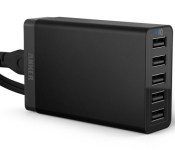
If you’re constantly running out of USB ports to plug in your various electronic devices, we suggest you try a USB charging hub. It’s a super convenient way to charge all of your devices simultaneously without worrying about running out of wall plugins. If you have this problem, Amazon is currently selling the Anker 40W 5-Port USB Charger at a significant discount.
This charging hub has five separate USB ports, allowing you to charge smartphones, tablets, smartwatches and anything else that requires a USB input, all at the same time. It will detect which device you have plugged in, and will charge your device with the proper amount of amps. The best part? It comes with five USB cables included in the package (three 1ft, one 3ft and one 6ft).
This USB hub has great reviews across multiple different retail websites, so you might not want to let this deal slip away. The charger is currently being offered for $38.99, which is 22%% off its normal retail price. And with all of the USB cables included in this package, this is quite a steal. Head to the link below if you’d like to grab one for yourself.
Buy the Anker 40W 5-Port USB Charger for $38.99 from Amazon
Hands-On Review of Oral-B’s iPhone-Connected Bluetooth Smart Toothbrush [iOS Blog]
Bluetooth-enabled appliances and electronics that connect everyday household items to smartphones and tablets are becoming increasingly popular, giving us a whole range of connected things — thermostats, coffee makers and mixing bowls, cars, and even connected toothbrushes, like the Oral-B SmartSeries toothbrush lineup, which features Bluetooth toothbrushes that are compatible with an iPhone app.
Oral-B showed off its first smart toothbrush in early 2014, and began shipping the $125 Oral-B Pro 5000 SmartSeries with Bluetooth later in the year. We caught up with Oral-B at CES in 2015 and got our hands on an Oral-B Pro 5000 so we could share the connected toothbrush experience with MacRumors readers.
Connected toothbrushes are set to take off in 2015, so this is a good time to explore available options and see what they can do for you. Oral-B has a second higher-end model coming out this year, and the Kolibree toothbrush, which gamifies brushing, is finally launching in a few months.
What’s in the Box
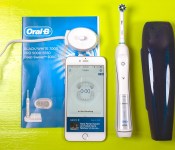
The Oral-B Pro 5000 SmartSeries with Bluetooth ships with the toothbrush itself, a brush head, a stand for charging, a travel case, and a guide that walks you through how to pair the toothbrush to an iPhone. There’s also a stand to hold multiple brush heads, but as you’ll see later in this review, the brush and its accompanying app isn’t really suited for more than one user.
 Box contents, along with iPhone
The Toothbrush
The Oral-B Pro 5000 SmartSeries with Bluetooth is essentially the company’s standard Oral-B Pro 5000 toothbrush with a Bluetooth upgrade. This brush has been around for quite some time and has racked up thousands of reviews on Amazon.
For that reason, we won’t go into a great amount of detail on the brush itself, but we’ll hit a few major points that are worth knowing. First of all, the Oral-B Pro 5000 is a rechargeable electric toothbrush that that oscillates and rotates to keep your teeth cleaner than a manual brush.
Read more 

Chrome OS devices for education and business can now be locked remotely if lost or stolen
![Samsung Chromebook [3] - aa](https://i2.wp.com/cdn01.androidauthority.net/wp-content/uploads/2013/09/Full-body-shot-Samsung-Chromebook.jpg?resize=640%2C426)
Google has just issued an update to the Chrome OS Admin Console that should come in handy for educators and businesses. The update enables both business/enterprise and education devices running Chrome OS to be locked remotely if the devices are lost or stolen. To do so, ask your IT admin to lock the device remotely from the web-based control system. If you’re an IT professional that works with Chromebooks, head to this link to learn how.
Once the Chrome OS device is in its disabled state, the thief will be presented with the image below upon booting up the Chromebook. The person who turns on the device will be presented the lock screen with the school’s or company’s phone number and address, likely to shame them into returning the device back to its original owner.

Unfortunately, this feature is disabled for personal use Chromebooks, so don’t think you’re in the clear if you happen to misplace your computer. There’s no telling whether or not Google will add a similar feature to personal Chromebooks in the future, but we’ll be sure to update you if they do.
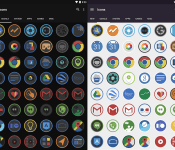
These should be your new icon packs.
For those of you that do not change your icon packs as often as I do you may not be familiar with icon designer Stealthychief. He has quite the icon portfolio under his belt with designs that range from colorful and comical to modern and sleek. Ovo and Devo are his latest work and they definitely keep up with his other work in terms of quality and aesthetics by offering a nice clean circular design with sharp colored borders. The two icon packs do not differ in overall design with the only real difference being the fact that Ovo is skinned in a light theme and Devo in a darker one.

Ovo and Devo are sure to fit any homescreen configuration with over 2000 HD icons and various wallpapers that are included in the app. You can test out the apps by using the widgets below and if you decide that they are not the right icons for you make sure to browse through Stealthychiefs other icons packs where you will surely find something that will look good with your new wallpaper.
(function() var script = document.createElement(‘script’);script.src = ‘https://stacksocial.com/widget.js?publisher=androidguys&type=editorial_post_widget_preferences’;script.async = true;var entry = document.getElementsByTagName(‘script’)[0];entry.parentNode.insertBefore(script, entry);)();
http://www.androidguys.com/pubgalaxy/728×90.html
The post These should be your new icon packs. appeared first on AndroidGuys.

Samsung sets world record for most selfies taken in 24-hours

Earlier today, Samsung announced that it has officially broken the Guinness World Record for the most selfies taken in 24-hours. The attempt took place last week in South Africa, following the launch of the two Galaxy A series smartphones. The South Korean company assembled ‘selfie’ booth’s, armed with the latest Galaxy A3 and A5 handsets, in all the major shopping centres in Cape Town and Johannesburg.
To encourage passers-by to participate, Samsung gave away 100 Galaxy A smartphones and masses of selfies sticks — clearly an offer they couldn’t resist. This resulted in a whopping 12, 803 selfies being snapped by members of the general public, which turns out to be almost 3,000 more than the previous record.
If you were lucky enough to take part in this small slice of Samsung history, or even if you weren’t, why not head on over to the company’s website where you will find the full gallery of selfies taken on the 30-31 of January, 2015?
Come comment on this article: Samsung sets world record for most selfies taken in 24-hours

Space Age: A Cosmic Adventure lands on the Mac App Store

There’s some good news today if you enjoyed the Space Age: A Cosmic Adventure experience on iOS: the retro-futuristic point-and-click space adventure has finally made its way to the Mac App Store.
For a refresher, Space Age: A Cosmic Adventure is set in a futuristic version of the year 1976, and puts you in the shoes of a team of space explorers venturing to the planet Kepler-16. Shortly after landing, the team discovers that there’s something amiss on the alien planet.
Here’s a rundown on what you can expect from Space Age should you give it a go:
- Many hours of challenging gameplay
- Multiple characters, controlled individually and in small groups
- Tactical maneuvering and strategic planning
- Varied environments and storylines
- Puzzles, mysteries, challenges
- Dialogue, inventory, sneaking. Just like the good old days.
- Action, fun, and… romance.
If you’re still curious about Space Age, we reviewed the iOS version back in November and came away very impressed with its nostalgia-inducing gameplay, so be sure to give that a look here. If you decide you want to dive into the game for yourself, it can be had for $4.99 from the Mac App Store link below. As an added bonus, the game will sync with the iOS version if you already have it as well.
- $4.99 – Download

iMore show 442: Photos for Mac beta!
The iMore show brings you everything you need to know about the week in iPhone, iPad, Mac, and Apple! On this episode The Photos for Mac beta is here and Rene and Serenity have spent as much time as possible testing it out. Now they’re here to answer questions and give (preliminary) opinions! Also: New columns!
Support the iMore show: Go to lynda.com/imore to start your free 10-day trial! Go to smilesoftware.com/imore to get PDFpenPro 7!
Show notes
- Photos for Mac first look: The future of ubiquitous photography approaches
- What you need to know about Photos for OS X
- Apple and the agents of change
- Kick procrastination’s butt with your iPhone
- Apple Retail roundtable: The stores of today and tomorrow
- Anybody who can’t make money off iPads or TUAW should get out of the money-making business
 AIVAnet