


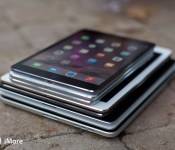
What if the iPad ran iPad OS?

The Apple Watch runs WatchOS. It’s a stripped down version of iOS, optimized for a much smaller screen and much smaller battery. It also has its own, distinctive look and feel, including the Home screen, its own interaction methods like the digital crown and force touch, and its own, distinctive capabilities optimized for a wearable. In contrast, when Apple decided to launch the iPad, they used iPhone OS. It was originally suggested they use the exact same single-column interface, but because it wouldn’t make efficient use of the much larger screen, they decided to implement a dual-column interface instead. Yet the Home screen and design language remained the same as the iPhone as did the interaction methods and capabilities.
Imagine instead, like the Apple Watch, the iPad ran its own distinct version of iOS: iPad OS. Rather than stripped down version for smaller screens and batteries, imagine it ran an amped-up version that really took advantage of bigger screens and batteries, with a Home screen, interaction methods, and capabilities optimized for a tablet.
The original iPad was famously dismissed as being “just a big iPhone,” yet that was its genius. It gave everyone for whom traditional computing was unapproachable, inaccessible, or intimidating something something that comforted and empowered them. Those who tried to compete against the iPad by offering more desktop-style interfaces have, to put it mildly, failed.
To keep the iPad as a mainstream point of entry into the world of computing, its primary interface layer has to remain approachable, accessible, and friendly. Apple has been very careful to make sure that, as more “advanced” features have been added to iPad and iOS — like the app switcher, notification center, control center, and extensibility — no one ever has to see or use them unless they seek them out and want to.
An iPhone can just be your phone, camera, and music player if that’s all you want or need. Likewise, an iPad can just be your web browser, ebook reader, and video watcher.
That’s exactly how the iPad was originally pitched: As being better than an iPhone and MacBook at those kinds of tasks. Yet the iPad now exists in a world of big screen iPhones and lightweight, long lasting MacBooks.
The iPad has been given some distinct features beyond the split view, of course. Apple added multitouch navigation gestures and USB adapters uniquely for the iPad. Yet Apple recently duplicated the split view controller in landscape mode on the iPhone 6 Plus as well.
At the same time we now have an iPad Air 2 with and Apple A8X processor — tri-core CPU, octa-core GPU, 2GB of RAM — and technologies like Swift and Metal that make it as fast and powerful as some laptops. We have an iPad so fast and powerful it might well exceed the capabilities currently afforded it by its software.
There remarkable apps — like Keynote and GarageBand that launched with the original iPad, and Pixelmator that launched with the iPad Air 2 — but those apps remain just that: remarkable. They’ve not become the norm. That might be a constraint of the market and not the system, but a distinct system could help unlock the potential of that market.
Rumors suggest Apple is already working on new capabilities — providing mechanisms for multiwindow apps, possibly with the ability to drag data between them. That would greatly increase the utility of the platform for people for whom productivity is important. There are also rumors of an iPad Pro with an Apple Pen, which some have come to hope would provide a digitizer to enable not only additional functionality for everyone from real estate agents to warehouse workers to enterprise sales teams, but creativity as well.
Those feel like first steps, though, not final ones.
Microsoft has been working on their Surface line of — tabtops? laplets? — for three generations (not counting the company’s previous decade-long dalliance with Tablet PC). They include not only pen and digitizer technology, but a highly integrated, detachable keyboard. Like Google with Material Design, however, Microsoft is pursuing a one-design-to-rule-them-all strategy where the Metro/Modern language gets painted across all screens, no matter the size or capabilities.
With OS X Yosemite, Apple has maintained a separate though related operating system and a separate though consistent design language for the Mac, and with the Watch OS is now doing a variant operating system and design language for the Apple Watch. The company is letting each device remain distinct and true to itself, but letting the computer and the watch work with mobile through technologies like iCloud and continuity but is also letting each device stay true to itself.
By decoupling activity from device, we move seamlessly through the range of screen and power sizes, from convenience to capability and back, depending on our needs. And that liberates the system behind those devices to better suit its needs as well. It lets there be cars and trucks, but it also introduces the possibility of an SUV.
What could iPad do if, like the Apple Watch, it had its own variant of iOS with interfaces, interaction methods, design language, and capabilities even more optimized for its size and power? What could the iPad do if it had its own iPadOS?

Should you install the Windows 10 Technical Preview on your phone?

A few points to consider before you go ahead and take the plunge
Now that February is here the big thing as yet unmarked on the calendar is the release of the Windows 10 preview for phones. We know it’s coming, but we don’t know when. It could be in a couple of days, it could be on February 28, or any time in between. But, as with the desktop preview, there are going to be a lot of people out there who want to play with it.
But there are some things to consider before jumping in with both feet. Shiny new things are always exciting but perhaps more so than a computer, the smartphone in your pocket is something you rely upon every single day. So tread carefully and consider these points first.

Apple mapping vehicles reportedly sighted in San Francisco area

A number of minivans have been spotted in the San Francisco area, and are believed to be from Apple. What makes these vehicles rather interesting is the equipment mounted on the racks, which appear to house cameras and LiDAR sensors (one on the front, another on the rear). It’s reported that Apple is looking to improve its mapping service. According to Apple Insider:
The number of cameras on the minivan — there appears to be at least 12 — seems to be a high number for a mapping vehicle, but Google’s latest-generation Street View cars use a ring of 15 5-megapixel CMOS sensors. Aside from the physical configuration, the equipment on the Apple-registered van appears to be broadly similar to the technology fitted to a Street View car.
Some, including tech analyst Rob Enderle, believe the vehicles to be part of a self-driving program, but Apple doesn’t have the necessary permits in its possession, bringing us back to its mapping platform.
LiDAR technology is also utilized by both Google, as well as Nokia for its HERE maps platform. Our friends over on Windows Central previously took a tour of Nokia’s fleet of vehicles, which also sported similar equipment. Should the reports be accurate and Apple is indeed absorbing huge amounts of data for its mapping platform, we could well be witnessing the potential birth of Apple Street View.
Source: CBS
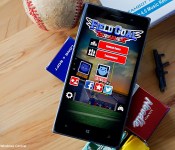
Field Goal Tournament for Windows Phone, aiming for the middle of the uprights

Field Goal Tournament is a challenging, casual sports game that is available for Windows Phone. The premise of the Windows Phone game is, as you might guess, is to kick field goals. It may not be a full game of American Football but a fun game nonetheless.
There are two gaming modes, a variety of football stadiums to kick in and plenty of crosswinds to contend with. Available for low-memory Windows Phones, the game may not be something to sit down with for hours on end but if you are in the mood for a little pigskin action, Field Goal Tournament is a nice title to have in your Windows Phone gaming library.

Kick procrastination’s butt with your iPhone

Welcome to the first edition of our new experts column on iMore! Every Wednesday we’ll be bringing you the experience and insights of the very best people in health and fitness, productivity and accessibility, design and development, music and art, education and analysis, and much, much more! And to start us off — licensed psychotherapist Georgia Dow!
Our iPhones, iPads, and MacBooks can serve as magnificent distractions. They’re mobile, so we can have them with us anywhere, and they’re instantly accessible, so we can use them any time. Thanks to all our tech, Reddit, YouTube, and Candy Crush Soda — Oh, sweet, sweet Candy Crush Soda — are always right there, only a click or tap away… Yet our tech can also help us conquer procrastination and get things done. All it takes is the right strategy and the right apps!
We procrastinate when whatever we’re supposed to be doing feels too scary, too daunting, too challenging, or just too much. We’re adverse to negative emotions so we do everything we can to avoid them and seek out positive ones instead. We do it even if it puts us behind in the long run. Mortgaging our future for our present is something we’re really, really good at.
Since most of us no longer have to hunt and gather, plant and harvest, we’re no longer exceptionally good at dealing with suffering and boredom. Our technology has made for a safer, less strenuous world. As a result, life and death struggles with predators, blights, and the forces of nature have been replaced by more mundane struggles with taxes, work, and simple boredom.
That’s made it so that even the mildest of stress can be too much for our milder resilience to handle. So, instead of laughing at the relatively trivial problems we encounter most days, we distract ourselves from them with things like video games and social networking.
A few years ago I might have cleaned my desk to avoid doing the laundry. Now I’m even more likely to check Twitter, iMessage with a friend, or play Crossy Roads.
But I’m not doing that right now. Right now I’m getting this article done, and I’m using the exact same technology to do it. So, how did I make that change?
Turn off notifications
If your iPhone is continually bleeping and buzzing it will continually be distracting you. Turn on Do Not Disturb mode and put your iPhone down, screen side on the table. That way you won’t hear or see notifications.
Turning on Do Not Disturb, or turning off all but the most essential notifications in general, will let you stay calm and focused on the task at hand.
Real emergencies are few and far between and there are settings so that the people most important to you can still get through if they genuinely need to. Non-emergenices, however, are almost constant and if you’re looking for an excuse to avoid what you’re doing, you’re going to want it to be more than just the next notification away.
Set reminders. A lot.
Trying to keep everything in mind all the time is impossible. You will get distracted. You will get interrupted. You will forget. Instead of using your technology to help with the distractions, get it to help you with the remembering. Use Siri to set up a reminder for what you need to do and when you need to get it done by. Siri works via voice control, which makes reminders quick and easy to set up, and the quicker and easier it is, the more likely we’ll do it.
I actually set up multiple reminders so that if the first one doesn’t stick, or something else comes up, it’ll bug me repeatedly until it’s done.
It’s like putting notes on the refrigerator, the front door, and the computer display. The idea of being nagged becomes worse than the idea of getting things done, so we get them done.
Break big jobs up into small tasks
Big jobs are BIG JOBS. They’re intimidating. They make us feel they’re impossible to accomplish even before we try. To counteract that feeling, break big jobs down into smaller tasks. Make them manageable.
Take a job, open your favorite Notes or To-Do app, and break it down into 15 minute tasks. Make the first task: “Break big job down into 15 minute tasks”. It’s easy to accomplish and sets you up for success. Then set reminders for each task.
15 minutes is easy to do and even the staunchest of procrastinators will often keep working longer than 15 minutes because the sense of accomplishment it instills is emotionally rewarding.
I used this technique to get through my master’s thesis and I can’t recommend it enough.
Set timers. Also a lot.
It’s not really the big things that get us. They’re few and far between. It’s the little thing. The ones that add up. The ones we get stuck on. The ones we begin to dread, or feel the need to get perfect, or find unworthy of our time.
The 15 minute task helps here to. It’s short enough that we can easily see it being over. It’s short enough that we can’t overthink or overwork. It’s short enough that we don’t have to dwell on what we’re doing, we can just focus on getting it done.
If you need extra motivation, or want to add some sense of competition, open the Clock app and set the timer for 15 minutes. That way you’ll know there’s no time to waste, only to work. It is fun to see how much you can get done in a small amount of time and that might even inspire you to keep at it. You’ll impress your self with how much can be done in a small amount of time.
Get music and get moving
If you find yourself getting too tired, too bored, or too distracted to power through your 15 minutes, change it up. You can put on some inspirational music to rock out to while you work. If you find it helps, you can make an inspirational playlist in the Music app or iTunes.
I’m doing that right now. I’m listening to Take me to Church by Hozier and it is been on repeat the entire time I’ve been writing this. It’s drowning out my inner critic and preventing me from perseverating about things that don’t need to be done right now.
If music isn’t your thing, try exercise. Get up, do 5 minutes of jumping jacks or dancing or whatever cardio it takes to get your heart rate up. Cardio not only eats stress, it improves focus and retention. That makes it especially great for studying, but it can really benefit anything that needs you concentrated on the task at hand.
When you’re done, take a breath, and then get to work.
Keep on rolling
Tech is neither good nor bad. Yes, our iPhones, iPads, and Macs can distract us and let us procrastinate, but they can also help focus us and keep us on task. Get your 15 minutes done, then get the next 15 minutes done. Soon you’ll be on a roll and the momentum will make it easier to keep on rolling.
Best of all, the feeling you get from your accomplishment will turn your old, vicious cycle into a shiny new virtuous one.
Give it a try and let me know how it works for you!

Cortana can now predict the results of English Premier League football matches

Cortana is bringing her popular Bing-powered predictions to the world of British football. After the 2014 World Cup and the NFL, Windows Phone owners will be able to see what results Cortana will predict.

U.S. iPhone sales top Android for the first time in two years

The latest report from research firm Kantar World Panel claims that sales of iPhones jumped ahead of Android devices in the US for the final quarter of 2014. Apple claimed 47.7% of the smartphone market, barely beating Android’s 47.6% share. It’s the first time that iOS has been ahead of Android in the US since the fourth quarter of 2012.
Compared to the same time period a year ago, Apple’s US share jumped up by 3.8%, while Android was down by the exact same percentage points. Not surprising, Kantar’s ComTech chief of research Carolina Milanesi said the sales success of the [iPhone 6]http://www.imore.com/iphone-6) and iPhone 6 Plus was the reason for the boost in iOS’s market share. She stated:
“While the success of the iPhone 6 and 6 Plus is unprecedented, this quarter’s performance also points to Apple having its strongest portfolio ever. With a range of devices available at different price points in both contract and pre-pay Apple was able to take advantage of a weaker Android offering at the premium end of the market.”
iOS was also ahead of Android in Japan and Australia for the fourth quarter of 2014, and made big gains in other countries. In Great Britain, Apple’s share went up by 13.1% to land at 42%, but is still behind Android’s 50.5%.
Source: Kantar World Panel
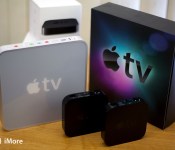
On the iPhone’s profit distortion field and Apple TV

Though I have faith that Apple isn’t shunting the iPad due to its less-than-measurable sales against the iPhone, it’s not the only other product in the company’s wheelhouse. The Apple TV in particular hasn’t seen a whole lot of love in recent years, even as company CEO Tim Cook proclaimed it no longer “a hobby” product. Jason Snell makes a good argument for why the Apple Watch might be more appealing to ship before a new Apple TV. From Six Colors:
The Apple Watch is the smart play for Apple right now. I recognize that. But I still have to lament the lack of progress in a product like the Apple TV. This is a product that’s seen very little hardware improvement in ages, with software that’s in desperate need of a rethink. It’s been passed by in every way by its competitors. The only reason I keep my Apple TV around is because it’s the only way to watch stuff I bought on iTunes and use AirPlay. I keep it around because it uses Apple’s stuff, not because it’s good.
Could Apple TV be the best TV-attached box on the market right now? Sure it could, and maybe there’s even an update in the wings that will make it that. Maybe it’s even been a priority at Apple—just not the top priority. Could you look at the iPhone numbers and choose differently?
It’s absolutely true that Apple TV has been on the slow track for several years, lacking in hardware upgrades while its potential competitors beefed up. Could that have hurt its chances to dominate in the market? Probably. But when you consider all the shifting pieces in play on Apple’s board, that delay might actually be a good one — even if we believe that it’s been done in part to bolster the iPhone.
For one, there’s been a steady influx of superstar talent to the Apple TV team over the last eighteen months, and they seem to be staying with the product rather than being shuffled around to different departments. That points to significant work being done, even if that work is behind the Cupertino curtain.
There’s also content deals to think of. Right now, all of the major set top competitors — Apple TV included — are using their own proprietary rental and purchasing system along with deals from various third-party services like Hulu, Netflix, and more. So far, most of the cable channel apps have required a cable subscription to use, but HBO’s reputed stand-alone service is coming in spring 2015… and wouldn’t that be a coup if a new Apple TV launched with HBO as its exclusive partner?
HomeKit is another consideration: The home automation service is just starting to see MFi materials for its hardware partners, and having a new Apple TV as, say, a June centerpiece for all those devices would be a great way to introduce people to HomeKit in the flesh.
Perhaps the silliest reason of all to focus on the Apple Watch before the TV is to offer its customers a new, hopefully better remote system. We know that Apple has an Apple TV remote app in the works for the Watch, and I suspect that the work being done on the device will actually feed the development of the set top box — especially when it comes to any potential Siri interactions or gesture-based viewing. In that way, the Watch might serve not only its profit-laden master, but also provide a strong hook into Apple’s upcoming tertiary products and services.
Whatever Apple’s reasons for the Apple TV’s stagnation, it’d be hard to imagine the device doesn’t have a significant upgrade in the works. But probably after the Apple Watch, and for good reason, too. After all, the company only has so many overworked engineers.

Sonos unveils limited edition Blue Note speaker to celebrate 75 years of jazz

Sonos has today unveiled its first limited edition speaker, the Play:1 Blue Note. Identical to the Play:1 but with a new lick of paint, this special limited edition speaker brings to the table an elegant new look with a gorgeous blue gradient effect. It’s a perfect representation of Blue Note’s style matched with Sonos speaker design.
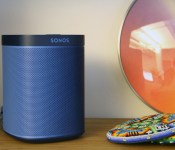
Sonos unveils limited edition Blue Note speaker to celebrate 75 years of jazz

Sonos has today unveiled its first limited edition speaker, the Play:1 Blue Note. Identical to the Play:1 but with a new lick of paint, this special limited edition speaker brings to the table an elegant new look with a gorgeous blue gradient effect. It’s a perfect representation of Blue Note’s style matched with Sonos speaker design.
Setting purchasers back by $250 (compared to $199 for the normal version), this version of the Play:1 had its blue shades applied by seven gravity-fed atomizing spray nozzles (airbrushed), which makes you want to stare at the sound system just that little bit longer.
But why blue, you ask? As highlighted in the title, this is a special Blue Note Records edition speaker. Blue Note is an American jazz record label, established in 1939 deriving its name from the “blue notes” of jazz. The detail is literally in the color, but that’s not all you’ll receive for the investment.
A full year’s worth of Blue Note programming is available through the Sonos app, with three channels on offer – Artist Selects, Born in Blue and Blue Note 101. Interested? Head over to the Sonos store where the limited edition speaker is exclusively listed. Be sure to act quickly once it’s available as only a certain amount of units will be on sale (around 4,100).
Source: Sonos
 AIVAnet