


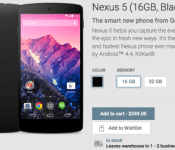
Google Play selling black Nexus 5, both 16GB and 32GB storage sizes

Never got around to purchasing the Nexus 5? Then rush over to Google Play right now because the device is in-stock, albeit in a limited way. Only the black color option in both 16GB and 32GB storage sizes is now available. The 16GB version costs $349 with 32GB adding $50 to that price. Both will leave the warehouse within 1-2 days of ordering.
Source: Google Play
Come comment on this article: Google Play selling black Nexus 5, both 16GB and 32GB storage sizes
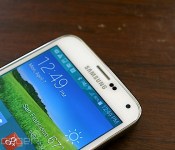
Verizon brings Lollipop to Samsung’s Galaxy S5 in the US

The rollout started in Europe already, but Samsung Galaxy S5 owners in the States are about to get a taste of Lollipop — so long as you’re on Verizon. Big Red is ready to update those handsets, and it’s the first carrier in the US to offer the latest version of Android on said device. The new version packs in Lollipop’s new features and a heavy dose of Material Design, all while still sporting Sammy’s latest TouchWiz skin. You likely won’t see a notification to install Android 5.0 immediately, as these things usually roll out in stages. However, folks with a Verizon GS5 can rest easy knowing that Lollipop will arrive shortly.
Filed under: Cellphones, Software, Mobile, Verizon
Via: Android Central
Source: Verizon
Microsoft’s Picturesque Lock Screen brings a new Bing image to your device everyday

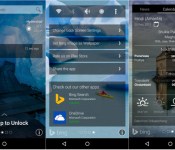
Microsoft is certainly no stranger to developing applications for Android. The company has released Torque Search for Android Wear, Next Lock Screen to help you stay more productive, and now we’re seeing a new app from the Garage team called Picturesque. The app aims to bring a slew of Bing-centric features to your lock screen. While this might not sound particularly appealing, the app is quite beautiful and may offer up some unique functionality that you can’t get elsewhere.
The first big selling point for Picturesque is that it brings a new Bing image to your device everyday. If you don’t like one of the images, you can swipe to the right or shake your phone to cycle between 6 different images. Picturesque puts a Bing search bar towards the top of your lock screen, similar to what we see on Google’s launcher with the Google Search bar. Using the Bing search bar from your lock screen won’t unlock your device, so you can actually search through web content without getting into your device.
Swiping over reveals a news ticker and a weather center, which could particularly come in handy. You can also jump right into your Camera or Phone app directly from the lock screen. Picturesque will also show you your most recent notifications and missed calls. Additionally, if you’re a user from India, Picturesque will also show you regional calendars and Muhurats.
If you’re interested in Microsoft’s most recent Android app, you can grab it from the Play Store today for free by following the link below.
Download Picturesque Lock Screen from the Google Play Store
5 apps your Nexus 6 needs
Google’s Nexus 6 is one of the most powerful Android phones on the market and to top it off, it comes with completely stock Android 5.0 Lollipop. That means there is no bloatware that is commonly found on HTC, Samsung, and LG phones. While that it is for the best, somethings are left out, whether they are widgets or apps.
This list is to help you get the most out of your Nexus 6 with apps found on the Google Play Store. We previously wrote an article on 5 reasons you should root your Nexus 6, but this one is for the stock users. No root is needed for the following apps.
ES File Explorer
ES File Explorer is the first one to mention on this list because it really opens up a new door on your Nexus 6. The device does not come with a file explorer out of the box, so it can be very difficult to find and manage files.
With ES File Explorer you can do things such as delete multiple unwanted files at the same time, move files altogether, or even copy and paste them into a new directory.
Some other perks are that you can manually search for custom ringtones, notification sounds, and even alarm tones. Normally you are subject to whatever default files reside in their respective folders.
Chronus Clock Widget
Since the Nexus 6 is running stock Android, there aren’t nearly as many widgets that come on HTC, LG, and Samsung phones. The negative side to that is the Nexus 6 doesn’t have very many options for a clock widget. In fact, there are only two: digital clock and analog clock. They may do their job, but that’s it; no weather or any other helpful information.
That is where the Chronus Clock Widget comes in. This clock widget is taken from CyanogenMod and features all of the same goodies. It has two options, a free and paid version, but the free version comes with what we want. A digital clock with good-looking weather icons.
It is fully customizable from making the text bold, displaying AM or PM indicators, battery percentage, etc. If you have been searching for a clock that has a nice interface and even a nicer widget, be sure to check out Chronus Clock Widget.
Sync.ME
One thing that every Nexus device lacks, is a way to sync your contacts with a social media site. If you are like me, you hate having contacts without images. It might be my OCD or it might be normal, I don’t know. Anyway, if you have been looking for a way to sync up high quality images to your Nexus, Sync.ME is what you want.
Currently, Sync.ME is compatible with Facebook, LinkedIn, VKontakte, and there is no word on whether they would expand. Sync.ME is very stable and I’ve never had a problem syncing to my contacts. My recommendation though is to turn automatic sync off, as well as notifications. They get to be a little too much.
Feedly
One thing that Nexus users usually have in common is that they are always interested in the latest news; whether it is phone related or not. We always want to be on the cutting-edge and know what is coming up. That is where Feedly comes in. It is a great app to consolidate all of the news you want, into a single place.
The app has a great interface and lets you follow anything from RSS feeds, Twitter feeds, blogs, etc. It is very easy to tailor the app to your needs and the Nexus 6’s huge screen is definitely a pleasure to read on. The app is definitely optimized for larger devices, and the Nexus 6 really shows that off.
Yahoo Weather
One of the most well put together weather apps on the Google Play Store goes to Yahoo Weather. Yahoo always puts together good apps for Android, but this one takes the cake. The Yahoo Weather app looks great on the Nexus 6 and really uses the QHD display. Not only does the apps visuals preform, but it is very functional as well.
You are able to easily set multiple locations of your choosing, so if you are like me living in cold, cold Minnesota, you can see the weather in Miami, San Diego, and Honolulu all at the same time. With the ability customize, you are also able to enable notifications for locations to for weather alerts and such.
Some other perks that go along with Yahoo Weather include hourly, 5, and 10 day forecasts, animated visuals, and full details on specific locations. It also comes with some visually pleasing widgets for you to employ on your homescreen.
That’s it for 5 apps your Nexus 6 needs. Let us know if we missed an app that you think should be on here, and we’ll be sure to write a follow up. Only two of us here on AndroidGuys have a Nexus 6, so I’m sure plenty of you have other apps we missed! Let us know!
The post 5 apps your Nexus 6 needs appeared first on AndroidGuys.
Paranoid Android is back to taste Lollipop
The Paranoid Android team is back with a post on their Google+ page after a long absence since Android 5.0 was debuted.
Their #WeAreBackBaby Edition is the nickname for their PA 5.0 Alpha 1 build and is a custom ROM based off of Android 5.0.2 and comes with some subtle but helpful changes, including:
– Update the baseline to AOSP Lollipop 5.0.2
– Improvements to Heads Up, such as an option to disable heads up interruptions completely
– Add Quick Unlock
– Extend the power menu
– Animate the volume panel in a more material manner
– Make it possible to skip songs using volume buttons when the device is locked
– Add CM12 Theme Engine
– Fix various small annoyances from AOSP
The PA team says while this is an alpha build, they are confident is it quite stable. Devices ready for this ROM include Nexus 6, Nexus 5, Nexus 9, Nexus 7 (2012 & 2013 WiFi only), OnePlus One, Oppo Find7, Find7s, and Nexus 10. The team confirmed that the Galaxy Nexus will not be getting the Lollipop update as of right now, but might be tweaked in the future under their “Legacy” section of devices.
For those of you who don’t know, Paranoid Android is a custom ROM you can download and install onto your device if it is rooted and unlocked for faster updates and more customization and features.
Check out Paranoid Android’s official website for download information. And of course, stay paranoid.
The post Paranoid Android is back to taste Lollipop appeared first on AndroidGuys.
Cartoon Network launches first ever Humble Mobile Bundle
We here at AndroidGuys love Humble Bundle since you can get a bunch of games for cheap and you get to help out Khan Academy and Child’s Play.. Today Cartoon Network announced that it launched it’s first ever Humble Mobile Bundle and you can get up to 11 games that are based on your favorite Cartoon Network shows. The shows include Adventure Time, Regular Show, The Amazing World of Gumball, Ben 10 and The Powerpuff Girls.
According to Angie Weiss, publicist for Cartoon Network/Adult Swim, the bundle also includes their critically-acclaimed original title, Monsters Ate My Birthday Cake.
This promotion will run for two weeks and more games will be unlocked midway through the sale.
Remember that you can pay what you want for the bundle, but if you pay more than the average price, you an unlock more titles.
Also, while the Humble Bundle app is no longer in the Google Play Store, you can either download the games from the browser or you can sideload the Humble Bundle app from their website here.
VIA Humble Bundle
The post Cartoon Network launches first ever Humble Mobile Bundle appeared first on AndroidGuys.
New Humble Mobile Bundle brings in a suite of Cartoon Network games
If you are a fan of Adventure Time or Regular Show, you might want to jump in on this sweet deal before time runs out. A new Humble Mobile Bundle has been loaded up for your pay-what-you-want (almost) pleasure. This time around it would appear that the crew has partnered up with the Cartoon Network […]
The post New Humble Mobile Bundle brings in a suite of Cartoon Network games appeared first on AndroidSPIN.

RadioShack May Close Half of its Retail Locations, Sell Other Half to Sprint [iOS Blog]
 The end may be near for RadioShack retail stores after a dire September warning that the company would not be able to finance operations “beyond the very near term” without a sale, investment, or company restructuring. According to Bloomberg, RadioShack may be planning to sell half of its stores to Sprint and close the other half in a move that would potentially see the termination of the RadioShack brand.
The locations sold to Sprint would operate under the wireless carrier’s name, meaning RadioShack would cease to exist as a stand-alone retailer, said the people, who declined to be identified because the talks aren’t public.
RadioShack was established in 1921 and flourished for many years, but in the early 2000s, the retail chain began seeing some decline in sales. In 2006, RadioShack closed 500 stores and laid off more than 400 employees in an effort to cut costs, but the brand has continued to struggle since that time as consumers have turned towards online retailers like Amazon and dedicated carrier stores from AT&T, Sprint, T-Mobile, Verizon, and more.
The company warned investors in September that it could be forced to file for bankruptcy protection, but RadioShack bankruptcy rumors have circulated since 2012, when RadioShack first began seeing major losses. A second consolidation was announced in 2013, with an additional 1,100 stores to be closed, but that move has since morphed into the liquidation plan to sell to Sprint or another company as RadioShack has continued to lose value over the course of the past year.
Terms are still being discussed between RadioShack and Sprint and Bloomberg warns that negotiations could break down or that plans could change. The two companies have discussed co-branding, and it’s still early enough in negotiations that another bidder could purchase RadioShack and keep the retail chain operational.
 AIVAnet