



FCC set to propose strong net neutrality rules this week

A new report says that the Federal Communications Commission could propose a set of regulations Thursday that would support net neutrality for both fixed and mobile broadband service providers. The proposal is likely to be similar to the ones that President Barack Obama announced in November 2014.

Outlook for iPhone or iPad could be the mail app we’ve been waiting for!

Outlook is Microsoft’s relaunch of Acompli, the iPhone and iPad email app they acquired last December. It’s been rebranded but it still supports not only Microsoft Exchange and Outlook mail accounts, but Google, iCloud, and Yahoo as well. For file storage, you can instantly hook into Google Drive, OneDrive, Dropbox, and Box. There are focus lists and scheduling options to help you get through your inbox faster, and your calendar is only ever a tap away.
Not only does Outlook support all these services and perform all these tasks, it does so exceptionally well. So well in fact, it may be the mail app you’ve been waiting for.
When you launch Outlook on your iPhone or iPad you’re asked to configure your accounts, both email and file storage. If you don’t want to set them all up right away, you can always add more later through the Settings section.
One of my favorite things about the Outlook app is the navigation along the bottom. I can single-handedly tap between my inbox, calendar, files, and recent contacts — even on an iPhone 6 Plus. In the mail tab, Microsoft has two main inbox views to help you get through your mail; Focused and Other. The Focused list smartly moves things that Outlook thinks are important to you. All other messages are filtered into Other.

At first I wasn’t sure what the Focused list was actually doing. As time went on, however, I realized it was picking up and filtering spam messages, bulk emails, and other kinds of content that I really didn’t need to concentrate on. All that was left were emails from developers, my family, my editors, and anything else that I had scheduled for later.
Speaking of scheduling emails, yes Outlook does that too. The first time you attempt to schedule a message, you’re asked if you want to set up a scheduled box. This is a single folder that appears in your folder directory. After that, you’re done. I prefer the implementation Microsoft is using for snoozing emails to Mailbox’s. Mailbox wants to create all new file structures in my accounts. I already have folders set up and have for years, let me use them.

Outlook also lets you set up gestures, however, you can’t have more than one function per gesture. For example, in Mailbox I typically slide part way to the left to archive and all the way to delete. In Outlook, part way or all the way achieves the same results.
Bulk email handling, by contrast, is really well implemented. If you tap and hold on any message in your inbox, you enter bulk edit mode. You can tap on more emails to select multiple messages to manage. I tend to delete messages more than I archive them, so I set a swipe gesture for delete and if I need to archive, I can do it in as little as two taps.

Outlook dedicates an entire tab Calendars. While it won’t replace Fantastical 2 on my iPhone or iPad Home screen any time soon, it’s convenient to be able to toggle to my calendar and see if something conflicts without having to leave the app. I would, however, like to see Microsoft do more in terms of sharing and attaching events inside the Outlook. A month view would also be a welcome addition.
In terms of file integration, I love what Outlook brings to the table. One tap and I have access to every single file in my inbox, whether it was a regular attachment, a Dropbox file, or a Google Drive document. I can even see stuff I have stored that isn’t in my email. We use Google Drive a lot at Mobile Nations for shared spreadsheets and I use Dropbox to house a lot of my own attachments, so having both in one feed is bliss. If any single feature will sell me on using Outlook on a regular basis, file handling will be it.
The good
- File management is epic, seriously
- Bulk mail management is better than most other clients
- Scheduling only adds one single folder to your email’s file directory, not several like other email services do to accomplish the exact same snooze abilities
- Notifications are blazing fast, and lots of tone options, yay
- Awesome landscape view for iPhone 6 Plus owners
The bad
- Draft support – I’ve been spoiled by Apple giving me draft cards that I can flick away so having to dig through a file system for drafts bums me out
- Reaching from Focus to Other in the inbox view one handed is a chore on an iPhone 6 Plus, perhaps some UI magic there would alleviate some of that frustration
- Calendar integration could use a month view and better share options
The bottom line

Microsoft didn’t destroy Acompli when they turned it into Outlook. If anything, they made it better. Little issues aside, Outlook for iPhone and iPad is a valuable tool for any working professional using any iOS device. The direction Microsoft took feels right this time and if they can follow through, Outlook could just be the mobile mail app many of us have been waiting for.
- Free – Download Now

BerryFlow Upstream Podcast – Feb

Did you miss out on the BerryFlow Upstream live Sunday because of the Super Bowl? If so, you can now watch the replay or download the audio. Among topics discussed, we touched on the latest BlackBerry 10 BBM update, the BlackBerry Enterprise Products and Services Webcast, our case or caseless poll, why people are choosing the BlackBerry Passport as well, we took a closer look at QNX Medical: Leading Driver in BlackBerry’s IOT Platform.

Saygus V2 is now available to pre-order for $549

With the extended registration window coming to a close, Saygus has commenced pre-orders of the V2. If you’ve registered for the pre-orders, you can get the device for a discounted price of $549, with others having to shell out $599.

Canadian HTC One (M8) owners will see Lollipop update tomorrow
 HTC has been hard at work preparing their Lollipop update for the M8, and it’s finally going to roll out to Canadian users on Rogers and Telus starting tomorrow. HTC’s product manager confirmed that the update has passed its testing and certification, so we shouldn’t have to wait too much longer to see it start hitting devices.
Unfortunately, still no word on when it’ll be available in the US after missing its 90 day deadline, but hopefully HTC keeps everyone updated about the progress of the upgrade.
source: Phandroid
Come comment on this article: Canadian HTC One (M8) owners will see Lollipop update tomorrow
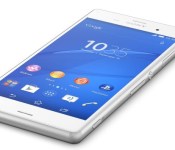
News Surfaces about Sony’s MWC Conference

The Mobile World Congress will be taking place in Barcelona on the 2-5 of March. The gathering is where we usually see greats like the next Samsung device (S6) or the next HTC device (M9). Unfortunately, this year it seems that Sony’s March 2nd conference will not feature a new Sony device. The current flagship from Sony is the Xperia Z3, which is a capable phone, but it pales in comparison to the soon-to-be-coming Xperia Z4.
The Z4 should feature a QHD screen, a Snapdragon 810 processor, and up to 4 GB of RAM, which makes it a reputable beast in the smartphone world. However, at this point there is no way to know if it still will be whenever it is finally released in Q2. For those of you upset about the lack of a new mobile device from Sony, the Japanese tech company is doing what it can to keep the Z3 looking appetizing, even releasing a purple color for the phone.
Source: GSM Arena
Come comment on this article: News Surfaces about Sony’s MWC Conference

Opera Mini beta is available once again for Windows Phone

As promised, the Opera Mini browser is now back in the WIndows Phone Store. The browser is available in beta form, and features a version number 0.9.0.8.

RadioShack may sell half of its retail locations to Sprint while closing the rest
 Recently, RadioShack started the process of avoiding bankruptcy by selling some of its retail locations to Sprint in order to bring in a little extra cash. While that deal hasn’t happened yet, it looks like RadioShack is considering pawning off half of its retail stores to Sprint while closing the other half, then stepping out of the retail game altogether.
The deal is currently still in the talking stages, so it’s not finalized just yet. Negotiations could fall through, or the specifics of the deal could change by the time it’s publicly announced. There’s always still a chance that another investor could step in and buy out RadioShack to keep it afloat, too, so we’ll just have to wait and see how things play out.
RadioShack currently managed about 4,000 retail locations, and Sprint is said to be interested in 1,300 to 2,000 of those locations. Both companies have also discussed co-branding the locations to help out both RadioShack and Sprint, but with things still in the negotiation phase, that could change.
Needless to say, all of this news hasn’t done much for RadioShack’s stock prices, and the NYSE has suspended trading of the company’s stocks due to low value.
source: Bloomberg
Come comment on this article: RadioShack may sell half of its retail locations to Sprint while closing the rest
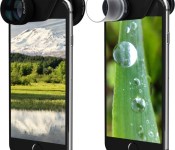
Hands-On With Olloclip’s New Telephoto/Polarizing and Macro 3-in-1 Lenses for iPhone 6 and 6 Plus [iOS Blog]
Following the October release of its redesigned “Selfie” 4-in1 Photo Lens for the iPhone 6 and 6 Plus, Olloclip is today introducing two new lens sets to expand the range of options available to iPhone photographers.
The new Macro 3-in-1 Lens offers three new magnification levels at 7x, 14x, and 21x, while the new Telephoto + Circular Polarizing Lens brings 2x magnification alongside a polarizing lens that minimizes reflections and reduces glare. MacRumors went hands-on with both of the new Olloclip sets over the weekend to give you a look at what kind of images the new accessories are capable of producing.

What’s in the Box
Like the 4-in-1 Lens for the iPhone 6 and 6 Plus, the two new Olloclip lenses come with a lens attachment that’s compatible with both the front and rear iPhone cameras.
The Telephoto + CPL accessory features a 2x telephoto lens attachment along with a polarizing lens that is detachable and compatible with other Olloclip lenses thanks to interchangeable filter mounts.
 Box contents of both lens sets combined.
The Macro 3-in-1 accessory comes with a 21x macro lens on one side, and a 7x/14x lens on the other side. Switching between magnifications is done by unscrewing the lens. There are also two lens hoods which serve as positioning guidelines to help you determine the optimum position for an in-focus macro shot.
Both lens sets come with three interchangeable carrying clips in green, blue, and black, lens caps, carrying pouches, a detachable wearable lanyard, and two removable inserts to adjust the fit to either the iPhone 6 or the iPhone 6 Plus.
Design
The lens accessories feature a reversible body made of a thick plastic that allows them to be fitted over the rear and front facing cameras of the iPhone 6 and 6 Plus, and the lenses themselves are made of high-quality aluminum and glass. As with all Olloclip photo accessories, the new lenses cannot be used with a case or a screen protector due to the tight fit, but Olloclip is working on a very nice iPhone 6 and 6 Plus case that we were able to check out at CES. It should be coming in the near future.
The lens sets are compatible with the iPhone 6 and the iPhone 6 Plus, with the different fit accounted for with plastic inserts. Each lens slides easily over the protruding rear-facing camera and locks into place. On the smaller iPhone 6, when the rear-facing camera is in place the opposite lens fits over the front camera, but with the larger iPhone 6 Plus, the lenses need to be tilted to the left when switching between the front and rear cameras.
Even though it’s necessary to slightly adjust the lenses on the iPhone 6 Plus, getting them on the phone is super quick and takes only seconds, which means you’re not likely to miss an important moment fumbling around to try to get the lenses attached. Read more 

Report: Google working on car service to compete with Uber and Lyft

Google self-driving car concept
If we can believe the reports, Google is about to put together their own car service that will compete with ride sharing services like Uber and Lyft. But there won’t be any drivers to contend with, we’re looking at a fleet of Google’s self driving cars.
This news comes out of Bloomberg, reporting that Uber executives have heard from Google of these plans.
Google has been a major backer of Uber, having invested more than $258 million into the ride sharing company. As such, Google has a seat on the board at Uber, from whom Uber has heard of Google’s plans for their driverless car initiative.
Looking at Google’s autonomous car program, this move makes sense. Google could attempt to sell their cars to us as individuals, requiring us to jump through hoops for registration and insurance. Instead, a ride sharing service leaves the cars in Google’s control and responsibility, which would be great for us, at least in some regards.

The idea of calling up a driverless car from Google for your local transportation needs is pretty slick, and could come at a rate far less than that of the competition, due to not having to pay a driver. This theory, however, falls apart entirely if local law requires a driver in each vehicle, but we’ll leave that discussion for another day.
Where does this leave things between Google and Uber, then? It looks like Google will withdraw their position on the Uber board. On the flip side, we are hearing that Uber is teaming up with Carnegie Mellon University to build their own autonomous driving systems. It seems the two have learned from each other and shall now part ways and get all up in each other’s business. We’ll have to wait to see how Uber fares… er, fairs, in this ordeal.
What do you say, would you go for a ride in one of Google’s autonomous vehicles?
 AIVAnet