


T-Mobile’s other Super Bowl commercial is all about celebrity one-upmanship (and Wi-Fi calling)
This is T-Mobile’s other commercial for Super Bowl XLIX. The other features noted famous person Kim Kardashian, and there’s also an online-only ad with a vulture. Needless to say, T-Mobile’s going for the Curly Howard Trophy for this year’s Super Bowl commercials. And I don’t know about you, but I get terrible Wi-Fi reception in my subterranean butcher shop.

Mr. Jingles is fully inflated, ready for the Super Bowl

At least we hope that’s what the Google+ notification icon dude is doing, seeing as how it’s the final game of the NFL season and everything.

Gas planets can become habitable if their stars get grabby

It’s tempting to think of gas planets as permanently hostile to life as we know it. A pair of University of Washington researchers beg to differ, however. They’ve used computer modelling to determine that these worlds can become habitable when their stars get particularly grabby. If a relatively small, solid-core gas planet orbits a class M dwarf, tidal forces can tug it into a habitable zone and not only wipe out the gas (through the dwarf’s X-ray and ultraviolet radiation), but produce life-giving water from the core’s ice. Provided the timing is right, the result could be downright Earth-like.
Just don’t expect this to be a common event — there’s a Goldilocks-like balance required for this to happen. If the hydrogen disappears too quickly, there won’t be any water left; if it vanishes too slowly, you’ll never see that rocky surface in the first place. Even if this kind of celestial movement is rare, though, it suggests that habitable planets are more abundant than we think. While it’s still safe to say that many of these planets form in the right orbit from the get-go, others may well get ‘lucky’ thanks to old host stars pulling them into position.
[Image credit: NASA]
Filed under: Science
Via: Slashdot
Source: University of Washington, Astrobiology

Microsoft Lumia 435 gets priced and dated for the UK

Microsoft’s latest low-cost Windows Phone, the Lumia 435, has been given a price and a release date for the UK. The device is now up for pre-order on Amazon UK for £88.49 in black, green or orange and will be released on March 1. And while it’s not particularly expensive, it’s perhaps a little more than we’d have expected.

Google ADT-1 Android TV Developer Kit now receiving the Android 5.0.2 Lollipop (LRX22G) update

It’s now the ADT-1′s turn to get the Android 5.0.2 Lollipop update as there are reports of it hitting some devices this morning. The ADT-1 is the developer kit for Android TV.
An Update Zip file is available, of which you can download now and install it. The source link also has instructions for those of you that are rooted or unrooted.
source: +Michael (Mastermind278) / Update.zip download link
Come comment on this article: Google ADT-1 Android TV Developer Kit now receiving the Android 5.0.2 Lollipop (LRX22G) update

How to use Find My iPhone: The ultimate guide

Find my iPhone, sometimes also called Find my iPad or Find my Mac when referring to the same app running on those devices, is a free service offered by Apple as part of iCloud. With it, you can track your iPhone, iPad, or Mac if it ever gets lost or stolen, lock it to make sure no one else can get into it, play an alert sound to help you find it, and even wipe it remotely if you’re sure you won’t be getting it back. It also enabled Activation Lock, which stops anyone without your password for using your device if it’s ever stolen.
To use Find my iPhone all you need is the free app, iCloud.com, and this guide!
- How to enable Find My iPhone on iPhone and iPad
- How to enable Find My iPhone on your Mac
- How to access Find My iPhone via the web
- How to access Find My iPhone on your iPhone, iPad, or iPod touch
- How to use Find My iPhone with Family Sharing
- How to remove an iPhone, iPad, or Mac from Find My iPhone and iCloud
- How to turn off Find My iPhone remotely and bypass Activation Lock
- How to find the owner of a lost or stolen iPhone
How to set up and start using Find My iPhone

Before you can start using Find My iPhone, you’ll need to set up the service. As long as you’re signed into your iCloud account on all your devices, it’s as simple as flipping a switch. After that, you can start tracking any devices linked to your account.
- How to enable Find My iPhone on iPhone and iPad
- How to enable Find My iPhone on your Mac
- How to access Find My iPhone via the web
- How to access Find My iPhone on your iPhone, iPad, or iPod touch
How to use Find My iPhone with Family Sharing

Family Sharing is available on devices running iOS 8 and up. Not only can you share purchases with other family members in your household, you can also keep track of each other with Find My iPhone. It works pretty much the same way as tracking your own devices does. As long as the person you’d like to track is a member of your Family Sharing group, you can always track them via Find My iPhone.
How to remove an iPhone, iPad, or Mac from Find My iPhone and iCloud

If you’re upgrading to a new device and are either getting rid of or passing down your old one to someone else, you’ll want to make sure that you disable Find My iPhone and remove your iCloud account. This does two things: it allows the new owner to link the device to their own iCloud account without any trouble, and it ensures that they don’t have access to any of your information in your iCloud account.
How to turn off Find My iPhone remotely and bypass Activation Lock

If you’ve already gotten rid of an iPhone, iPad, iPod touch, or Mac and forgot to turn off Find My iPhone, there is a way you can remove it from your account remotely. This is the guide you want if you sold your device and the new owner tried restoring and can’t get past Activation Lock. Just keep in mind that it doesn’t work unless you know the iCloud password for whatever account the device is linked to.
How to find the owner of a lost or stolen iPhone

What happens if you find an iPhone, iPad, or Mac left behind at a coffee shop, park, classroom, or bar? Find my iPhone is great not only for helping you keep track of your own devices, but helping you return a lost device to someone else.
How to get more help with Find My iPhone
If you need more help with Find My iPhone, or just want to learn even more, hit the links below!

T-Mobile releases their final Super Bowl ad

T-Mobile just released their final Super Bowl ad. This one was already teased with a behind-the-scenes look a couple of days ago. It stars Sarah Silverman and Chelsea Handler making calls in unusual locations to promote T-Mobile’s Wi-Fi calling feature. You can hit the break to see the full commercial, and if you haven’t seen them already, check out the Kim Kardashian West spot as well as the Rob Riggle spot (for the Super Bowl live stream).
Click here to view the embedded video.
Come comment on this article: T-Mobile releases their final Super Bowl ad

Jaybird BlueBuds X International Giveaway over at Sound Guys
The Bose SoundLink 3 is one of the best Bluetooth speakers out there. It’s surprisingly bassy for its size, pumps out a tons of volume, and has up to 14 hours of playback time. Want one? Now is your chance.
The Jaybird BlueBuds X are one of the best, if not the best wireless sport earbuds in their price range. The sound is excellent, they’re super comfortable, and have a lifetime warranty against sweat-related damage. Want a pair? Here’s your chance.
Our partners over at Sound Guys are now doing giveaways monthly, and it this month’s giveaway is super easy to enter. Just head over to the Sound Guys YouTube channel and leave a comment on the video (the same video linked about) about what you’d like to see in the brand new Sound Guys newsletter. That’s it. The giveaway is international and you’ve got all month to enter.

Dwelp, connect the dots with this casual puzzle game for Windows Phone and Windows 8

Dwelp is a challenging connect the dot puzzle game that is available for both Windows Phone and Windows 8 devices. The Windows Phone game includes 100 puzzle levels where you are tasked with linking all of the same colored dots.
There is no time limit to solving the puzzles but the fewer moves it takes, the better. Dwelp is available for low-memory Windows Phone and after playing Dwelp over the past few days, it comes across as a fun game to pass the time with. Graphics are minimal but nice and game play is challenging in that you have to think out your moves in advance or you’ll find your pursuit of a solution stalled.
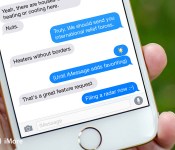
What would you change about Apple’s Messages app?

Messages launched with the original iPhone as “SMS”, because that’s all it did at the time. Apple had Safari, so they didn’t build an old-school WAP browser and it turned out an old-school WAP browser is what MMS used and needed. So, Apple built one and, once carriers stopped freaking out about the potential bandwidth, added it to the app. Then Apple did an end-run and announced iMessage, integrated alongside MMS and SMS in the Messages app, and running on data completely outside carrier control. They brought it to iPad and Mac. Most recently, Apple enhanced group messaging, added instant sound-bites, selfies, and with SMS-relay brought the carriers to iPad and Mac as well.
Now we want to know what you’d like to see next?
- Allow Messages to be secured by Touch ID or Passcode
- Extend VIP from Mail to Messages
- Allow a confirmation before sending soundbites, selfies, or location
- Combine FaceTime and Messages together into a single super-app
- Support for stickers
- Allow favoriting of a message
- Per-person read receipts in group messages
- iMessage for iCloud web app
- iCloud Drive file attachments
- Smarter search and filtering to find messages
If Apple asked you what you wanted in Messages for iOS 9 and OS X 10.11, what would you tell them?
 AIVAnet