


Try one of these royally dark Disney themes

Call me a princess. I dare you.
I’m a child of the 90’s, and as such, I was raised on Disney Princess movies. Everyone thinks princesses — and everything around them — should be light, bright, and saccharine. Well, we’ve got a princess theme that brings our favorite royals into the lovely embrace of the dark. Whether you kick it old-school with Snow White or rock the harem pants with Jasmine, we’ve got you covered for the six “original” Disney Princesses. Sorry, Raps, we’ll get to you later.


This six-facet theme pack is built upon Nova Launcher, using subgrid positioning to get our icons placed around the dockless home screen and tint both our folders and app drawer. If you’re an Action Launcher user, you’ll have a slightly harder time positioning your home screen icons, but Quicktheme will make quick work of coloring the folders and app drawers.


Wallpapers
These wallpapers originally came from a post on Disney Style of papercut Disney Princess wallpapers. They’re cute they’re colorful, but the darks aren’t nearly as dark as they could be, and the colors are a tad pastel. We’ve tweaked the exposure and layering on these wallpapers to produce more vivid colors and blacker blacks.
- Snow White
- Cinderella
- Aurora
- Ariel
- Belle
- Jasmine
How to apply your wallpaper
Long-press an open space on your home screen.
Tap Wallpapers.
Tap Pick image.


Select your downloaded princess wallpaper.
Make sure your image is centered on the screen to your liking.
Tap Set wallpaper.


Icons and Folders

These dark wallpapers deserve dark icons, and no pack does simple, refined black icons quite like Zwart icon pack. Before applying the icon pack, position your icons around the screen outside the black areas. For Ariel and Jasmine, position your icons in a sort of gentle slope over the screen. For Snow White and Belle, arrange your icons above the princesses in the second quarter of the screen, leaving room for the widgets to come. For Aurora, surround the royal couple with your icons.
For Cinderella, line up the icons on the left-hand side of the screen. If you want an extra little bit of magic, you can set the phone icon over the glass slipper and then set the icon to a blank .png image. This way, when you tap the slipper, you get the dialer.
Applying Zwart
Open Zwart.
Tap the three-line menu icon in the top left corner.
Tap Apply.


Tap your launcher to apply the icons.
Tap OK.


Theming folders and app drawers in Nova Launcher
This theme features black icons on a wallpaper that has black in it, and that can make the app drawer a bit of a beast to read, so we’re going to help keep things easily visible by adding a royal hue to our folders and app drawer so that icons will pop instead of fading into the darkness. Each princess has her own hue for this process, and here are the hex color codes we’ll be using in a moment:
- Snow White – #B20058C0
- Cinderella – #B20068A0
- Aurora – #B2D71475
- Ariel – C4189070
- Belle – #C4F8A818
- Jasmine – #C428A0A0
Open Nova Settings.
Tap Folders.
Tap Background.


Tap Custom.
Input the hex code for your princess as listed at the top of this section.
Tap OK.
Go back to the main Nova Settings menu.


Tap App & widget drawers.
Tap Background.
Tap the first color in Recents, which should be the color we just applied to our folders.


Another Widget

The Pixel 2’s home screen style may be a bit controversial to some, but the At A Glance widget that it touts is a very handy widget, and since it’s transparent, it blends with many, many themes. While the original At A Glance widget is only available on the Pixel Launcher, Another Widget is available for everyone and is even better than the original, as it’s customizable.
Long-press a blank space on the home screen until a menu appears.
Tap Widgets.
Drag and drop Another Widget onto your home screen.


In the widget editing window, Tap See your Events.
Allow Another Widget calendar permissions to see your events.
Tap Control the Weather.


Allow Another Widget location permissions to see where you are and get weather info for it.
(Optional) Tap Tap on weather opens.
(Optional) Select your favorite weather app to open.
Tap the home button.


Long-press and drag your new Another Widget to your intended place on the home screen. For Belle, drag the widget to the bottom of the screen. For everyone else (except Aurora), drag it to the top.
Resize the widget to make it one row high, or half a row high if you want to keep the widget small and subdued.


1Weather Widget for Aurora

There wasn’t enough room for an Another Widget to fit comfortably on the Aurora theme alongside the thorny music widget and the icons, but I think I found something even better: a nice pink temperature widget from 1Weather, which blends right into Aurora’s skirt. If you wanted to do this with any of the other princesses, all you’ll need to do with swap Aurora’s bright pink to a hue that matches the princess of your choice.
Long-press a blank space on the home screen until a menu appears.
Tap Widgets.
Under 1Weather, drag and drop a 1Weather 2×1 widget onto the skirt of Aurora’s dress.


In the widget editing window that appears, tap Background color.
Tap Light.
Tap Accent.


Tap Custom (the rainbow).
Set the color to a nice bright pink and then tap OK.


Uncheck Show refresh.
Tap Done.
Long-press and drag your widget to better align it within Aurora’s dress.
Resize the widget until just the temperature is showing.


Melodi Music Widgets

Music is an integral part of a princess’s life, especially ones that are so iconic they have their own songs. Whether you’re singing ‘Cinderella’ or ‘Belle’, ‘Part of Your World’ or ‘Whole New World’, music widgets can add an extra bit of flair to a home screen while also giving us quick control of our currently playing music. Each of the princess themes employs a different widget from the Melodi for Kustom pack, and as such, to implement them we’ll also need KWGT Pro. Perfect princess widgets might look like they take a whole lot of work, but trust me, these are easier than whistling a happy tune, and here’s how it goes:
Long-press a blank space on the home screen until a menu appears.
Tap Widgets.
Under KWGT press and drag a 2×2 KWGT widget to your home screen. For Snow White, Ariel, and Jasmine, drag the widget to the bottom of the screen. For Cinderella, Aurora, and Belle, drag the widget to the top of the screen.
Long-press the new KWGT until a menu appears.
Tap Resize.


Resize the widget to fit the music komponent to come:
- For Ariel and Cinderella: resize the widget into a square slightly left of the center on the screen. For Ariel, you should aim for the square to sit completely within the rock she’s perched on, for Cinderella, set the square above Cinderella’s head.
- For Snow White, Aurora, and Belle, resize the widget to cover 1 or 1.5 rows of the home screen from edge to edge.
- For Jasmine, resize the widget to cover the bottom third of the screen.
Tap the new KWGT to configure it.


Under Installed, tap Melodi.
Select the Melodi Preset for your princess:
- Snow White: Melodi_9
- Cinderella: Melodi_11
- Aurora: Melodi_6
- Ariel: Melodi_12
- Belle – Melodi_14
- Jasmine – Melodi_13
Tap Layer in the center bar.


Tap the – and + icons to adjust the scale of your widget to fit the widget box. Start at 100 and adjust up and down as needed.
Tap Save (the floppy disc icon in the top bar). At this point, Ariel’s widget is done.


Tap Items in the center bar.
Tap the Music komponent.
For Cinderella, tap the toggle for NiteMode to On. Tap Save and Cinderella’s widget is done.


Tap Background Color.
- For Aurora and Belle, type in #FF000000 and then tap the color box underneath it.
- For Snow White, type in 00000000 and then tap the color box underneath it.
- For Jasmine, type in D0000000 and then tap the color box underneath it.


Tap Save (the floppy disc icon in the top bar) and return to the home screen. The widget is complete.


Practically Princess Perfect

Whether you take it easy with just a wallpaper and an icon pack or you get down and dirty with KWGT for that perfect widget, I hope you give these royal home screen themes a try. They are regal, they are radiant, and they’re not blinding beacons of white, glitter and glitz, which is proof positive that you can be a princess while still loving all themes dark and handsome. Which theme is your favorite? Which princess do you take after (or wish you did)? Nerd out with me in the comments, and tell us what themes you’d like to see me conquer in the future!
Google looking into Home and Chromecast devices that kill Wi-Fi networks
If your Wi-Fi derps while using Google Home or Chromecast, you’re not alone.
Google’s been trying its hand at connected home gadgets for a few years now, and now that it has devices like the Chromecast, Google Home, and soon Smart Displays, it’s clear now more than ever that this is a market it wants to dominate. Before that happens, however, Google needs to issue a fix to a bug that’s recently caused Wi-Fi networks to go dark when using these gadgets.

According to the folks at Android Police, the issue first appeared with the Google Home Max and TP-Link Archer C7 router. Users reported that the router would go offline and be inaccessible as soon as the Home Max was added to their network, and shortly after this, TP-Link issued a software update through its beta channel that supposedly fixed the issue.
However, after this update was released, more and more complaints appeared. More people were quick to report that other Home devices, Chromecast/Cast-enabled products, and even other routers were exhibiting the same problem.
If this sounds familiar, that’s because users of the Nexus Player ran into a similar roadblock last September. MDNS packets are used to keep products with Cast technology online and available to use, but rather than sending these packets at a steady rate every 20 seconds, the Home Max and other gadgets are doing so at a much faster rate and causing routers to overload and shutdown.
Google has since responded and said that it’s actively looking into a fix, and considering just how many Google Homes were sold this holiday season, the sooner the better.
Google and Qualcomm are poised to put assistants in all the things
Toyota caves to pressure and adds CarPlay to new models
Many car manufacturers have joined the modern era by adopting Android Auto, Apple CarPlay or both, but not Toyota. It insisted on going its own way, and that has usually meant skipping its cars entirely if you cared about smartphone integration. Thankfully, the automaker has seen the light. The 2019 Avalon and future models (including Lexus vehicles) with an Entune 3.0 or Enform 2.0 system will support Apple CarPlay, letting you use the more sophisticated apps from your iPhone instead of making do with limited built-in features. CarPlay will be standard on all Avalon trim levels when the sedan goes on sale in late spring, although that’s no guarantee it’ll be standard on other models.
A spokesperson told MacRumors that CarPlay would initially be limited to US models, and that there’s no wireless option. Also, there’s no mention of Android Auto. If you carry an Android phone, you’ll have to use the Avalon’s Alexa voice control and smartwatch support. You do get Qi wireless charging and a WiFi hotspot feature, however.
Toyota hasn’t outlined pricing for the Avalon, but its role as Toyota’s flagship sedan suggests it won’t be trivial. As such, the car giant isn’t quite going toe-to-toe with smartphone-friendly rivals like Honda or Volkswagen, which offer Android Auto and CarPlay across a wide range of designs. It’ll be a while before you can get a seamless smartphone interface in a new Corolla. Even so, it’s good to know that the feature is at least on the horizon — this closes a gaping hole and lets you focus your buying decision more on driving dynamics and style than on in-car tech.
Click here to catch up on the latest news from NAIAS 2018!
Via: AppleInsider, MacRumors
Source: Toyota
Apple Sued Over Meltdown and Spectre in U.S. as iPhone Slowdown Lawsuits Now Total 45
Apple faces its first legal action over Meltdown and Spectre in the United States, even though the vulnerabilities were found to affect nearly all computers and other devices, according to court documents reviewed by MacRumors.
Meltdown and Spectre are serious hardware-based vulnerabilities that take advantage of the speculative execution mechanism of a CPU, allowing hackers to gain access to sensitive information. All modern Intel, ARM, AMD, and Nvidia processors are affected, with many patches and mitigations already released.
Anthony Bartling and Jacqueline Olson filed a class action complaint against Apple last week in a U.S. district court in San Jose on behalf of anyone who purchased a device with an ARM-based processor designed by Apple, ranging from the A4 to A11 Bionic chips used in iPhone, iPad, iPod touch, and Apple TV models.
The complaint alleges that Apple has known about the design defects giving rise to the Meltdown and Spectre vulnerabilities since at least June 2017, and could have disclosed details to the public more promptly.
An excerpt from the complaint:
ARM Holdings PLC, the company that licenses the ARM architecture to Apple, admits that it was notified of the Security Vulnerabilities in June 2017 by Google’s Project Zero and that it immediately notified its architecture licensees (presumably, including Apple) who create their own processor designs of the Security Vulnerabilities.
The complaint added that it is unlikely Apple would be able to fully and adequately release fixes for Meltdown and Spectre without the performance of its processors decreasing by between five and 30 percent.
Apple addressed Meltdown in macOS High Sierra 10.13.2 and iOS 11.2, while Spectre mitigations were introduced in a macOS 10.13.2 supplemental update and iOS 11.2.2, both of which were released early last week. The vulnerabilities have also been addressed in older versions of macOS and OS X.
Despite one claim that Apple’s patch for Spectre resulted in a significant performance decrease on one developer’s iPhone 6s, Apple said its testing indicated that the Safari-based mitigations had no measurable impact on its Speedometer and ARES-6 tests and an impact of less than 2.5 percent on the JetStream benchmark.
The complaint expects at least 100 customers to be part of the proposed class, with the combined sum of compensatory and punitive damages expected to exceed $5 million if the case proceeds to trial.
A group of Israelis have filed a request with the Haifa District Court to file a class action lawsuit against Apple, Intel, and ARM over Meltdown and Spectre as well, according to local news publication Hamodia.
iPhone Slowdown Lawsuits Continue to Mount
Apple continues to face an increasing number of lawsuits that either accuse the company of intentionally slowing down older iPhones, or at least of failing to disclose power management changes it made starting in iOS 10.2.1.

In the United States, the iPhone maker now faces at least 39 class action complaints as of January 15, according to court documents compiled by MacRumors. Additional lawsuits have been filed in France, Israel, Russia, Korea, and Vietnam, with another pending in Canada, bringing the total to 45.
Many of the lawsuits demand Apple compensate all iPhone users who have experienced slowdowns, offer free battery replacements, refund customers who purchased brand new iPhones to regain maximum performance, and as Apple has already promised, add more detailed info to iOS about a device’s battery health.
We’ve already answered many frequently asked questions about Apple’s power management process, and covered the issue extensively, so read our past coverage for more information about the matter.
Tag: lawsuit
Discuss this article in our forums
The totally normal, completely unsurprising lack of women at CES
There’s a spot on the corner of Paradise Road and Sahara Avenue in Las Vegas where you can stand, facing the convention center, and see ads for Huawei, Hisense, Bosch and naked women. The tech-branded tents and billboards have now disappeared, soon replaced by different ads specific to a different industry, but for one week in January every year, Sin City is overrun with technology companies for CES.
The newsstand offering images of nude women isn’t directly connected to CES, but it’s still there, in the background of the entire show — this idea of women as a commodity, rather than thought leaders, creatives, entrepreneurs or even a viable market. The Consumer Technology Association, which puts on CES every year, came under fire in November when it announced the 2018 lineup of keynote speakers, all of whom were men. White men, in fact, aside from one speaker.
Tech-industry leaders, people on Twitter and groups like Gender Avenger noticed the lack of women in the keynote lineup and started the hashtag #CESSoMale. Others compiled lists of female tech leaders who could potentially host a keynote address, noting that this would be the second year in a row with no female keynote speakers.

“When the lineup was announced, I immediately imagined all the women like me, sitting in a dark room, watching the stage and waiting for that sign of a future in which they could see themselves — and waiting, and waiting, and waiting, and having that not happen,” Sonos chief marketing officer Joy Howard said. “That feeling is really demoralizing when you’re trying to be a part of the future of technology.”
CTA senior vice president Karen Chupka penned a blog post in December addressing the outcry. It reads, in part, as follows:
To keynote at CES, the speaker must head (president/CEO level) a large entity who has name recognition in the industry. As upsetting as it is, there is a limited pool when it comes to women in these positions. We feel your pain. It bothers us, too. The tech industry and every industry must do better.
Chupka and CTA president Gary Shapiro promised to add women to the keynote lineup, but they didn’t. The CTA did, however, redesign the keynote page, adding women from smaller conferences to the main hub.
For many women at CES, the lack of female representation in the keynote wasn’t surprising. It wasn’t even the CTA’s sole fault. A 2016 study by the National Center for Women and Information Technology found women held 57 percent of all professional occupations, yet only 25 percent of all computing jobs. These figures were even lower for non-white women: Asian women held 5 percent of jobs in the computing industry, black women held 3 percent and Latinas just held 1 percent.
To be in 2018 and still have a CES where there are no female [keynotes] — it’s really disappointing. I can’t say surprising, but disappointing to say the least.
Dr. Knatokie Ford, founder of Fly Sci
A handful of tech industry leaders have recently lost their jobs over claims of sexual harassment or encouraging a sexist culture, including Hyperloop One co-founder Shervin Pishevar and former Uber CEO Travis Kalanick.
Because of these facts, and based on copious amounts of personal experience in the tech space, Dr. Knatokie Ford wasn’t shocked at the CES keynote lineup. She’s founder of consulting group Fly Sci Enterprise and served as senior policy adviser for the White House Office of Science and Technology under President Barack Obama.
“It’s disappointing most of all, especially given that there have been so many conversations happening for so long about the importance of diversity and inclusion,” she said. “To be in 2018 and still have a CES where there are no female [keynotes] — it’s really disappointing. I can’t say surprising, but disappointing to say the least.”
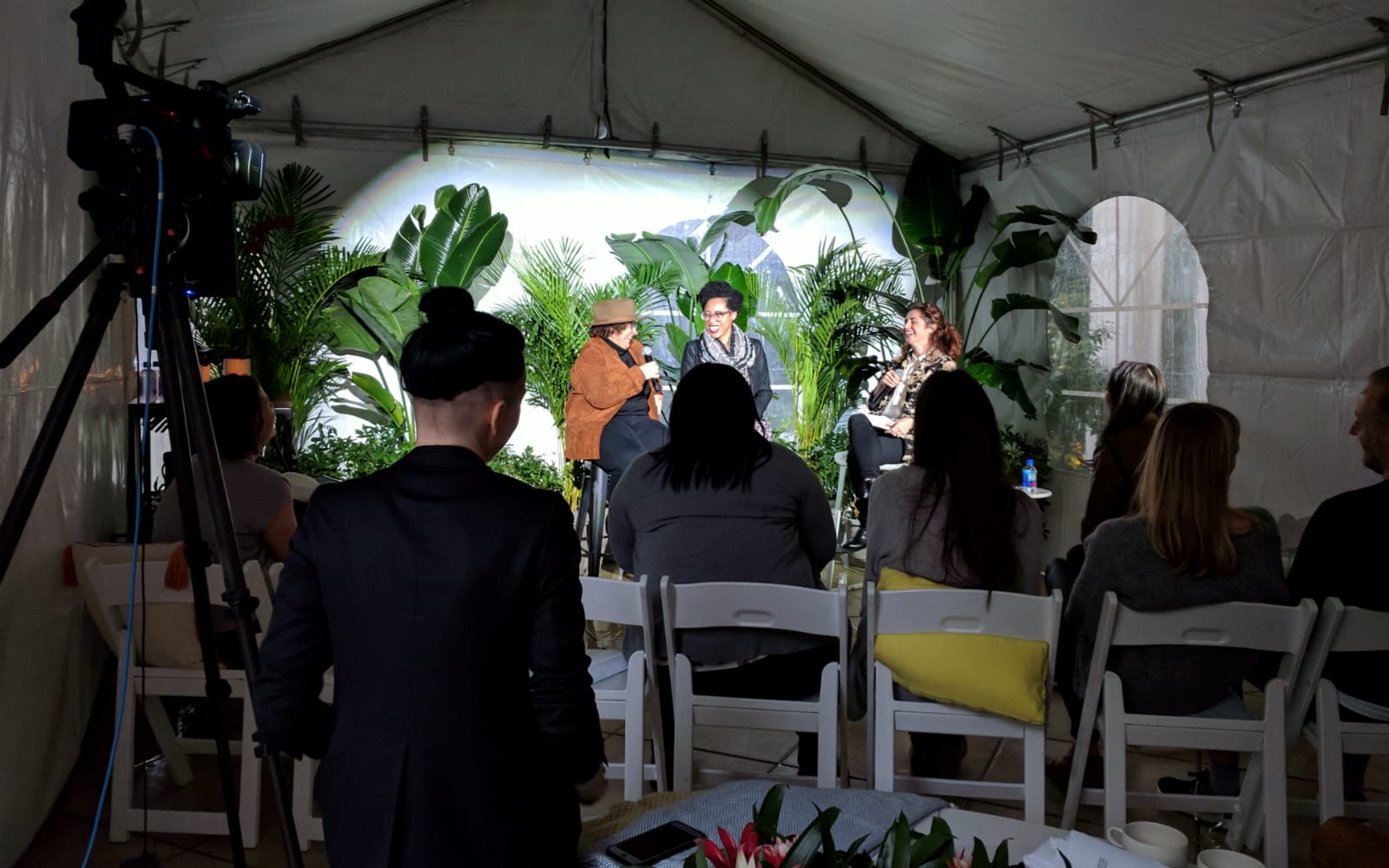
Ford was a speaker at the Boom Boom Room, a CES-adjacent event for women in technology hosted by Sonos. It was an intimate, four-hour session held in the Villas at The Mirage, featuring women leaders in tech and music. The talks were held outside on the first day of CES, in a small white tent under gray skies and pounding rain, but the event itself was warm. Laughter regularly punctuated the rolling drops of rain as women like Dr. Ford and iHeartMedia EVP and CMO Gayle Troberman shared stories of challenges and triumph in male-dominated workspaces.

The Boom Boom Room extended beyond tech to include members of the music industry as well. Leah Julius is the bassist of the band Thunderpussy, which was featured at the event.
“I wish I was surprised,” she said about the lack of female representation in tech. “No, I’m not surprised. It feels really similar actually to the music industry in that it still is very male-dominated, obviously. But it feels like this year, and just kind of this time, things are feeling different in general. Talking to other women here in tech, it seems like they’re feeling it, too.”
Sexism and sexual harassment are hot topics on the mainstream stage, with women across a range of industries speaking out about their own experiences and demanding change. The #MeToo movement saw women around the globe sharing personal stories of sexual harassment at work, while the Time’s Up campaign dominated the dialogue at the Golden Globes, as female actresses wore black and stood with activists on the red carpet. With events like the Boom Boom Room, the tech industry is part of this conversation, too.
One point that many female tech leaders come back to is the idea that companies are making a bad business decision by essentially ignoring half of the population — half of their total addressable market. Liz Klinger is CEO of Lioness, a company that makes smart vibrators and recently launched Artgasm, a project that turns female orgasms into works of art. Klinger noticed a lack of women-led companies at CES in 2017 and she vowed to get Lioness at the show this year. Though she said Lioness ticked all of the CTA’s boxes for inclusion in Eureka Park, its application was denied and the company was eventually even turned away from a women-focused event in the CES Girls’ Lounge. Lioness ended up showcasing Artgasm at the Hangover Suite at Caesar’s Palace and at a booth in the Sands center, thanks to interested investors.

Klinger published a blog post about her experience, where she writes the following:
CES could not only do a lot of good by having more female-centric companies showing at the officially sanctioned show — but also it’s good business for attending retailers and industry partners. Especially considering that women are 50 percent of the customers and users in the world. It’s not just a feel good thing or a politically correct thing, though I’m certainly biased towards providing more options for women. It’s also a money-making opportunity for everyone involved.
This is an important message, according to Dr. Ford. She said companies — and the CTA — won’t simply do the right thing because it’s right. They’re looking out for their bottom line. It’s a good thing then, she said, that diversity is good for business.
“It’s not going to be overnight and it’s not going to be easy, but I do think that we will see progress, especially because we have a couple things in our favor, especially when we talk about diversity in business, whether it’s in tech or entertainment,” Dr. Ford said. “There’s this tremendous case for the advantage of it. It’s not going to be at the detriment of the bottom line.”
Click here to catch up on the latest news from CES 2018.
Acura puts its ‘True Touchpad’ Android UI in the 2019 RDX
In 2016 Acura showed off its “Precision Cockpit” concept that included a touchpad with 1:1 mapping to a central display. It’s supposed to improve on both touchscreens, which can require an awkward reach from the driver to somewhere out of their line of sight, and existing remotes that try to copy a mouse-controlled UI.
Now the company has announced that technology is coming to the 2019 RDX branded as a “True Touchpad.” This Android-based car OS is the first use of a touchpad with absolute positioning in a car, making sure that wherever the driver taps on the pad corresponds to what is shown on the central 10.2-inch screen, which is mounted high up, in the driver’s line of sight. Combined with a new natural language interface and an interactive heads-up display for the driver, it’s supposed to be easier to use than any car software we’ve seen before.
This upcoming version of Acura’s luxury SUV has other changes as well, in a “top-to-bottom” remake that will launch around the middle of this year. It brings Acura Super-Handling All Wheel Drive (SH-AWD) back to the RDX, and includes an NSX-inspired driving dynamics system that lets drivers choose between Sport, Sport+, Comfort and Snow modes. Every 2019 RDX will include AcuraWatch driver assist features, while optional additions include the 4G AcuraLink WiFi hotspot and surround-view camera system.
An ultra-wide panoramic moonroof is standard, and the prototype is fitted with four thin ceiling-mounted speakers as part of its 16-channel, 710-watt Acura ELS Studio 3D audio system.
Click here to catch up on the latest news from NAIAS 2018.
Source: Acura
Nissan’s Xmotion concept swaps key fobs for fingerprints
Infiniti’s eye toward the future has manifested itself with the Xmotion (pronounced “Crossmotion;” it’s a crossover SUV). The suicide-door clad ride boasts hand and eye motion and gesture sensors for the generous door-to-door digital dashboard, climate controls and infotainment system. The latter is compatible with both Android Auto and Apple’s Car Play setups, as well as surround sound for the 4+2 seating arrangement. In the stage demo, the display showed off swimming koi and driving information. The fish are actually a virtual assistant, and you can see them in action below.
As far as power goes, Infiniti is holding that close to the chest aside from saying it has an Intelligent All-Wheel-Drive system. More than that, it also uses a fingerprint reader instead of a key fob to unlock the doors. It also uses the ProPilot driver assist system for semi-autonomous single lane highway travel.
Nissan has sold over 75k semi-autonomous vehicles, saying that it has more on the road than any other mass market manufacturer. By 2022, its ProPilot tech will be in all of its models.
Click here to catch up on the latest news from NAIAS 2018!
Contraceptive app under fire for causing unwanted pregnancies
A contraceptive app used by more than 500,000 women has come under fire after reportedly causing 37 unwanted pregnancies. Stockholm’s Södersjukhuset hospital has now reported the Natural Cycles app to the Swedish Medical Products Agency (the government body tasked with the regulation of medical devices) according to news outlet SVT.
The app scans body temperature during the menstrual cycle to notify women when it is safe to have unprotected sex. Days when it’s okay are marked as green on its calendar, but if it shows red couples are advised to use an extra form of protection. It’s own research suggests Natural Cycles is more effective than the contraceptive pill when used correctly.
The 37 unwanted pregnancy cases stem from a study of over 600 women who sought abortions at Södersjukhuset hospital from September 2017 until the end of the year. “We have a duty to report all side effects, such as pregnancies, to the Medical Products Agency,” midwife Carina Montin told Siren news agency. The findings could come as a blow to Natural Cycles’ plans to gain FDA approval.
In a statement, Natural Cycles said: “No contraception is 100 per cent and unwanted pregnancies is an unfortunate risk with any contraception.
“To have 37 unwanted pregnancies out of the 668 mentioned in this study at Södersjukhuset means that 5,5 per cent of women who stated they used Natural Cycles also had an unwanted pregnancy. This is in line with what we communicate as the risk of unwanted pregnancy with typical use, and which is comparable to other types of contraception.”
In February Natural Cycles became the first app to be certified for contraceptive use, following approval by Germany’s Department of Health, after which its UK users spiked from 5,000 to 125,000. In November, the app, founded by husband and wife duo Dr. Raoul Scherwitzl and Dr. Elina Berglund, snagged $30 mIllion in funding.
Source: SVT
Make-up brand taps AR to help you find the perfect brow shape
Benefit Cosmetics is throwing people all over the world a high-tech lifeline before they drown in desperation over failing to find the right brows for their face shape. The make-up company has teamed up with digital makeover veteran Modiface to create Brow Try-On, an augmented reality tool that can show what you’ll look like with different eyebrows before you attack your real ones with a blade and a tweezer.
Brow Try-on works by detecting the hair on your brows and cloning each one to create different shapes. Add the tool’s ability not too stray too far from your real arches, and you’ll get the most natural-looking suggestions. Nothing too high, too pointy or too unnatural that you can’t replicate it unless you shave all your brows off and draw them back on an inch higher.

The tool is far from being the first cosmetics or beauty-related AR tool/app you can use to see what your face will look like with make-up or with a slightly altered feature. Even cosmetics retail giant Sephora jumped into the AR app game with the release of Virtual Artist last year. But the fact that this focuses on brows in an era where “power brows” and “brows on fleek” are a thing makes it extra useful for those who still don’t know the most flattering shape for their face.
In fact, the tool’s target users are people still new to shaping their brows, but there’s no rule saying you can’t use it even if you’re already a pro. If you want to try it out, simply go to Benefit’s official website, choose live to see its magic in real time, upload your photo or choose a model’s image if you see someone there with a face shape like yours.
Source: Benefit Cosmetics
Top 5 best writing apps for Android and IOS
As the world continues to move towards mobile technology, everybody seems to be looking for an easy way to prepare their documents via their mobile devices. Nowadays, there are several phones and tablets with big screens and great external keyboard supports. These and much other technological advancement has provided an avenue for people to use their mobile phones for writing.
Many certified mobile app developers have offered a great writing papers help. There are now several apps available for writing via mobile. Some of them are free while some are premium. In order to assist you, we have come up with a list of the top 5 best writing apps for Androids and iOS devices.
Each app has its own unique feature and you need to watch out for the app that really suits your need. All in all, all the mobile applications for writing listed below are perfect for your everyday writing needs. You must be eager to check out these apps, isn’t it?
Top 5 best writing apps for Android and IOS
1) iA Writer (iOS, Android)
iA Writer is a very popular premium writing app among most people for good reasons. It works perfectly on both Android and iOS devices. Although its Android app is still lacking in terms of features, it is still a very good writing app for you.
The iOS app version has additional features ahead of the Android own. These extra features include syntax highlighting which allows you to highlight the nouns, adjectives, adverbs, verbs, or conjunction in a document. What’s more, the iOS app version has a full support for the iOS 9 special features, such as a split screen. The Android version is more of a “Beta” version when compared with the iOS version. All in all, iA writer app is a good writing mobile app.
2) Microsoft Word (iOS, Android)
Definitely, you must be already familiar with Microsoft Word on your PC and desktop computer. The company has put effort into developing mobile application compatible with both Android and iOS devices. Although it is considered too bloated, its freemium package has made it a top choice for most mobile users.
Microsoft word app integrates the Dropbox feature which allows you to save/backup your document to cloud. This, coupled with other excellent features, make Microsoft word a great mobile app for both Android and iOS users.
3) Drafts 4 (iOS)
You can use the draft iOS app not only to easily prepare your documents but also to quickly enter your thoughts for safekeeping and immediate future use. Drafts app also allows you to send a text to a number of service and apps. Simply, it can be called a scratch pad for writers.
Plus, it has an Apple Watch app which allows you to access your Drafts inbox and the app also supports split6 screen on iPad. Another exciting feature is that the app has a customizable app at the top which allows you to Markdown shortcuts.
4) Editorial (iOS)
The editorial mobile app is one of the powerful writing applications available today and the favorite app of WritingJobz freelance writers according to the recent statistics. It has every necessary feature all writing app should have. Plus, it has a support for workflows and a powerful and intuitive user interface.
Furthermore, the editorial app has a strong Dropbox synchronization and an active workflow online community where you can easily explore further options. In short, Editorial is a very good premium app for iOS users.
5) JotterPad (Android)
Last but not the list o out list is the JotterPad Android writing application. It has a long list of exciting features and one of the few best writing apps available out there. It has an option to export to PDF and DOCX file format.
The app is freemium but has some other premium features. The app is of great use to those looking to write articles, thesis, dissertations and other creative design writing works.
Conclusion
With the increasing trend of mobile technology in the world today, there is even a need for writers to follow the trend. There are many mobile writing applications available for both the Android and iOS devices. However, only a few of them are perfect for you. We have drawn out a list of the top 4 best
 AIVAnet