



YotaPhone 2 review

Niche Android phones have a history of doing that one _really cool thing_, but more often than not fail at being a great regular phone. It’s cool if you’re one of the 100 people in the world who could honestly benefit from having a projector baked into your phone, or have a mighty need for the ability to charge someone else’s phone with the massive battery built into your device. But when these features end up being the sole thing that makes your phone special, it’s clear that the phone isn’t ever going to escape that niche market.
When I was first able to spend time with the original YotaPhone, I immediately felt that the phone was forever doomed to niche markets. It was huge, the software wasn’t great, and while the ePaper screen was neat it didn’t really do much. There’s a really good chance that very few people have ever touched the original YotaPhone — mostly a Russian endeavor anyway — as a result.
This is not that phone. This is the YotaPhone 2, and it is clear that the creators of this device have done everything they could to take this phone out of that extreme niche category to make something that could legitimately appeal to everyone. Like its predecessor, the most interesting part of the YotaPhone 2 is the second screen on the _back_ of the phone. Unlike its predecessor, the rest of the YotaPhone 2 is a decent phone. A combination of thoughtful software development, careful hardware optimization, and the potential for a limited U.S. release for those who don’t want to import have created a unique option that would work well for users of all types.
Here’s our full review.

Game of Thrones Episode 2 for Android launching next month

Telltale Games launched Game of Thrones Episode 1 on Android and iOS devices not too long ago. And now, the developer is ready with Episode 2 of the game, building enough interest among fans.
For those curiously waiting for the follow up of the first episode, you will be pleased to know that the game is expected to arrive on Android by February. It will pick up where the first episode ended, so users will be able to progress further with the game.
To further fuel your excitement, Telltale Games even has a teaser video showing off what plot lines will be discovered in this episode. Considering that the first game costs $4.99 on the Play Store, we can expect similar pricing for the latest iteration as well. The gameplay should mostly remain the same as it’s only the plot that changes.
Click here to view the embedded video.
Source: Telltale Games
Come comment on this article: Game of Thrones Episode 2 for Android launching next month
Popular Task Management App ‘Any.do’ Comes to Mac [Mac Blog]
Any.DO today announced the launch of a Mac version of Any.Do, the company’s popular task management app for iOS, allowing users to manage their tasks and to-dos on multiple platforms throughout the day. While the app quietly went live last week, today marks the official launch with a major Editor’s Choice feature by Apple in the Mac App Store.

With Any.do for Mac, life is as productive as you want it to be. No need to pick up your phone or start your web browser. With one click from your desktop you get clear visibility into your daily tasks and all the same powerful planning features you’ve come to expect from the Any.do app. We’ve learned that it’s the little differences that can make a big impact on your productivity, and that’s why Any.do for Mac matters. Now, when you have an immediate access to your Any.do, being the best version of yourself is that much simpler.
Like its iOS counterpart, the Any.do Mac app includes basic to-do list features in addition to real-time user collaboration on tasks, voice entry, the ability to attach video, audio, photos and Dropbox files, and Any.do Moment, a daily planner feature.
While the app and service is free, Any.do also includes a premium subscription tier that gives users access to more color schemes, fully customizable reminders, location support and priority support from Any.DO’s in-house support team. The subscription is regularly $4.99 a month, but is currently discounted to $2.99 a month to celebrate the launch of the Mac app.
Any.do is available in the Mac App Store for free. [Direct Link]

10 of the most popular apps this week (January 23)
Welcome back to the regular series aimed at helping Android users get more from their devices. If you’re looking for some new Android apps or games check it out: we have a handful of popular new titles to get you started. What you’ll find below are some of the hottest trending apps of the last seven days (or so). We’re certain you will find something fun to play with this weekend. Let’s get to it!

Words On Tour
Zynga, the developers behind Words with Friends, have created a new word game, Words On Tour. It is fairly simple word game, but centered around levels that take you to around the world to various cities. You can play with friends, offline or online (its said that we even have to clarify that anymore). It has 4.2 stars and over 500,000 installs. It is free with in-app purchases, check it out with the widget below.
 App Lock by AJK

One of the coolest features that came with Android Lollipop is the ability to pin apps so that someone borrowing your phone will only use the apps you have pinned. App Lock by AJK takes this idea to a whole other level by giving some customization and more control over this feature. You can use a password, pattern, or even a fake app crash to block certain apps. Its got tons of other features on top of all of that.

The Witcher Battle Arena
The popular video games Witcher now has a mobile game, The Witcher Battle Arena. This is a MOBA game where two teams face off against each other in an arena. Characters you choose have various abilities that can get better as the game advances. What is cool about this game is they say you can unlock everything in the game by playing the game, but if you choose to get things sooner you can purchase it. However, theoretically you can unlock everything in the game by just playing through it. It looks like it has great graphics as well.

Crossy Road
Fans of Frogger and Minecraft will be happy to know that the new game Crossy Road is Frogger with Minecraft-like graphics, but rather than a frog you play a variety of other characters. There’s not much else to it other than that. You can collect characters, play 50 levels, and it is completely free to play. It does have over 5,000,000 downloads and 4.7 stars, so it should be a great play.
 Star Wars™: KOTOR

Knights Of The Old Republic was a very popular video game when it came out back in 2003. With today’s smartphones, their processing power can handle older video games. That is what this is, the old video game available for your smartphone. It is the full game, so they even mention in the description that it will be a big download. This has all the features of the game: choose your adventure, build your character, learn 40 force powers, build a lightsaber, and more. Because it is the full game, it does cost $9.99. If you are pining for this game though, this is a great way to have it with you everywhere.
 App of the Day ’15 – 100% Free

There are lots of app discovery apps out there, but this one supplements the finding of apps with discounts, ranging from 15% to 100%. What’s cool is if the app features an app that has a premium and a lite version, it will unlock all of the premium features. And, if you later decide to get rid of this app, the features and apps you get from the app stay with you for life.
 Dr. McDougall Mobile Cookbook

This was an app initially on iOS, and was in high-demand enough that they released it on Android. What is cool about this app is it is health focused, so has healthy meals and even health tips. It even will help you gather a shopping list. The only thing with this is app is it costs $4.99. If you’re willing to spend that (which we support paying for apps) then try it out.
 Restaurant Story: Coffee Shop

If you’re looking to build your own coffee shop, then this game is for you. This allows you to design and build your own restaurant, and then serve customers. You even create your own menu, and decorate everything. You can even invite friends to build a shop next to you and share recipes. It currently has 4.2 stars and over 100,000 downloads.
 WWE Immortals
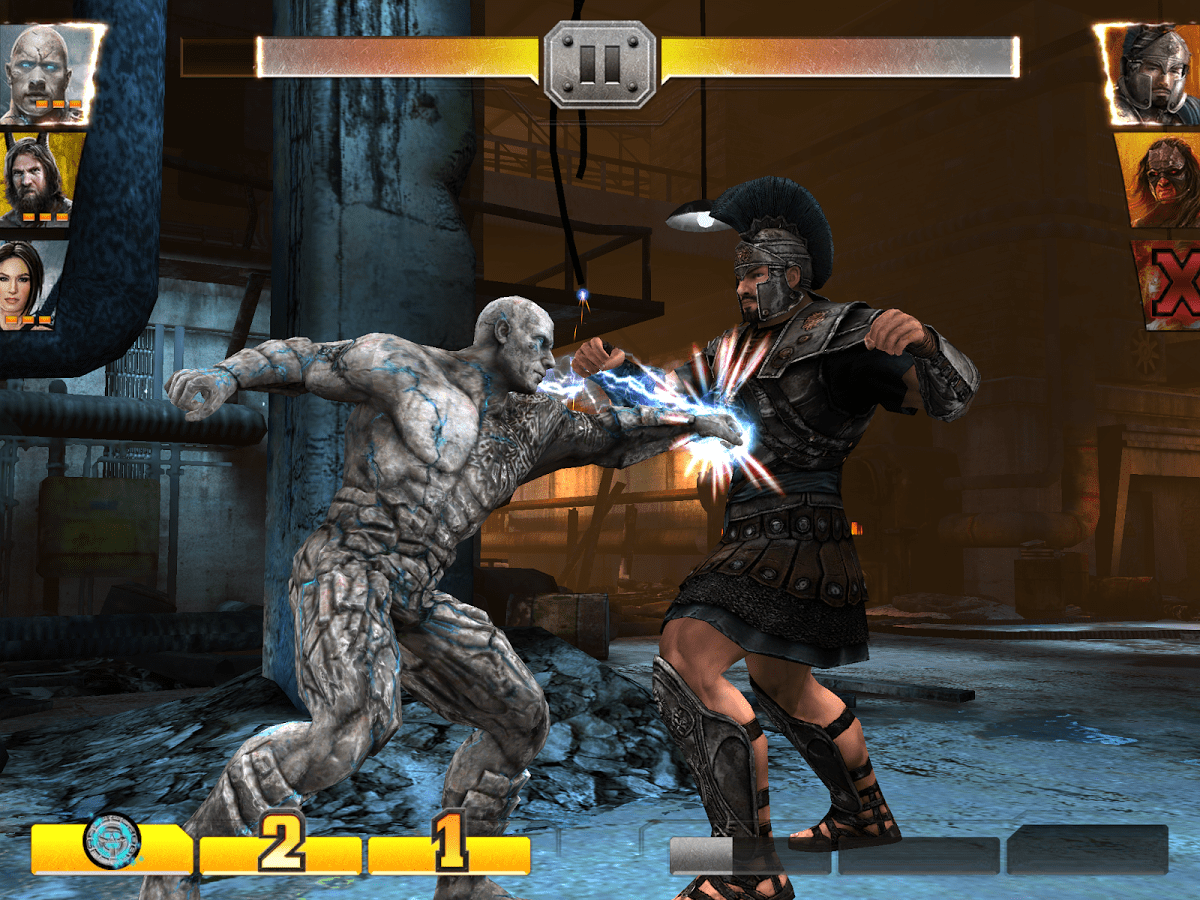
WWE Immortals brings your favorite WWE stars and brings them into a game. You can have powers, level up, play others online, and more. It has good graphics, and evidently great game play based on the 4.3 star rating and over 500,000 downloads. Otherwise, this is a cool looking fighting game with WWE stars.
 Cops N Robbers
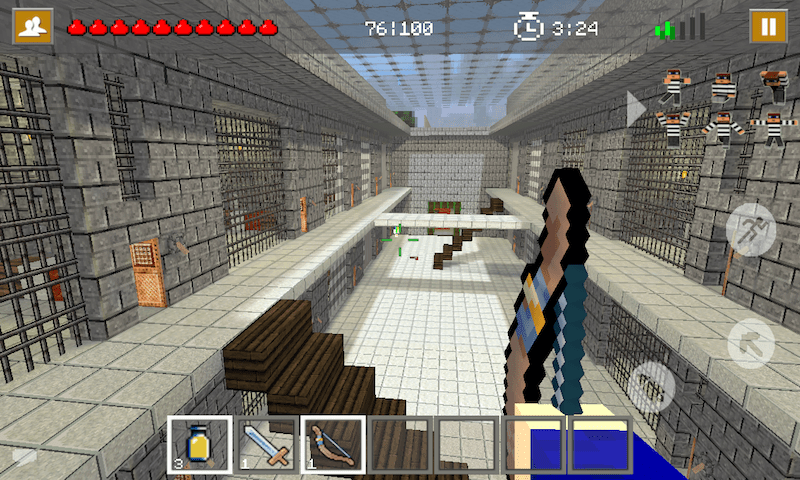
Cops N Robbers is a popular mini game that is now in a game to download for your phone. It has comfortable touch controls, good graphics (in a purposefully pixelated look way), and even multiplayer. You can either play a Cop or Robber, and depending on your role will depend on your goal in the game. It is currently $0.99, download it with the widget below.


FEATURED POSTS


The post 10 of the most popular apps this week (January 23) appeared first on AndroidGuys.
Sonim XP7 Review
// <![CDATA[
brightcove.createExperiences();
// ]]>
The Bottom Line
- Fantastic battery life
- Rugged/ extremely durable
- Bulky
- Low resolution display
- Proprietary charging port
The Sonim XP7 is a rugged phone made to withstand a lot of punishment, and while it does cost a pretty penny, it might be worth the investment if your particular lifestyle demands a phone of this caliber.
(function($)
$(document).ready(function()
$(“#aa_bottom_line .aa_bl_pros_cons”).each(function()
var aa_bl_pc=$(this).find(“.aa_bl_pc”);
var aa_bl_pros=$(this).find(“.aa_bl_pros”).height();
var aa_bl_cons=$(this).find(“.aa_bl_cons”).height();
if(window.innerWidth > 480 && aa_bl_pros != aa_bl_cons)
if(aa_bl_pros > aa_bl_cons)
aa_bl_pc.height(aa_bl_pros);
else
aa_bl_pc.height(aa_bl_cons);
)
);
)(jQuery);
Smartphones nowadays are designed to be thin and good looking, but this does require consumers to sacrifice on durability, as is evident by the fact that most of us rush to pick up a protective case or cover for our new devices. At the other end of the spectrum is the latest smartphone by Sonim, designed with only one thing in mind, and that is to take a lot of abuse. Is its durability enough to make it a worthwhile investment? That is what we find out, in this comprehensive review of the Sonim XP7!
Design

Adjectives like thin, sleek, lightweight, or even good looking isn’t what can be used to describe the Sonim XP7, but with the focus on function over form, it wasn’t meant to be. The device is thick, bulky, and heavy, feeling like a brick both in the hand and in the pocket, and in a lot of ways, is everything that most modern smartphones aren’t. Of course, there is a very good reason for it all, with the target consumer for this device being those with very rough lifestyles. The Sonim XP7 certainly isn’t a smartphone for the casual user, but if you’re looking for something that can keep up with you in harsh conditions, it might be one of the better options out there.

Of course, the phone isn’t indestructible per say, as I was able to damage it eventually, but as you can see in the video above, it can withstand one hell of a beating and still keep on ticking. The hard rubberized outer casing not only protects the device from the most brutal of drops, but also makes it resistant to punctures. The device can also withstand corrosive chemicals and oils, extreme pressure, as well as sudden vibrations and shocks. Rounding out its capabilities are its IP68 and IP69 rating for dust and water resistance, which means that it can be submerged in up to 2 meters of water for as long as 30 minutes, as well as resist against a high temperature and pressure wash.

When it comes to the design language, the volume rocker is found on the right side, along with a red button that can be used to contact Sonim’s emergency support line for lone workers. The service isn’t available yet, though it is expected to launch later this year. On the left side is a dedicated camera shutter button, a push to talk button, and a quite awkwardly placed power button. Up front are three physical buttons, and the home button can be used to wake the device, which reduces the need to keep reaching for that power button.

Up top is a bright notification light, along with a headphone jack and a SIM card slot, both of which are covered by flaps held in place by torx screws. The headphone jack can be accessed without needing to remove the screws, but needs to be removed in the case of the SIM card slot, easily done with the tool included in the box. The charging port is at the bottom, but isn’t a microUSB port, but rather a proprietary magnetic port which is unfortunate considering how prevalent microUSB charging is.
Display

On the specifications front, the Sonim XP7 features hardware that is mostly entry level to mid-range in its nature, starting with the decidedly low end display. The 4-inch display with a 800 x 480 resolution is functional, but in this day and age is quite a poor looking panel. Apart from the low resolution, colors are washed out, with a lot of color shifting when viewing off axis, which doesn’t make for a very good gaming or media consumption experience. On the flip side, the screen is usable with gloves, which is the bright spot in an otherwise disappointing display experience.
Performance and Hardware

Under the hood, the Sonim XP7 packs a quad-core Qualcomm Snapdragon 400 processor, clocked at 1.2 GHz, along with 1 GB of RAM. Like most phones running the Snapdragon 400, the performance is more than respectable, with the device running smoothly, applications loading quickly, while also handling some graphic-intensive games admirably. A contributing factor may be the near stock version of Android the device has onboard, but there is no denying that the Snapdragon 400 is one of the best mid-range processing packages available.

The device comes with 16 GB of on-board storage, but due to no microSD card slot the storage is somewhat limited, which might lead you to depend on cloud-based storage services. On the connectivity front, the XP7 packs a standard suite of sensors and connectivity options, and while it is designed for Canadian carriers like TELUS and BELL, it will work just fine on the LTE networks of T-Mobile and AT&T.

One of the biggest highlights of the Sonim XP7 definitely has to be the battery life. It packs a huge 4,800 mAh battery, and when combined with the fact that the processor isn’t pushing a lot of pixels due to the low resolution display, the battery life is understandably amazing. With 48 hours off charger, and almost 11 hours of screen on time, I have no doubt that you can go on a weekend road trip and not even have to worry about bringing the charger. This was also with really heavy usage that included gaming and watching a lot of videos on Youtube, after which it was still very difficult to drain the battery. It is by far the best battery life I’ve ever experienced on an Android smartphone, and I was pleasantly surprised at how long it lasted on a single charge.
Camera

The Sonim XP7 comes with a 8 MP rear camera, and comes with stock Android camera software. It’s not the more up-to-date Google Camera, but you do have the option to download it from the Google Play Store. The camera software is quite minimalistic, bringing just essential features like HDR, exposure, panorama, and a few other basic camera settings.
The picture quality is just about average in this case, but is certainly better than what I expected and offers a decent amount of color and detail. Noticeable is the fact the a lot of the photos tend to have a blue-ish tinge to them, along with there being a lack of dynamic range. HDR helps bring out more detail, but it does so at the expense of introducing more noise into the picture.
Software

As mentioned, the Sonim XP7 is running what is basically a stock version of Android 4.4.2 Kitkat out of the box. There are a few carrier-specific applications, an FM radio, and a couple of useful additions like a flashlight toggle on the lockscreen, but overall, it is a very pure experience, that keeps things running very smooth and fast.
Specifications
| Screen | 4-inch display, 800 x 480 resolution, 233 ppi |
| Size and Weight | 137 x 72.1 x 20.8 mm 290 grams |
| Cameras | 8 MP rear camera 1 MP front-facing camera |
| Memory and Storage | 1 GB RAM 16 GB storage, not expandable |
| Processor | 1.2 GHz quad-core Qualcomm Snapdragon 400 |
| Sensors | GPS, Accelerometer, Compass, Proximity |
| Networks | 3G/4G LTE |
| Wireless | Wi-Fi 802.11 a/b/g/n, dual-band, hotspot Bluetooth 4.0 |
| Ports | microUSB 2.0 |
| Battery | 4,800 mAh |
| OS | Android 4.4 KitKat |
Gallery


Pricing and Final Thoughts
The Sonim XP7 will set you back $650 off-contract, which is certainly very steep for what is essentially a mid-range smartphone in its specifications and features. To justify this price point, you really have to want its rugged features, and even that may not make it compelling enough for most users.

So there you have it – a closer look at the Sonim XP7! All said and done, this smartphone is a very niche product catering to a very specific target audience in mind, so while it may not be for the casual user, if you have a lifestyle that demands this level of ruggedness, this phone could potentially pay for itself in the long run.

6 common problems with the Nexus 6 and how to fix them
With the Nexus 6, Google has attempted to provide a worthy competitor in the phablet space dominated by Samsung. Packed with top of the line specifications, a sharp display and the best iteration of Android yet, you’re bound to find something impressive in this larger than life phone. Unfortunately, there isn’t a smartphone in the market without its flaws, and that is true with the Nexus 6 as well. Today, we’ll be taking a look at some of the most common problems with the Nexus 6, and offer potential solutions on how to fix them.
Disclaimer: Not every user of the Nexus 6 will face these issues, and it is quite likely that you won’t come across any of the problems listed below.
Problem #1 – Issues with random rebooting

A number of Nexus 6 users have reported that their phone suddenly reboots with no apparent reason. Sometimes, this can happen multiple times in a row, with the phone booting to lock screen, and then rebooting the moment a PIN or lock-code is entered.
Potential Solutions:
- Corrupt or fragmented data in your phone could be causing an issue. Back up any important data and perform a factory reset.
- Disable active notifications – this is sometimes helpful.
- Disable the primary messenger application and try using hangouts instead.
- Enable Google Play Services and GPS high accuracy.
- Make sure your device is charged fully.
- Wipe the cache partition on your phone, as this can remove any fragmented data.
Problem #2 – Bugs with Bluetooth connection

A number of Nexus 6 users have struggled with problems regarding Bluetooth connectivity.
Potential Solutions:
- Start by turning the Bluetooth on your device off and back on again.
- If the problem continues, clear the cache for Bluetooth by going to Settings – Apps – All – Bluetooth Share – Clear Cache.
- Go to Bluetooth Share and tap Clear Data
- Restart the phone after clearing the data and cache, if this doesn’t work, try booting the phone into safe mode using the directions below.
Problem #3 – Abnormal battery drain

Though its large battery suggests that the battery life of the Nexus 6 should be quite good, a number of these devices have been affected by abnormally fast drain despite normal usage.
Potential Solutions:
- Third party applications could be causing excess battery drain, so disable any power-heavy applications that are running in the background unless they are used frequently.
- Ensure all applications are updated to the latest version.
- Try uninstalling power-hungry applications one by one to see if the problem can be isolated.
- Turn off vibrations, and reduce screen brightness if possible.
- Try rebooting the device with all third-party applications uninstalled, or factory resetting the phone. This should help to clear out any damaged files in your data.
Problem #4 – Cloud Print errors and force closing

Some users have reported that on the Nexus 6, it is difficult to keep the Cloud Print application running.
Potential Solutions:
- Update your Cloud Print application and ensure that the device is fully up to date.
- Go into Settings – Apps – All – Cloud Print and select both Clear Cache and Clear Data
- Attempt a factory reset to get rid of any fragmented data.
Problem #5 – Screen isn’t bright enough outside

An issue that has plagued many users of the Nexus 6 is that when outside, the screen brightness seems too low, especially on bright or sunny days.
Potential Solutions:
- Go to Settings – Device – Display and change your settings.
- You should be able to alter the brightness level of set auto-brightness on the device.
- Turn on adaptive brightness to automatically optimize the level of brightness on your phone screen in regards to the light around you. This setting is generally on as default, and still allows for brightness settings to be altered when needed.
Problem #6 – Slow charging

Slow charging is one of the problems that many Nexus 6 owners have complained of since buying the phablet.
Potential Solutions:
- If the phone is charging slowly, disable any unwanted applications
- Press the back button twice when exiting an application, instead of simply tapping “Home”, this closes the app from the background and prevents the excessive drain of power.
- Don’t play games when the Nexus 6 is charging, as they require extra processing power.
- Check the charger cable is working by attempting to charge using another cable, or charging a different device with the same cable.
- Try charging through direct connection to a laptop or computer.
- A malfunctioning application could be causing the problem, boot the phone into safe mode and see if it charges faster. This will imply a faulty app. If an application is the problem, perform a factory reset and reinstall apps selectively.
These are some of the most common issues that users of the Nexus 6 have been suffering. If you have struggled with one of these problems yourself, or have experienced something that we haven’t mentioned above, make sure to get in touch through the comment section. We’ll be working to keep this list updated as more solutions and problems appear.
SEE ALSO: Nexus 6 Review
Following are the guides on how to delete data, factory reset, and boot your Nexus 6 into safe mode.
Related Videos
.rvs_wrapper
width: 335px;
.rvs_wrapper.align_left
float: left;
.rvs_wrapper.align_right
float: right;
.rvs_wrapper.align_center,
.rvs_wrapper.align_none
width: 100%;
.rvs_wrapper.align_center
text-align: center;
.rvs_wrapper.align_center.cbc-latest-videos ul li
float: none;
display: inline-block;
vertical-align: top;
.rvs_wrapper.cbc-latest-videos:not(.align_none) ul li:nth-child(2n+1)
clear: both;
.rvs_title
font-weight: 600 !important;
margin: 0 !important;
.rvs_wrapper.align_right .rvs_title
padding-left: 20px;
.rvs_title a
font-family: ‘Roboto Condensed’;
color: #3a3a3a;
.rvs_wrapper.cbc-latest-videos ul
padding-top: 10px;
.rvs_wrapper.align_left.cbc-latest-videos ul li,
.rvs_wrapper.align_none.cbc-latest-videos ul li
padding: 0 15px 0 0;
.rvs_wrapper.align_right.cbc-latest-videos ul li
padding: 0 0 0 15px;
float: right;
.rvs_wrapper.align_center.cbc-latest-videos ul li
padding: 0 7px;
.rvs_wrapper.cbc-latest-videos ul li > a
font-weight: 400;
.rvs_wrapper.cbc-latest-videos ul li > a .yt-thumbnail
margin-bottom: 0;
@media only screen and (max-width : 480px)
.rvs_wrapper
width: 100%;
text-align: center;
#page .rvs_wrapper.cbc-latest-videos ul li
padding: 0 7px;
display: inline-block;
float: none;
vertical-align: top;


Deleting Data:
- Go to Settings – Personal
- Tap Backup and Reset
- Choose Factory Data Reset
- Confirm with Reset Phone
- Enter your PIN or pattern code.
- Tap Delete everything
Hardware Factory Reset:
- Turn off the phone
- Hold the volume down button and Power button simultaneously until the device switches on.
- You should see “Start” with an arrow
- Tap volume down twice and the power button to enter Recovery Mode
- Hold the power button then press and release the volume up button
- Use the volume buttons to select wipe data/factory reset
- Choose “Yes – erase all data” with the power button
Safe Mode:
- Hold the power button after ensuring the screen is on.
- Tap and hold the Power off selection in the menu
- Tap OK to initiate Safe Mode

VLC beta for Windows Phone scores more bug fixes in 1.0.9 update

VLC for Windows Phone has picked up an update today, bringing it up to version 1.0.9. While there’s no changelog listed on the WIndows Phone Store, we expect that this build brings some bug fixes and cosmetic changes that VLC developer Thomas Nigro hinted at last week.

Expedia buys Travelocity, but don’t expect much to change

How much does it cost to buy one of the biggest brands in online travel? Only about $280 million, as it turns out: That’s how much Expedia paid in cash to acquire Travelocity today from its parent company Sabre Corporation (no relation to these the makers of the critically panned Pyramid). So what does that mean for you, the average vacation-loving consumer? We reached out to Expedia to clarify matters (their spokesperson didn’t offer much in the way of new info), but don’t expect things to change dramatically… if they change at all.
Thing is, Expedia already owns a slew of other big-name travel sites – think Hotels.com, Hotwire and Trivago – all of which started off as independent companies before being snapped up by the former Microsoft company. In case you don’t feel like searching, yes, all of those sites still exist and still proffer flight and hotel deals to people in search of their next big sojourn. The events that led to today’s announcement were set into motion back in 2013 when Expedia and Travelocity cooked up a deal that basically saw the former offer its travel platform to be painted over in the latter’s colors and served up to Travelocity customers. In other words, the lines between Travelocity and Expedia have been pretty blurry for the past year and change anyway; it was basically just for Expedia to tap into its rivals pool of loyal customers.
And if you don’t like the idea of giving your money to a veritable travel juggernaut? Well, mainstay travel companies Orbitz and TripAdvisor join upstarts like Hipmunk, Kayak and Hitlist as worthy players that have so far escaped Expedia’s clutches. Let’s see how long they hold out.
Source: Expedia

Research suggests that Windows 10 will not have a major impact on the Chromebooks

According to a new report from Digitimes Research, Microsoft’s recently announced unified Windows 10 experience would not have a massive impact on the Chromebooks which is eating its way through the notebook marketshare with each passing month.
Microsoft is using a unification system with Windows 10 which will bring together its mobile, tablets and PCs with the same apps running seamlessly across devices. This can be partially likened to what Apple is doing with iOS and Mac OSX.
However, the steadily increasing Chromebook sales will be hard to contain, according to the report. Chromebooks are affordable and offer seamless integration with Android devices, which pegs the odds in its favor.
While Microsoft will still dominate the notebook segment, it probably won’t see as much success as it is currently expecting. It is being said that Windows tablet sales will see growth in the current year, which is offering some hope for Microsoft.
But as it stands, it seems like Google and Apple will continue to dominate the mobile segment while Chromebooks slowly sneak up on the PC marketshare.
Source: Digitimes
Come comment on this article: Research suggests that Windows 10 will not have a major impact on the Chromebooks
US variants of the LG G3 to see Android 5.0 Lollipop updates ‘soon’
The LG USA Mobile Twitter account pushed out a tweet earlier this morning with the image you see above. It is obviously in reference to the LG G3 and a Android 5.0 Lollipop update. Being that the tweet came from the LG USA account, we surmise that this means the US variants are close to seeing the […]
The post US variants of the LG G3 to see Android 5.0 Lollipop updates ‘soon’ appeared first on AndroidSPIN.
 AIVAnet