


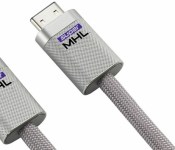
MHL’s new adapter can handle 8K video and link your devices

If you thought MHL’s existing adapter spec could handle just about everything under the sun, you ain’t seen nothin’ yet. The MHL Consortium has taken the wraps off of SuperMHL, a new connector format that’s ready for hardware you can’t even buy yet. It can play gigantic 8K videos at 120 frames per second, and it’s also ready for wider color ranges (up to 48-bit) that present a more natural-looking picture. Also, you can link multiple SuperMHL devices — it’s possible to steer your TV, receiver and Blu-ray player using one remote. Think of it as a supercharged version of the years-old HDMI-CEC control standard.
Other perks? You can now charge devices that use up to 40W of power, so you won’t have problems juicing up a high-end tablet (or theoretically, a laptop) while it sends video to the TV. There’s also support for all-encompassing sound technologies like Dolby Atmos and DTS-UHD, and the connector is reversible much like USB Type-C. If there’s anything holding the technology back, it’s the wait. The spec will be available near the end of January, but it’s going to take much longer than that for device makers to build it into TVs and peripherals. It’ll be a long, long while before you’re watching 8K movies on a next-generation streaming media stick.
Filed under: Cellphones, Home Entertainment, Peripherals, Tablets, HD, Mobile
Source: MHL Consortium

TCL revives Palm, new company will be stationed in Silicon Valley

The company that was acquired by HP in 2010 and put to rest the following year will return. Following the purchase of Palm-related trademarks, TCL announced today that a new Palm Inc. will be stationed in Silicon Valley. The location shows how serious TCL is about reviving Palm, saying that it is time to “revive and bring back this pioneer spirit.” Palm will be able to take advantage of TCL’s assets outside of Silicon Valley. Primarily, TCL will offer access to its 5,000 engineers and seven research and development centers located around the world.
We do not know when the first Palm device will be released, but what we do know is that its parent company is fully committed to ensuring its success.
Hit the break for the full press release.
TCL Communication co-(re)creates Palm
LAS VEGAS, Jan. 6, 2015 /PRNewswire/ – Palm brand has always been synonymous with innovation throughout its history. As such it has consistently acted as a pioneer of mobile technologies. Now is the time to revive and bring back this pioneer spirit.
To do so, TCL Communication Technology Holdings Limited (“TCL Communication” or the “Company” which, together with its subsidiaries, is referred to as the “Group”; HKSE stock code: 02618) is very proud to announce that it will create a new Palm Inc., a US-based company that will take ownership of the Palm brand. New Palm Inc. will remain a truly Californian, Silicon Valley, based company leveraging on the talents and partnerships of the area.
Palm has always carried a lot of affect and emotions. That’s why TCL has set the direction to rebuild the brand involving Palm‘s very own community, making it the largest scale crowd-sourced project ever seen in the industry.
The objective goes far beyond proposing a more advanced device. It is to deliver absolute breakthrough innovations in Technology, Design, User Experience, Eco-system, Marketing, Supply Chain, and Business Models.
Palm will be fully supported by the various assets of TCL Communication:
- A best in class R&D organization, rich with 5000 engineers across 7 R&D centers around the globe
- The most modern and efficient mobile devices manufacturing facility
- A top level quality record recognized by the global tier 1 carriers and retailers around the world
- A cutting-edge supply chain ready for the flexibility required by the market today
- A global network already serving more than 170 countries and the most demanding customers of the industry with local Sales, Marketing and Technical teams
The exact timeline of the roll-out of the Palm project will be communicated at a later date.
TCL Communication, the 5th largest global handsets vendor, is operating globally under the ALCATEL ONETOUCH brand and TCL brand. It has already reached breakthrough positions, in multiple regions of the world.
During the past 3 years, TCL Communication has evolved from a leading position in feature phones to a top player in Smart Devices with a comprehensive portfolio of Smartphones, Tablets, IoT, Wearables, Mobile Routers. Today the company is adding new dimensions to its legacy hardware capabilities, turning itself into a true mobile Internet player with applications and cloud services in areas such as health care, education, smart home, video conferencing, music, etc.
About TCL Communication
TCL Communication Technology Holdings Limited (“TCL Communication” or the “Company”; HKSE stock code: 02618) together with its subsidiaries (collectively the “Group”) designs, manufactures and markets an expanding portfolio of mobile and internet products worldwide under two key brands — ALCATEL ONETOUCH and TCL. The Group’s portfolio of products is currently sold in China and over 170 countries throughout the Americas, Europe, the Middle East, Africa and Asia Pacific. Headquartered in Shenzhen, China, TCL Communication operates its highly efficient manufacturing plant and R&D centers in various provinces of the PRC. It employs over 16,000 people in mainland China, Hong Kong and overseas.TCL Communication is one of the few companies in Hong Kong or mainland Chinawho owns or licenses 2G, 2.5G, 2.75G, 3G and 4G-patented technologies. It is also able to independently develop products and solutions for the GSM, GPRS, EDGE, CDMA, WCDMA, TDSCDMA and LTE. For more information, please visit its website at http://tclcom.tcl.com
Come comment on this article: TCL revives Palm, new company will be stationed in Silicon Valley
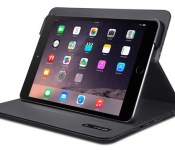
CES 2015: AT&T Announces 4G LTE Smartcase With MicroSD Slot for Wi-Fi iPads
AT&T today announced the upcoming availability of its new Modio smartcase that will add 4G LTE connectivity to a Wi-Fi-only iPad or iPad mini. The Modio smartcase will be compatible with the iPad Air 2, iPad Air, iPad mini 3, iPad mini 2 and iPad mini.

The Modio will allow Wi-Fi iPad owners to connect to AT&T’s 4G LTE network using the data available on the customers’ Mobile Share plans. Mobile Share allows customers to pay for a monthly data allotment that is shared between smartphones, tablets and other connected devices.
Beyond cellular connectivity, the Modio smartcase also includes its own 4,600 mAh battery to support up to 10 hours of use, along with a microSD card slot that can be used to store up to 32 GB of media and other files. Case owners can install the accompanying AT&T Modio Data application to monitor data usage and manage cellular plan details.
The AT&T Modio smartcase for iPad mini is listed on AT&T’s website as coming soon, with a version for larger iPad Air models to follow. Pricing and exact launch dates for the new cases has yet to be announced.

Saygus V2 Android phone boasts up to 320GB of storage

You may not be familiar with the company behind the V2 phone, and that is no surprise as Saygus is hardly a household brand. However, their new multimedia phone may just put them on your radar, with up to 320GB of internal storage and all the right specs to make a splash in the market.
Saygus is showing off their V2 Android powered smartphone at CES 2015, and we are on site to check it out. Stay tuned for a full video rundown to see how we feel about this 5-inch device.
In the same way we suspect Saygus started off when they began designing this phone, let’s dive straight into the specifications.
Starting with a 5-inch 1080p display, the Saygus V2 packs a Snapdragon 801, 2.5GHz quad-core processor, 3GB of RAM and runs Android 4.4.4 KitKat. We know its got a 21MP rear camera with dual LED flash and a 13MP front shooter as well. Fingerprint scanner and Wireless Qi charging are a nice touch. Focusing on the media side of things, sound comes to you out of Harmon Kardon speakers and you won’t have trouble taking your media along for the ride, with support for up to 320GB of storage space.
Now, before we get ahead of ourselves, that 320GB of space comes as up to 64GB of internal storage, with support for two microSD cards up to 128GB each.

Aside from the massive amount of storage space, one of the key features that stand out to us on the Saygus V2 is the built-in root access. We have been talking a lot about root access on phones lately, centered around the root abilities of CyanogenMod 12. In general, you guys tell me that you want to see better root support from manufacturers, or Android itself, and it looks like the V2 will deliver.
Saygus is working hard to launch the V2 in the U.S. this coming spring, but have not yet announced pricing for the multimedia focused Android phone.
Stay tuned for our hands-on video of the Saygus V2, coming soon from the CES show floor. Also, stay tuned for more great coverage from CES 2015, we have nearly half our team at the show to bring you the best coverage on the latest and greatest consumer electronics.
What do you say, is 320GB storage space too much for your needs, or is this the device you have been patiently waiting for?
CES 2015: The CocoJet 3D printer needs to be in my life
I don’t care if this isn’t strictly Android related – I’m sure everyone will be able to appreciate how awesome this gadget is. 3D Systems and Hershey have combined forces to create the CocoJet 3D printer so that all our dreams of 3D printing food are realized (nobody else dreams of only eating chocolate?). Dark, milk and […]
The post CES 2015: The CocoJet 3D printer needs to be in my life appeared first on AndroidSPIN.

Motion capture suits can detect lies better by tracking your fidgeting

Stone-cold bad guys don’t worry about lie detectors, because they can only suss out fibs 60 percent of the time — not much better than someone without one. But there’s a new hope for cops. Scientists at the University of Cambridge have used full-body motion capture suits to cajole the truth at a much better clip. They put 90 volunteers in $12,000 Xsens mocap suits, and had them lie to other volunteers. By tracking joint displacements, their algorithms could pick three out of four liars — a much more useful result for law enforcement. One researcher said “put simply, guilty people fidget more… independent of cultural background, cognitive load and anxiety.” The team thinks it can fine tune it for even better accuracy, so police may one day be squeezing perps into skin-tight suits rather than finger sensors.
[Image credit: Chernin Entertainment/20th Century Fox]
Filed under: Wearables, Science, Alt
Via: IT World
Source: University of Cambridge (1), (2)

Android TV wave spells the end for Google TV

The Google TV and Android TV teams took to Google+ today to announce the end of the road for the development on the Google TV platform. As the team indicates in their open “letter” to Google TV developers, the focus going forward will be working on the Android TV platform and helping OEMs get them to market. Much of this new focus is driven by the launch of Android 5.0 Lollipop and the ability to bring Android to the television form factor. In addition to Android TV, Google’s own development team will be working on the Google Cast ecosystem.
Google’s developers say existing Google TV devices will continue to work, along with all of the apps that have been developed for the platform. However, Google TV libraries will no longer be available. Without being specific, they do indicate that a “small subset of Google TV devices will be updated to Android TV.” Other than those devices, Google is looking forward to new devices coming to market from Sony, Sharp, Philips and other manufacturers.
Google’s teams say they have made new Leanback support libraries available to help developers transition their existing apps over to the Android TV platform.
What do you think of the “death” of Google TV?
source: +Google TV Developers
Come comment on this article: Android TV wave spells the end for Google TV

CES 2015: Energous Demos Wire-Free Universal Device Charging With ‘WattUp’ [iOS Blog]
Setting up a “future home environment” at the Hard Rock Hotel & Casino during this year’s Consumer Electronics Show, technology company Energous Corporation demoed its newest product WattUp, a Bluetooth and radio frequency-enabled transmitter that uses the same radio bands as a Wi-Fi router to deliver “intelligent, scalable power” to charge everything from smartphones and tablets to wireless keyboards and children’s toys.
The patent and trademark-pending charging solution differs from most wireless charging technologies due to its lack of need for a pad or other near-field peripheral to communicate between the device needing charge and the device giving the charge. The company promises “meaningful, useful power” will be used to charge a device, not only providing the equivalent charge of a traditional wall outlet, but allowing ease-of-use in letting consumers roam up to 15 feet away from the transmitter.

“As a leading company in the development of true wire-free, uncoupled power with complete mobility, Energous is proud to be demonstrating our technology in model homes of the future. This event at CES 2015 marks a significant achievement for Energous and the industry in showing how wire-free charging can be deployed in everyday living environments.” said Stephen R. Rizzone, CEO of Energous Corporation. “We believe we are the only CES exhibitor to be demonstrating true wire-free charging technology that lets users roam while their devices charge.”
Energous promises WattUp will charge “in essence any battery-powered device in your home or office,” but the device itself must require 10 watts or less to function with the transmitter. One WattUp transmitter can handle 12 receiver devices at any given time.
The company also detailed a mobile and web-based app that will be used to control the order and preference of charge by customers. Users can opt for manual control, only receiving charge to devices when they specifically call for it. Those needing a constant top-off can set prioritized schedules inside the app, causing heavily-used phones and tablets to receive charges once the user walks through the door, and less time-sensitive items like remote controls and keyboards to charge on their own during the day.
Energous says it will begin licensing WattUp to both wearable and smartphone accessory markets, hoping the future brings expansive partnerships with Wi-Fi routers and smartphones themselves.

14 best antivirus Android apps and anti-malware Android apps

Antivirus Android apps have exploded over the last year. Despite Android’s mostly secure internal security, there are millions of people who just like having extra security around for those just-in-case scenarios. It also doesn’t hurt that many phones come packaged with antivirus Android apps and that many of those apps have other features aside from antivirus protection such as phone finding and phone security benefits. Here is our list of the best antivirus Android apps! It is worth noting that prices may vary as many of these companies have promotions and price changes many times throughout the year.
 360 Security – Antivirus Boost

[Price: Free]
Why can’t more antivirus apps be like this one.
- Totally free with ad support.
- Scans and deletes threats and keeps an eye out for others with features like privacy adviser.
- Has functionality to clean devices from old files left behind by apps, corrupted files, and other trash that should be gone.
- Built in data monitor for those who need that.
- It could use some anti-theft features like some of these other apps.
First up is 360 Mobile Security. This full featured and free application does pretty much everything you’d expect in an antivirus Android app. It scans and removes threats, cleans your device, and some additional stuff like a privacy adviser and data monitor. It’s highly rated with a 4.5 rating in the Play Store.

(function($)
$(document).ready(function()
$(“#aa_bottom_line .aa_bl_pros_cons”).each(function()
var aa_bl_pc=$(this).find(“.aa_bl_pc”);
var aa_bl_pros=$(this).find(“.aa_bl_pros”).height();
var aa_bl_cons=$(this).find(“.aa_bl_cons”).height();
if(window.innerWidth > 480 && aa_bl_pros != aa_bl_cons)
if(aa_bl_pros > aa_bl_cons)
aa_bl_pc.height(aa_bl_pros);
else
aa_bl_pc.height(aa_bl_cons);
)
);
)(jQuery);
 Anti-Virus

[Price: Free / $2.59/month / $23.17 per year / $116.32 or $139.61 for lifetime license]
Competent even if it’s not well-known.
- Lots of payment options and free is one of them.
- Antivirus and anti-malware features include scanning, real time tracking, and removal.
- Anti-theft such as locking the phone and remote location tracking.
- The paid version apparently re-installed itself if it’s deleted to protect against thieves. That’s a new one.
- Network monitoring.
- Most expensive license is $100 bucks. We don’t imagine many people will like that.
- Some paid features like call blocking are provided for free in other apps.
If nothing else can be said about this application, it’s can be said that they’re flexible with how much you pay. The free version comes with a lot of features including antivirus, anti-malware, and anti-theft services. You can pay for a subscription monthly, yearly, or a single lifetime license if you prefer.
(function($)
$(document).ready(function()
$(“#aa_bottom_line .aa_bl_pros_cons”).each(function()
var aa_bl_pc=$(this).find(“.aa_bl_pc”);
var aa_bl_pros=$(this).find(“.aa_bl_pros”).height();
var aa_bl_cons=$(this).find(“.aa_bl_cons”).height();
if(window.innerWidth > 480 && aa_bl_pros != aa_bl_cons)
if(aa_bl_pros > aa_bl_cons)
aa_bl_pc.height(aa_bl_pros);
else
aa_bl_pc.height(aa_bl_cons);
)
);
)(jQuery);

 Antivirus & Mobile Security

[Price: Free]
Free and simple the way it ought to be sometimes.
- Includes your standard antivirus and anti-malware scanning features.
- Secure web browsing features are included.
- Data backup and device location services are also included.
- Candid Camera Theif ID is pretty much what it sounds like. Take a picture of those theives!
- You may have problems uninstalling this one because of the security features. It’s doable but tedious.
TrustGo’s Antivirus & Mobile security is another totally free Android antivirus option that is worth a look. This one takes a more simplistic approach as it doesn’t offer too many extended features like other apps. You get antivirus and anti-malware protection as well as browsing protection and some other security features along with anti-theft and backup features.
(function($)
$(document).ready(function()
$(“#aa_bottom_line .aa_bl_pros_cons”).each(function()
var aa_bl_pc=$(this).find(“.aa_bl_pc”);
var aa_bl_pros=$(this).find(“.aa_bl_pros”).height();
var aa_bl_cons=$(this).find(“.aa_bl_cons”).height();
if(window.innerWidth > 480 && aa_bl_pros != aa_bl_cons)
if(aa_bl_pros > aa_bl_cons)
aa_bl_pc.height(aa_bl_pros);
else
aa_bl_pc.height(aa_bl_cons);
)
);
)(jQuery);
 AVAST Mobile Security

[Price: Free / $1.99/month / $14.99/year]
More security than you can shake a stick at.
- Has more features in the paid version than some totally free apps on this list.
- Undercuts its competition in terms of pricing by about 50% per year.
- It put the pricing information in the Google Play Store description. I don’t care what anyone says, that’s a pro.
- Has features for root users including firewall services.
- Probably won’t work well on older or low spec devices.
- The real time protection is a tad overzealous sometimes.
Avast is another well-known antivirus company from PC and it’s Android offering is also above average in most areas including its pricing. While most places are looking for $30 or more per year, Avast charges about half that so if you don’t spending money and you don’t want to spend too much, this is a good option.
(function($)
$(document).ready(function()
$(“#aa_bottom_line .aa_bl_pros_cons”).each(function()
var aa_bl_pc=$(this).find(“.aa_bl_pc”);
var aa_bl_pros=$(this).find(“.aa_bl_pros”).height();
var aa_bl_cons=$(this).find(“.aa_bl_cons”).height();
if(window.innerWidth > 480 && aa_bl_pros != aa_bl_cons)
if(aa_bl_pros > aa_bl_cons)
aa_bl_pc.height(aa_bl_pros);
else
aa_bl_pc.height(aa_bl_cons);
)
);
)(jQuery);
 AVG AntiVirus Security

[Price: Free / $3.99/month / $14.99/year]
Everybody has heard of AVG.
- The free version comes with the basics like antivirus, anti-phishing, and anti-malware.
- With over 100 million installs and a 4.4 rating, sometimes you can trust the public on what apps are good.
- The paid version comes with a host of unique and advanced features like app backup, app locks, and SIM locking.
- Anti-theft features are in both free and paid versions.
- The list of features is too long for this pros list.
- Most secure browsing features are locked to the stock Android browser that most people don’t use.
- This is not for people who dig simplicity. This is a security suite.
Next up is the venerable AVG AntiVirus app. It comes in two flavors and that’s Free and Pro. The free version has a fairly basic set of features while the paid version has most of the extended features. You can buy it in monthly or yearly subscriptions based on your needs. It’s another household name in the antivirus game and it’s a solid app even in its free form.
(function($)
$(document).ready(function()
$(“#aa_bottom_line .aa_bl_pros_cons”).each(function()
var aa_bl_pc=$(this).find(“.aa_bl_pc”);
var aa_bl_pros=$(this).find(“.aa_bl_pros”).height();
var aa_bl_cons=$(this).find(“.aa_bl_cons”).height();
if(window.innerWidth > 480 && aa_bl_pros != aa_bl_cons)
if(aa_bl_pros > aa_bl_cons)
aa_bl_pc.height(aa_bl_pros);
else
aa_bl_pc.height(aa_bl_cons);
)
);
)(jQuery);

 Bitdefender Antivirus Free

[Price: Free]
Simple is as simple does.
- Very simple. Just install, run the scan, remove the crap, and the app sits and waits for more threats.
- Antivirus, anti-malware, and anti-phishing.
- Very light so it’s great for older devices and that also means a shorter permissions list.
- Free.
- If you need more features and more protection, look elsewhere.
Even though Bitdefender has a full-featured antivirus app, we actually liked this one better. It’s wildly simple to use. Here’s how it works. You install it, scan for stuff, remove threats, and then it sits there and waits for bad stuff to try to come to you. That’s it. No ridiculous features and no nonsense. It’s also free. If you want to keep the Bitdefender name but move on to paid antivirus support, check out BitDefender Mobile Security.
(function($)
$(document).ready(function()
$(“#aa_bottom_line .aa_bl_pros_cons”).each(function()
var aa_bl_pc=$(this).find(“.aa_bl_pc”);
var aa_bl_pros=$(this).find(“.aa_bl_pros”).height();
var aa_bl_cons=$(this).find(“.aa_bl_cons”).height();
if(window.innerWidth > 480 && aa_bl_pros != aa_bl_cons)
if(aa_bl_pros > aa_bl_cons)
aa_bl_pc.height(aa_bl_pros);
else
aa_bl_pc.height(aa_bl_cons);
)
);
)(jQuery);
 CM Security
[Price: Free]
What more could you ask for?
- Antivirus, anti-malware, and safe browsing features baked in.
- Anti-theft functionality includes Google Maps integration, picture taking support, and scream mode.
- Currently boasts a 100% detection rate.
- Light on system resources makes it good for older devices.
- It doesn’t make you breakfast?
CM Security is a newer Android antivirus app that’s hit the market and so far it’s wildly popular and very highly rated. The app brings antivirus, anti-malware, and find-my-phone functionality in a totally free package that people seem to really enjoy. It has a lot of features and they’re generally ones you’d have to pay for in other apps.
(function($)
$(document).ready(function()
$(“#aa_bottom_line .aa_bl_pros_cons”).each(function()
var aa_bl_pc=$(this).find(“.aa_bl_pc”);
var aa_bl_pros=$(this).find(“.aa_bl_pros”).height();
var aa_bl_cons=$(this).find(“.aa_bl_cons”).height();
if(window.innerWidth > 480 && aa_bl_pros != aa_bl_cons)
if(aa_bl_pros > aa_bl_cons)
aa_bl_pc.height(aa_bl_pros);
else
aa_bl_pc.height(aa_bl_cons);
)
);
)(jQuery);

 Dr Web Anti-virus

[Price: Free / $75]
A good old fashioned antivirus app.
- Free version includes antivirus, anti-malware, and device protection including a service that lets you know when something is accessing your device storage.
- Paid version includes anti-theft, anti-spam, and cloud checker services.
- Smaller virus definition updates for those on limited data plans.
- Low system resources required makes it good for older devices.
- $75 is a big expensive even if it is for a lifetime license.
- If you’re looking for advanced features, prepare to pay for them.
It’s one of the more expensive options on this list, but Dr Web antivirus doesn’t operate on a subscription service so that’s a big plus over the long haul. With the free version you get basic antivirus and anti-malware protection along with basic device protection. It’s definitely worth checking out. If you want anti-spam, anti-theft, and a cloud checker service, you’ll need the full version.
(function($)
$(document).ready(function()
$(“#aa_bottom_line .aa_bl_pros_cons”).each(function()
var aa_bl_pc=$(this).find(“.aa_bl_pc”);
var aa_bl_pros=$(this).find(“.aa_bl_pros”).height();
var aa_bl_cons=$(this).find(“.aa_bl_cons”).height();
if(window.innerWidth > 480 && aa_bl_pros != aa_bl_cons)
if(aa_bl_pros > aa_bl_cons)
aa_bl_pc.height(aa_bl_pros);
else
aa_bl_pc.height(aa_bl_cons);
)
);
)(jQuery);

 Eset Mobile Security & Antivirus
[Price: Free / $9.99/year]
We’ll give this one a nod. Get it?
- Boasts a 99.7% detection rate.
- Auto-scan new files as you download them.
- Tablet interface which is something a surprisingly few number of these apps have.
- Premium features include call/SMS blocking, advanced anti-theft features, and even a training course on mobile security.
- The free version is extremely basic. You’re either going all in with this one or you’ll probably look for something else.
- KitKat permissions issue prevents SMS blocking from working.
- Automatic virus definition updates are premium only.
Eset is the maker of the popular Nod32 series of antivirus apps on desktop which are both highly rated and very popular. They have taken the opportunity to make their subscriptions per year only instead of per month and their prices are actually fairly decent. The free version is a little bottlenecked but the premium version is among the best out there.
(function($)
$(document).ready(function()
$(“#aa_bottom_line .aa_bl_pros_cons”).each(function()
var aa_bl_pc=$(this).find(“.aa_bl_pc”);
var aa_bl_pros=$(this).find(“.aa_bl_pros”).height();
var aa_bl_cons=$(this).find(“.aa_bl_cons”).height();
if(window.innerWidth > 480 && aa_bl_pros != aa_bl_cons)
if(aa_bl_pros > aa_bl_cons)
aa_bl_pc.height(aa_bl_pros);
else
aa_bl_pc.height(aa_bl_cons);
)
);
)(jQuery);
 Kaspersky Internet Security
[Price: Free / $14.95/year (license for two devices)]
A solid offering from a solid company.
- Free version is pretty basic but offers the essential antivirus and security features.
- Anti-theft features available in the free version. That’s a win.
- Paid version enables cloud protection and anti-phishing.
- Real-time protection is a paid feature for some reason.
- SMS bug in KitKat prevents the stock messaging app from receiving texts.
- Poor performance on older or midrange devices.
- You must create a Kaspersky account in order to even open the app the first time.
Kaspersky has made it to the Android platform and thus onto this list. They’re one of the most popular and trusted antivirus companies out there and that rings true on mobile as well. Like most it has a scaled down free app with a premium option available as a yearly subscription. The free version is pretty good and the premium features are also pretty good.
(function($)
$(document).ready(function()
$(“#aa_bottom_line .aa_bl_pros_cons”).each(function()
var aa_bl_pc=$(this).find(“.aa_bl_pc”);
var aa_bl_pros=$(this).find(“.aa_bl_pros”).height();
var aa_bl_cons=$(this).find(“.aa_bl_cons”).height();
if(window.innerWidth > 480 && aa_bl_pros != aa_bl_cons)
if(aa_bl_pros > aa_bl_cons)
aa_bl_pc.height(aa_bl_pros);
else
aa_bl_pc.height(aa_bl_cons);
)
);
)(jQuery);
 Lookout

[Price: Free / $2.99/month / $29.99/year]
Comes pre-installed on many devices.
- Antivirus, anti-malware, some anti-theft, and some backup capabilities in the free version.
- Paid version gives you theft alerts, lock and wipe capabilities, privacy guards, and safe browsing.
- Competitive pricing for the premium version.
- Free version automatically saves device’s last known location when the battery is low.
- A lot of people don’t like bloatware and thus don’t like Lookout because it does come pre-installed on devices.
- Alerts can be pretty annoying if you don’t configure them to your needs.
- Underwent a pricing change lately that put more of the free features on the paid verison.
A lot of people already know Lookout because it comes pre-installed on a lot of devices. If that’s the case, you can probably just keep it because it’s one of the best ones out there and you likely don’t need to replace it. It offers a plethora of features and most of them are included in the free version although you can get premium features if you want them.
(function($)
$(document).ready(function()
$(“#aa_bottom_line .aa_bl_pros_cons”).each(function()
var aa_bl_pc=$(this).find(“.aa_bl_pc”);
var aa_bl_pros=$(this).find(“.aa_bl_pros”).height();
var aa_bl_cons=$(this).find(“.aa_bl_cons”).height();
if(window.innerWidth > 480 && aa_bl_pros != aa_bl_cons)
if(aa_bl_pros > aa_bl_cons)
aa_bl_pc.height(aa_bl_pros);
else
aa_bl_pc.height(aa_bl_cons);
)
);
)(jQuery);
 Malwarebytes Anti-Malware
[Price: Free]
Like that one everyone recommends on PC.
- Much like its PC counterpart, this app is lightweight and focuses only on stopping or removing malware.
- Also scans for apps that may be abusing their permissions, such as location or other personal information.
- It’s totally free.
- Recognizes that Android Device Manager exists as a reason for not having anti-theft. We like smart people who say smart things. The app also integrates directly into Android Device Manager.
- Whitelist approved apps for customized security.
- There have been a few hiccups here and there that expect will get fixed.
- Some of the features may be a tad overzealous sometimes which may be annoying.
The famous (and free) PC anti-malware tool made its way onto Android back in late 2013. Despite some early hiccups, the general consensus about Malwarebytes is that it’s a positive force in Android security. This app focuses more on removing threats and preventing them. The developers have also significantly decreased bloat over its competitors. If you need something simple and free, this is a good option.
(function($)
$(document).ready(function()
$(“#aa_bottom_line .aa_bl_pros_cons”).each(function()
var aa_bl_pc=$(this).find(“.aa_bl_pc”);
var aa_bl_pros=$(this).find(“.aa_bl_pros”).height();
var aa_bl_cons=$(this).find(“.aa_bl_cons”).height();
if(window.innerWidth > 480 && aa_bl_pros != aa_bl_cons)
if(aa_bl_pros > aa_bl_cons)
aa_bl_pc.height(aa_bl_pros);
else
aa_bl_pc.height(aa_bl_cons);
)
);
)(jQuery);
 McAfee Free Antivirus & Security
[Price: Free / $2.99/month / $29.99/year]
A sound name and a sound app.
- There are a lot of features and most of them are available for free.
- App will literally lock down your phone if thieves attempt to uninstall it. Don’t forget your PIN.
- Anti-theft, antivirus, anti-malware, web surfing protection, call blocking, and app locking available.
- We’re not entirely sure why there’s a paid version.
- It’s very clunky. If you need something slim then this is not it.
- While the security is top notch, activating all that security is a pain in the rear end.
McAfee is another trusted name in the antivirus world although we’ve had reports that soon this will be changed to Intel Antivirus & Security so be sure to keep an eye out for that. They recently revamped their payment structure to where you get most of the app features for free including antivirus, privacy guarding, anti-theft, and device security for free. We liked that a lot. You can still pay for some extra features if you so choose using their subscription service.
(function($)
$(document).ready(function()
$(“#aa_bottom_line .aa_bl_pros_cons”).each(function()
var aa_bl_pc=$(this).find(“.aa_bl_pc”);
var aa_bl_pros=$(this).find(“.aa_bl_pros”).height();
var aa_bl_cons=$(this).find(“.aa_bl_cons”).height();
if(window.innerWidth > 480 && aa_bl_pros != aa_bl_cons)
if(aa_bl_pros > aa_bl_cons)
aa_bl_pc.height(aa_bl_pros);
else
aa_bl_pc.height(aa_bl_cons);
)
);
)(jQuery);
 Norton Security & Antivirus
[Price: Free / $29.99/year]
You all know Norton.
- Plenty of advanced features like app locking, privacy guard, anti-theft, and antivirus.
- Has some other unique features like contact syncing and a central website to manage all devices.
- Free version at least lets you scan and remove threats to your system.
- Free version is severely limited. You’re either buying this app or you’re using something else.
- Uninistalling the full version takes some effort and is tedious.
Last and certainly not least is Norton Security & Antivirus. One of the heaviest hitters in the PC antivirus game, Norton is also quite popular and respected on Android. They have a free option as well as a $29.99/year option depending on what you need. It’s a big name and it’s not bad although the free app is rather bottlenecked.
(function($)
$(document).ready(function()
$(“#aa_bottom_line .aa_bl_pros_cons”).each(function()
var aa_bl_pc=$(this).find(“.aa_bl_pc”);
var aa_bl_pros=$(this).find(“.aa_bl_pros”).height();
var aa_bl_cons=$(this).find(“.aa_bl_cons”).height();
if(window.innerWidth > 480 && aa_bl_pros != aa_bl_cons)
if(aa_bl_pros > aa_bl_cons)
aa_bl_pc.height(aa_bl_pros);
else
aa_bl_pc.height(aa_bl_cons);
)
);
)(jQuery);
 Wolfguard Mobile Security Antivirus Free
[Price: Free]
Who doesn’t like wolves?
- Pretty basic feature set but includes antivirus, anti-malware, and anti-phishin protection.
- Anti-theft features are included.
- Has a couple of unique features like the ability to scan links in text messages for malicious intent.
- Free, ad supported.
- Developers haven’t updated since September of 2013 which isn’t a good sign.
- It says there’s a Pro version but we couldn’t find it anywhere.
Wolfguard Mobile Security Antivirus is the last fully free antivirus on our list. It features a relatively short list of features but its simplicity is also probably one of its strengths. It’s ad supported which may annoy some but developers have to make money somehow right? If you need something with some advanced features that aren’t that bloated then this is a good option.
(function($)
$(document).ready(function()
$(“#aa_bottom_line .aa_bl_pros_cons”).each(function()
var aa_bl_pc=$(this).find(“.aa_bl_pc”);
var aa_bl_pros=$(this).find(“.aa_bl_pros”).height();
var aa_bl_cons=$(this).find(“.aa_bl_cons”).height();
if(window.innerWidth > 480 && aa_bl_pros != aa_bl_cons)
if(aa_bl_pros > aa_bl_cons)
aa_bl_pc.height(aa_bl_pros);
else
aa_bl_pc.height(aa_bl_cons);
)
);
)(jQuery);

Antivirus Wrap-up
Antivirus apps are truly one of the most controversial genres in all of Android. With all the stock protection, getting malware is all but impossible so many pundits will say that you don’t even need one of these. Even though that is true, there are people who feel safer with third party protection and don’t mind paying for it. Really, it’s a toss up. If there’s a great antivirus Android app that we’ve missed, please let us know in the comments!
Editor’s Note: Thanks to a change in how Google handles SMS permissions starting in Android 4.4, there isn’t a single antivirus or SMS blocking application that can block SMS/MMS on Android 4.4 KitKat. That’s actually a problem caused by Google and their implementation of Hangouts. However, many of these antivirus applications list SMS blocking as a paid feature knowing full well that it doesn’t work on KitKat and took absolutely no steps in warning their potential customers that this is the case. Thus, all antivirus apps that list call blocking as a paid feature and don’t mention that it doesn’t work on KitKat took a hit to their ratings. Those who list it as a free feature did not because it’s not a feature people are paying their hard earned money to use. It should also be noted that all antivirus apps that don’t list their subscription rates in their app description (where they belong) took a hit to their rating while antivirus apps that provided their price details in their app descriptions got an increase to their rating. Transparency matters.

Basis Peak fitness and sleep tracker is all about nonstop bio monitoring #CES2015

The folks at Basis have updated their design but have lost none of the original drive that made their first fitness and sleep tracker important in the first place. Basis Peak is an upgrade in every conceivable way, from the solid design update and fantastically responsive display to the hardware responsible for data collection. The whole point of Basis from the beginning has been to accomplish the most accurate picture of your health with hardware that is constantly monitoring. Not only do you get a clearer picture of your health throughout the day, but Basis is using some clever contextual software to simply know when you are doing things. This means no prompting for sleep mode or workout mode, but the app will still be able to accurately demonstrate when you fell asleep or how long you were riding a bike.
What you won’t find on the Basis Peak is any smartphone notification integration of any kind. This is a connected fitness and sleep tracker through and through.

