


Project Ara pilot market headed to Puerto Rico, teaser trailer gets us excited
You all remember Project Ara, right? The crazy and super cool modular phone design that Google has been messing about with for a while now isn’t as far off being a reality as many might think it is. Today there has been a lot of technical details and talks for what is happening and what […]
The post Project Ara pilot market headed to Puerto Rico, teaser trailer gets us excited appeared first on AndroidSPIN.

Our top picks from CES 2015!
<!–
–>
<!–
By use of this code snippet, I agree to the Brightcove Publisher T and C
found at http://corp.brightcove.com/legal/terms_publisher.cfm.
–>
Following the slow down in news that comes during the holiday season, every January CES arrives on cue, ready to kick off the new year and give us a small taste of what to except in the weeks, months and, sometimes, even years to come. While this year’s CES was arguably a bit mild for Android fans, there were actually several noteworthy products shown off last week, including LG’s new flagship-level G Flex 2.
For those who regularly follow Android Authority, you know that we typically give out top pick awards at all major tech shows, recognizing the devices and technologies that most impressed us. This year is no exception, and so let’s jump right in and take a look at our Android Authority CES 2015 top picks!
LG G Flex 2
We’re sure no one is surprised to see that the LG G Flex 2 made the cut. Easily one of the biggest announcements of CES, if not the biggest, the G Flex 2 builds upon the solid foundation of its predecessor, though this time LG listened to some of the biggest gripes most of us had with the original G Flex: namely the oversized 6-inch display with a less than flattering 720p resolution. The G Flex 2 not only features a smaller 5.5-inch 1080p curved display, LG has also greatly improved the build quality, enhanced special features like quick healing (which is now even faster), and will be the first globally available handset to market that ships with a Snapdragon 810 processor.
While the G Flex was a solid device with reasonably higher-end specs, the G Flex 2 is a great step forward and so picking it as a top pick was sort of a no-brainer.


Learn more about G Flex 2:
Asus Zenfone 2
Asus unveiled the first-generation ZenFone line back at CES 2014, coming in 4, 5 and 6-inch variants. A year later, they’ve now refreshed the series at CES 2015 with the ZenFone 2 and the ZenFone Zoom. While both of these devices are quite solid, we want to give special attention to the ZenFone 2. The ZenFone 2 is interesting for a number of reasons: it’s ergonomically-curved design and slim edges, its pricing begins at just $199, and there’s a model available that comes with a massive 4GB of RAM.
Bottom-line, the ZenFone 2 takes everything we liked about the original ZenFone series and upgrades it with improved Intel-powered internals and a better overall design. Aggressive pricing is what really sells this series, though we still don’t know exactly how much the higher-end 4GB variant will set consumers back.
Learn more about ZenFone 2:
HTC Desire 826
While HTC doesn’t break the mold with the Desire 826, we applaud the work HTC has done in the mid-range sector, creating handsets that look and feel so premium you’d be forgiven if you thought they were actually flagship products. As far as looks are concerned, the Desire 826 seems a bit like a cross between the Desire 820 and the Desire Eye, both of which were released last fall.
The Desire 826 might follow a similar design as found on 2014’s Desire family, but the 826 is noteworthy for a few reasons. First, the handset is the first HTC device to ship with Android 5.0 Lollipop right out of the box, with Sense on top of it. Second, the Snapdragon 615-powered handset experiments with the somewhat controversial HTC UltraPixel cam in a new way, bringing it to the front. On the back, is the same 13MP shooter we’ve seen on several recent HTC mid-range products.
Like most of this year’s CES winners, the Desire 826 may be derivative, but it’s still a step forward and is a great starting point for HTC as it heads into 2015.
Learn more about Desire 826:
Qualcomm Snapdragon 810

Okay, while we’ve known about the Snapdragon 810 for a while now, Qualcomm officially “launched” the chipset at CES 2015, and the LG G Flex, the first globally available device running the chipset, was also announced during this same timeframe. Up until now, the latest Snapdragon 800-series processor was the 805, and while the 810 isn’t worlds apart from its predecessor, it should still provide a modest step up in performance, a move to 64-bit, and the Adreno 430 is a gamer’s dream.
While the Snapdragon 810 wasn’t the only major new mobile chipset announced at CES, the big difference is that Qualcomm actually showcased the technology in a traditional mobile product, something we’ve yet to see from the much-hyped Nvidia Tegra X1.
Learn more about Snapdragon 810:
- Qualcomm demos Snapdragon 810 features in video
- Qualcomm Snapdragon 810 vs 805
- LG G Flex 2 officially announced with Snapdragon 810
YotaPhone 2
<!–
–>
<!–
By use of this code snippet, I agree to the Brightcove Publisher T and C
found at http://corp.brightcove.com/legal/terms_publisher.cfm.
–>
The YotaPhone 2 was released a couple of months ago, but its presence at CES 2015 was a great way for the company to showcase this unique smartphone to the US market. Yota has certainly come a long way with their signature smartphone, from the more experimental first iteration to the YotaPhone 2, which includes an even better implementation of its unique rear display setup.
The YotaPhone 2 packs decent hardware, but of course, the big story with this smartphone is the E-Ink display that is found on the back. With a slew of software features, such as YotaMirror and YotaSnap, to take advantage of this rear screen, the YotaPhone 2 certainly has a very different take when addressing a common issue with most current smartphones, battery life.
This device may not feature the latest and greatest in terms of specifications, but the rear display is far from just a gimmick, and can actually prove to be quite useful to a lot of users. Being able to stand out in an overcrowded smartphone market is one of the many reasons the YotaPhone 2 is certainly deserving of our Best of CES 2015 top pick title!
Learn more about YotaPhone 2:
Saygus V2
While the Saygus V2 may not be as unique as the LG G Flex 2 or the YotaPhone 2, what really caught our eye was everything it manages to pack into a single device. A beautiful display, front-facing Harman Kardon speakers, and a storage capacity more than what you may know what to do with, the V2 is certainly worthy of its title as a true multimedia smartphone.
That is just the tip of the iceberg when it comes to the V2, which also features a 21 MP rear shooter, a 13 MP front-facing camera, and a fingerprint scanner, all in a premium looking Kevlar and metal body. Of course, the marquee feature of the Saygus V2 is its storage capabilities, with 64 GB of on-board storage enhanced by two 128 GB microSD card slots, for a total of potentially 320 GB of memory. The V2 also comes with an unlocked bootloader and it is easy to gain root access, making this a dream device for developers as well.
Giving an unknown company like Saygus a “top pick” award might seem a little strange, but we were really impressed by what we saw from this startup. As long as pricing is at least somewhat aggressive, we could see this being a great device for spec-hounds that like the idea of tons of storage, a durable waterproof design, a fingerprint reader and aren’t turned off by the fact that this is a relatively unheard of brand. By ticking all the right boxes and offering above and beyond what we get from even the most expensive of flagships, the Saygus V2 is very much worthy of one of our Best of CES 2015 awards.
Learn more about Saygus V2:
ZTE SPro 2
As we’ve seen quite often recently with TVs, watches and automobiles, Android isn’t just limited to smartphones and tablets, but one of the more unique implementations we’ve seen is with the ZTE SPro 2, a projector and 4G LTE Hotspot device, that brings with it almost all the capabilities of Android.
The pico projector is capable of outputting a 720p image up to 120-inches in size, with a brightness of 200 lumens, doubling what was available with its predecessor. As was the case with the first iteration, the SPro 2 also works as a 4G LTE Hotspot, allowing for up to 8 devices to be connected simultaneously. USB 3.0, HDMI, and audio connections are all available, along with a potential storage capacity of up to 2 TB. The battery has also seen a bump to 6,300 mAh, which means that the SPro 2 can run for 3 hours while used a projector, and up to 10 hours when functioning as a hotspot.
A skinned version of Android 4.4 Kitkat is available on-board, packed with useful media-centric features, with navigation made possible easily on the 5-inch touchscreen. A Qualcomm Snapdragon 800 processor and Adreno 330 GPU found under the hood also make some portable projector-based gaming possible. The metal construction also gives it a more premium look.
The ZTE SPro 2 improves on its predecessor in a number of ways, and should allow for an even better experience this time around.
Learn more about ZTE SPro 2:
Sony Bravia Android TV
<!–
–>
<!–
By use of this code snippet, I agree to the Brightcove Publisher T and C
found at http://corp.brightcove.com/legal/terms_publisher.cfm.
–>
A pleasant surprise during CES 2015 was from Sony, and it had nothing to do with their next flagship smartphone or tablet. Instead, it was the announcement that the upcoming line of Sony Bravia Smart TVs would come with Android TV on-board.
With Android TV, users now have access to movies, TV shows, games, and music, all through Google Play. The TV sets ship with a remote for navigating around the OS, and for using Google Now through voice dictation. Gaming is also possible using any Android-compatible controller, or even a Playstation 4 controller, connected to the TV via Bluetooth.
While we focused mostly on the 4K model during our CES coverage, what truly makes Sony’s Android TV partnership significant is that it applies to all smart TVs made by Sony, meaning no more custom interfaces for Sony smart TVs. Sony’s commitment to Google’s TV platform is a huge boost for Android TV, and adds a whole other aspect to the television viewing experience, which we can’t help but be excited about.
Learn more about Sony Bravia Android TV:
Fugoo XL

Fugoo took the wraps off its latest lineup of wireless Bluetooth speakers at CES 2015, and as the XL in the name suggests, it is not an understatement to say that these speakers have been super-sized, by almost 4 times, when compared to its predecessors.
In terms of design, things remain largely the same though, just in a much bigger iteration, with the latest series also coming in Style XL, Sport XL, and the Tough XL versions. The Tough XL is of course the most rugged of the lot, said to be nearly indestructible, but the good news is that all Fugoo Bluetooth speakers come with a IP67 certification for protection against dust and water, with the Style XL and Sport XL versions also coming with the ability to float.
It’s not just the size that has been given a boost, with each of the speakers now coming with eight acoustic drivers, compared to the six of the original, adding two more neodynium tweeters for a total of four, along with two neodymium aluminum domed mid-woofers, and two passive radiators. Of course, the battery has been super-sized as well, now offering up to 35 hours of continuous playback at moderate volume levels.
In a world where wireless Bluetooth speakers, good and bad, are a dime a dozen, the Fugoo XL certainly manages to stand out in a crowd.
UE MEGABOOM

Joining the Fugoo XL in the supersized wireless bluetooth speaker department is the UE MEGABOOM, that was also unveiled last week during CES 2015. A follow up to the successful BOOM speakers by Ultimate Ears, a subsidiary of Logitech, the MEGABOOM brings with it the same great cylindrical design, in a bigger, and more powerful avatar.
Even though this latest speaker is larger, it’s easy to hold in one hand and weighs about the same as its smaller sibling, making it just as portable. It boasts a Bluetooth connectivity range of a 100 feet, with a larger battery allowing for audio playback of up to 20 hours, playtime up to 20 hours, and like the original, can be paired with another MEGABOOM speaker for a stereo sound.
For those audiophiles looking for a high-quality bluetooth speaker experience, the UE Megaboom is hard to beat, and that’s why we felt it was worthy of one of our Best of CES 2015 awards!
Wrap Up
At least from a mobile-focused perspective, this year’s CES was less about innovation and more about making improvements to existing technologies. Of course, this isn’t necessarily a bad thing, as the G Flex 2, ZenFone 2 and even the S Pro 2 are all great examples of how to take an existing product and make it even more desirable. What do you think of this year’s Best of CES top picks winners? Agree with them, feel we let something out? Let us know what you think in the comments.
As for what’s next? CES may now be behind us, but Mobile World Congress will be here before we know it and 2015 is already shaping up to be a pretty exciting year. Be sure to stay tuned to Android Authority as we strive to deliver the very best in all things Android and mobile technology!
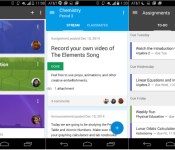
Google Classroom makes its way to the Play Store

Google has just released their Classroom app to help students and teachers communicate better after almost 6 months of being exclusive to the web. The mobile app, available through the Google Play Store and iOS App Store for anyone with a Google Apps for Education account, has all of the same features as the web interface with a few nice additions to help both students and teachers. Along with the launch of the mobile app, Google has added two new features to Classroom: snapping photos for documentation and share from other apps via the Classroom app.
Students can now snap photos directly from their assignment page in the mobile application. This feature could be particularly useful if a student needs to take a photo of their science project or a simple drawing of a family tree. What’s more, if a student leaves their homework at home, a parent can snap a photo of it and send it in through the Classroom app. Take a look at the video below for more details.
Google has also added in the ability to share from other apps to Classroom. When you save a document into Drive or draw a picture in a drawing app, you can click the share button and Classroom will be a new option in the list. This is sort of a no-brainer feature, but we’re happy Google included it in the first version of the app.
The app also supports offline caching, so if your classroom is lacking in service at the time, information stored on Classroom is still available. Additionally, Google has launched a teacher’s assignments page on the web, which aims to give teachers access to any assignment from any class at a given time.

Last but not least, Google added an “archive class” button, giving students easy access to removing a class once it’s over. Now, the key word here is archive, not delete. If a student needs to retake a class or turn in an assignment after the class is over, the class will still be available in read-only mode. If you’re interested in download the new Google Classroom app, head to the Play Store to download it for free.
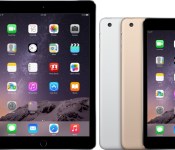
iPad Buyer’s Guide: Which Model is Best For You [iOS Blog]
So you want to buy an iPad? Great. Would you believe Apple actually offers five different iPad models? Sure, the company only touts two of them — the iPad Air 2 and the iPad mini 3 — but Apple continues to carry three older models that could be right for you, depending on your circumstance. In this guide, we’ll take a look at the different iPads Apple offers to help you decide which model is best for you.

iPad models
Apple has two current iPads, with the most obvious difference being size. Here’s an overview of what each line offers:
iPad Air: The bigger of the two models. The current version is the iPad Air 2. Key specifications:
- Measures 9.4 by 6.6 by 0.24 inches and weighs less than a pound
- Fully laminated 9.7-inch LED backlit Retina display with an anti-reflective coating
- 2048‑by‑1536 resolution at 264 pixels per inch
- 64-bit A8X processor and M8 motion coprocessor
- 16GB, 64GB, or 128GB of storage
- 8-megapixel iSight camera and 1.2-megapixel FaceTime camera
- Sensors include Touch ID, gyroscope, accelerometer, barometer, and ambient light

Apple also offers the original iPad Air in its current lineup. When comparing the 16GB models (the iPad Air is available with 16GB or 32GB storage), you save $100 if you go with the iPad Air, but it lacks the Touch ID, iSight burst mode, and the anti-glare screen that is found in the iPad Air 2. It’s also a little thicker and uses an older and slower 64-bit A7 processor with an M7 motion coprocessor. The iPad Air 2 is worth the extra money, even if only for the laminated anti-reflective display that makes content look absolutely gorgeous.
For a deeper dive into the differences between the iPad Air 2 and the iPad Air, read the MacRumors iPad Air 2 roundup.
iPad mini: A smaller iPad is by no means a lesser iPad. The latest model is the iPad mini 3. Key specifications:
- Measures 7.87 by 5.3 by 0.29 inches and weighs about 0.75 pounds
- 7.9-inch LED backlit Retina display
- 2048‑by‑1536 resolution at 326 pixels per inch
- 64-bit A7 processor with M7 motion coprocessor
- 16GB, 64GB, or 128GB of storage
- 5-megapixel iSight camera and 1.2-megapixel FaceTime camera
- Sensors include Touch ID, gyroscope, accelerometer, and ambient light

Apple has two other iPad mini models in its current lineup, and both are older models.
The iPad mini 2 has only one major feature difference from the iPad mini 3: Touch ID. While Touch ID is a great security feature that’s convenient to use, you might be willing to sacrifice it to save some money. Also, the iPad mini 2 is the only iPad mini model available with 32GB of storage, a nice alternative for anyone who doesn’t have the cash for a 64GB iPad mini 3.
The original iPad mini does not have a Retina display; its resolution is 1024‑by‑768 resolution at 163 pixels per inch. It has an older and slower A5 processor, and has no support for panoramic photos, camera burst mode, or video zoom. It’s also available only with 16GB of storage. It’s the entry-level, cheap iPad in Apple’s lineup, good for Internet access, ebooks, and casual games.
The MacRumors iPad mini 3 roundup has more details on the differences between the three iPad mini models.
Performance
If you want to get the fastest, most current iPad available, pick the iPad Air 2 — it’s a remarkable 87 percent faster than the iPad mini 3 in Geekbench 3 multi-core benchmark, and it’s an impressive 34 percent faster in Geekbench’s single-core benchmark. The iPad Air 2 is Apple’s fastest iPad to date.

Thinking about buying an iPad Air instead, to save a few dollars? You’ll make a performance sacrifice. The iPad Air 2 is 70 percent faster in Geekbench’s multi-core benchmark, and 23 percent faster in Geekbench’s single-core benchmark.
When it comes to the iPad mini 3 and the iPad mini 2, there’s virtually no performance difference because they use the same internals. Geekbench results show that the iPad mini 2 is marginally faster than the iPad mini 3, but we’re talking low single-digit percentage points. There’s no need to consider performance when deciding between the iPad mini 3 and the iPad mini 2.

There’s a huge difference between the iPad mini 3 (and iPad mini 2) and the original iPad mini. You’re going to give up a lot of performance to save some money. In Geekbench’s multi-core benchmark, the iPad mini 3 is nearly four times faster than the iPad mini. In Geekbench’s single-core performance, the iPad mini 3 is well over four times faster than the iPad mini.
So is it worth saving $150 to buy a $249 iPad mini over a $399 iPad mini 3? For anyone on a budget, it’s a compromise that has to be made, but you might want to consider buying a $299 16GB iPad mini 2 instead. For the extra $50, you get the same performance boost as you would if you bought an iPad mini 3, and the only feature you miss out on is Touch ID.
Customization options
Apple offers several features that you can add to the iPad. They all cost extra, so be prepared to add to the price of the standard configuration model.
Storage: All iPads start with 16GB of storage. The latest iPad models have options to upgrade to 64GB (an extra $100 to the base price) or 128GB (an extra $200 over base) — there’s no 32GB option anymore. If you play a lot of games with detailed graphics or like watching movies and TV shows, consider getting more storage. Otherwise, you’ll find yourself trying to remove storage-hungry apps, removing media files more often than you’d like, and relying on cloud storage (which could be fine if you’re always connected to the Internet).
Cellular connectivity: Speaking of Internet connectivity, if you need to be online most of the time with your iPad, you can’t always depend on a Wi-Fi connection being available. Apple offers cellular iPads that work with AT&T, Sprint, T-Mobile, and Verizon in the U.S. and a variety of carriers internationally.
Cellular support adds $130 to the price of all corresponding models, plus you have to sign up for a data plan with each carrier and pay a recurring fee. If you already have a plan, see if it has an option to add an iPad data plan. If you have an iPhone on a service plan that allows mobile hotspots, also consider whether pairing a Wi-Fi iPad with an iPhone will meet your needs. With Instant Hotspot in iOS 8, it’s dead simple to allow an iPad to connect via Wi-Fi to an iPhone and use the phone’s cellular data service as needed.
Available finishes: The iPad Air 2 and the iPad mini 3 are available in gold with a white bezel, silver with a white bezel, and space gray with a black bezel. The iPad Air, iPad mini 2 and iPad mini are available in silver/white and space gray/black. There’s no extra cost for picking the colors of your choice.

AppleCare+: Each new iPad comes with one-year warranty and 90 days of complimentary support. For an extra $99, you can get AppleCare+, which extends the warranty and support to two years and also allows for two incidents of accidental damage coverage (subject to a $49 service fee per incident).
AppleCare+ is a good idea if your new iPad is going to be used by several people, such as by your family or in a classroom. And if you plan to bring your iPad with you while traveling or working on location, the accidental damage coverage is reassuring.
Fortunately, you don’t have to buy AppleCare+ right away. Apple gives you 60 days from the date of purchase to buy AppleCare+. You can buy your new iPad, monitor how it’s being used, and then decide to invest in AppleCare+ if it fits your use case.
Accessories
As you may or may not know, there are hundreds of different kinds of accessories you can buy with your iPad. These are just a few you might consider when you’re buying your new iPad.
Cases: A case will help protect your investment. Cases are as simple as a protective sleeve, or as complex as a combination case/stand/keyboard. Expect to spend $25 to $150. Apple’s $39 iPad Air and iPad mini Smart Covers use magnets to attach to the iPad and the protective flap folds to do duty as a stand. A more expensive Smart Case ($69 iPad mini, $79 iPad Air) offers better protection and features the same folding cover.

Cables: The iPad comes with a USB to Lightning cable, but you might want to buy an extra one. They’re a little pricey; a 1-meter cable is $19. Cheaper non-Apple Lightning cables are available, but shop carefully, since many cheap cables are not durable, or the may not work properly with your iPad.
Input devices: Since all iPads have Bluetooth, you can use a Bluetooth keyboard ($100 to $200), which is ideal if you want to do a lit of writing. Some keyboards that are designed for the iPad have a built-in iPad stand or an do double duty as a case. If you’re an illustrator, you may want to buy a stylus ($15 to $100), especially one that’s pressure sensitive.
Which iPad should you buy?
It’s easy to recommend the iPad Air 2. It’s fast and lightweight, and the new anti-reflective screen is a vast improvement. It also has features not on the iPad Air, most notably slow-motion video capture, burst camera mode, and Touch ID. The iPad Air seems like an affordable alternative, but the iPad Air 2’s price/performance and features are an excellent package well worth the money.
If you prefer a smaller iPad, you can choose between the iPad mini 3 and the iPad mini 2. The only difference between the two is Touch ID — is a fingerprint sensor really worth the extra money? Touch ID is a convenient feature, but it’s one you can probably live without. Save some money and go with an iPad mini 2. However, if you want 64GB or 128GB of storage, your only choice is the iPad mini 3 unless you can still find one of the higher-capacity iPad mini 2 models on closeout somewhere. The original iPad mini is Apple’s entry-level device at $249 and could be a good iPad dedicated to your kids.
Should you get an iPad mini 3 or 2 if you have an iPhone 6 Plus? The iPhone 6 Plus has a nice, big screen, but the iPad mini’s screen still offers quite a bit more screen real estate. More importantly, the iPad mini will use the iPad version of your apps, while iPhone versions run on the iPhone 6 Plus. iPad apps are designed to take advantage of the bigger screens, so the interfaces are different than iPhone versions, which have interfaces made for smaller screens.
 Mockup of 12.9-inch iPad (left) with fourth-generation iPad (right) and iPad mini
If you’re not in a rush to buy a new iPad, you could wait and see if/when Apple releases a 12-inch iPad Pro. Rumor says that the iPad Pro will measure between 12.2 and 12.9 inches, resemble the iPad Air 2 and iPad mini 3, and use the same A8X processor.
Finally, if you want to save a few dollars, check Apple’s refurbished store. Apple installs a new battery and replaces the outer shell on refurbished iPads, and you get the same one-year warranty as you would with a new iPad. The inventory varies greatly, so make sure to check back frequently if the model you want isn’t in stock.
It also takes a few months for new products to begin showing up at all in the refurbished store, and at the time of this writing, Apple had yet to begin offering refurbished versions of the iPad Air 2 or iPad mini 3. Since a lot of returns happen after the holidays, there may be and influx of new products in the refurbished store soon.

Google details Ara Manager app for wrangling all your modules

We’ve known that there’ll be an Ara Manager app to help Android users grok their shiny, new modular toys, but we’ve just gotten a better sense of how it’ll actually work when Ara devices trickle into the wild later this year. At its most basic, the app — which should come pre-loaded on Ara phones — allows users to lock and unlock the modules currently slotted into the phone by using a bit of current to disengage the electro-permanent magnets holding them in place. We knew that already, though: What’s new?
Well, what about when you’ve got multiple, similar modules slotted into a phone’s endo, like a regular camera and a thermal camera? You’ll be able to use the app to determine which one you want to use at any given time, though it’s not exactly clear how the interface will let you do that. Oh, and seeing as how there’s firmware specific to each module, the app will also let you manage the updates and “support packages” that’ll assuredly become available as developers refine their modules. Beyond the mechanics of managing an Ara phone, the app will provide users will status information (think battery levels, vendor details and the like), but maybe the app’s most important role is a sherpa of sorts, a guide to help people figure out their devices by flagging potential issues and offering suggestions for optimal module spots. Linaro CEO George Grey hinted that slipping hardware into certain slots would lead to less-than-ideal performance, but sadly, he didn’t dive into what exactly that meant.
Filed under: Mobile

Apple and Ericsson sue each other over wireless patent licensing

Apple has gotten involved in yet another lawsuit. This time, its with Ericsson, which the company claims is demanding “excessive royalties” for the patents it holds for LTE wireless technology.
According to Reuters, Apple says that Ericsson is trying to gain royalties based on the price of an entire smartphone or tablet, but Apple thinks it should only pay based on the price of the processor inside. It quotes a company spokesperson as saying:
We’ve always been willing to pay a fair price to secure the rights to standards essential patents covering technology in our products. Unfortunately, we have not been able to agree with Ericsson on a fair rate for their patents so, as a last resort, we are asking the courts for help.
Today, Ericsson filed its own lawsuit against Apple, claiming it has tried and failed to work out a new license agreement with Apple for two years. Reuters quotes an Ericsson spokesperson as saying:
We have been trying to negotiate a new agreement. We came to the conclusion we needed the help of a third party.
If a court does make a decision in this case in favor of Ericsson, Apple could be forced to pay as much as $750 million a year to continue to use its wireless patents.
Google’s Play Store eclipses Apple’s App Store in number of apps and developers for first time

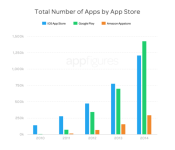
Given the differing business models being employed by Google and Apple in getting their mobile operating systems into the hands of consumers, it should be no surprise that despite a jump start by Apple, Google is ahead in many measures. Even in areas where Apple has a lead, Google is steadily marching toward dominance. An example of this occurred in 2014 according to app metrics tracking firm AppFigures whose latest numbers show Google’s Play Store has surpassed Apple’s store in terms of both number of apps and developers.
According to AppFigures, the Google Play Store now boasts 1.43 million apps compared to 1.21 million available in Apple’s App Store. There are some who may counter that Apple is much more strict about what gets into their store, which keeps the numbers down. Nevertheless, there will be many Android fans who will point to this change in app figures as a major milestone for Google’s business.
Meanwhile, the number of developers who are working on apps for each store continued to grow faster for the Play Store than it did for the App Store. In terms of actual numbers, Google has been in the lead for a few years now and has now reached 388,000 developers compared to Apple’s 282,000 developers.
As a whole, app development continues to grow at a very strong clip. All three major app stores – Google’s Play Store, Apple’s App Store and Amazon’s Appstore – all saw at least 50% growth during 2014. This kind of expansion should continue during 2015 as manufacturers work to expand their ecosystems to a whole variety of new platforms, especially wearables, that will push developers to consider new ways to support interaction with apps.

source: 9to5Google
Come comment on this article: Google’s Play Store eclipses Apple’s App Store in number of apps and developers for first time
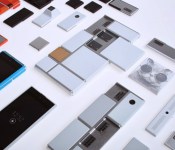
Google will launch Project Ara market pilot in Puerto Rico later this year

Google has just announced that Project Ara is making its way to Puerto Rico for its first market pilot later this year. Earlier today in Google’s second Project Ara developer conference, the company laid out its plans on how exactly they plan to proceed in getting the modular smartphones into consumer’s hands. In the second half of the year, Project Ara will be launched in the United States territory on both OpenMobile and Claro.

Google chose Puerto Rico for a few different reasons. Firstly, the mobile phone market is largely diverse with a broad number of users on smartphones and feature phones, all spread out in a wide variety of US carriers, Puerto Rican carriers, as well as local mobile carriers. Puerto Rico also has a 1:1 ratio in terms of sales with high-end flagships to entry-level devices. Puerto Rico also abides by FCC regulations, so Google won’t need to sidestep any regulations while still in the planning process.
Google’s ATAP venture will be opening up a number of “food truck-style” vehicles on the streets of Puerto Rico in order to sell Project Ara devices and extra modules. At the time of launch, Google says they’ll have 20-30 Ara modules available across multiple different categories. In order to expand their reach, the search giant has partnered with 11 different schools in the University of Puerto Rico system to invite developers on board if they’re interested.

We also saw an updated version of the “Spiral 2″ hardware, which is the current device being tested. The newest model boasts a NVIDIA Tegra K1 processor, a 720p display, 5MP rear-facing camera and much more. The Spiral 3 skeleton is the device Google plans to launch when the market pilot comes to Puerto Rico. The company plans to release an updated and improved version of the Sprial 3 when the device hits the mainstream. So we’re still far away from seeing anything come to market, but at least we have a more updated vision on what’s to come in the second half of the year.
We’ll be sure to fill you in once more details surface about the upcoming Project Ara launch.
European App Store Price Increase Turns Off Auto-Renewing Subscriptions [iOS Blog]
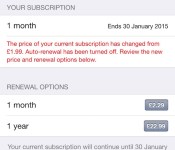
Apple last week implemented price increases for App Store content throughout the European Union and in several other countries, rebalancing the company’s pricing as exchange rates have shifted and new taxes have gone into effect in some countries.
One side effect of that change, however, is that auto-renewing subscriptions for app content have been automatically turned off for any pricing tiers that saw increases due to Apple’s changes. The issue was noticed by a MacRumors reader and also highlighted by Popular Science UK editor Tom Royal today.

Users have so far apparently not been notified that auto-renewals have been turned off following the price increases, although in the examples we’ve seen the renewal dates are still several weeks into the future.
It is understandable that Apple may want or need to receive consent from customers before automatically raising recurring subscription fees, but so far neither publishers nor users have been notified of this issue and they are only discovering it for themselves when digging into the subscription settings for their apps.
Apple was proactive about notifying app developers of impending price increases roughly a day and a half of time, but additional information on the effect those changes are having on recurring subscriptions was not included. As a result, some users may suddenly find themselves losing access to their content while publishers may lose out from users who simply elect not to follow up on the issue and resubscribe, regardless of whether the new rates themselves would be a determining factor.
Users in affected countries should check their settings for any recurring in-app subscriptions and ensure that they turn auto-renew back on should they wish to continue receiving their content.
(Thanks, Richard!)
How AT&T will deliver TV (and more) over crowded LTE

During the first-ever College Football Playoff National Championship, AT&T showed off a working demo of a new version of its Long-Term Evolution network: LTE Broadcast. With this, the wireless carrier is hoping to alleviate the congestion problems consumers face when they are in highly crowded places — such as professional sports stadiums. AT&T’s been working on LTE Broadcast for years, but until now has shared few details about it. In 2013, AT&T CEO Randall Stephenson said that the company was “all about architecting networks to deliver video,” pointing out that the technology would be “mature in scale within the three-year time horizon.” We’re not quite there yet, but what I saw on Monday leaves me hopeful for the future of smooth, buffer-free television over LTE.
#fivemin-widget-blogsmith-image-23786display:none; .cke_show_borders #fivemin-widget-blogsmith-image-23786, #postcontentcontainer #fivemin-widget-blogsmith-image-23786width:570px;display:block;
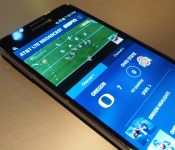
For this particular demo, AT&T decided to build a mobile application that streamed two different live feeds related to the College Football Playoff championship game. Channel 1 consisted of the Spidercam angle, which gave you an overhead view at the action, while Channel 2 let you watch and listen to experts and analysts who were on an ESPN set. The video looked great and there were no buffering or stuttering issues to speak of — AT&T says the demo was sending the connection at a 1 Mbps rate, allowing the stream to be relatively sharp, similar to what you would see over WiFi. In general, LTE Broadcast can deliver data in the same speed range as LTE, since the service uses that same network to fulfill its purpose. The idea here, though, is to maintain a quality consistency regardless of how many people are watching at the same time.
On LTE Broadcast, AT&T says it allocates a portion of its spectrum resources to deliver specific content to users, without any compromises (read: crappy video quality). And it can do that by sending the same stream of content to multiple devices all at once, rather than on a one-to-one basis, which is how the current LTE network works. Simply put, you’re not sending any data back to AT&T’s servers, only receiving it; since LTE Broadcast is designed to push out clear-cut content, AT&T doesn’t have to worry about tailoring the experience for every single user. At a place like AT&T Stadium, home of the Dallas Cowboys, this also helps by taking the load off the major network, since those who decide to use LTE Broadcast would be connected to a different cell site. When there are more than 80,000 people with smartphones in one place, that’s even better.
#fivemin-widget-blogsmith-image-23786display:none; .cke_show_borders #fivemin-widget-blogsmith-image-23786, #postcontentcontainer #fivemin-widget-blogsmith-image-23786width:570px;display:block;
 trydocument.getElementById(“fivemin-widget-blogsmith-image-23786″).style.display=”none”;catch(e)
AT&T partnered with Ericsson, ESPN, MobiTV, Samsung and Qualcomm during the College Football Playoff demo of LTE Broadcast. The streaming app, created by MobiTV, was running on a Samsung Galaxy Note 3, which the carrier built specifically for this purpose. Qualcomm supplied the chip inside the handset; Ericsson brought the infrastructure; and, finally, ESPN provided the content. On that note, it’s worth mentioning that LTE Broadcast isn’t compatible with any device currently out on the market, and AT&T says it doesn’t know what the plans for OEMS are.
The company adds that it has been exploring LTE Broadcast technology, which is compatible with all spectrum bands, as an add-on for LTE since the very beginning of its Long-Term Evolution efforts, but it’s just now ready to display its progress. Naturally, AT&T is hoping to create buzz around LTE Broadcast, and it needs support from other firms to get its shiny new network beyond the trial stages. AT&T’s president of network operations, Bill Smith, said, “Part of the reason for us showcasing it here is to get other potential partners interested.” Now, whether it actually achieved that goal is too early to tell. At the very least, the carrier can feel confident that it managed to get ESPN, Samsung and Qualcomm on board for the very first public demonstration.

AT&T says there’s more where that came from too. According to the company, the streaming app built to be shown inside a jam-packed stadium is only the beginning. “The stadium is only one use case; we wanted to show what our network can do,” an AT&T spokesperson at the event said. “The market will dictate what it’s used for.
In the future, LTE Broadcast could be used to deliver plenty of high-demand content, including software updates for smartphones and tablets. “We stagger updates because of so many people downloading at once,” AT&T’s representative said. “With Broadcast, you can take the load off and deliver specific payloads for those huge files.” As for what kind of damage LTE Broadcast does to your device’s battery life, AT&T wasn’t willing to answer — though it did say that, during the demo, it had been performing “especially well.”
LTE Broadcast is, without a doubt, a great example of what AT&T’s network can do. Unfortunately, at the moment there’s not much subscribers can do with it. For now, you’ll just have to deal with the fact that it exists, and maybe one day you’ll have access to it. Let’s hope so.
Filed under: Cellphones, Wireless, Networking, Mobile, AT&T
 AIVAnet