



Here’s what Apple does when US law enforcement wants your data

Apple insists that the US government doesn’t have backdoor access to its data (despite signs to the contrary). So what happens when law enforcement comes knocking at the company’s door, then? We have a fairly good idea as of this week. The company has published guidelines showing just what data it can provide to the authorities and the legal steps needed to get that information. As a rule, Apple can hand over anything from iCloud and its stores as long as there’s a proper court order, subpoena or warrant. It can also pull call records, contacts, text messages and media from locked iOS devices sent to its headquarters in Cupertino, although calendars, email and third-party apps are off-limits.
The company goes into significant detail about what it won’t do. It doesn’t intercept either FaceTime calls or iMessage chats, since they’re always encrypted; while some security researchers believe it’s possible to scoop up iMessages, Apple doesn’t plan on doing that itself. The tech firm also can’t remotely switch on Find My iPhone or grab GPS information, so don’t expect Apple to lead the feds to your door. Apple will warn you if the government is requesting information, but it will stay silent if a heads-up is either illegal or likely to put someone in immediate danger.
The policies are largely in line with those of other tech giants, and it’s clear that Apple wants formal requests before it turns over anything sensitive. As Ars Technica suggests, though, the only surefire way to prevent Apple (or any other third-party) from disclosing data is to keep it to yourself.
Filed under: Cellphones, Mobile, Apple
Via: Ars Technica
Source: Apple
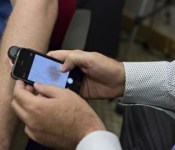
This smartphone app can detect skin cancer

You can already use your smartphone to do things like hail a pimp ride home or order an artisan pizza, obviously the next step is cancer detection, right? Researchers at the University of Houston think they’ve created a smartphone app that can detect melanoma even better than your doctor. Called DermoScan, the app works by taking a photo of your odd-shaped mole, and then analyzing it to determine if it might be cancerous. Initial testing found that DermoScan was able to identify skin cancer roughly 85 percent of the time, making it just as effective as visiting a dermatologist and even better at diagnosing melanoma than the average primary care physician. Don’t head over to the app store just yet. The app requires a special $500 magnifying glass to make the magic happen — not exactly more cost effective than a trip to the old MD.
It might not make sense for the average American to shell out five bills for the necessary equipment to use DermoScan, but the app could be big news for developing countries and rural areas where there isn’t a primary physician for people to see. One device could potentially diagnose an entire village. Paired with something like Wello’s tricorder-esque iPhone case, an 5S could become a powerful tool in helping an entire town determine if they need to travel to see a doctor — all for less than your average trip to the ER.
Filed under: Wireless, Science, Mobile
Via: Re/code
Source: EureakAlert

Google Camera 2.1 adds ability to take photos while recording video

The standalone Google Camera app has recently been updated to allow users to take photos while recording video, just in case you didn’t read the title! However, lets breakdown what you can do with the app.
Features
• Photo Sphere for immersive 360º views
• Lens Blur for SLR-like photos with shallow depth of field
• Panorama mode with high resolution
• Viewfinder shows whole image sensor for uncropped images (may result in a smaller viewfinder on some phones)
• Updated UI that gets out of your way and is centered on an extra large capture button
Requirements
• Works on phones and tablets running Android 4.4+ KitKat
• Photo Sphere and Panorama require a gyro sensor (not available on Moto G)
• Photo Sphere, Panorama, and Lens Blur require at least 1 gigabyte of memory
The update is still rolling out to users, so if you haven’t got it yet, be patient. Who has time for that? Grab the APK form XDA-developers here. You can also cruise over to the Play Store below! Tell us what you think of the new Camera feature in our comments below.
Source: TalkAndroid
The post Google Camera 2.1 adds ability to take photos while recording video appeared first on AndroidGuys.
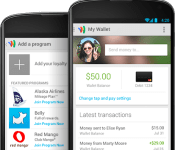
Google Wallet update adds multi-account support

Google has recently pushed an update to its Wallet app allowing users to use multiple Google accounts on Wallet. No major changes to the user interface have happened except for a new, “Cards and Accounts” which has been added to the slide out menu.
In order to change to a different account, just pull to the left and select the account you would like to access. Once selected, enter your pin for the account and voila! You can now send money to all your friends from a different account. Check it out and let us know what you think!
The post Google Wallet update adds multi-account support appeared first on AndroidGuys.

Photos surface of gold LG G3

As the leaks keep pouring in about LG’s new flagship device, the G3, a much clearer picture of the device has surfaced and it’s in Gold! Nothing has officially been released about the device, especially the materials the phone is made of. From the picture above, it sure looks metallicish, but we won’t know anything until the unveiling on May 27th.
Could this be LG taking notes from HTC on how to build a premium device that not only performs but just looks awesome? Hopefully LG does! I know some people out their prefer your phones to be polycarbonate and have the backs fly off of them when you do drop it. However, I am a fan of the metal, hence my HTC One M8, but we will find out soon enough. In the mean time check out the rumored specs of the new LG G3.
Source: GSMArena
The post Photos surface of gold LG G3 appeared first on AndroidGuys.

Google’s camera app once again lets you snap photos while recording video

Google’s redesigned Android camera app wasn’t a full step forward. While you got a much improved interface, you also lost the ability to snap photos while recording video — not so hot if you want more than just movies from a friend’s wedding dance. Well, it’s back. A low-key update to Google Camera once again lets you capture stills in mid-video, making sure that you’ll have album-worthy images alongside your YouTube clips. If you’ve been holding off on upgrading the camera app because of that earlier omission, it’s now safe to jump in.
Filed under: Cellphones, Mobile, Google
Via: Phone Arena
Source: Google Play

Here’s how to to get that Harman Kardon sound on your new HTC One

The recent introduction of a special edition One M8 by Sprint, which features some sound-enhancing software from Harman Kardon, had a few owners of HTC’s flagship feeling slightly neglected. Thankfully, nursed by the beauty of Android’s open ecosystem, the great minds over at XDA Developers have figured out a way to get the Clari-fi sound feature up and running in just about any US model of the new HTC One. Not surprisingly, you’ll need to root your M8 in order to make this happen — as always, do this only if you feel comfortable with a bit of unsupported tinkering.
After gaining deep access, some files will need to be downloaded to and installed on your device as part of the process. And to assist with that, our friends from The Unlockr have written a detailed tutorial to help install Harman Kardon’s audio goods on your very own HTC One. If everything goes according to plan, you should be able to hear what all the fuss is about the next time you boot up and play some tunes. Because sound does matter.
Filed under: Cellphones, Portable Audio/Video, Mobile, HTC
Source: The Unlockr, XDA Developers

PBS gives parents a way to monitor what kids are watching on its site

The PBS KIDS website is a pretty great hub of entertainment for little ones. And even though there’s nothing but useful learning content to be enjoyed there, PBS still wanted to make it easy for parents to monitor what their kids are doing on the site. Enter PBS KIDS Super Vision, an iOS application which promises to give you, the parent, a powerful tool that lets you do anything from keeping track of what the kids are watching in real-time, to limiting the amount of time they can spend on certain activities.
But this isn’t just about having control over your children. PBS is also going to use Super Vision to recommend things you can be doing with your kids based on the type of stuff they access the most on PBSKIDS.org. Better yet, parents can keep track of all of this via the Activity Summary within the app, which breaks down the educational skills, games, shows and videos that your beloved children use every time they’re logged in. The network says we should expect Super Vision to get even more helpful with time, since it plans to use your feedback to drive features for the app in the future.
Filed under: Home Entertainment, Internet, HD
Source: App Store

United States credit card system begins complete overhaul in the next 18 months

The United States is lagging behind most of the world when it comes to credit card technology, but luckily it’s about to catch up. In the next 18 months, the US is gearing up to transition debit and credit cards away from the magnetic stripe to chip-and-PIN technology, which is already widely used in Europe, Asia and beyond. Who can you thank for the long-overdue upgrade? Target, whose data security breach earlier this year highlighted the security flaws in the magnetic stripe system. It’s a 50-year-old technology, after all, and it’s much easier to counterfeit than the computer chip in your next Visa card.
In addition to adding a chip to each of the 1.2 billion credit and debit cards circulating in the US, the rehaul requires upgrading card readers at retail locations, and there’s plenty of incentive for businesses to hop on board with the change. If your local WalMart doesn’t adopt chip and PIN readers, it will be held accountable for any fraudulent face-to-face transactions. Point-of-sale systems used by smaller businesses, such as Square and PayPal here, will need to reissue card scanners as well.
According to research firm Javelin, the upgrade could take about three years, with international and premium cards getting the switch to chip and PIN first. For the record, there are already several cards with the new tech available to Americans, from American Express and JPMorgan Chase among other institutions.
Filed under: Misc
Via: Bloomberg

New Video for Phonebloks Shows Us Modules Not just for Phones

Phonebloks took the community by storm when the concept was displayed in a video that circulated throughout the internet. It is a beautiful concept of not having to upgrade your entire phone, and only just upgrading the parts you need. This is made possible by the modules that act like LEGO pieces, so if your WiFi antenna breaks, you can just detach it and attach a brand-new one. Project Ara is Google’s take on the concept, and hopefully we will see something innovative come out from them, but in the meantime, let’s dream about the Phonebloks concept not only existing in the phone world.
The video below shows us the Phoneblocks concept being used with common household appliances. Say you need some added storage for your smart appliances, you can easily accomplish this by attaching a new module to one of those appliances. This is where the people behind Phonebloks want to take the technology, and I fully agree with it. To expand the concept to multiple pieces of technology can only be beneficial to us tech enthusiasts. So check out the video below and let us know your thoughts about it.
Source: Android Police
//<![CDATA[
ord = window.ord || Math.floor(Math.random()*1E16);
document.write('’);
//]]>
 AIVAnet