


Nike’s power-laced Mags net millions for Parkinson’s research
All the nostalgia around Nike’s self-lacing shoe, the 2016 Mag, came together in a major way for a great cause. Today, the sportswear titan revealed it raised $6.75 million through its online raffle and two auctions, with all proceedings going to The Michael J. Fox Foundation. The money, as a refresher, will help the organization try to find a cure for Parkinson’s disease. Michael J. Fox, who starred in the Back to the Future II film that made the sneakers popular, suffers from Parkinson’s himself.
Breaking: The #NikeMag raised $6.75M for Parkinson’s research through the Draw & 2 auctions! Thank you to everyone who took part!
— michaeljfox.org (@MichaelJFoxOrg) October 20, 2016
Nike says it sold more than 650,000 tickets via The Draw, its online raffle, as people hoped to get lucky and win one of the 89 pairs available. Two Mags were sold at auction in Hong Kong and London, according to the company, raising a total of $160,000 — one sold for $105,000. If you have that kind of cash, there’s still hope for you. The last pair will be auctioned in New York City next month, on November 12th, so you have a few weeks to think about it.
If not, don’t fret. You can always buy the officially licensed, non-Nike Back to the Future shoes for less than $100 at a Halloween store. Hey, at least they light up.
A video posted by Edgar Alvarez (@edgaralvarezb) on Oct 4, 2016 at 7:19pm PDT
Source: The Michael J. Fox Foundation
Razer’s new Blade Pro laptop houses a mechanical keyboard
Razer has definitely made a name for itself in the world of gaming notebooks, but for the past few years, the Blade family of laptops has had a black sheep: The Razer Blade Pro. This 17-inch machine was the company’s original thin gaming notebook, but it lingered in obsolescence after Razer introduced the more popular 14-inch variant and, later, the Razer Blade Stealth. For years, the smaller machines were given modest CPU, RAM and graphics updates while the ironically named “Pro” lagged behind with a 4th generation Intel processor. Those days are over. Today, Razer announced that the 17-inch Razer Blade Pro is back — and it’s finally going to live up to its moniker.
Razer is calling the new Blade Pro the most powerful system its ever built, and indeed, this thing is a beast. An Intel Core i7-6700HQ CPU, 32GB of RAM and NVIDIA GeForce GTX 1080 graphics pulse under the aluminium chassis. That, by the way, is as thin as ever, measuring 0.88-inches at its thickest point. The laptop also has a dizzying collection of ports, including a Thunderbolt 3 connector, three USB 3.0 ports, HDMI output, a 3.5mm headphone jack, an Ethernet jack and an SDXC card reader. All that, plus the new Blade’s 17.3-inch 4K display, are more than enough to qualify it as Razer’s “Pro” laptop — but that said, there is one thing missing from the flagship gaming machine: Razer’s iconic Switchblade interface.

The Switchblade interface used to be integral to the Razer laptop brand. It was a set of ten customizable keyboard buttons that each housed their own tiny screen. Paired with a trackpad that also featured its own display, it allowed users to create a custom set of keys to fit any application. It was neat, but Razer told us it was eliminated to make way for “more performance focused components.” That doesn’t mean the Razer Blade Pro’s keyboard isn’t special, though — the 17-inch Blade Pro will be the Razer laptop to feature its new “ultra-low-profile mechanical switches,” which are supposed to emulate the actuation of a full-size mechanical keyboard.
So, what’s a thin, 17-inch gaming laptop with the latest graphics technology, a ton of RAM, a 4K display and the world’s thinnest mechanical keyboard cost? At least $3,699, possibly more if you want more than 512GB of SSD storage. Razer doesn’t have an official launch date yet, but expects to start shipping orders sometime next month.
Sony jumps into eSports with ‘PlayStation Tournaments’
How good of an NBA 2K17 player do you think you really are? Well, you’re about to find out because on Thursday, Sony announced that it is teaming up with the ESL gaming network and hosting a month-long digital basketball tournament.
The PlayStation Tournament, as it’s being called, will run from October 27th through November 26th with “Major Cup rounds” every Saturday. And since the real NBA season is kicking off, the Tournament will be based on NBA 2K17. If you manage to be one of the top three players at the end of the tourney, you’ll score a prize pack with stuff like PlayStation Gear and controllers, plus bragging rights.
To participate, you’re going to need a copy of the game (duh), a PlayStation Plus subscription and an ESL account. You will need to register for the tournament beforehand at ESL but once you do, you’ll be automatically prompted when your time to compete comes. There’s no word on how large of a player pool this tournament will have but the matches will be 1-on-1. Sony is reportedly looking to expand the scope and playstyle variety of these tournaments moving forward.
This isn’t the first time that a console maker has waded into the tournament pool. Microsoft unveiled its Xbox Live Tournament Platform back in March at GDC, which enables developers to create their own game tournaments using Xbox Live. FaceIT and ESL have both already signed on to use the platform for their upcoming tournaments. What’s more, games like Halo and Destiny have already taken advantage of the platform to create their own miniature leagues.
Source: Playstation Blog
Kanye West Blames Rivalry Between Apple and Tidal for Lack of New Collaboration With Jay-Z
During the Seattle leg of his Saint Pablo Tour, Kanye West was reported as calling out the rivalry between Apple Music and Tidal as the main factor behind the reason why there won’t be a sequel to Watch The Throne, his 2011 collaboration with Jay-Z. The main reason appears to be Jay-Z’s ownership of Tidal and the streaming company’s ongoing rift with Apple Music, which he previously said was negatively affecting the music industry as a whole (via The Fader).
West also said that he and Jay-Z didn’t appear on the final cut of Drake’s song “Pop Style” because of the same “beef” between the two streaming services. The singer hinted that Apple didn’t want artists mainly associated with a rival to appear on one of its exclusive albums, Drake’s Views. During the concert, West said the trio needed to quash the squabble and “let people have this song,” echoing a similar tweet he sent out over the summer.
“Y’all didn’t get, what y’all were supposed to get with me and Drake on this song because of some Tidal/Apple bull—-,” Kanye said. “Every time I perform this song I think about this s—. I think about the politics. I think about how hard I go for music, for art, for y’all.”
Kanye’s discontent with Apple Music began earlier in the year when he remained adamant that his new album “Pablo” would “never” launch on the service, but it eventually did after a few weeks. In the summer, West tweeted out a request for Apple and Tidal to meet and officially end their fight, which came on the back of reports that Apple might have been discussing the acquisition of Tidal. Apple Music executive Jimmy Iovine eventually quelled those rumors, saying “we’re really running our own race. We’re not looking to acquire any streaming services.”
Tags: Apple Music, Kanye West, Tidal
Discuss this article in our forums
Sony MDR-1000X Review: Wireless Hi-Res Headphones Offer Next-Level Noise Canceling
The wireless headphone market has been shaken up so much recently that it’s hard to know where to begin when a new entry appears on the stage and announces itself as the next big thing.
Fortunately this latest Bluetooth offering from Sony is targeting a very specific market segment best referred to as “premium noise cancelation”, and the company seems pretty confident that with the MDR-1000X headphones ($400), it has got a hit on its hands.
Sony is claiming “industry-leading noise cancelation” with these luxury cans, which use ostensibly the same drivers as last year’s highly regarded MDR-1A headset made for listening to Hi-Res Audio, as supported by the company’s audiophilic Walkman range, not to mention its line of wireless home speakers and in-car audio systems.
Can it improve upon the finely honed features of Parrot’s Zik 3.0, Bose’s QuietComfort 35, and Sennheiser’s PXC 550 Wireless noise-canceling headphones? Let’s take a look.
Design
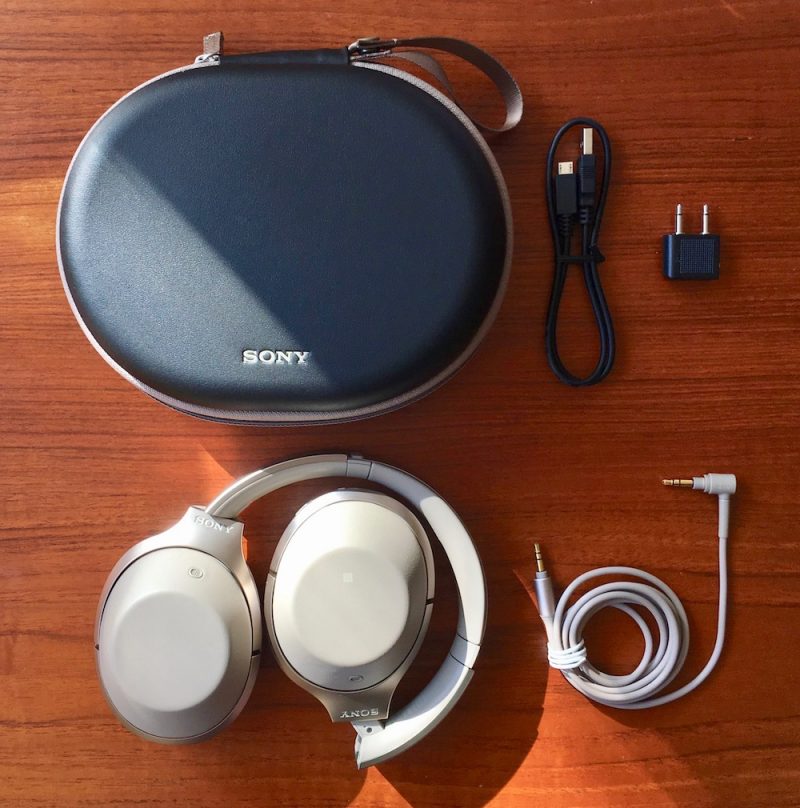
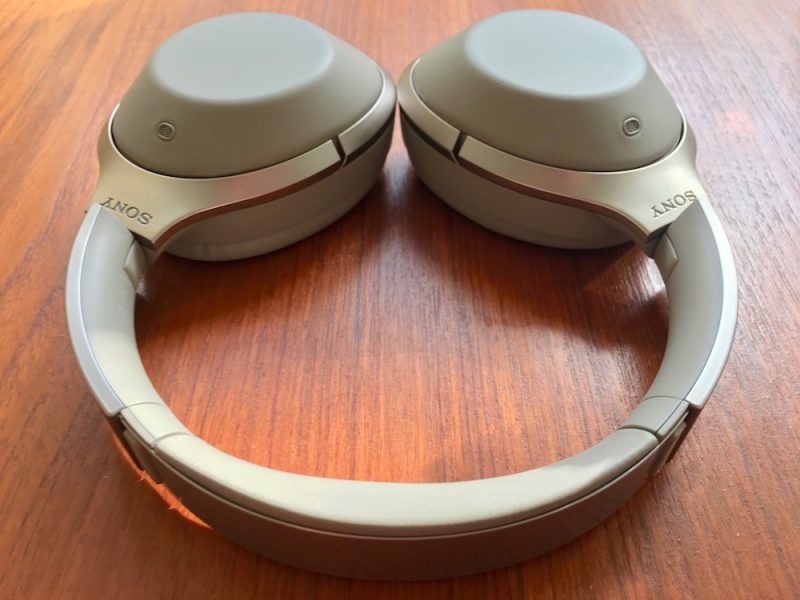
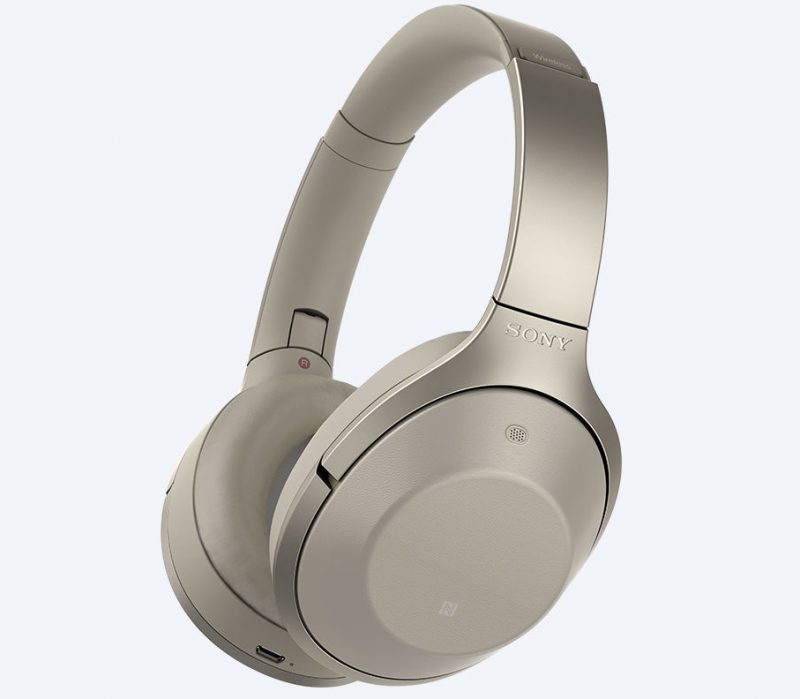
The Sony MDR-1000X’s come in a box design and hard carry case that will seem suspiciously familiar to Bose QC35 owners, but that’s where the similarities pretty much end. I received a beige pair (also available in black) that came with a nice thick matching 1.5 meter cable sporting a gold-plated mini jack, along with a black micro-USB charging lead and an airline adapter.
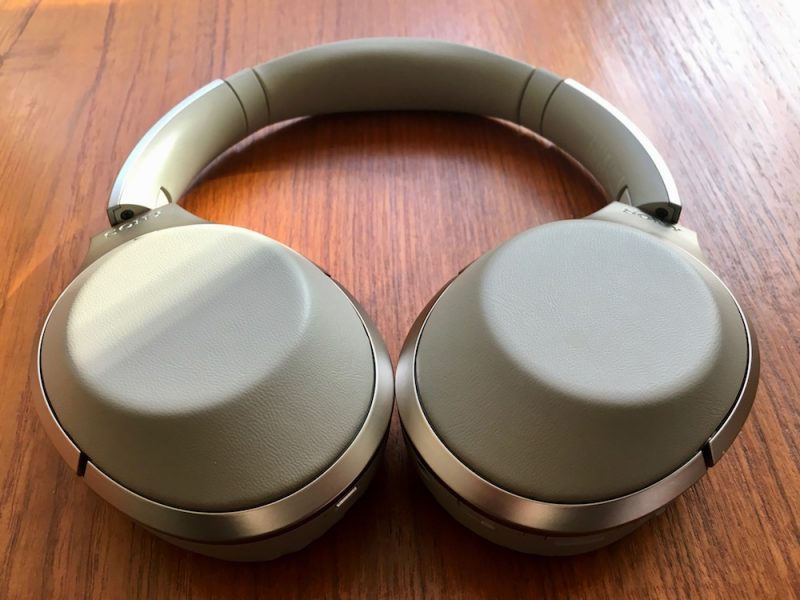
The swivel-folding earcups and pivots are made of a robust, creak-free plastic, with champagne-colored rims and squishy earpads covered in smooth synthetic leather that’s pretty convincing to the touch.
The polished steel headband packs some decent padding between the adjustable slats, and Sony has decided to let the design speak for itself by keeping the branding relatively understated. The only other distinctive mark on the outside of the cups are two small grilles where the noise-canceling microphones live. Altogether the headset weighs 275 grams, so slightly lighter than the QC35’s (309g).
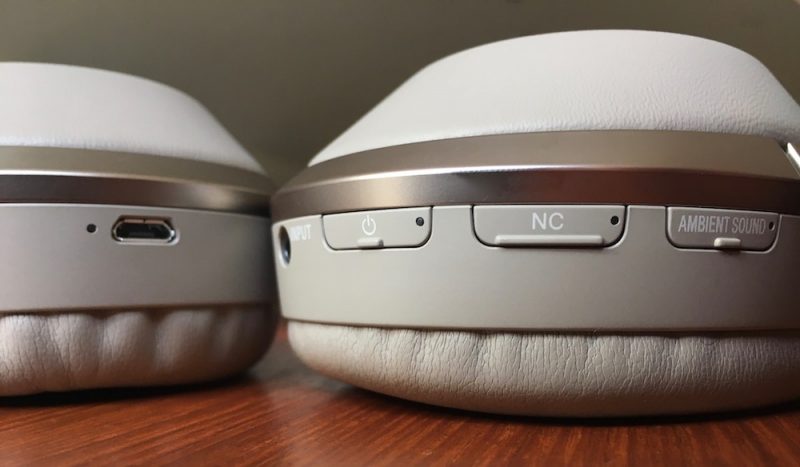
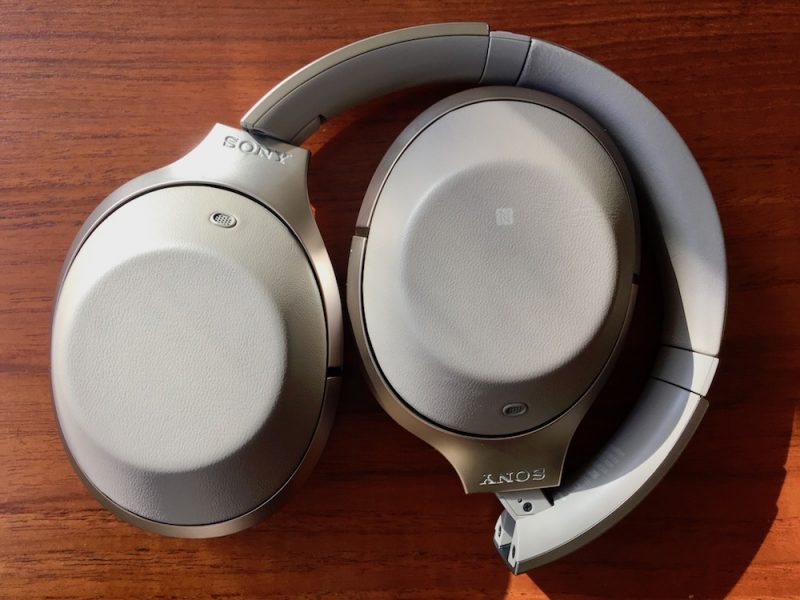
The left earcup contains an NFC chip for pairing with compatible devices and a micro-USB port for charging, while the right earcup has a touch-sensitive back that responds to taps and swipes to control music playback, skip tracks, change volume, and invoke Siri. Like most modern headphone gesture pads, it can also be used to take and end calls.
Around the rim of the right earcup are three physical buttons and an input jack. Unfortunately these controls aren’t particularly textured or distinctive, so expect some fiddling when you’re wearing the headphones before you get used to where they sit in relation to each other (although voice prompts helpfully accompany each press). The Ambient button lets you choose between different external sound filtering modes which we’ll cover below, the NC button lets you turn noise canceling on and off independently, while the power button can be pressed quickly for a battery level update and also activates the pairing sequence with a long press. All of the buttons have inset LEDs to indicate status.
Performance and Features
It’s worth stating right off the bat that Sony has taken noise cancelation to a new level with these headphones. This seems to have been achieved through a sustained period of self-reflection and extensive acoustics research in light of earlier shortcomings, combined with an exhaustive exercise in technological oneupmanship. In other words, Sony has pulled out all the stops in an attempt to beat Bose at its own game.

To begin with, Sony has chosen a headset design with a firmer grip than its NC rivals so that the earcups alone do a better job of isolating you from the outside world. There’s a slight trade-off here – Sony has used thicker urethane foam earpads than those found on Bose and Sennheiser’s NC cans to improve passive reduction, and they don’t feel quite as plush against your head as a result. It’s not a deal breaker by any means – they still feel lovely and squishy, and never bothered me after several hours of listening, but a few minutes back with the QC35’s was all it took to confirm they do lack the latter’s sumptuous cushiness.
Second of all, Sony’s patented Sense Engine boasts a “personal NC Optimizer”, a fancy-sounding piece of tech that’s supposed to determine your individual characteristics and wearing style to optimize the audio output just for you. Basically, Sony had the bright idea to build a microphone within each ear cup, which means the headset can sample ambient noise from both inside and out, effectively canceling out a wider range of sounds with corresponding inverted frequencies.

Hold down the NC button, and the headphone speakers emit a series of tones that bounce back and forth between the mics to analyze the shape of your head, work out whether you have big hair, wear glasses, and so on. It’s a unique innovation from Sony in the NC space – and it works, too. The only minor drawback for some wearers will be the ever-so-slightly more noticeable hiss when no music is playing. I found it pretty relaxing, kind of like distant lapping ocean waves. Your mileage may vary.
Otherwise, the NC easily stood up to scrutiny in a range of environments, including a busy bus and a crowded shopping mall. It didn’t detract from calls either, and effectively piped in my own voice as part of the conversation. The filtering is adaptive too, and corrected for changes in ambient levels as I moved around. These are also the first pair of noise cancelers I’ve worn that completely blot out my heavy-handed keyboard tapping and reduce my house phone in the same room to a barely audible, faraway whisper.
You don’t even need to take off the cans to realize just how effective the technology is, thanks to another feature unique to the Sense Engine called “Quick Attention”. Cupping your fingers over the touchpad instantly turns the volume down and lets in the outside world, allowing you to engage someone in conversation. Bring your hand back down and the music is re-instated to its prior volume. It’s genuinely useful for situations in which you’d usually be apt to take off the headphones – when a fight attendant offers you refreshments, for example.
The MDR-1000X’s Ambient button performs two further NC sound tricks. One is called “Voice mode” and lets in the range of sound frequencies the human voice normally occupies. This is also meant to let you hear in on important announcements – when you’re waiting to be called to a boarding gate, say – while still allowing you to enjoy your music in relative quiet.
I found the feature a bit overly enthusiastic, sometimes failing to filter out other ambient sounds like the rustle of bags and suchlike which then became exaggerated and annoying. The “Normal” ambient mode on the other hand worked very well, and let me stay mindful of traffic sounds as I walked the street without entirely extinguishing that insulated cocoon feeling that good NC cans do so well.
Sony’s headphones certainly have a stronger Bluetooth connection than the competition – the MDR’s didn’t drop out once in areas where rival Bluetooth headsets I’ve tested regularly faltered. The link was retained around harder corners and over bigger distances – the MDR-1000X’s even passed the ‘microwave test’ and didn’t get all glitchy as I hovered around the kitchen while my dinner was being nuked.
Wireless audio connections have their limits of course, but Sony has also included a neat sound prioritization feature in the MDR-1000X that I haven’t seen in other cans. By default the headphones automatically select the highest quality Bluetooth protocol available, but hold down both power and NC buttons for a couple of seconds and you can switch them to “Priority on stable connection” mode, which falls back to the less-demanding SBC codec. Bear in mind I’ve no idea how well it works because I never had to use it.
On the subject of wireless codecs, this headset supports them all: AAC (iPhone), aptX (Mac/Android), SBC (everything), and LDAC. That last one is a Sony special which apparently transmits up to three times more data than conventional Bluetooth for superior sound, but it only works with Sony devices, such as the company’s Xperia smartphones and Walkman digital audio players. There’s some proper science behind it and I have it on good authority (an audiophile friend) that it delivers on its promise, but I didn’t have any other Sony hardware to test it with.

To be honest though, it didn’t bother me. The MDR-1000X’s sound brilliant over bog-standard Bluetooth anyway, and certainly outperform the QC35’s thanks to a wider, more expansive soundstage. The mid-range is wonderfully balanced and the highs sparkle, while a good, chunky bass serves as a warm foundation. They sound even better when the cable is used – so long as the headphones are on. Whether this is all down to Sony’s DSEE HX processing (which allegedly recreates higher frequency signals lost in low-quality compressed music files) or simply better tuned drivers, I can’t say. Whatever the reason, the MDR-1000X’s sound fantastic, especially for NC cans.
A few other points bear noting. Unlike the QC35’s and PXC 550’s, Sony’s headphones don’t seem to be able to pair with more than one device at the same time. I had to manually disconnect my iPhone to reconnect with my Mac, and vice versa, despite the fact that the cans had no trouble auto-pairing with the last known device when turned on. Also, the 1000X’s live up to their 20 hour battery life, but they take 4 hours to fully charge – twice as long as Bose – and the battery is similarly integrated, so it has to go back to Sony if/when it comes to replacing.
Bottom Line
Sony has pulled a fast one on its rivals here. For a company whose last serious attempt at noise canceling was the h.ear on Wireless NC headphones, the MDR-X1000’s are a huge step up in performance. Not only do they look smart and block out distraction, they also pack a ton of technology (not to mention compatibility), keep a strong connection, and deliver a beautiful sound.
It’s a sure sign that the premium NC market is maturing, and that translates to better consumer choice. For those who favor comfort, always-on NC and listening simplicity, Bose still wins. If a bigger sound and the ability to switch between multiple audio sources are your top considerations, Sennheiser’s PXC 550 cans are a great alternative. But if superior noise canceling and audio quality are more important to you than cushiness and dynamic pairing, then these new MDR-1000X headphones from Sony have your back.
Pros
- Unrivaled noise canceling
- Exceptional sound for wireless
- Multiple audio codec support
- Solid design and touch controls
Cons
- Comfy, but not Bose-comfy
- Lacks dynamic multiple device switching
- Longer charge time than other cans
- $50 more expensive than Bose QC35
How to Buy
The Sony MDR-1000X headphones come in beige or black, cost $400, and can be ordered via the Sony website.
Note: Sony supplied the MDR-1000X’s to MacRumors for the purposes of this review. No other compensation was received.
Tags: Sony, review
Discuss this article in our forums
Apple Seeds Fourth Beta of tvOS 10.0.1 to Developers
Apple today seeded the fourth beta of tvOS 10.0.1 to developers for testing purposes, 10 days after releasing the third tvOS 10.0.1 beta and more than a month after releasing the tvOS 10 update. tvOS 10.0.1 has been in testing since September 21.
Designed for the fourth-generation Apple TV, the tvOS 10.0.1 beta can be obtained by connecting the Apple TV to a computer with a USB-C to USB-A cable and downloading and installing the software from a registered developer account via iTunes or Apple Configurator. Once a beta profile has been installed on the device through iTunes, new beta updates will be available over the air.
No obvious outward-facing features were discovered in the first three tvOS 10.0.1 betas, so it’s likely the update focuses on bug fixes and under-the-hood performance improvements to address issues discovered since the release of the first version of tvOS 10.
Single sign-on, a feature that will allow Apple TV users to sign in once with their cable credentials to access all live cable content included in a cable subscription, does not appear to be included in this beta and will be introduced in the future.
tvOS 10 brings improved search, expanded Siri capabilities, a new dark mode, a Continuity option for using the iPhone for text input, automatic download of universal apps, easy access to live TV, and more.
Related Roundups: Apple TV, tvOS 10
Buyer’s Guide: Apple TV (Caution)
Discuss this article in our forums
How to fix Mail’s two annoying problems in iOS 10 – CNET
The Mail app didn’t get the overhaul that Messages did with iOS 10, but it still received an update with a few changes that might be tripping you and your inbox up. If you are less than thrilled with Mail after making the move to iOS 10, these two fixes might help.
Problem 1: Tiny text
When I first updated to iOS 10, my Mail app looked like it was displaying a desktop version of emails. The main view of my inbox looked normal with the usual font size for senders’ names and subject lines. When I opened any email message, however, the text was so small I could barely read it. I had to pinch to zoom in order to make it legible, but that meant I had to swipe side to side to read to the end of each line and then the start of the next.
Weird, because the font size significantly increased in other parts of iOS 10, including Apple’s redesigned Music and News apps.
I experienced this tiny-font issue on my iPhone 7 Plus, but it was not evident on my wife’s iPhone 6S, so your mileage and font size my vary. (Judging from AppleSupportforums, however, I’m not the only one who was struggling to read the Mail app’s tiny font after updating to iOS 10).
The fix: If the Mail app displays tiny text for you, the fix is easy: simply restart the Mail app by double tapping on the Home button and swiping up on the Mail app to quit out of it. When you open the Mail app again, the font size should be much larger and legible without the need to zoom.
Problem 2: Order of threaded conversations
Apple inexplicably changed how threaded conversations are organized in iOS 10. When you have a back-and-forth email conversation, the Mail app groups the messages under one subject line in your inbox. This is nothing new. What is new is the small blue-arrow button along the right edge of the subject line of any threaded conversation in your inbox — and the order in which messages are displayed in a conversation.
You can tap that blue-arrow button to view the subject lines of all the emails in a thread without leaving the main view of your inbox. It’s a convenient way to locate a specific email in a thread. The messages in this expanded view are ordered so that the most recent message is at the top.
If you tap to view the most recent message in the thread, however, you are taken instead to the original email and then must scroll down past all subsequent emails to reach the most recent email. If you are keeping up with a thread and just want to read the most recent message, it requires lots of scrolling. Too much scrolling.
 Enlarge Image
Screenshot by Matt Elliott/CNET
The fix: There is a setting that reverses the order of threaded conversations. Go to Settings > Mail and tap to turn on the toggle switch for Most Recent Message on Top. With this setting enabled, you are taken to the most recent message in a threaded conversation and then can scroll down to read the previous messages in the thread.
For more, check out our complete guide to iOS 10.
UA Sport Wireless Heartrate Headphones Release Date, Price and Specs – CNET
Under Armour has partnered with JBL to create a pair of in-ear Bluetooth sports headphones with a built-in heart-rate sensor. Bose and Jabra also make in-ear sports headphones with an integrated heart-rate monitor, so this isn’t a unique product, but few sports headphones offer this feature.
Under Armour has one advantage, though: The UA Sport Wireless Heart Rate Headphones can connect to the company’s immensely popular Record platform. The app lets you track workouts and receive audio updates for things like pace, distance, heart rate and heart-rate zones.
While the Record app is free, Under Armour’s headphones are priced at $200 (which converts to about £160 or AU$260), which is higher than some better-sounding alternatives. To sweeten the deal, the company is throwing in a complimentary 12-month subscription to MapMyFitness Premium, an offer valued at $30, which converts to about £25 or AU$40.
Hands-on with Under Armour’s new heart-rate…
See full gallery


1 – 4 of 10
Next
Prev
Design and battery life
The headphones are designed primarily for working out and are rated IPX5, so although they aren’t fully waterproof they will do just fine in the rain and with sweat. The open design and loop hooks help keep the headphones in place when exercising. This also allows you to hear cars and people around you when running, but it means they aren’t very good for blocking out noise.
 Sarah Tew/CNET
I want to hear my surroundings when running, but not at the gym. Unfortunately you can’t have it both ways. These weren’t able to cancel out gym noise unless I raised the volume to an uncomfortable level.
The headphones come with a small carrying case and four different size earbuds, but they aren’t normal earbuds. They are super-sized ones with a small ear tip at the end, and they are incredibly difficult to remove and replace. While I had an OK fit, my colleague David Carnoy struggled with his and preferred the comfort of the Bose SoundSport Pulse Wireless headphones.
 Sarah Tew/CNET
Other features include an inline remote and microphone on the right wire for taking calls, changing songs, and changing the volume. Charging the headphones is done through a Micro-USB port located right on the remote. The battery will last up to 5 hours, which is the same as Bose’s heart-rate headphones, but still a bit short for my liking.
Working out
I’ve been working out with the headphones for the past few weeks. I had no connection issues with Android and iOS phones, and the audio sounded crisp and clear for the most part, although the bass was a bit lacking. These were also one of the only headphones that didn’t fall out when I was running.
 Sarah Tew/CNET
Under Armour’s Record app has been one of my favorites for quite some time. It’s easy to use and is compatible with a lot of devices, even those that aren’t made by Under Armour. The app uses the sensors in your phone (such as GPS) to track a variety of exercises, such as running, biking and weightlifting.
You can set up audio prompts to activate after a specific distance or time. These will give you real-time feedback on your pace, distance, calories burned, heart rate and heart rate zones. You can also get an on-demand audio update on your heart rate by tapping the Under Armour logo on the right earbud.
 Sarah Tew/CNET
As for the heart rate sensor, it’s located on the left earbud and is similar to what we’ve seen in the Fitbit Charge 2 and Apple Watch — a flickering green LED light used to illuminate the capillaries and measure the blood as it flows past. I was a bit skeptical at first. This was my first time using heart-rate earbuds, but they turned out to be pretty accurate for measuring both runs and gym sessions.
The heart rate feature is cool. But let’s be honest, most people probably don’t care about it, and those who do are better off getting a heart-rate running watch or using a chest strap at the gym.
There are better alternatives
The sport earphone market is extremely competitive. If I’m paying top dollar for a pair of headphones, I expect them to be as close to flawless as possible. The sound quality of Under Armour’s headphones doesn’t justify the high price. They also aren’t worth wearing when you aren’t working out, and $200 (about £160 or AU$260) is a lot of money to pay for a pair of part-time headphones.
If you’re sold on having heart-rate tracking headphones, you’re better off getting the Bose SoundSport Pulse Wireless and Jabra Sport Pulse Special Edition. Both cost the same as Under Armour’s headphones, include heart rate, offer superior sound quality and are a more comfortable fit.
Amazon Fire TV Stick With Alexa Voice Remote review – CNET
The Good The $40 Amazon Fire TV Stick with Alexa Voice Remote is one of the least expensive devices to stream video from Netflix, Amazon, Hulu, HBO, Sling TV and other online services. It’s just as responsive as other devices, meaning it’s lightning-fast, and charges less for an included voice remote.
The Bad The current user interface pushes Amazon content too aggressively. Alexa is less useful than with always-on devices. There’s no dedicated app for any other a la carte video service beyond Amazon’s.
The Bottom Line The fast, affordable new Fire TV stick is great for fans of Amazon who’ll use its voice capabilities, and an excellent value, but it’s still not as good as Roku.
Amazon’s Alexa rules the home voice-tech world while rivals Google, Apple and Microsoft race to keep up. The giant retailer doesn’t make phones (anymore), but it’s building the talking digital assistant into devices beyond its blockbuster Echo and Dot line of always-on, always-listening home speakers.
The cheapest, the Fire TV Stick with Alexa Voice Remote, costs just $40. It’s always on but not always listening. Instead, it requires your TV to be powered up and you to talk into the remote while you hold down, er, Tap, the mic button.
Once you do that, the Stick behaves just like any other Alexa device. Her sorta-robotic female voice replies to questions like “What’s the weather?” or “How much does the sun weigh?” via your TV’s speakers (unlike Siri on Apple TV, who remains silent for now) and an on-screen message. She can turn on the lights, set the thermostat or otherwise interact with any other Alexa-compatible device in your home.
Amazon Fire TV Stick with Alexa Voice Remote
See full gallery


1 – 5 of 18
Next
Prev
That’s not why you’re buying one, however. For most people, Alexa on the Fire TV Stick will be an afterthought. The Stick’s main schtick is streaming video, just like its predecessor, which cost the same and also worked with Alexa, but didn’t include that voice remote.
The new Stick is faster and remains an excellent value with plenty of content. It’s a no-brainer buy for heavy Amazon video watchers and people who prefer talking rather than pressing buttons. But compared to rival Roku, whose $50 streaming stick is our favorite such device, the new Amazon stick currently falls a bit short.
The main reason is the on-screen user interface, which still relentlessly pushes you toward Amazon’s TV shows and videos rather than provide the equal playing field for all apps (like Netflix, YouTube, Hulu, WatchESPN, Sling TV and countless others) that Roku does. The new Amazon Stick is just as quick as Roku’s stick, and its voice capabilities run circles around Roku’s, but for now it’s not as good unless you already get most of your video from Amazon anyway.
Why do I say “currently” and “for now”? Amazon will soon give all of its Fire TV devices a completely overhauled menu system and user interface (above). It will roll out first to this product by the end of the year, then make its way to older Fire TV models like the 4K-capable Fire TV box (which remains on sale at $100). For that reason I’m not going to say much about the current menu system (detailed here) in this review.
I will update this review when the new system becomes available and I can test it. In the meantime, here’s my take today.
 View full gallery
The original $40 Fire TV Stick (left) is a bit smaller than the new one, and doesn’t include the voice remote.
Sarah Tew/CNET
Same winning stick design
In my book smaller is better for pretty much any tech device (that doesn’t have a screen). The stick form factor slims streaming down to the bare minimum, allowing the device to hide discreetly behind the TV. The only real downside compared to boxes like the $100 Fire TV, Apple TV or Roku’s boxes is lack of ports like Ethernet (although Google’s Chromecast has a clever solution), MicroSD, USB and optical audio.
Unlike many of streaming boxes the new Fire TV Stick has 1080p resolution, not 4K. The only mainstream 4K stick-like streamer is the $70 Chromecast Ultra. Like the 4K-capable Fire TV box the new Stick does have HEVC decoding, so it can take advantage of that superior compression format to enable better image quality and use less bandwidth, even with 1080p streams. Amazon has re-encoded its entire video library to HEVC.
The newer version of the Fire TV stick is a bit chunkier than the original but still plenty small. If the back of your TV is too cramped to accommodate it, you can use the included “port saver,” a short female-to-male HDMI adapter included in the box (Roku’s stick doesn’t include one).

View full gallery Sarah Tew/CNET
Compared to the original, the new Fire TV Stick improves the Wi-Fi capability from 802.11n to 802.11ac, and adds the ability to connect a set of Bluetooth wireless headphones for private listening. I had no issues connecting to either 2.4GHz or 5GHz networks, and both of the headsets I tried (a Polk Hinge and a Motorola SF520) connected easily and showed good-enough lip sync. Lip sync issues can vary on different Bluetooth headphones, however.
Like other sticks Amazon’s power can come from a standard AC wall socket via the included adapter and cable, or from a USB port (typically on the TV). I recommend using the wall socket since it allows the stick to remain in standby, ready to go immediately. Using USB power from a TV means you’ll have to wait around 40 seconds for it to boot up each time. At least that beats the original stick, which took 110 seconds to boot up.

View full gallery Sarah Tew/CNET
Amazon’s speed stick
Amazon claims a 30 percent boost in speed compared to the original Fire TV Stick thanks to a new quad-core processor, and comparing the two directly the new version is certainly faster in many ways. That said, the improvement isn’t so stark that current Stick owners should feel compelled to upgrade.
The most popular apps provide the biggest differences. Netflix launched twice to three times faster, while YouTube launched about twice as fast. Browsing Netflix was about the same on both devices, although while YouTube’s browse was a bit pokier on the old one.
LeEco has to prove its content-first strategy is worth our time

Without its content offerings, the LeEco Le Pro3 is just another cookie-cutter smartphone.
How does a manufacturer make its generic-looking smartphones enticing to the general populace? For LeEco, the answer is stuffing its first two U.S. smartphone releases with an abundance of internet TV channels and what seem to be direct-to-video movie releases.
LeEco failed to explain why anyone would choose it over Hulu, Netflix, and Amazon Prime Video.
This is not a viable marketing strategy for a phone company that’s brand new to the U.S. Throughout its nearly two-hour presentation, LeEco showed off lots of product, including its flagship, the Le Pro3, and its mid-range counterpart, the Le S3, both of which come bundled with promises of bountiful content availability. However, LeEco failed to explain exactly why anyone would choose its offering over what’s already available. Hulu, Netflix, and Amazon Prime Video are all alive and well. The Chinese device maker is planning to compete in an already saturated market.
What’s more: Despite the fact that Google’s been strong-arming software updates and ensuring that legacy devices are supported with security patches, there was no promise from LeEco that it would do the same. With regards to its smartphones, LeEco’s strategy seems to be to push its vast library of content while ignoring what it is that brought us all to Android in the first place: the software.
Internet TV is as bland as it sounds
Internet TV is not the same as cable television. I say this as a loyal watcher of Pluto TV, one of the best internet television apps. I like to put it on the Late Night channel as I’m getting ready for bed to catch up on Jimmy Kimmel and James Corden. It’s become a nightly routine for me, but I don’t see myself doing the same with either the Le Pro3 or Le S3.
The content offered by LeEco is slim at best. First off, there are four different applications that all offer a variance of the same content: LeView, Le, LeVidi, and Live. Le is the live video app, while LeVidi offers all of LeEco’s movies and television content on demand. LeView is a video aggregator affixed to the far left side of the home screen and Live is merely a quick launch icon for Le that lives permanently in the dock.

If this all sounds confusing, that’s because it is. There are ostensibly four ways to consume LeEco’s content library, though only two of the apps are worth using: Le and LeVidi. Le offers a live television view, like if you were to launch the channel list option on your satellite or cable television receiver, while LeVidi looks and functions like Hulu, though it offers links to live feeds from time to time. The app also offers quick access to content from providers like Tastemade, SeeSo, and Machinima, as well as well as links to movies from partners like Lionsgate and MGM. Most of the movie offerings look like the kind of titles I’d typically skip over on any other streaming service, but I don’t doubt that there are at least a few gems buried in there.

Unfortunately, I didn’t have much time to delve deeply into LeEco’s media library, but I can say that I was dubious about what I initially saw. Much of the content reminds me of what free apps like Crackle and Tubi.tv offer, and I don’t bother with those services because I already know what I’m paying for with Netflix and Hulu.
Here’s the other kicker: You actually have to pay for all this content after your initial three-month trial period is up
Here’s the other kicker: You actually have to pay for all this content after your initial three-month trial period is up. A subscription to LeEco’s EcoPass is required to continuing using the aforementioned apps, though you get a couple of other goodies, too, like 5TB of cloud storage and extended warranties. LeEco hasn’t released details on how much the EcoPass will cost yet, but I imagine that whatever the going rate is will cover subscriptions to services like Seeso, which is typically included with an Amazon Prime subscription. Expect EcoPass to cost around the same as an annual Netflix subscription, too.
Software that’s trailing behind Google’s
Let’s forget for a second that the launches of the LeEco Le Pro3 and Le S3 are centered around their seemingly abundant content offerings. Would you still be interested in one as your daily driver? What if I told you that both of these devices are still running Android 6.0.1 and that they both eschew any semblance of Google’s stock Android interface in favor of a candied, millennial-esque aesthetic? LeEco’s EUI (ecosystem user interface) looks similar to what Xiaomi does with MIUI and Huawei’s done with EMUI, albeit mercifully doesn’t add the pile of features and apps that the other companies do — the main features of EUI are the content selection and seamless interaction with other LeEco products.
I understand that LeEco wants to differentiate itself, but there’s a way to do so while also offering an interface experience that’s close to Google’s. OnePlus is the perfect example of this with OxygenOS; it sticks to Google’s native Material Design paradigm while also tossing in extra features that make it an Android interface worth considering.
Bottom line

LeEco’s content offerings are compelling to some extent, considering the wide variety of videos offered — but the content offering alone is not enough to warrant the price of the Le Pro3 or the Le S3, which taken in a vacuum aren’t all that interesting themselves. Then you remember that the LeEco content requires a (currently unknown) monthly subscription fee.
LeEco is not exactly raking in subscriptions overseas, either, so it’s unclear as to why it’s marketing content as its marquee feature in the U.S. in the first place. Regardless, this strategy isn’t likely to work well in the U.S. where consumers have recently been trained to fear data-hungry services that will eat into their capped mobile data buckets.
LeEco has quite a journey ahead of it if it plans to make an impact stateside. I’ll be curious to spend a weekend with nothing but LeEco content to entertain me. Maybe then I can be convinced that this is the future of content consumption, and a feature worth buying a phone to get.
More:Le Pro3 and Le S3 hands-on: Welcome to the U.S., LeEco
 AIVAnet