



10 of the most popular apps this week (January 30)
Welcome back to the regular series aimed at helping Android users get more from their devices. If you’re looking for some new Android apps or games check it out: we have a handful of popular new titles to get you started. What you’ll find below are some of the hottest trending apps of the last seven days (or so). We’re certain you will find something fun to play with this weekend. Let’s get to it!

Bubble Mania Valentine’s Day
Looking for a way to get into spirit of love in the air? Then this game will do it for you! … Maybe not, but this bubble shooter game has a Valentine’s theme for those who like holiday themed games. It’s made by the popular developer TeamLava. This game requires an internet connection, and is free to play with IAP.
 Microsoft Outlook Preview

After releasing the Microsoft Word and Excel previews last week, Microsoft has released the Outlook preview after implementing features from the app they acquired, Acompli. It looks a lot like Inbox by Gmail but with Microsoft accounts attached. There are also some features that are from the desktop Outlook program, such as looking at your calendar and sending available times from it. This is all part of Microsoft’s plan to bring all of its services across multiple devices with Microsoft 10. If you are looking for more integration with Microsoft’s services, you should definitely try this out.

TV Remote Control (PRO)
This app brings more functionality to phones that can control TVs. Unfortunately, there is hardly anything in the description, so proceed with caution. The comments are also filled with “this app doesn’t work,” but that seems to be with phone models that don’t have an IR blaster. So, please note: this app likely requires an IR blaster to work.

East Legend
East Legend is from popular developer Com2uS, and brings a fantasy story to your phone. Play as a knight to find a chalice and defeat demons to save the world! You can power up, level up, and more. It currently has a 4.2 star rating, so its worth trying out.
 NuMi
NuMi

NuMi is a new weight-loss app that curates recommendations based on your lifestyle. It helps give you tons of recipe ideas for eating in, and even recommendations based on GPS for eating out. You can even connect a FitBit or Jawbone device to help track activity and such. There are also tons of features to help you stay focused and motivated on losing the weight you want. A bar code scanner, daily progress, real-time activity recommendations, and the list goes on.
 RAM Booster Ultimate Pal

This app boosts your phones performance by cleaning your RAM at points you can set for yourself. The app claims to improve your phone’s performance to be like the day you first bought it. It even has a nice design to it. Although, whether RAM cleaners help your phone or not is questionable. However if you’re looking for a new RAM cleaner, this could be own to try.
 Battery Pal (2X Saver)

If a RAM cleaner isn’t the only thing you’re looking for to optimize your phone, than perhaps you can give Battery Pal a shot. Battery Pal helps optimize your phone’s battery by finding problem apps and other things and gives you suggestions on how to make our phone last longer. The app has over 10,000 downloads, so it’s worth trying out. Use the widget below.
 Candy Blast Mania Valentines

Another holiday another Candy Crush clone. This one is based on Valentine’s Day, and has over 800 levels, so should keep you entertained for awhile. It has 4 stars and over 100,000 downloads though, so try it out.
 notifyier

If picking up your smartphone and checking it for notifications sounds like a chore, than look no further than notifyier. This app speaks out your notifications for you, and allows you to interact with them without touching your phone. You can customize the apps it works with, wave to dismiss, and more. This is reminiscent of how the Moto X works with its “What’s Up?” feature. Try it out with the widget below.
 Skyward

Monument Valley is a very popular puzzle app with beautiful animations, and it seems we have our first clone in Skyward. Skyward is made by the developer Ketchapp, and brings the Monument Valley style in a free package. It already has over 100,000 installs and 4.3 stars, and is free, so what’s there to lose?


FEATURED POSTS


The post 10 of the most popular apps this week (January 30) appeared first on AndroidGuys.

Google Earth Pro features are now free for everyone

The annual subscription fee of $399 for Google Earth Pro is gone. This morning, Google announced the the subscription to access Google Earth Pro features would be folded and activated for all users. The uses for Google Earth Pro vary from planning an office building to taking a trip into the mountains. So, yes, Google Earth Pro is pretty capable. It can also record high definition video around the globe and take precise radius and area measurements.
The following must be done to use Google Earth Pro for free:
- Complete this form.
- Wait for Google to email the free license key to you.
- Download Google Earth Pro.
- Enter the license key.
Source: Google Lat Long
Come comment on this article: Google Earth Pro features are now free for everyone
Samsung Galaxy XCover 3 shown off in leaked photos

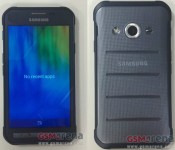
We have yet to see Samsung’s followup to the rugged Galaxy XCover 2, which we reviewed back in May 2013. That all may change soon, if this new leak proves correct. In a couple of new leaked photos, GSM Arena seems to have scored a sneak peak at the followup device, the Galaxy XCover 3.
Not only do we see photos of the device from the leak, we’re getting a handful of rumored specs to go along with it. The phone’s model number is SM-G388F, and will come with a Marvell Armada PXA1908 chipset, a quad-core 1.2GHz Cortex-A53 CPU and 1GB of RAM. Additionally, it will come with a 4.8-inch screen with 800 x 480 resolution, 8GB of internal storage, MicroSD support up to 32GB, as well as a 5MP rear-facing camera and a 2MP front-facing camera. The phone will also launch with Android 4.4.4 KitKat.
The photos released show a close, and surprisingly not so blurry, shot of the front and back of the device. The front definitely borrows design cues from the Galaxy S5 Active, with a physical home, back and recent apps key. The corners seem chunky and extremely rugged, which will come in handy if you’re using the device in a rough environment. The back of the device doesn’t really offer anything new when it comes to design. We’re seeing a flash, camera and a speaker towards the top edge of the device. The back cover has a few indented lines running horizontally, which definitely give the phone a more rugged look.
Other than that, we don’t have much information on the device. But remember, these are just rumors so far, so take these with a grain of salt. Pricing information and a release date has yet to surface, so we’ll have to wait and see what Samsung has in store for us in the coming months.

HTC One M8 and M7 Lollipop update delayed

When Google first rolled out the Android L developer’s preview back at I/O 2014, HTC announced that they would bring the the new update to One M8 and M7 owners within 90 days of the source code being posted. The promise for timely updates is part of the HTC Advantage, a program that assures customers will get timely updates, cracked screen replacements, and free cloud storage. Once Google released the source code for Android 5.0 Lollipop back in November, HTC’s Mo Versi took to Twitter to announce that the 90-day countdown has started, and that M8 and M7 owners would soon receive their Lollipop updates. 90 days from that announcement falls on February 1st, and with that date rapidly approaching, HTC has announced that they won’t make their 90-day deadline.
We’re making good progress on our #AndroidLollipop, but unfortunately missing our 90-day goal. For more info visit: http://t.co/n8sWz1Wwe6
— Mo (@moversi) January 30, 2015
HTC says that the 90-day deadline has helped them move along with the update quite rapidly thus far. However, since Google has been constantly updating the code ever since its release, HTC has had a hard time keeping up.
We’ve been working hard in the labs with Google and our carrier partners ever since the code release and are making great progress so far, but if you’ve been following the progress of this rollout you will know that Google has had to address several issues with this release. We’ve been diligently working to fix some of them on our end and incorporating Google’s fixes as quickly as possible, but despite everyone’s best efforts some carrier versions of the HTC One (M8) and HTC One (M7) will not meet our 90 day goal, which is February 1st. While we are committed to delivering within this time period, we are even more committed to ensuring these updates result in an even better experience with your device because that is what the updates are intended to do.
HTC explains that they are taking every necessary precaution to ensure that their users will get the smoothest experience possible. While this news is disappointing, many would argue that HTC taking their time is a good thing. We’ve heard many reports from Moto X (2nd Gen.) owners that are unhappy with the update, and that Motorola should have waited until Lollipop was significantly less-buggy. No matter the case, we know HTC is working hard to get the update pushed out as soon as they can.
We’ve seen the Lollipop update come to Google Play, Unlocked, and Developer Editions of the One M8, and HTC ensures us that other variants aren’t too far behind.
Hands-On Review of the Revamped Adonit Jot Pro and Jot Mini Styluses [iOS Blog]
Apple has never shown much interest in styluses, even as companies like Samsung and Microsoft have embraced them as major selling points for smartphones and tablets. Former Apple CEO Steve Jobs even went as far as saying “If you see a stylus, they blew it,” on one occasion, and at Macworld in 2007, he asked “Who wants a stylus? Nobody wants a stylus.”
Apple’s focus on the fingertip as the best input method doesn’t mean styluses are entirely pointless — they can be useful for taking notes, making sketches, creating artwork, and in dozens of other situations. Luckily, Apple’s disinterest in the stylus hasn’t stopped third-party accessory makers from developing them, and eight years after the iPhone first debuted, there are a range of stylus options on the market.
Adonit is a company that got into the stylus game early, debuting its first stylus on Kickstarter in 2011. The Adonit Jot was one of the first styluses to incorporate a thin plastic precision disc, doing away with a rubber tip to let users see more of the screen while writing. Since then, Adonit has gone on to make a range of styluses, some that even connect via Bluetooth to incorporate pressure sensitivity.
The company’s newest styluses, the Jot Pro and the Jot Mini, are standard non-connected styluses, but they’re the culmination of years of work perfecting the stylus based on customer feedback and they’re some of the nicest writing utensils that Adonit has produced yet. Get a quick look at the Jot Pro or Jot Mini in the video below, or keep reading to see our full thoughts on the two styluses.
What’s in the Box
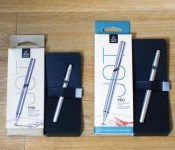
The Jot Pro and the Jot Mini come nicely packaged in an outer cardboard box and a plastic insert with an adhesive strap that holds them in place during shipping. They arrive with caps in place to keep the tip from being damaged and are ready to use once the cap is removed and affixed to the bottom of the stylus.

Design and Features
Both the Jot Pro and the Jot Mini are made from a lightweight aluminum in black or silver that matches the aluminum backing of the silver/space gray iPad and iPhone. Each comes with a screw-off cap that connects to both ends of the stylus and serves two purposes — keeping the stylus safe during transport in a bag or pocket and extending the size of the stylus when in use.
Each version comes with a built-in clip at the end that allows the stylus to clip onto a shirt pocket or bag and they both have the same plastic tip.

The larger Jot Pro has a few features not found in the miniature version. In addition to being both larger and heavier (123mm and 20 grams vs 98.7mm and 13 grams), it comes with a textured grip to make it easier to hold and a cushion at the tip that gives it a bit more flexibility against the screen for quieter writing.
Functionality
When it comes to styluses, some of the most important elements to consider are the tip of the device, the weight, and how it feels in the hand, as all of these can impact the writing or sketching experience.
The major benefit of the plastic tip of the Jot Pro and Jot Mini is the ability to see the entire screen when you’re writing or sketching. With a larger rubber-tipped stylus, the screen is obscured so you can’t see the point where the stylus connects to the screen. The plastic tip of the Jot isn’t inherently more accurate than a rubber tip, but it can feel more precise because you can see what you’re doing.

Writing with a rubber-tipped stylus can sometimes cause overcompensation resulting in distortion because it’s difficult to see the letters being formed, but the Jot Pro alleviates that problem for writing that’s clearer, especially when writing small letters.
The downside is that there’s more resistance against the screen with the Jot Pro, which means that the writing experience is not quite as smooth. This is more evident when attempting to sketch, but it’s definitely noticeable when writing too. This extra drag isn’t a deal breaker by any means due to the fact that it’s fairly subtle, but it’s something to be aware of when choosing a stylus.
Earlier Jot styluses had some issues with pivoting and the plastic tip popping off, but those problems seem to been resolved. The tip of both the Jot Mini and the Jot Pro pivoted smoothly and allowed for uninterrupted writing at any angle.
One major con of both styluses and of the plastic tip in general is the noise. When writing or drawing, there’s a distinctive click that’s similar to the tap of a fingernail against the screen. The larger Jot Pro has a cushioned tip that provides a somewhat smoother writing experience and a slight dampening of the sound, but the click is still very much audible with either stylus.
Weight and hand feel may not seem like important factors when picking a stylus, but these elements can have an impact on the fluidity of writing and the feel of your hand after writing for a long period of time.

The Jot Pro is slightly thicker than your standard pen, and about as heavy as a nice quality pen you might buy for $40 or $50. It has a textured grip and overall, it feels nice in the hand. The extra weight helps make writing somewhat smoother, and its pen-like feel makes it comfortable to use for long note taking or drawing sessions.
The Jot Mini is smaller, lighter, and thinner than the Jot Pro. The build quality is great, but its small size means that it is slightly less comfortable to hold. Its compact size and light weight make it a great travel stylus for occasional use.
Who’s it For?
With the Jot Pro and the Jot Mini, you’re getting precision at the cost of a bit of drag on the screen and a clicking sound that might be annoying to some. It’s an excellent all around stylus and it really shines in precision writing and drawing situations due to its ability to allow its user to see the entire screen.

Unless you need something portable and low cost, the Jot Pro is the better pick over the Jot Mini. It’s larger size means it’s more comfortable to use for long periods of time, and its cushioned tip offers a smoother, quieter writing experience.
Pros
- Full field of view
- Very precise feel
- Excellent form factor
Cons
- Pricer than most rubber-tipped styluses
- Clicking sound on screen
- Slight drag compared to rubber tip
How to Buy
The Jot Mini is available from the Adonit website for $19.99. The Jot Pro is also available from the website, but priced slightly higher at $29.99.

Aziz Ansari’s new Netflix stand-up special debuts March 6th

If you’re a big fan of comedy specials that are unique Netflix, the latest from the man behind Parks and Recreation’s Tom Haverford is on the way. On March 6th, Aziz Ansari: Live at Madison Square Garden will premiere at 12:01 AM PT. The title is another Netflix original from Ansari, whose first, Buried Alive, debuted back in 2013. Other stand-up specials from the comedian are available through the internet service too, including Intimate Moments for a Sensual Evening and Dangerously Delicious. For those who fancy an extra dose of Ron Swanson, fellow cast member Nick Offerman has a Netflix original stand-up session of his own, offering his “10 Tips for a Prosperous Life” in American Ham.
[Photo credit: Colleen Hayes/NBC/NBCU Photo Bank via Getty Images]
Filed under: Home Entertainment, Internet, HD
Source: Netflix
Google Now open to third parties
The time has come: Google Now has been opened up to third party app developers. Beginning today, January 30th, the Mountain View search giant will be allowing Google Now integration from 30+ companies. If have any of these non-google apps installed on your device, you will start seeing cards based on your activity. Google plans on delivering this experience to end users today with an update to the stock Google app. Since the Mothership is prone to staged rollouts, look for an update to the Google app on your devices in the coming weeks. In order to get all this to function correctly, new app permissions will need be accepted per app integrated with Google Now.
The most interesting part of this integration, it seems, is the prompt to spend money through Google now. For example, companies like TripAdvisor can now alert you, via a Google Now card, if prices have dropped for searches you have made on their site. EBay can now remind you if a product you have searched for in the past is now up for bid. Google Now is no longer predictive search. Google Now can also be used to predict commerce. Like many of Google’s offerings, the main thing it costs their customer base is privacy. This could be the barrier of entry for companies to begin integrating with Google Now. What do you think? Will you be allowing your third party apps to integrate with Google Now?
The post Google Now open to third parties appeared first on AndroidGuys.

Factory images of Android 5.0.2 available for Nexus 7 (2012) GSM and Nexus 7 (2013) LTE

Owners of the Nexus 7 (2012) GSM and Nexus 7 (2013) LTE can get their hands on Android 5.0.2 immediately. Google has posted the factory images for the latest version of Android for those two tablets. Prior to the update, the software on the tablets was Android 4.4.4 (KTU84P). This version goes by LRX22G. The update arrived on other devices in mid-December and includes general fixes and minor changes.
Click here for directions on how to manually install the Android 5.0.2 update.
Source: Google Developers
Come comment on this article: Factory images of Android 5.0.2 available for Nexus 7 (2012) GSM and Nexus 7 (2013) LTE
Cellular connected Nexus 7 Lollipop factory images now available from Google
At long last the cellular connected Nexus 7 tablets finally have their taste of Android 5.0 Lollipop. Google has finally uploaded the needed factory images for the LTE Nexus 7 and 2012 ‘Mobile’ Nexus 7 today. This should help you breathe a new lease of life into the aging tablets and give you something to play […]
The post Cellular connected Nexus 7 Lollipop factory images now available from Google appeared first on AndroidSPIN.

T-Mobile unveils two Super Bowl ads starring Chelsea Handler, Sarah Silverman and Rob Riggle

A few days ago, T-Mobile released a new ad starring Kim Kardashian to debut during this year’s Super Bowl XLIX. T-Mobile recently announced ‘Data Stash’ – a new way for customers to roll over unused data from month to month – and that seems to be the theme of the carrier’s Super Bowl advertisements. The Un-carrier has just unveiled two new ads set to debut this Sunday, and they’re quite hilarious.
#1 – Chelsea Handler and Sarah Silverman | T-Mobile Behind the Scenes Teaser Video
While the full advertisement won’t air until Super Bowl Sunday, the newest ad starring Chelsea Handler and Sarah Silverman should be quite a hit. T-Mobile claims that Handler and Silverman basically wrote the whole thing. The carrier gave the two comedians a topic, and they essentially did whatever they wanted with it. This is an early look at what the ad will feature.
#2 – Data Vulture
This next one stars comedian Rob Riggle and a giant vulture, and was produced specifically to live stream during the game through NBC’s Sports Live Extra app. The ad talks about Data Stash, and how T-Mobile’s Un-carrier initiatives have been changing the mobile industry.
Speaking of live streaming the big game, NBC will allow you to stream up to 11 hours of Super Bowl XLIX content through the Sports Live Extra app for free. If you’re interested, head to the Google Play Store to download the app.
 AIVAnet