



Ask AC: What’s that star in my notification area?

Welcome to the wonderful, confusing world of Android 5.0 notifications
This question still hits our inbox from time to time, and it’s worth a quick reminder. Android 5.0 Lollipop — at least in its current, unadulterated form — changes the way notifications work. Or, more specifically, there are now three ways they’ll be presented to you. The firehose is simply called “All.” That is, you’ll see every notification there is to see in your notification area. You’ll get a buzz, or hear the notification tone.
Then there’s “Priority,” which brings us back to the question at hand. You can designate specific apps as being “Priority,” and then you’ll get only “Priority” notifications.
So what’s a “Priority” notification? And what’s it have to do with that start up there? Glad you asked.
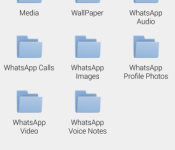
WhatsApp Calls folder appears, could voice calling launch soon?

A user of WhatsApp downloaded and installed an update from the app’s official site only to notice that something new has been added behind the scenes. Reddit user /u/akhilman78 posted the image above showing the WhatsApp Calls folder. The folder could belong to the highly-anticipated voice calling feature that WhatsApp promised almost one year ago. Being that the folder appeared via an update pushed directly from the site, a launch could be right around the corner.
Do you use WhatsApp? If so, let us know in the comments whether or not you are eager for voice calling.
Source: /r/Android
Come comment on this article: WhatsApp Calls folder appears, could voice calling launch soon?
Extend your Nexus 6 battery life with these tips
The Nexus 6 has a huge 3,220mAh battery and combined with Android 5.0 Lollipop’s battery optimisation thanks to Google’s Project Volta, provides pretty decent battery life, but there’s always room for improvement, especially when compared to the battery life of the Xperia Z3 or OnePlus One for example.
That’s why we’ve compiled a few tips you can use on your Nexus 6, and pretty much most Android smartphones, to stretch the battery life just a little bit further. These may be common knowledge to the technically gifted of us who know our devices inside-out, but will perhaps prove useful for someone who is not necessarily familiar with such techniques.
Turn off Ambient Display
To benefit from a longer standby time, head on into Settings -> Display -> Ambient Display to turn it off. Ambient display allows you to see notifications without having to fully wake the device, but at the cost of battery life.
Optimise Location Settings
Google allows for different location modes when it comes to the accuracy and method of obtaining your location for various apps. Often certain apps, especially social network apps, can request a GPS location quite frequently putting a strain on your battery.
If you’re not running the Maps application and can cope with a less refined location, then it’s worth setting your location to only be requested by using your geo-location through WiFi or Cellular network. Alternatively, to fully save battery, you can turn location services off completely.
Enable automatic brightness
It should come of no surprise that usually the biggest culprit of battery drain is the screen itself, and with the huge 6-inch qHD display on the Nexus 6, having the wrong brightness settings can significantly affect battery life.
Android 5.0 Lollipop has a feature called adaptive brightness, which automatically adjusts the brightness of your screen to suit the environment. This means that firstly you don’t have to manually adjust the brightness and also ensures permanent maximum brightness isn’t killing your battery. You can check adaptive brightness is still enabled in Settings -> Brightness.
Check what is using your battery
Even having every battery optimisation under the sun turned on, all it takes is one erroneous app to be maxing out your processor to absolutely kill your battery life, so be sure to check what is using the most battery under Settings -> Battery.
You should notice the usual culprits like ‘screen’ and ‘Android OS’, but if you see an app that you haven’t used in a while clocking up the %’s then chances are it’s doing something funky in the background and needs to be force closed or uninstalled.
Do you have any other tricks that you’ve found gives you the few extra hours of battery life on the Nexus 6, or any other Android device? Let us know in the comments below.
The post Extend your Nexus 6 battery life with these tips appeared first on AndroidGuys.
Cyanogen to attempt a Google free Android
The Information, an online subscription based news site, recently had an event in San Francisco on the “Next Phase of Android.” According to Android Authority, Cyanogen had a lot to say when it came to their future as well as the industry’s.
With an opening statement that hid nothing back, Kirt McMaster introduced himself as, “…the CEO of Cyanogen. We’re attempting to take Android away from Google.” As the interview continued, McMaster clarified by expressing that Android is currently limited in how apps can interact on a base system level, so his company would create their own version of Android to rectify this, with more possibilities for app developers and less Google influence. The bold statements didn’t stop there however, with another statement saying that Cyanogen will have their own version of the Google Play Store within 18 months. Until then, they will encourage alternative app stores on the Android platform.
These are massive goals for any company to set for themselves, let alone achieve, and whether or not they are actually viable remains to be seen. There are many challenges facing Cyanogen in the future, such as achievement of enough of a loyal fans to switch from Google to Cyanogen apps, creating their own ecosystem and dealing with the imminent security threats that could arise with allowing applications deeper system integrations.
The post Cyanogen to attempt a Google free Android appeared first on AndroidGuys.

The Godmother of Virtual Reality: Nonny de la Peña

“Print stuff didn’t scratch the itch. Documentary didn’t scratch the itch. TV drama didn’t scratch the itch. It wasn’t until I started building this stuff. There was no way I could do anything else. I just couldn’t do anything else. I don’t know even how to explain that. And I think sometimes I wanna shoot myself in the head that I can’t do anything else because it just motivates me. [VR] drives me. This is such a visceral empathy generator. It can make people feel in a way that nothing, no other platform I’ve ever worked in can successfully do in this way.”
Let that stand as your introduction to Nonny de la Peña, the woman pioneering a new form of journalism that aims to place viewers within news stories via virtual reality. That vision has culminated in Emblematic Group, her content- and VR hardware-focused company that she runs along with her brother in Los Angeles.

VR visionary Nonny de la Peña speaking on a panel at Tribeca Film Festival in 2014.
De la Peña’s resume runs the gamut, including work on documentary films, television dramas and a longtime stint as a correspondent for Newsweek. But her name almost always surfaces in connection with the boy billionaire, Oculus VR founder Palmer Luckey, who served as her intern and provided a prototype Oculus Rift when she debuted Hunger in LA at the Sundance Film Festival in 2012. That first VR piece was displayed at New Frontier, an exhibit within the festival that focuses on works that meld technology, art and filmmaking. Hunger served as an entry point to De la Peña’s brand of immersive journalism as it dealt with the true story of a diabetic’s collapse due to starvation while waiting in line at a food bank in Los Angeles.
“I was really kind of a nightmare because I was so nervous, right?” De la Peña admits, speaking of her VR debut. “It was the first one. I was so scared to go in the world. And then the opening night, when the first people to take off the goggles started crying, I think it blew all of our minds. … And then nine months later came the Kickstarter for Oculus. And last spring when Palmer … when they sold the company to Facebook, I texted him, “Thank you so much.” Because look. [gesturing to the New Frontier exhibit around her] Look at this place now. Look at what’s happening here. It’s so fabulous!”
De la Peña’s right to be so giddy, to take a certain pride in the explosion of VR projects (11 in total) dominating New Frontier. Many of the artists exhibiting this year, like Chris Milk with Evolution of Verse, Rose Troche with Perspective and Danfung Dennis’ Zero Point, drew inspiration from seeing her original work and linked up with other like-minded creatives to begin exploring the VR space.
“This is such a visceral empathy generator. It can make people feel in a way that nothing, no other platform I’ve ever worked in can.”
But the fanfare and accolades flowing De la Peña’s way are only a recent development. It wasn’t always like this. The warm embrace was once a stiff, cold shoulder. “Back in 2012 when I launched Hunger in LA, I was still considered such a weirdo,” she explains. “I had colleagues literally pointing their finger at me and saying, ‘You can’t do that. That doesn’t work. It’s not ethical. It’s too subjective.’ And I got so much criticism. It was really difficult.”
De la Peña chalks up much of that early anxiety and resistance to the medium’s newness, as well as the transformations surrounding traditional notions of journalism. She concedes it was a scary time for old-guard journos that felt like “their lives were being threatened by digital technologies.” The introduction of an additional technological layer, virtual reality, certainly didn’t ease those fears either.

Nonny de la Peña exploring the virtual world of Project Syria in custom VR gear.
The tides have turned for De la Peña who was once jobless when she spent $700 of her own money to fund Hunger. Now, her work is being funded by the likes of the University of Southern California (where she’s studying for her doctorate), Tribeca Film Institute, Google, Associated Press and the World Economic forum, which commissioned this year’s exhibit Project Syria.
A fully immersive sociopolitical work that utilizes computer-generated graphics, as opposed to live action with human actors, Syria places Sundance attendees within the aforementioned Arab country where the experience moves through three distinct moments: a calm street scene, a sudden bombing and a camp for refugee children. It’s a testament to the alternate hardware approach De la Peña’s taken with her VR hardware that Syria really allows the viewer to feel transported into another reality.
“Last spring when Palmer… when they sold [Oculus] to Facebook, I texted him, ‘Thank you so much.’ Because look. Look at this place now. Look at what’s happening here. It’s so fabulous!”
Where Oculus’ dev kits continue to focus on a standalone headset experience with inbuilt audio and inward and outward-facing camera-based tracking, De la Peña’s custom hardware opts for a higher-end, albeit more cumbersome, setup. That approach incorporates facial-tracking, separate headphones and an external, body worn pouch housing crucial processing circuitry.
“I love Oculus, but it’s a sit down experience. They don’t really want you walking around,” says De la Peña. “And I can spend $3,000 on my goggles instead of $300 right now. Right? I can get higher-end components to make it crisper and get a wider field of view. And I can set up my own tracking system. This is a face-based tracking system which I have to tell you is still one of the best in the world. You know what? It’s really good.”

Oculus shows off its new Crescent Bay prototype headset at CES 2015.
That boast is not without merit, either. Motion sickness is one of the most persistent hurdles to making VR a mass-market consumer technology. It’s why Facebook’s acquisition of Oculus makes sense — billions of dollars in research are required to overcome the medium’s Achilles’ heel and make the experience a seamless one for all users.
It’s also the one major con to VR that I consistently encounter. Unlike my other colleagues that regularly cover the VR space, I seem to be part of that small, but nonetheless important minority that’s prone to motion sickness. Indeed, when I experienced Perspective, another VR work at New Frontier, I had to close my eyes and take several deep breaths to keep from throwing up. That did not happen with Project Syria and De la Peña’s gear.
“I had colleagues literally pointing their finger at me and saying, ‘You can’t do that. That doesn’t work. It’s not ethical. It’s too subjective.’”
“In general, I think we report less levels of nausea. I know we do, because I collect data. … I collect data also beyond my anecdotal, my observations. I actually collect information data to inform how to make better pieces,” says De la Peña.
That’s not to say De la Peña’s being dismissive of the Oculus approach. She likens the two companies’ differing solutions as being akin to “TV vs movie theatre.” She also concedes that it likely won’t be her company Emblematic Group that delivers the VR industry’s coup de grâce when it comes to tracking tech and a motion sickness solution. “Honestly, I presume somebody else is going to solve the headgear problem before we are. I mean, that’s not what my number one goal has been because there’s so many billions of dollars [thrown] at this and huge people.”

An early 3D-printed prototype of Emblematic Group’s Zig Zag, a low-cost VR viewer.
There is a bigger picture in mind for Emblematic Group, though. De la Peña’s vision for the fledgling startup company she’s founded with her brother (the man responsible for creating the vast majority of her hardware is nothing if not ambitious. With a steep background in media, she’s confident Emblematic can become a content juggernaut covering everything from entertainment stories to tech stories to general news and human rights pieces. At present, she’s even deep in development with a major Hollywood director on an unspecified fiction project, in addition to working with The Guardian, BBC and Al-Jazeera.
“People keep saying, ‘Are you a content maker? Are you a hardware maker?’ And I keep saying we’re a content business, but… when there’s a hardware problem we just solve it for now.”
In a sense, it’s almost as if De la Peña envisions Emblematic becoming a sort of virtual reality news network — think the CNN of VR. When I asked if she had any interest in hiring on and training journalists in this new form of immersive journalism, De la Peña eyes sparkled with that glint visionaries often have. “That would be a dream come true. It would be a dream come true to do that.”
“We understand content here. But the crazy thing is we’ve turned out to understand a bit of hardware too,” says De la Peña. She is, of course, referring to the VR headset that she and her brother specced up and 3D printed out of their Mother’s garage. The end-goal being that, with the proper deep-pocketed funding, Emblematic can tackle the higher-end consumer VR market. “Oculus is wonderful for everybody,” she says. “And maybe we’d be the high-end folks. Because I think that’s what we do best.
In the near-term, however, Emblematic is gearing up to release an affordable VR viewer. Think of it as Emblematic’s competitor to Google Cardboard. Zig Zag, as she and her brother have deemed it, is a collapsible VR viewer that, when closed, resembles a hard plastic eyeglass case. De la Peña showed it off to me during our interview and admitted that it was “hot off the 3D printer this week.”

Nonny de la Peña demos her company’s collapsible Zig Zag virtual reality viewer.
Zig Zag works much like Gear VR and Cardboard in that it requires the use of an Android phone to power the experience. The actual “hardware,” however, apart from its lenses which she independently sources, contains no moving parts or processor; it relies entirely on the smartphone to power the experience. And, unlike Google’s flimsy Cardboard, it’s durable. “It’s not going to break or bend,” she says.
Ultimately, De la Peña would like to distrbute Zig Zag through Emblematic’s site, but she’s also considering a Kickstarter campaign and is in talks with an unnamed partner that’s interested in ordering 10,000 units. She’s confident that Emblematic can offer Zig Zag for a relatively inexpensive price.
“It’s really nice not to feel vulnerable anymore. I think Keri Putnam, the head of the festival here, put it best when she said to me, ‘You don’t have to justify yourself anymore.’”
While De la Peña is focused on the high-end, she sees opportunities for devices like Zig Zag to work in conjunction with the 3D imaging tech in Google’s Project Tango. That technology is where De la Peña sees VR inevitably headed on the consumer end. “Right now we’re looking at 360 [degree] video as very realistic stuff and I’m still doing a lot of CGI stuff,” De la Peña says. “They’re gonna merge. And we’re already merging it now. You’re going to use your Project Tango on your phone and you’re gonna just res-up a scene you just [scanned]. And it’s gonna turn into a 3D model right away that people can see. That is for sure the future.”
#fivemin-widget-blogsmith-image-738757display:none; .cke_show_borders #fivemin-widget-blogsmith-image-738757, #postcontentcontainer #fivemin-widget-blogsmith-image-738757width:570px;display:block;
 trydocument.getElementById(“fivemin-widget-blogsmith-image-738757″).style.display=”none”;catch(e)
Google ATAP’s Johnny Lee talks about the new Project Tango tablet built for developers.
The novelty of the medium may have initially aroused disdain from her peers, but De la Peña doesn’t think the world-at-large will throw up the same level of resistance to VR. She points to her young children as examples of digital natives that don’t fear technology. They’ve already become accustomed to living in virtual gaming worlds like that of Minecraft. And, besides, she insists the technology’s already matured enough to the point where it’s no longer considered a moonshot; it’s already practical for consumer use.
“I don’t know why people get so terrified by technology. … Look, I’m the one that could tell you. I would know. I would know. I took so many hits,” she says. “The criticism I’ve gotten over the years, you have no idea. It’s really nice not to feel vulnerable anymore. I think Keri Putnam, the head of the festival here, put it best when she said to me, ‘You don’t have to justify yourself anymore.’ And that is the truth. That’s why being at this moment with everybody here… it’s so gorgeous. So again, thank you Palmer Luckey.”

Secret Siri commands: Twelve cool questions you can ask right now!

Siri launched in 2011 and can now be found on all modern iPhones and iPads. It’s a virtual digital assistant that uses natural language voice control and sequential inference to listen to what you want and provide the best possible information or answer it can provide. It can help you stay connected, organize your life, and get thing done both professional and personal. It can also do a lot of cool tricks… all you have to do is know what to ask!

1. The name’s Bond… No, not boned!

Siri will default to using your name and the name of your contacts. If you want to change that, tell Siri: “Call me ‘honey muffin’ ” or “Gwendolyn is my mom”. If Siri has trouble pronouncing a name or nickname, tell it: “That’s not how you pronounce ‘A Lie’!” and it will ask you for the correct pronunciation.
2. Cone of silence!

If you were out way too late, if you need to get some work done and people just won’t leave you alone, if all you want is a little peace and quiet, tell Siri: “Do not disturb”. If you want to go nuclear, you can tell it: “Delete all alarms” and even “Airplane mode”.
3. Are we there yet?

Not only can Siri take you where you need to go, it can tell you how long it will take you to get there. You can tell it: “Take me home” to get quick directions. “Walking directions to Starbucks” if you prefer sneaker to tire. Even “ETA” to find out how much longer you have to go.
4. Remember the… bacon!

Siri is the faster way to add anything to a Reminders list, and that means it’s the fastest way to add anything to a shopping, packing, party, or any other list. To get specific, tell Siri: “Add bacon to shopping list” or “Add bacon to packing list” (what?).
5. Mathamagics

Thanks to Wolfram Alpha, Siri is great with numbers. For simple math, ask Siri: “What’s 10 times 10?” or “What’s the square root of 50?”. For tips, ask: “What’s the tip on $100″. For conversions: “How many kilometers in a mile”. For chance, tell it: “Flip a coin” or “roll the dice”.
6. What birthday…?

Instead of excusing yourself, racing upstairs, jumping out the window, and tearing off to the only open Quicky Mart, ask Siri: “When’s Kelly’s birthday?”, then: “Set a reminder” for the date or, f it’s already too late: “Buy an iTunes gift card!”.
7. Directed dictation

When you’re telling Siri what to type, you can dictate punctuation like “comma” or “elipses”, symbols like “hashtag” and “copyright sign”, and even emoticons: “smiley” or “winky”. You can format with “new line” or “new paragraph”, prevent formatting with “hyper no space space”, and get loud with “ALL CAPS”.
8. Keep current

Siri can set reminders, make appointments, send messages and email, Tweet or post to Facebook, but it can also keep you up to date. Ask Siri: “What time is sunset in Cupertino?”, “What’s the weather in London?”, “What’s on my calendar?”, “Planes overhead?”, “Pictures of the Golden Globes”, or “Trending on Twitter”.
9. Win fights and influence diets

Siri can quickly settle arguments, bar bets, and flat-out fights. Ask Siri: “Who starred in the Matrix?”, “Who won the last SuperBowl?”, “What did Apple close at?”, or “How many calories are in a Big Mac?”. And if you’re wrong and end up paying for dinner or a movie, Siri can find you tickets and book a table at a restaurant as well.
10. Do over!

If Siri gets something wrong, or if you realize you asked the wrong question, you can tel Siri to: “Change” things like dates and times. You can even tap the question you asked and manually type in different words to alter the query.
11. Goodnight, Siri

When HomeKit accessories start hitting the shelves this spring, we’ll be able to use Siri to turn off and shut down our homes: “Goodnight” or, my preference, “Crash the compound”. While we’re waiting, we can still get Siri to read us a birthday story. Just ask thrice.
12. Bonus: chit chat!

Siri has a sense of humor. Kids can talk to Siri like a virtual friend. Kids of all ages just have some fun. You can give Siri all sorts of pop culture references: “What do you think of Google Now?”, “tell me a joke”, or “Will you marry me?”.
13. More Siri and secrets
If you just can’t get enough of Siri, or you want to learn more of the secrets to iPhone mastery, check out our ultimate guides and secrets and tips pages. And if we missed any of your favorite Siri tips, add them to the comments below!
<!–*/
.imageleft
float: left;
margin: 0 25px 0 0;
.imageright
float: right
margin: 0 0 0 25px;
.screenshot-16×9
height: auto;
width: 88.97%;
.screenshot-16×9.imageleft,
.screenshot-16×9.imageright
width: 50%;
.screenshot-4×3
height: auto;
width: 66.66%;
.screenshot-4×3.imageleft,
.screenshot-4×3.imageright
width: 50%;
/*–>*/

Comic: An elegant computer for a more civilized age
Happy Saturday, iMore! Because Rich is awesome, he’s letting us run some of his Mac-themed comics from the Diesel Sweeties archive on weekends. Bonus comics, woo! We hope you enjoy.


Read more comics from the Pixel Project on iMore.com.

The claim process for Sony’s $15 million PSN breach lawsuit starts now

Been waiting for Sony to start dishing out the $15 million in restitution for the 2011 breach that took its PlayStation Network and Qriocity services down back in 2011? Well, thanks to the outfit putting a claim form online, now you can start the payment redemption process. It’s limited to those who had either a PSN, Qriocity or Sony Online Entertainment account prior to the intrusion (May 15, 2011), and the payouts aren’t all that different from what the firm gave out as part of its “Welcome Back” program at the time. Of course, back then PlayStation 3 and PlayStation Portable games and themes were a bit more desirable, but three months of PlayStation Plus is actually a bit more valuable now than it once was. Sony doling out the goods could still take a bit longer, though.
You see, there’s still a chance that the class-action suit will see an appeal come its May 1st Fairness Hearing, and payments won’t be made until the court grants final approval and any appeals are resolved. Until then, there’s always the PlayStation 4 for gaming — we’ve heard it’s pretty popular.
Filed under: Gaming, Home Entertainment, Internet, HD, Sony
Source: Sony
What is a fanboy?
In almost any phone article on any website, you will find people fighting over what phone is better. These arguments range from iPhones vs Android phones to different Android manufacturers and every spot in between. Some of the people in these debates have good points while others do not, but regardless of the validity of each person’s opinion, you will see one word thrown around more than any other. That word is fanboy. You will see commenters say this to each other and to the writer of the article. However, people do not seem to understand what the term means and just attribute it to anyone who does not share the same opinion they do. This is completely wrong and we need to stop the overuse of fanboy towards those who do not share the same characteristics.
Who is a fanboy?
To decide whether to call someone a fanboy, we first need to figure out what exactly a fanboy is. The first sign you are talking to a fanboy is that they only buy a certain phone brand and do not have any reasons for that. Apple fanboys will often say that iPhones are the best because there is an apple on it. This same characteristic is also seen in fanboys of Android OEMs such as Samsung, LG, HTC, and Motorola. They buy their phones because it is a certain brand and nothing else. Another key sign that you are talking to a fanboy is that they think every other phone is terrible. Regardless of how good another phone is or how awesome a new feature on it is, fanboys of other phones will not say anything good about it. If a fanboy does compliment another phone, it will be backhanded. They will say something like, “That 2K screen is really nice, if you like a phone that cannot fit in your pocket,” or, “The thinness of that phone is cool, but you are just going to put a case on it”. The biggest giveaway that you are talking to a fanboy is that they will never admit that their brand makes a mistake. No matter how blatantly obvious the mistake is, fanboys will defend it as long as they can. Whether this is a protruding camera, large bezels, laggy software, or poor build materials, fanboys will not recognize these as flaws and rather commend them or say they do not exist or matter. If you are talking to someone who is exhibiting these traits, then you are probably talking to a fanboy.
Who is not a fanboy?
Now it is time to look at those who prefer a certain brand but do not fall into the fanboy category. While these people may only buy a certain phone, they actually have respectable reasons for doing so. Examples include people buy iPhones because they are integrated into the Apple ecosystem, or people who buy HTC phones because they love music and the HTC One speakers are fantastic. If they have good reasons for owning the phones they do, then they are not a fanboy. These phone users also respect other phones and are able to accept when another manufacturer does something better than their preferred company. It is also possible for them to like other phones even though they prefer a certain brand. Odds are, you will never hear someone like this claim that their brand is the best at everything. Another characteristic of these non-fanboys (for lack of a better term) is that they can accept it when their company makes a mistake. They do not try to overlook it or hide it because they know that all companies make mistakes. If you are talking to someone like this, then they do prefer a certain phone but are not a fanboy.
What kind of fanboys are there?
Now that we have determined who is a fanboy and who is not, we can move on to the different types of fanboys. The most common form of fanboy seen on tech sites is a phone fanboy. These are the ones that prefer a certain phone from a certain maker. You have iPhone fanboys, Samsung Galaxy Note fanboys, HTC One fanboys, Nexus fanboys, Moto X fanboys, and every fanboy in between. You can easily find them in the comment section of almost every article on every tech site. A less common type of fanboy is an operating system fanboy. These are people who prefer Android or iOS but do not have a certain phone that they are loyal to. Instead, they argue that their operating system is the best and every other one is terrible.
When is the word fanboy appropriate?
We have discussed who are fanboys, who are not fanboys, and what kind of fanboys there are, and now we are on to when the term fanboy is okay to use. The answer is simple – never. Sure, people are fanboys and they are relatively easy to spot; however, nothing good will ever come from calling someone else a fanboy. People should not be criticized because they prefer a certain type of phone or type of operating system regardless of their reasons. Be together. Not the same.
The post What is a fanboy? appeared first on AndroidGuys.
Here’s the only flashlight app you will ever need

There are a zillion flashlight apps in Google Play, but I stumbled upon a really good one thanks to Ron Richards introducing it in the App Arena on TWIT TV’s All About Android show. It’s called Power Button Flashlight / Torch, and you’re probably already wondering what makes this better than any other flashlight app? A light is a light right? This one is all about how simple it is to turn on.
Turning on your flashlight is always a chore. You have to find the app, which is usually in the app drawer, and then you have to turn it on. Google has improved things by adding a built-in flashlight in Lollipop, while other manufacturers have offered the same. Still, you have to turn on your device, swipe down the notification panel, and press the flashlight icon. There has to be an even easier way right?
With Power Button Flashlight, all you have to do is tap the power button 3 times, and bingo, the flashlight turns on. What could be simpler? If your display is already turned on, then you tap the power button 4 times. You can even customize how many times you need to press the button. Turning it off is as easy as going to the notification panel, but for a mere $0.99 cents, you will be able to turn it off with the power button. There’s even a shake gesture option. You will also get the ability to modify how long before it automatically times out (default is 10 minutes).
I don’t know about you, but using a flashlight is not something that I use every day, but when you want to use it, you don’t want to fumble around looking for the app. This is simply the easiest and fastest way to fire it up. It’s free, so what do you have to lose? Once you see how easy it is, you won’t be able to drop that $0.99 cents fast enough to enable those extra features.


Come comment on this article: Here’s the only flashlight app you will ever need
 AIVAnet