


Download and install the HTC One M8’s Gallery app on any Android device [APK Download]
If you’re a fan of the HTC One M8’s Gallery app but aren’t fortunate enough to own the device itself, then good news since you’re now able to download and install the APK file on any device.
“Turkbey06″ over at XDA has modified the One M8’s Gallery app to enable it to work on other Android devices. It was tested on the LG G3, but users of other devices are saying it works just fine.
To download the HTC One M8’s Gallery app, simply head on over to the XDA thread. No root access is required so you should fine it just works.
The post Download and install the HTC One M8’s Gallery app on any Android device [APK Download] appeared first on AndroidGuys.
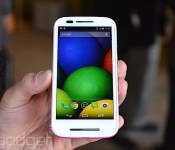
FTC says Straight Talk’s promises of unlimited data were crooked

If you were seduced by offers of “unlimited” phone data on prepaid carriers like Straight Talk or Simple Mobile only to find your service unbearably slow after a certain point, the Federal Trade Commission has your back. The carriers’ owner, TracFone, has agreed to pay the FTC $40 million to settle charges that it misled customers by advertising unlimited data that was really throttled into oblivion. In other words, Straight Talk was being… less than straight. Beyond the payout, TracFone has to avoid making sketchy claims in its ads and provide refunds to anyone who’s been burned. The settlement won’t affect a huge number of people, but it could serve as a warning sign to AT&T and other big carriers trying to avoid penalties for similarly shady throttling practices.
Filed under: Cellphones, Wireless, Mobile
Via: New York Times
Source: FTC
Material Design comes to Runtastic Running and Fitness in version 5.4 update

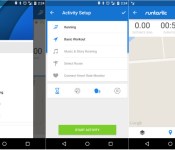
Runtastic Running and Fitness has long been one of our favorite fitness tracking apps here at Android Authority, and today the app is receiving quite the update. Version 5.4 of the app brings a slew of Material Design enhancements to the user interface.
Some applications that follow Google’s Material Design guidelines aren’t all that Material, after all. They may take influence from those guidelines, but many fall short. However, that’s not nearly the case in this Runtastic update. It has the floating hamburger menu that can be accessed from the left side, colored notification bar, responsive touch feedback throughout the entire app, and much more. The app is still as easy as ever to navigate, but now it’s much more beautiful than before.
The Material Design overhaul takes up the bulk of this update, though the Runtastic team has added a new Story Run to the mix: The Tetradome Run.
If you have yet to download the app or are looking for a well-oiled fitness tracker, you should definitely try it out now. Head to the Google Play link below to grab the update.
Download Runtastic Running and Fitness from the Google Play Store
Qualcomm confirms a key customer dropped its Snapdragon 810 processor

Annually, flagship smartphones in the United States and other countries launch with processors designed by Qualcomm. Look at any flagship smartphone released in the last few years and it is almost guaranteed that a Snapdragon processor is inside. The Snapdragon 810 was expected to be the go-to processor for hardware manufacturers this spring, but reports of technical difficulties including overheating caused some to believe otherwise. Today, the company confirmed that a key customer has walked away from using the Snapdragon 810.
The key customer, while not named by Qualcomm, is likely Samsung. We have seen reports and rumors that Samsung is looking elsewhere for the processor to be used in the Galaxy S 6 in select countries. Samsung is one of the few companies that develops its own processors and that means there is a chance to replace the Snapdragon 810 and go against Qualcomm with Exynos.
Samsung may have backed away from using the Snapdragon 810 due to a potential lawsuit between Qualcomm and LG. Yesterday, a source familiar with the situation made it clear that LG would seek legal action if Qualcomm modified the Snapdragon 810 for Samsung. Why? Because the Snapdragon 810 will power the soon-to-be-released G Flex 2. Well, LG also believes that there is no overheating.
In addition to a key customer dropping the Snapdragon 810, Qualcomm announced that its business in China has underperformed despite settling a licensing payments dispute in the country. The Chinese National Development and Reform Commission has repeatedly gotten in front of Qualcomm and the company believes that has caused Chinese customers to not properly report sales.
Qualcomm reduced its financial estimates for the next two quarters because of the ongoing issues.
Source: Re/code
Come comment on this article: Qualcomm confirms a key customer dropped its Snapdragon 810 processor
TracFone nailed by FTC for $40 million for throttling ‘unlimited’ data plans
There has been a lot of debate over the years regarding unlimited data and exactly what it is and isn’t. Consumers believe it should be just that, unlimited full speed data every month. Where as many carriers force it to be unlimited, but high-speed access limited to a set amount with a heavy throttle after […]
The post TracFone nailed by FTC for $40 million for throttling ‘unlimited’ data plans appeared first on AndroidSPIN.
Calendar Notify review: a widget for your notifications
If you are like me, you tend to forget things like deadlines and meetings easily. Having my schedule on my phone helps some, but I still find tasks sneaking up on me. Putting a widget on my homescreen helps sometimes, but I often overlook the widget and go right into another app. If this sounds familiar, then Calendar Notify is an application you need to download now.
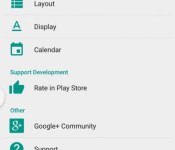
The easiest way to describe Calendar Notify is to say it is a widget for your notification shade. This app creates a constant notification that shows you the next 7 appointments in your calendar up to a certain date. With Calendar Notify, you can change several things about the notification’s appearance and abilities. You can set the priority of the notification so that it will always display at the top of your notifications or you can set it at a lower priority. You can choose for the app to look 1-7 days or two weeks ahead in your calendar for events. Something that I liked was that when my calendar had no upcoming events, the notification would hide itself which is much better than simply displaying a blank notification since it frees up space in my notification shade. The look of the app is fantastic because it utilizes Material Design and the notification looks great on Android 4.1 and up. Also, expanding the notification give you the option to refresh the notification and add events.


After using this app for only a few hours, I immediately bought the premium version for $0.99 to utilize the extra features. In the premium version, you get more control over the notification layout and design. It adds the ability to include durations and end times for events and you can hide the icon to the left of the events to create more room. You can change what the notification icon displays (such as day of the month, number of appointments that day, etc.) or you can even hide the icon to make space in your notification bar.
I have to recommend this app to everyone because it is a simple and elegant solution for event reminders. It is much harder to overlook this widget since it appears every time you pull down you notification shade. For those running Lollipop on their device, the app will even display the notification on the lockscreen. If you do not like the idea of having this app add a notification, you also have the option to use Calendar Notify as an actual widget on your homescreen. Go get Calendar Notify for free in the Play Store and quit forgetting about lunch with your mom!
The post Calendar Notify review: a widget for your notifications appeared first on AndroidGuys.
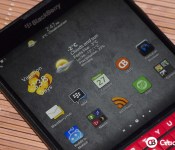
Home Screen Plus updated with resizable widgets, new countdown timer and bug fixes!

While the last update to Home Screen Plus brought forth some massive changes including widgets and a name change, the latest release has now arrived in BlackBerry World and keeps the changes a bit smaller while still adding some new features that folks are sure to appreciate.
Building on the widget experience, this release adds the ability to resize most of the included home screen widgets and also introduces a new countdown timer that shows the remaining days until a holiday or event with many major holidays already pre-set up within the app and of course, the ability to add you own as you see fit. If that’s not enough, multiple bugs have also been squashed based on user feedback.

Bill Gates is helping Microsoft create ‘Personal Agent’, thinks HoloLens is ‘amazing’
Microsoft co-founder Bill Gates wrote today that the company’s recently revealed Microsoft HoloLens hardware is “pretty amazing” and “the start of virtual reality.” He also revealed, as part of a Reddit AMA session, he is working with Microsoft on a project called Personal Agent.
Facebook’s ‘Paper’ App for iOS Updated With Photo Sharing Improvements [iOS Blog]
 Facebook today updated its Paper app to version 1.2.5, adding several improvements to the app’s photo management capabilities. It’s now possible for users to access their “Favorited” photos album on iOS for faster sharing of preferred photos, and the Camera Roll in the app organizes photos by date.
The “Favorites” album was introduced with the iOS 8 Photos app revamp and houses all of the images that a user favorites via tapping the heart icon on individual pictures within the app.
Today’s Paper update also includes performance enhancements that are designed to make various features within the app run faster, including photo uploads.
We’ve been working to perfect your experience with Paper. In this release, we’ve focused on making it even faster and easier for you to share photos, in addition to fixing a few issues you’ve let us know about. Thanks for your feedback!
Here’s what’s new and improved:
– Camera Roll organized by date. When selecting media to share in the composer, photos and videos are now organized by the date they were taken.
– Share your Favorited photos. Quickly share photos from the new Favorites album introduced with iOS 8.
– Faster performance. We’ve improved the responsiveness of several parts of Paper including posting a photo.
First introduced in January of 2014, Facebook’s Paper app is a news creation and curation tool that pulls in content from a user’s Facebook news feed and other well-known publications, organizing it into a magazine-style layout for easy reading. Many people have come to prefer Paper over the standard Facebook app to read through their news feeds.
Facebook’s Paper app can be downloaded from the App Store for free. [Direct Link]
Why Apple is underestimated so insanely always

Last year, the level of stupidity surrounding Apple was best exemplified by Haunted Empire, the calamitously bad book that tried to make the “Tim Cook’s company is doomed” meme mainstream. Yesterday, Apple announced the most profitable quarter in the history of the business world — of which the other four companies in the top five are oil magnates. So, beyond market manipulation and negative attention seeking, what makes otherwise rational, intelligent analysts and journalists experience such a continued, collective blindspot when it comes to Apple’s prospects?
Ben Thompson, writing for Stratechery:
It’s difficult to overstate just how absurd this is, but here’s my best attempt: last quarter Apple’s revenue was downright decimated by the strengthening U.S. dollar; currency fluctuations reduced Apple’s revenue by 5% – a cool $3.73 billion dollars. That, though, is more than Google made in profit last quarter ($2.83 billion). Apple lost more money to currency fluctuations than Google makes in a quarter. And yet it’s Google that is feared, and Apple that is feared for.
Ben chalks the endless underestimations up to bad assumptions — that markets are monolithic, that consumers care more about specs and price than they do experience, and that when Apple says all they want to do is make great products, it’s not given credence.
Tim Cook from our Q1 2015 transcript:
Apple’s mission is to make the greatest products on earth and enrich the lives of others. Through the success of iOS, we have provided hundreds of millions of people with powerful personal technology that is simple and fun to use. Our customers are using Apple products to transform education, discover new ideas for business, and express their creativity in ways that no one could have imagined when we sold the first iPhone less than eight years ago.
It’s amazing to watch, and it reminds us that people and great ideas are the reasons we make the things we make.
That the same people can be wrong about the same thing so completely always — and that people continue to publish and link to their wrongness — is what the rest of us have a hard time understanding.
“Okay, Apple made some money this quarter, but next quarter they’ll fail.”
“Okay, Apple made some more money this quarter, but now next quarter they really have to fail.”
I experienced it again yesterday. After reporting on Apple’s quarter, I was told it was just a temporary blip — pent up demand for bigger phones that, now exhausted, would leave Apple to “once again” plummet in the market.
It seems insane, but it’s really not that dissimilar to a certain kind of gambling mentality. Some people see Apple as betting on the same thing quarter after quarter, year after year, and they figure Apple’s luck just has to run out. The more Apple wins, the more they believe the odds stack against Apple, and the more likely they think it is the company has to lose — and soon. Every time Apple wins, they not only expect the loss to be inevitable next time, they want it to be.
The problem is, Apple isn’t betting. They’re investing.
The company is lining themselves up — rather conservatively — behind a very few product categories at a time, and with a strategy they’ve proven for decades. And like I wrote yesterday, while many continue to misunderstand or ignore the “make great products” strategy, Apple is doubling down on it.
 AIVAnet