



Sky confirms launch of its own O2-powered mobile network

Talks between Three owner Hutchison Whampoa and O2 haven’t yet reached a conclusion, but already some of the UK’s biggest companies are keen to take advantage of a future merger. After briefly flirting with Vodafone in a recent trial, Sky has confirmed it will become a quad-play provider with the launch of its own O2-powered mobile network in 2016. According to Sky, O2’s current owner Telefónica UK will provide access to its 2G, 3G and 4G services, allowing Sky to go up against BT, Virgin Media and also TalkTalk, which signed a deal with the operator in November, to offer phone, broadband, TV and mobile services.
Filed under: Cellphones, Wireless, Mobile
Source: Sky
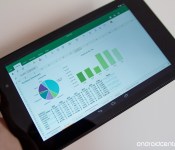
Office for Android tablets exits preview, finished versions of Word, Excel and PowerPoint now available

Microsoft launched Office for Android tablets in preview form earlier this month, and now the Redmond giant has launched the final version of these apps on the Play Store. Finished versions of Word, Excel and PowerPoint are now available for download on your Android tablet.

Microsoft releases Outlook Preview for Android

Microsoft has released a preview of its Outlook app for Android, completing the full Office experience on Google’s mobile OS. While this new app is in the testing stage, it’s a fully featured email client worth downloading if you use the desktop version and enjoy utilizing Microsoft Office products. It’s a solid app that not only lets you tap into the world of Outlook and Office 365, but also connect to Gmail and other supported accounts.
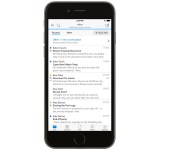
Microsoft releases new Outlook app for iPhone and iPad

Microsoft has released a new Outlook app for iPhone and iPad, completing the full Office experience on iOS. This new app is a fully featured email client, worth downloading if you use the desktop version and enjoy utilizing Microsoft Office products. It’s a solid app that not only lets you tap into the world of Outlook and Office 365, but also connect to Gmail and other supported accounts.
Available as a free download for both smartphone and tablet owners, the new Outlook app for iOS offers a full email experience with calendar functionality. The requirement to switch between apps to manage both email and schedule appointments has now been eliminated, and everything can be achieved within Microsoft’s latest app release. Here’s a quick look at the newly released app (as well as the Android version):
The new Outlook has a neat new feature, which separates your inbox into two sections – focused and other. Emails deemed important by the app are loaded into your focused tab, while remaining messages are accessible via the other tab. It’s all automatic and moving email between the two tabs enables Outlook to learn which messages should be stored in the two sections.
Some other features offered by the new Outlook app:
- Customizable swipe gestures for archiving and managing emails conveniently.
- Schedule Email feature temporarily removes email from the inbox and returns affected messages at designated times.
- Predictive search hunts down email, files and people.
- Integration with calendars.
- Built with Android design features in mind.
All available features are loaded and ready to go, regardless as to which supported mail service you’re using.
- Free – Download Now
Source: Microsoft
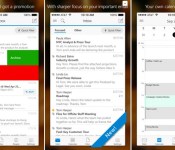
Microsoft Launches Outlook for iOS with iCloud, Gmail, Yahoo Mail Support [iOS Blog]
Microsoft today launched its official Outlook app for iOS, which allows users to easily view and organize their email inbox, calendars, attachments, and more under one unified view. The app works with Microsoft’s own Outlook.com and Office 365 services, while iCloud, Gmail, and Yahoo Mail are also compatible. Outlook for iOS also features quick gestures, as users can simply swipe to delete, archive or schedule messages.

Now, with Outlook, you really can manage your work and personal email on your phone and tablet – as efficiently as you do on your computer. And, because we know that everyone has their own, unique way to manage email, Outlook offers customizable swipes and actions, so you can tailor the experience just the way you like it. Beyond email, the new Outlook app offers integrated calendaring that makes scheduling a meeting or sharing your schedule a single tap away.
Outlook for iOS is the first app developed by Microsoft after its acquisition of email startup Accompli, which also previously developed an email client app for iOS and Android. Microsoft has stepped up its efforts in the realm of mobile productivity in the past year, bringing Office to iOS last March and launching updates that added printing capabilities and third-party fonts.
Microsoft Outlook is a free app for iOS devices and can be downloaded through App Store. [Direct Link]
LG sells 59.1 million smartphones in 2014, net profit doubles

LG has plenty to be excited about, as the South Korean manufacturer’s financial results for 2014 indicate that it sold 59.1 million smartphones in 2014, an increase of 24 percent from the previous year. LG’s net profit of $474.81 million marked an increase of 125 percent from 2013, with revenue itself increasing by 1 percent from 2013 to $55.91 billion.
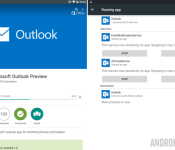
Microsoft Outlook Preview for Android lands in the Google Play Store

We know that Microsoft is pushing forward with a vengeance to get Windows 10 and a new round of Office products into the hands of consumers. To that end, they have just released their new Outlook Preview app for your Android devices.
Microsoft Outlook Preview is free in the Google Play Store. They ask only that you remember this is not the final release software, you will find a few bugs, and they would love it if you could report them to help improve the app for future updates.

This is not the first item out of Microsoft’s Office suites to find a home on Android, indeed, you can find Office Mobile, Word, Excel, Powerpoint, OneNote and more in the Play Store. We are huge fans of Microsoft’s transition to a viable competitor in the mobile space and suspect that the continued growth of Office apps for Android will allow many users to step away from their Windows machines a little more in their work day.
Outlook Preview offers up many of the basics of a powerful email client. Multiple account handling, file attachments, integrated calendar with notifications and reminders, quick search functions, and all the send/receive functionality you could hope for.
Microsoft has taken to splitting your Outlook Inbox into two tabs. The Focused tab offers up just the most important messages based on factors such as your previous interactions with senders, contacts list and more, think Google’s Priority Inbox in Gmail. The Other tab (yes, it’s called “Other”) does away with grouping your messages, bringing you all of your mail in reverse-chronological order. No sorting option to be found in this version.

A key feature we’ve found missing, or just couldn’t find it, is support for POP based email. We get that POP is what some consider to be antiquated, but it is still live and well in many companies around the globe. I was looking forward to testing the new Outlook Preview with my own POP account, it appears I will have to enable IMAP at the very least to proceed.
Outlook Preview for Android is free in the Google Play Store, head on over to grab your copy and check out all of the other features available in the app. No doubt that most Outlook for PC users will find this a great mobile edition for their needs.
Do you still use Outlook or another full email client for your email needs, or have you transitioned to web based services?

Skin patch turns friction into electricity to power wearables

Until we find that perfect technology to power wearables with our own bodies, scientists all over the world are going to keep developing possible candidates. A team from the National University of Singapore, for instance, has developed a flexible, postage-sized device that can convert static electricity into usable energy. One surface of the device is attached to the skin, while the other is covered in silicon with a gold film underneath. Sandwiched in between the two are tiny pillars of silicone rubber — slimmer pillars lead to bigger output, since they allow a larger surface area to touch the skin.
The group presented their findings at the 2015 IEEE MEMS conference last week, as well as demonstrated how much electricity the device can produce. After attaching the patch to one’s forearm and then to one’s throat, they found that clenching your fist and talking generate 7.3 and 7.5 volts, respectively. Tapping it with a finger, though, produces 90 volts or enough energy to power several commercial LED lights. The team plans to make their creation even more flexible in the future, so that they can create one in any size and still confirm to the contours of the human body. They’ll find that they have a lot of competition from all over the world, though, such as those researchers who developed a tattoo that converts sweat into electricity and those who created a headset that turns a person’s jaws into a power plant.
Filed under: Science
Source: IEEE

Looking to buy the Nexus 6? T-Mobile is offering a discount of $48 on the handset

After offering a $36 discount on the Galaxy Note 4 earlier this month, T-Mobile is now slashing prices of the Nexus 6. Both 32 and 64GB versions of the Midnight Blue Nexus 6 are discounted by $48.
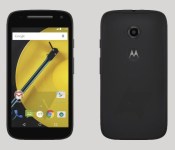
Here’s a possible (probable) look at the second gen Moto E

If Motorola has done one thing since its resurgence, it’s made the budget phone appealing. With OK specs that run Android decently, the Moto E has been an acclaimed phone in the sub-$150 tier. While the Moto E is roughly about nine months old, it appears that Motorola is already readying a sequel and luckily it’s popped up in a press-shot. The device does appear to be similar in builds to that of the Moto X and Moto G.
What we can see the render is a lack of a camera flash, a second noise-cancelling microphone, and a front-facing camera. Also from the render we see the Android 5.0 Lollipop nav buttons so it’s safe to assume that Lollipop will be on-board. Other than that, we don’t know about specs, connectivity, or when it will be released.
That said, the very existence of photos suggests that Motorola is working on the second gen Moto E. We’ll update you when we know more.
source: Android Police
Come comment on this article: Here’s a possible (probable) look at the second gen Moto E
 AIVAnet