


Sony commissions limited edition Xperia Z3 devices with artistic engravings of Berlin, Tokyo and Warsaw
Some phone manufacturers occasionally release limited edition versions of their flagship devices that seem a little excessive – the Swarovski crystal encrusted versions of Samsung devices immediately spring to mind. Sometimes, though, there will actually be a limited edition that is genuinely interesting, like the limited edition Xperia Z3 devices that Sony has just commissioned as part […]
The post Sony commissions limited edition Xperia Z3 devices with artistic engravings of Berlin, Tokyo and Warsaw appeared first on AndroidSPIN.

SkEye, the perfect companion app for any stargazer

Without a doubt, one of the most wonderful pieces of equipment a person can own is a telescope. For centuries, these optical devices have been used to bring objects afar close to both the eye and the soul. And, now that most of the gift-giving this holiday season has passed, you, like a few people I know, may have received one of these instruments.
I could spend pages talking about Newtonian reflectors or laser collimators, but this being Talk Android, I’d like to give you my review of an app I have used for a few years that has made stargazing incredibly fun and easy. The app is called SkEye and it brings a planetarium straight to your smartphone or tablet.
One of the most challenging things about astronomy is finding objects in the sky to look at. Assuming your equipment is set up the way it should be, how do you determine where your planets and other celestial bodies are located? This is the main problem SkEye sets out to resolve.
SkEye works by using your device’s sensors to determine where your phone’s back-side is pointed relative to the night sky. It uses a combination of three sensors: the gyroscope, accelerometer and the magnetometer. The app uses the sensors splendidly without much lag or jitteriness and, in my experience with the app across several versions of Android, custom ROMs, and different devices, SkEye has never had any issues with reliability in pinpointing where my smartphone has been aimed.
The most powerful feature of SkEye is its search-and-direct tool. Let’s say you really want to find Neptune in the night sky, but Neptune, unlike the closer planets, is fairly hard to distinguish from the millions of other twinkling stars in the night sky. Simply click the three vertical dots in the top right of the SkEye starmap and tap “Search” in the pop-up menu. From there, you can type in or find “Neptune”. You will then be re-directed to the starmap, with a bullseye reticle and arrow that will guide you to Neptune’s location in the sky. Hopefully it’s above the horizon!

If you’re just playing around without your telescope, you can also scroll around on the starmap to see where things are. This will disable the alignment to your phone so you can freely roam about. To get back to alignment mode, just click “Back” in the top left.
SkEye’s database on objects is immense. The free version contains all stars up to Mag 8 and approximately 200 NGCs, whereas the pro version contains all stars up to Mag 10 and all known NGCs and ICs. Both versions also include Messier objects. The app will even let you locate satellites and the International Space Station!
SkEye also offers the ability to change color themes to help your eyes better switch from your device’s screen back to your telescope. The night theme uses a red-light overlay, which is very easy on the eyes in the dark so readjustment is much quicker. A lot of objects you will look at through your telescope can be faint, so if you just got done looking at a bright smartphone screen, it can take quite a while for your eyes to readjust.

In closing, if you or someone you know got their hands on a telescope this holiday season, SkEye is definitely something you don’t want to pass up. There is a free version for the app or, if you want to support the developer and get some added goodies like the complete database, the pro version will run you $6.
Have fun out there and prepare to feel very tiny when you get your first look at Jupiter!
Google Play Download Link [Free Version]
Google Play Download Link [Pro Version]
Developer’s Website: SkEye
Come comment on this article: SkEye, the perfect companion app for any stargazer
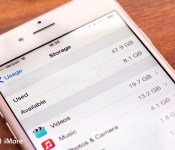
Apple sued for false advertising by plaintiffs that don’t understand iPhone digital storage

A pair of iPhone owners from Miami are suing Apple and seeking class action status in doing so, alleging that Apple has falsely advertised how much storage is actually available on the phone. They’re not alleging that the iPhone 6 or iPhone 6 Plus actually have less physical storage than Apple claims, no, they’re perturbed to the point of legal action that when Apple advertises a 16GB iPhone it only comes with around 13GB of free space out of the box because that pesky iOS 8 needs to take up space.
Said the plaintiff’s attorney, according to the Wall Street Journal:
“In reality, nothing close to the advertised capacity of the Devices is available to end users. Indeed, the discrepancy between advertised and available capacity is substantial and beyond any possible reasonable expectation.”
It has been common practice for years, nay, for all of consumer computing device sales history to advertise the complete storage volume of a device, not the space available out of the box. It’s simply impractical to advertise the available space (except for some fine print to say that available storage capacity will vary) because that available space is going to vary. The size of iOS fluctuates with each update, as customers of filled-up iPhones and iPads found out when they tried to update to iOS 8 and didn’t have enough storage space.
What we have here, ladies and gentlemen, is either a ill-conceived plan to get money out of Apple for following a standard industry practice, or a pair of plaintiffs that don’t understand how computers work and decided the best way to find out was to sue. The plaintiffs also allege that Apple does not allow microSD expansion of the storage space on iPhones, which is of course entirely true. But also in no way a surprise or worth the filing of a lawsuit — you can buy any number of Android, BlackBerry, or Windows Phone smartphones that offer that feature. Although it’s worth noting that all of these manufacturers also advertise a nice whole number storage capacity as well.
In the meantime, if you’re looking at buying a new iPhone, we suggest you consider buying at least the 58.21GB version, though you should be warned that there are some other apps on there taking up space, but at least you can delete those if you really need that space.
Source: Wall Street Journal
Samsung beats Apple in consumer satisfaction smartphone study

For years now, the press and consumers alike have been on Samsung’s case about plastic parts on its flagship phones. While things are changing dramatically these days, it seems that when push-comes-to-shove, the presence of plastic has little effect on consumer satisfaction, at least according to a recent survey conducted by the University of Michigan.
The American Consumer Satisfaction Index looked at 230 different brands in the country, and interviewed approximately 70,000 individuals. With respect to smartphones, it concluded that Samsung has a “satisfaction score” of 81, a 6.6% increase from last year’s rating of 76. While one could argue about the relevance of these results and their ability to account for the population at large (something that could be said of any survey), the fact that Samsung not only has an above average score, but actually managed to increase its standing in the past year might offer a bit of pleasant news for a change these days. Likewise, the score would also serve to indicate that American consumers on the whole, are pleased with the service and products Samsung provides.

Perhaps the more interesting finding this study revealed, is that Samsung managed to overtake Apple, which actually dropped from 81 (in 2013) to 79 this year. Given that Apple faced “bendgate” shortly after the release of its Plus-sized hardware earlier this year, there is a chance that the decline was a result of a perception of diminished product quality. On the other hand, it is also likely that the consumers polled simply had different answers, experiences, or even allegiances this year.
While one might take any survey with a few sprinklings of salt, at the very least this one suggests that Samsung has had a favorable year among Americans buying its products, something that it needs for momentum as 2015 approaches and the market becomes even more competitive.
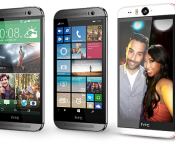
HTC promising stellar 2015, huge surprises to “blow you away”

HTC’s Senior Global Online Communications Manager, Jeff Gordon, took to Twitter today to make the claim that HTC is launching a roadmap for 2015 that will be their “best ever”. He further went on to say that there will be some huge surprises that will blow consumers away.
From what we know already about HTC’s 2015 plans, we are expecting its newest flagship successor to the HTC One (M8) to be unveiled sometime in the first quarter, but it will not likely be at CES 2015; however, HTC is almost certain to be unveiling a selfie smartphone in their Desire-line of devices during the electronics show, which may feature a 4MP UltraPixel camera.
Specs on the HTC One (M8) successor, code-named HTC Hima, haven’t fluctuated much in the rumor mill. As has been discussed since nearly the beginning, Hima will likely come with a Snapdragon 810 under the hood, 3GB of RAM and a 5-inch 1080p display. HTC’s Sense 7 will, no doubt, make its debut.
Source: Jeff Gordon, Twitter Link 1 & Link 2
Come comment on this article: HTC promising stellar 2015, huge surprises to “blow you away”
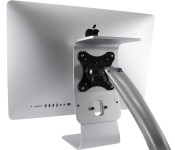
You can now easily adapt any new post-2012 iMac for VESA mounting

NewerTech now has a new adapter that makes it much easier — nay, possible — to mount any 2012-or-newer iMac, even the new Retina 5K iMac with the universal VESA system. The NuMount VESA is a machined aluminum bracket that clamps through the power-cable passthrough in the iMac’s stand, adding both a quartet of screw holes for a 100mm x 100mm VESA mount and a shelf above that for storing items you want nearby but neither want to see or need to reach (say, an external hard drive for backups).
The NuMount VESA exists because iMacs purchased since 2012 had to have VESA mounting specified when ordering — it’s either an attached stand or four screw holes drilled into the back. So if you purchased your iMac at a retail store, or you ordered it with a stand and now you find you want to mount it up on the wall or an arm, you have an option.
Apple offers a VESA adapter for older iMacs and the aging Thunderbolt Display, but there’s no such option to pop off the integrated stand on iMacs made after 2012. So now there’s the NewerTech NuMount, although you’ll be paying $99 for the privilege.
- NewerTech NuMount VESA adapter for iMac – $99.00 – Buy Now
Source: NewerTech
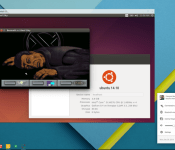
Chromebooks can now run Linux in a window

Chromebooks are great for day to day computing needs, but Google’s Chrome OS still falls a little short of a fully fleshed out operating system. Installing Linux is one solution available to the tech savy, but switching back and forth is not particularly convenient. However, a tweaked version of David Schneider’s Crouton extension now allows Chromebook owners to run Linux in a window with a simple terminal command.
The extension currently works with Debian and Ubuntu, so far, giving users with their Chromebook in Developer Mode full Linux functionality in a simple Chrome OS window. If you are interested in giving it a go, and already have Linux installed, here are the instructions, courtesy of François Beaufort:
- make sure your Chrome Device is in Developer Mode (not Dev Channel).
- Install the Crouton Integration Chrome Extension
- Download crouton
- Open a shell with <Ctrl>+<Alt>+T, type shell and hit <Enter>
- Run sudo sh ~/Downloads/crouton
You will still have to go through the process of installing Linux on your Chromebook first, but this definitely seems like a superior solution for those who need a little more from their Chromebook.
If you have tried this method out, let us know your thoughts and experiences in the comments below.

