


First chapter of Sons of Anarchy: The Prospect game rides onto iPhone and iPad
The first chapter of Sons of Anarchy: The Prospect, a new adventure game based on the recently completed FX crime TV series, is now available for download for the iPhone and iPad. The first episode costs $1.99.
The player takes control of Clint Lancet, “a young man trying to avoid the outlaw lifestyle in Lincoln, Oregon, home to a Sons of Anarchy motorcycle club (SAMLIN).” Here are the game’s features:
- A NEW CHAPTER – Created in conjunction with the Sons of Anarchy writing team, The Prospect introduces a brand-new story featuring a never-before-seen Oregon chapter of the Sons of Anarchy motorcycle club. Meet new characters, see some familiar faces from SAMCRO (and more!) and experience crossover stories from the show.
- EVERY DECISION COUNTS – The actions you take and the relationships you forge in each episode will have lasting consequences.
- DIVERSE, FIRST-PERSON GAMEPLAY – The Prospect offers an authentically gritty SOA experience in addition to a variety of gameplay—mixing meaningful story and decision-making with intuitive puzzles and mini games, as well as first-person motorcycle driving and fighting.
There’s no word on how many chapters the game will eventually release.
- $1.99 – Download now

Playworld Superheroes helps kids make their own heroes
Playworld Superheroes an imaginative new iPhone and iPad game for kids where they jump between a real world setting with their own treehouse and costume-building materials, and a fantastic world where those designs are realized. Simple taps and swipes help the custom hero battle cartoony villains and unlock new powers. Back at the treehouse, you can find new materials to deck out your costume with.
As a nice added bonus, there aren’t any in-app purchases whatsoever. He’s a rundown of what else Playworld Superheroes has to offer.
• Empowers a child’s creativity.
• Stunning AAA visuals and console quality gameplay.
• No in-app purchases or hidden costs. A safe and stimulating environment for children.
• Real-time crafting – design your ultimate alter-ego before using the Imagination Cloud to see your suit as it appears in Playworld!
• Over 15 alien invaders to defeat across nine hero missions.
• Unlock new superpowers such as flight and super strength by crafting new items in the treehouse – two games in one!
• Collect PlayGems to unlock new items.
• Important ecological messages entwined with gameplay.
• Intuitive gameplay controls.
• Enjoy limitless play with the Mayhem level.
• A true showcase for the under-valued Kids category on the AppStore.
- $4.99 – Download now

Rock a dual-screen setup on your MacBook with Mountie

Laptops are wonderful because they’re portable — you can work at your desk, you can work on a plane, you can work sprawled on your couch, you can work standing at a kitchen table. But with that freedom comes limitations: balancing a Stump Stand on your couch for your iPad or iPhone is doable, but not ideal.
Enter Mountie — the goofy gadget from Ten One Design I giggled over at first, but have grown to love.
Mountie’s goal is to take your iOS device out of your lap or cluttered table and attach it on your laptop screen: It’s a little plastic-and-rubber dongle that connects to a laptop bezel on one side; iPhone or iPad bezel with the other. I’ll be honest — when I first saw the initial advertising for Mountie, I laughed. Watch Netflix while you work? Okay, there’s a first world problem I hadn’t thought of.
But take away the silly reasons one could mount an iPhone or iPad to their laptop, and you’re left with a variety of quite compelling ones. Adding a second monitor using an app like Duet Display while on the go. Separating daily social tasks like Twitter and Facebook onto iOS while you save your work for OS X. Testing or prototyping applications as a developer. Saving table room when in a crowded workspace.

It’s the last one of those that I got first-hand experience with when taking Mountie for a test run. During the MIT Mystery Hunt, 35 teammates and friends of mine crammed into one classroom for 60 hours to solve puzzles; as you might expect, table space was pretty limited. I’d gotten my Mountie review unit in the mail that morning, and figured I might as well bring it along — and it ended up being one of the most useful gadgets I’d packed.
It helped that setting the Mountie up on my MacBook Air was simple as could be — just two plastic-and-rubber clips. The only thing I had a moment’s worth of difficulty over was figuring out which way to turn the device to properly mount it, but I solved that puzzle pretty quickly. (Hint: One of the rubber feet is bigger than the other. That one generally attaches to the thinner object, AKA your MacBook screen.)

Once attached, the Mountie gripped like a champ. It doesn’t slide down your screen, or feel in any way loose or compromising to your iOS devices. You can tap pretty hard on an attached iPhone 6 or iPad and not even feel any device shake. And since the mounting connections themselves are coated rubber, you don’t have to worry about accidentally scratching your screen.
Mountie achieves its tight lock on iPhones, iPads, and screens alike thanks to four removable rubber inserts; to swap mounts, all you have to do is slide the insert off the device and replace it with the insert best suited for your device. (You can check to see which of the included inserts you’ll need to swap in on Ten One’s website.)
You can mount iPhones or iPads in either portrait or landscape orientation, though I’ll say that I far preferred portrait when connecting them to my 11-inch MacBook Air; the Air is light enough that too much weight on its screen-side tends to make the laptop tip backwards if you’re not actively typing on it. Testing the same on a 13-inch Air and Pro, I had far less difficulty.

On an iPhone, the Mountie clasp does slightly cover one side of the screen when in portrait orientation, but it doesn’t interfere with multitouch gestures and I found it fairly easy to ignore while scrolling. In landscape, you’ll have no issues.
For those wondering about using a Mountie on desktop machines — say, an iMac? — it does work, though not as rigidly or nicely as on a MacBook. (And you’ll need a post-2012 iMac to make this work at all; the rubber feet don’t really fit on older models.) I also managed to clasp the Mountie on a 15-inch Windows laptop during the Mystery Hunt.
Bottom line
After two full days of using Mountie on my iPhone and iPad in a crowded environment, I was sold. I’ve been using it all the time in the days and weeks since, especially when working in non-desktop environs like a couch or plane. It’s an awesome little tool if you travel or like to work with your iOS device somewhere other than a desk, and I’d definitely suggest checking out Ten One’s website if you’re interested in learning more.
- Mountie – $25 – Buy now

iTunes Connect offline following login issues [Update: Back]

Update: iTunes Connect is now back online.
iTunes Connect, the portal Apple developers use to manage their apps, is currently offline. This follows several developers reporting login issues where they were presented with apps accounts not their own. That’s obviously an incredibly serious problem, as evident by iTunes Connect being taken down.
Apple is no doubt aware of the issue and we suspect iTunes Connect will be back online when the login issues have been resolved.
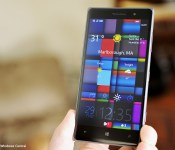
Microsoft’s Tetra Lockscreen for Windows Phone adds weather info with latest update

Tetra Lockscreen, the Windows Phone app that Microsoft launched a few months ago as part of its Microsoft Garage project, just got its first major update. It now displays local weather information along with some other additions and fixes.
Unfortunately, the app is still only for those in the US.
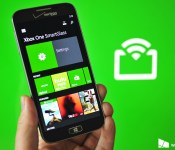
Xbox SmartGlass beta updated with TV streaming for Australia, shifts to Studios division

Microsoft has pushed out an update today for their SmartGlass beta app on Windows Phone. The update coincides with the recent rollout of OneGuide and Digital TV Tuner for Australia.
Additionally, the name of the publisher has shifted from Microsoft Corporation to Microsoft Studios. The transition of the publisher likely has to do with SmartGlass being folded into the new Xbox app for Windows 10. During our time last week at Microsoft’s event, we were told that SmartGlass indeed was going away as the Xbox universal app for Windows 10 makes SmartGlass functions redundant.


Evolve: Hunters Quest boils down first-person shooter to match-3, now available for Windows Phone

The fantastic upcoming first-person shooter Evolve is being reimagined for mobile as a match-3 Windows game called Hunters Quest, available for free today in the Windows and Windows Phone Store. As in the original, players are hunting a big, bad alien and have to work together to make sure they don’t become the prey. Over time, you earn ability mastery points in the mobile title that carry over to the full-fledged console game.

New BBM beta for BlackBerry offers landscape support, multiple picture transfer from the pictures app

Although this is a limited beta and not available to everyone right now, after many folks were upset that BBM on iOS got landscape support, I figured it was worth a mention that BlackBerry users haven’t been forgotten and it looks as though landscape support could be coming soon, assuming all goes well with the beta.

Miss the BlackBerry Enterprise Products and Services webcast? You can now watch the replay

Did you miss the BlackBerry Enterprise Products and Services webcast that was held on January 28th? If so, you can now watch the replay of the event. Principal Analyst Brian Bernard outlines the following BlackBerry Enterprise Products and Services and offers you invaluable insight into how they can amplify your business:
 AIVAnet