



Sony reportedly looking into new ventures, partnerships and sales for their mobile division

Sony’s mobile division has been suffering over the past few years, and the company may be looking into a new venture to turn their business around. In a recent report, Sony is said to be exploring other options including new business partnerships and even a sale when it comes to the company’s mobile division. The report from Reuters doesn’t name any specific deals or avenues Sony is looking towards, but we do know that the electronics giant is looking for new ventures to save their dying mobile branch. Sony CEO, Kazuo Hirai, explains that “the mobile and TV businesses both require a drastic overhaul.” He goes on to say, “Without drastic reforms such as joint ventures or alliances, they will both be in the red three years from now.”
Sony has been largely focusing on high-end mobile phones and cost cutting over the past few years, and it’s apparent that these attempts to save money aren’t warranting any results. At CES 2015, Hirai elaborated on the company’s status to a group of reporters:
Electronics in general, along with entertainment and finance, will continue to be an important business. But within that there are some operations that will need to be run with caution – and that might be TV or mobile, for example.
All of these alternate business ventures haven’t spawned completely out of the blue, though. In late 2012, Sony moved its headquarters to Japan and vowed to cut 1,000 jobs by the year 2014. The effort didn’t produce many results because Sony later reported a $1.7 billion loss due to poor smartphone sales in late 2014. If that didn’t make a big difference, Sony has also recently planned to slim their smartphone line down to hopefully return some sort of profit.
Sony looking into other business opportunities seems to be a last-ditch effort on Hirai’s part to turn the company’s mobile division around. For now, only time will tell what the company will do to increase profits.

Interview with Energous Wireless Charging Solutions at CES 2015
Wireless charging has come a long way in the past few years, offering a more convenient way of making sure your device has enough battery to last the day. Though it may be convenient, wireless charging is still heavily dependent on cables in some form, whether you’re setting the device down on a PMA-powered charging mat or a Qi-enabled docking station. The folks at Energous would like to take this idea even further, offering wireless charging up to 15 feet away from the central ‘hub’, which is placed somewhere around your home. Using their WattUp technology, Energous has a vision that entails walking into your home and instantly having your devices begin charging. We had the great opportunity of speaking with Energous at CES 2015, and they explained their ideas and goals for the always-charging home.
Energous has a vision that entails walking into your home and instantly having your devices begin charging.
The technology is geared towards devices that can charge under 15 or 16 watts, which means it can charge any type of mobile device you have. Energous has a variety of WattUp hubs that can be placed anywhere, all specifically made to look like everyday items found around the house. In the examples shown to us, we saw televisions, speakers, routers and many more devices, all acting as wireless charging hubs. Each hub has a 15-foot charging radius from its core, so if you have a device in the center of a room, that means it has a 30-foot charging distance from end-to-end. Depending on how much power you’d like to give off at one time, these hubs can charge up to 24 devices at once. Energous has also partnered up with various companies to create receiver cases to place on your mobile devices that enables them to charge wirelessly. We’re assuming that if this technology becomes more mainstream, WattUp charging compatibility will be built into mobile phones and tablets without needing a receiver, but that vision is still a ways off.
Energous also commented on how they plan on keeping this technology safe. WattUp technology has already passed its first wave of regulatory approvals, and they’re working on building more partnerships to make this technology as safe as possible. Energous is currently partnered with 14 JDA partners, a retail planning software company, which all have tremendous knowledge of FCC regulations and health and safety practices.
Energous says they plan on making consumer-ready products available sometime around the end of 2015, but most products won’t hit the market until sometime in 2016.
Nexus 6 may have inbound call problem for Sprint customers

It has generally been viewed as a positive development that the Nexus 6 is available on all major U.S. carriers and a simple swap of a SIM card is all that is needed for users to switch networks if they are in a position to do so. That doesn’t come without some risk though and Sprint customers seem to be suffering the ill effects at the moment as several Nexus 6 owners are having trouble receiving calls.
The issue has been identified by users for well over a month already, but neither Sprint nor Google has found a solution. The inability to come up with something may be because of the sporadic nature of the problem that does not seem to be connected to location. Some users have indicated the issue does seem to only crop up when connected to Wi-Fi.
When the problem does come up for users, they will find that they do not receive inbound phone calls. To make matters worse, when the phone gets in this state of not accepting calls, it functions like a phone that has been turned off and does not pop up a missed call notification. Unless the caller leaves a voicemail or the Nexus 6 user checks their call history, they may never know they missed a call.
Anyone out there experienced this problem with the Nexus 6 on Sprint not receiving inbound calls?
source: Sprint
via: Android Police
Come comment on this article: Nexus 6 may have inbound call problem for Sprint customers
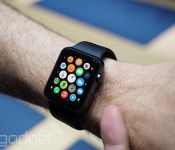
Here’s how the Apple Watch companion app works

It’s no secret that Apple is making customization a big part of the Apple Watch, but there’s apparently more to it than meets the eye. The folks at 9to5Mac claim to have details and images showing how a pre-release version of the wearable’s companion iPhone app works, and there’s a fairly extensive range of tweaks. For a start, you can create your own watch face monogram if you just have to remind everyone that it’s your wristwear. You also don’t have to embrace Apple’s fitness model if you don’t want to. You decide how often it gives you progress updates, and you can turn tracking off altogether if you’d rather not let the watch quietly judge your lifestyle.
Other noteworthy examples? You can customize the app grid from the phone, and limit when you get messages to prevent strangers (or just overly chatty friends) from buzzing your wrist non-stop. It’s not clear that this represents everything the app will do by the time it’s ready, and there’s certainly more customization on the watch itself, but this at least gives you an inkling of the control you’ll have when you strap this device on your arm.
Filed under: Cellphones, Wearables, Mobile, Apple
Source: 9to5Mac
Apple Watch iPhone Companion App Reveals New Details About Upcoming Wearable
Apple’s latest iOS 8.2 beta includes a reference to an Apple Watch companion app that will be installed on the iPhone to give users a way to access settings on their Apple Watch devices, and a new report from 9to5Mac using code created by developer Steven Troughton-Smith (which can be found on Github), details some of the functionality that can be found in the upcoming app and in the Apple Watch.
Called the Apple Watch “Companion,” the app is described as housing both settings for the Apple Watch itself and settings for various Apple Watch applications. As we learned from the WatchKit SDK included in the first iOS 8.2 beta, initial Apple Watch apps will be extensions of existing iPhone apps and will be reliant on the iPhone to function.
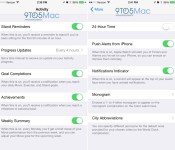
According to screenshots of the app running on an iPhone, the Apple Watch will be able to send reminders to stand up every hour, progress reports on activity at selected intervals, and notifications for goal completions such as reaching a daily Move, Exercise, or Stand goal.

The Apple Watch will also be able to send notifications for achievements, such as when a personal activity milestone is met, and there’s an option for a Weekly Summary, which will give users a brief recap of how much they moved during the previous week.
In addition to various fitness-related alerts, there are sections in the app to turn on push alerts from the iPhone for Timers and Alarms, get a notification alert in the form of a red dot on the Apple Watch face, and specify acronyms for various cities in the World Clock. All of these aforementioned settings and notifications can be controlled within the “Companion” app.
There’s also an interesting feature that lets users choose a one to four letter monogram that will appear on the Apple Watch’s Color watch face, which is described as a “Complication.” First introduced in new marketing earlier this year, Apple Watch Complications are special functions that are displayed within various watch faces, such as stock quotes, weather, and more, like the monogram. With this enabled, the Apple Watch face will display a user’s initials.

Apps displayed on the Apple Watch home screen in a cluster pattern will be able to be organized and rearranged within the Apple Watch Companion app on the iPhone. Because there’s no keyboard, there are tools within the Companion app that suggest the Apple Watch will use voice-based communications for messages and other text-based entry forms.
Like the iPhone and the iPad, the Apple Watch will include an option for a passcode that’s used to verify Apple Pay payments. As has been detailed in the past, the Apple Watch will require users to enter a passcode when putting the watch on for the first time, and it will make sure that skin contact is maintained to prevent unauthorized Apple Pay payments with the device.
The Companion app also appears to confirm that the Apple Watch will indeed feature its own storage and the ability to play songs stored directly on the device, as the About Screen lists storage capacity, songs, and photos stored on the Apple Watch.
As the launch of the Apple Watch approaches, details on the device are beginning to leak out, but there are still several unknown elements. For example, there’s no solid word on how long the battery will last, aside from Apple CEO Tim Cook’s suggestion that users will need to charge it on a nightly basis, and we have no word on pricing, aside from the entry-level $349 Sport model. There’s also no clear cut launch date in place, but the most recent rumors have suggested that the device could be released in March.

There are a few other minor details that can be gleaned about the Apple Watch based on the Companion app screenshots, and a full range of images is hosted over at 9to5Mac. Other details include stock selections, the use of the Taptic Engine for Maps directions, various Accessibility features, and more.
Facebook News feed will post AMBER Alerts

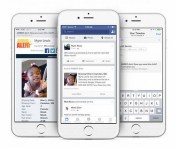
AMBER alerts is a national alert system, broadcasting missing children information on television, radio, and now on Facebook News feeds. AMBER Alerts that will show up on Facebook are based on local results. So if an abduction of a child happens in your local area, your news feed will include a photograph of the missing child, along with any important information needed to locate the missing child. Once the AMBER alert is posted, you can choose to share it with others allowing the possibility of locating the missing child.
Facebook and the National Center for Missing and Exploited Children have announced their partnership so that the Facebook community can have an active role in helping to locate missing children. Based on past experiences, the chances of finding a missing child increases when more people are on the lookout, especially during those critical hours.
The number of alerts people see will depend on how many incidences happen. Some may see quite a few alerts on their news feeds, and some may not ever see one. While the AMBER alerts show up on your news feed, it will not trigger any special notification.
Since the program commenced in 1996, many children have been recovered as a direct result of AMBER Alerts. Now with the aid of Facebook, the idea is that many more children will be reunited with their families. The AMBER Alert will show up on desktop, Android and iOS platforms beginning today. Hopefully other social media will follow Facebook’s lead.
Source – Facebook Newsroom
FEATURED POSTS


The post Facebook News feed will post AMBER Alerts appeared first on AndroidGuys.
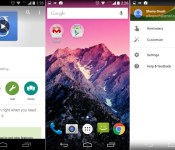
Google Now Launcher update brings Material Design tweaks to KitKat and Jelly Bean

A new update is rolling out for the Google Search app that brings a new look to the Google Now Launcher. Well, at least it is new if you’re someone running something older than Lollipop.
For those running Android 4.1 through 4.4, the latest update will bring Material Design elements to the Google Play launcher. Now before you get ahead of yourself, this doesn’t mean all MD design changes like the new navigation buttons, but there are a few changes to the aesthetics including slightly improved animations, the white app launcher button, a white color in the Google Search bar and improvements to the Google Now area of the launcher including a slide-in panel that lets you switch Google Now settings and accounts.
If you’ve yet to see these changes rollout to your device yet, be patient, as it should only be a matter of a few more days. Already have the latest update? What do you think of the changes to the Google Now Launcher? What do you think of Material Design in general? Let us know your thoughts in the comments.

Amzer CRUSTA Rugged case and holster for the Galaxy S5

The Samsung Galaxy S5 is still a monster hit among Android fans, and that means we can’t forget to look at some great cases. Today we’ll have a look at the Amzer CRUSTA Rugged case and holster combo. Complete with a tempered glass screen protector in the box, it’s a great solution for complete protection for people who value a little extra padding over a slim phone.
There are a lot of parts to deal with, but the assembly isn’t difficult at all once you get started.

Interview with Intel at CES 2015
We’ve seen a lot of news coming from Intel in the past few months, whether it’s regarding the company’s new Curie module to power wearables or new chips that may power our mobile devices someday. And of course, we’ve heard a lot regarding the Dell Venue 8 7840, which we recently saw at CES 2015. We got the chance to sit down with Chris Walker, General Manager of tablets at Intel, and talk a little bit about where Intel’s plan for 2015 and beyond.
As the tablet market continues to evolve in a variety of different form factors, Intel hopes to use its Atom processor to power tablets of all shapes and sizes. After a huge increase in tablet processor marketshare in Q3 and Q4 of 2014, the company plans to continue growth throughout 2015 by providing quick updates for tablets that use Intel processors. The company’s new RealSense 3D camera software can be found in the new Dell Venue 8 7840 tablet, which makes it apparent that Intel would like to not only focus on processors, but also give users a great overall tablet experience by integrating other unique features.
As for the future of Intel, the company’s goal is to continue to offer a wide variety of open hardware and software partnerships to create a more fluent and enjoyable Android experience, whether that be with tablets or smartphones. Intel will continue in 2015 to branch out of solely making processors to enhancing the Android experience with other unique software features. What do you think, does Intel have a future in mobile devices or are they doomed to be nothing more than a minor player at least for the foreseeable future?
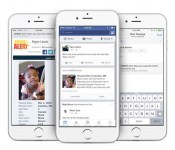
Facebook to introduce AMBER Alerts to your News Feed

Facebook is pretty much everywhere nowadays, and it looks like they’re putting their extended reach to good use. The social networking giant has reached out to partner with the National Center for Missing and Exploited Children to bring AMBER Alerts to everyone’s News Feeds. If you’re unfamiliar, the AMBER Alert program is a child abduction alert system that broadcasts missing children information on televisions, radio networks and straight to our smartphones. The AMBER Alerts that will show up on Facebook are based on local results, so you’ll only get alerts that happen around your area. The alerts will include photographs and basically as much information as the organization has on the child. Once you see an AMBER Alert post on your feed, you can share it with whomever you’d like, allowing the information to spread as quickly as possible. The alerts will begin going out today and will show up on desktop, Android and iOS Facebook applications.
If you’re already receiving these alerts on your smartphone and not through your Facebook app, you’re not alone. Most smartphones already have this functionality built-in but it doesn’t necessarily help as much as you might think. If you receive an AMBER Alert on your phone you’ll hear a loud ring, followed by a few lines of text, linking to the AMBER Alert website. This method is convenient and certainly makes users look at their devices, though it doesn’t really give out that much information for people to gather. Facebook aims to give you as much information as possible with each alert they send out, hopefully warranting more results.
Some may not think this is a big deal right now, but this is a big step forward in hopes to find more missing and abducted children.
 AIVAnet