


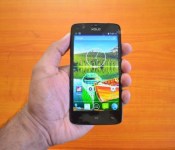
Xolo to push out Lollipop update for the One starting Friday, January 16

Keeping the promise it made back in October and to entice new customers, Xolo announced earlier today that it will begin pushing out the much-anticipated Android 5.0 Lollipop update to all unlocked variants of its first budget-friendly smartphone, the One, starting Friday, January 16.
“Having a dedicated software team is one of the key factors behind rolling out the Lollipop update ahead of other players. We have sold around 2,00,000 units of Xolo One smartphone since its launch in October last year. The acceptance of this device is too high and with the upgrade coming in, there will be more people interested in buying this device. The update will be an advantage with us,” writes Sunil Raina, Head of Business at Xolo.
For those unaware, the Lollipop upgrade brings support for multiple accounts, improved notifications, a smoother multitasking experience and the recently-announced Material Design guidelines.
The full changelog can be seen below:
Material Design: You will quickly notice a whole new colorful look and feel to your device – from fluid animations to new application and system themes, colors and widgets.
Notifications UI & Priorities: In order to alert you to the most timely and relevant information, the format and behavior of notifications have evolved:
- notifications will appear on the lock screen and are intelligently ranked by type and who sent them.
- you double-tap to open one, swipe left or right to clear one, or clear all notifications from the bottom of the list.
- you can set the priority and privacy of notifications for each application.
- very high priority notifications will pop up briefly over other applications so that you can take action.
- when you dismiss a notification on one device it will be dismissed on your other Android devices, if they are connected to the Internet.
- you can further tailor how notifications behave with the new Downtime and Ambient Display settings (see below).
New Interruptions & Downtime Settings: You can tailor how interruptions behave, choosing to allow all, none, or only priority interruptions. You can personalize what counts as a priority interruption (reminders, events, calls, messages) and even tailor them to be from only contacts you specify. The Downtime setting will allow only priority interruptions during the times and days that you specify. e.g. allow only priority interruptions on the weekend.
Recent Apps (Multi-tasking): The redesigned Overview space (formerly called Recents) will include both applications and separate activities within those applications. For instance, each open tab in Chrome will also appear here along with recent applications; both your Gmail Inbox and a draft email message will appear as separate cards. This provides a consistent way to switch amongst tasks.
Ambient Display: While your phone’s display is off, Ambient Display can show notifications without turning on the full display. This will be triggered when a notification arrives. You will see notifications similar to that shown on the lock screen. You can turn this feature on in the Display menu in Settings, and note that it will increase the power consumption of your device.
Motorola Assist and Downtime: Motorola Assist integrates the new Downtime settings to control when you don’t want to be disturbed. Motorola Assist also now uses the new Interruptions settings so that you can customize exceptions, such as letting only people on your starred contacts list get through.
Flashlight: Lollipop includes a new flashlight option as part of Quick settings (swipe down with two fingers from the status bar to see it).
Share your Device: You can now set up multiple user accounts on your phone. Guest mode is enabled by default. You can give calling and text privileges to other users of your device, or restrict them as you like in the Users menu under Settings. Note that the personalized Motorola experiences (Motorola Assist, Motorola Connect) are for the owner account only. The Motorola Camera, Motorola Gallery, and Motorola FM Radio applications support multiple user accounts.
Pin a view/app: Screen pinning allows you to keep a specific app or screen in view. For example, you can ‘pin’ a game and your child will not be able to navigate anywhere else on your phone.
Battery: The Battery settings panel now shows an estimated projection for how much time you have left while discharging or charging. You can also enable a new battery saver mode that will save power by reducing performance and most background data operations to extend your battery life.
Smarter Internet Connections: With Android Lollipop, your phone will not connect to a Wi-Fi access point unless there is a verified Internet connection. This feature improves hand-offs between Wi-Fi and cellular connections, helping to maintain your video chat or voice-over-IP (VoIP) call as you switch.
Performance: Your phone now uses the new Android Runtime to help optimize application performance. After upgrading to Lollipop, your applications will undergo a one-time optimization process. Note that the optimization for ART requires more space.
Smart Lock (Trusted Devices): Android Lollipop adds native support for allowing trusted devices to keep your phone unlocked (such as your Moto 360, a Bluetooth car kit or headset, etc.). Smart Lock replaces the prior trusted device capability in your Motorola phone. Note that you will need to add your trusted devices back after the transition to Lollipop in the Security settings menu under Smart Lock.
Security: Encryption can now use a stronger 256-bit key to help protect your data. Note that the stronger key willonly be used after you perform a factory reset on Android Lollipop. Otherwise encryption will continue to use 128-bit key. You can turn on encryption in the Security settings menu.
Come comment on this article: Xolo to push out Lollipop update for the One starting Friday, January 16
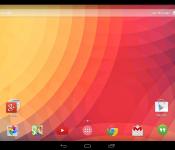
Google Now Launcher update now offers Lollipop design to older devices

Here’s some great news for fans of pure Android, especially those who are afraid of rooting their devices. The Google Now Launcher, made directly by Google, now brings a Lollipop look to every device running at least Android 4.1 Jelly Bean.
It’s completely the same as stock Lollipop with the exception that the left-most home screen is Google Now. Therefore, swiping to the far left allows you to view cards related to your searches, your location, recommended websites, favorite sports teams, stocks, and so forth. You can even use voice commands on this screen.
Android Central notes that the only downside of the launcher is the lack of customization seen on other launchers. However, it adds that the Google Launcher offers high stability, Material Design, and the vanilla Android experience. You can get it in the link below.
FEATURED POSTS


The post Google Now Launcher update now offers Lollipop design to older devices appeared first on AndroidGuys.
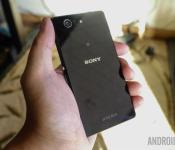
8 common problems with the Sony Xperia Z3 Compact and how to fix them
The Sony Xperia Z3 Compact is an amazing high-end smartphone that meets the requirement of those users who prefer a smaller display size and form factor, without a compromise on features and specifications. Sony’s signature design language, powerful camera, and the best processing package of the time are all key features of the Xperia Z3 Compact. However, like many other smartphones on the market today, there are a few issues with the Xperia Z3 Compact that users have faced. Today, we’re going to be taking a look at a few of these common problems, and providing potential solutions on how to fix them.
Disclaimer: Not every user of the Sony Xperia Z3 Compact will face these issues, and it is quite likely that you won’t come across any of the problems listed below.
Problem #1 – Build quality issues

Owners of the Xperia Z3 Compact have complained about the rear and front glass cracking, waterproofing failing to work, and flaps refusing to close properly.
Potential Solutions:
- Use a screen protector to keep your front glass from cracking.
- Use a protective case that covers both the front and the back of the phone for extra security.
Problem #2 – Bad audio quality and low volume.

A number of users have reported problems with low volume and bad audio quality.
Potential solutions:
- Attempt to repair the firmware by using the PC Companion
- Use Google Play Music to adjust the equalizer. The default configuration for the Xperia Z3 Compact speakers is quite poor, so you may need to turn the mid-range frequency up quite high to improve volume.
Problem #3 – Issues connecting to Wi-Fi

Many Xperia Z3 Compact users have complained about struggling to connect to a network.
Potential Solutions:
- Make sure that Stamina mode isn’t switched on. Settings – Power management – Stamina mode.
- Go into Settings – Wi-Fi and check the box to keep Wi-Fi on during sleep.
- Ensure the software for the phone is updated by going to Settings – About phone – Software updates – system updates
- Make sure that the router firmware is up to date.
- Go to Settings- Wi-Fi and hold your finger over your preferred network. Select Modify network – advanced options then select the box for “Static”.
- Make sure that all of the details entered are correct.
- Find the Wi-Fi MAC address for the phone and ensure it is recognized by your router. Settings – About phone – Status – Wi-Fi MAC address.
Problem #4 – Dead pixels on the screen

A few users have complained that they begin to see dead pixels on their Xperia Z3 Compact screen, either immediately, or after using the phone for a while.
Potential Solutions:
- Try adjusting the brightness on the phone to attempt to burn away unresponsive pixels.
- Restart the phone to see whether the issue persists
- Factory reset the device
- Use the Dead Pixel Detectto potentially discover and fix the problem
Problem #5 –Battery life drains quickly

A lot of users of the Xperia Z3 Compact feel that the battery drains too quickly.
Potential solutions:
- Make sure things like mobile data, Wi-Fi, Bluetooth, and NFC are turned off when not in use.
- Check which applications may be consuming excessive amounts of power and delete the ones that you don’t need.
- Lower the speaker/ringer volume or turn off vibrate.
- Reduce the brightness of the screen
- Go to Settings – Power management and turn on Stamina mode
- Avoid using games or the camera application when the battery is low.
- Make sure that the phone is up to date by going to Settings – Device – System updates
Problem #6 – Issues swiping between screens

Some consumers have reported problems with attempting to swipe between pages in applications and on their home screen. Swiping to unlock is also a problem, and many users have to attempt the process four or more times for it to work.
Potential Solutions:
- Make sure that “Glove mode” in Settings is not switched on (though this should make the screen more sensitive, instead of less).
- Turn “Double tap to wake” off and on.
- Try taking off any screen-protectors that have been applied to the glass of your phone.
- Make sure that the phone is completely dry, this includes wiping away any condensation.
- Download and use Nova launcher instead of the regular home application.
- Go to Settings – Power Management – Stamina Mode and select “Extended usage”. This lowers the speed of the processor.
- Keep up to date with any software patches or improvements.
Problem #7 – Overly sensitive touchscreen

Some users have commented that they struggle with over-sensitive touchscreens, especially during fast scrolling. The screen often seems to bounce or move erratically.
Potential Solutions:
- Make sure that glove mode is not enabled.
- Go to Developer options and enable “Show touches”.Test the screen a couple of times, then turn the option off again.
- Use a screen protector that is fingerprint resistant
- Go into Settings – Apps – Running apps and force stop com.sonymobile.touchscreen.touchfilter.tfpss.
Problem #8 – Speed-dial doesn’t work

Many Xperia Z3 Compact users have complained that they cannot get the speed-dial feature to function on their phone.
Potential Solutions:
- Backup any important data and factory reset the phone (find instructions on how to do this below).
- Try out some different dialling applications from Google Play Store.
Those were some of the most frequent problems that users have been having with the Sony Xperia Z3 Compact. If you’ve been a victim of one of these issues, then make sure to tell us whether our solutions helped. We’ll do our best to keep this list updated as more issues make themselves known.
SEE ALSO: Sony Xperia Z3 Compact Review
Following are the guides to force-restart, force-shut-down, and factory reset the Xperia Z3 Compact.
Force Restart:
- Hold down the Power key
- When a menu opens tap Restart
- Tap “Okay” to confirm
- The device should restart itself automatically
Force shut down:
- Detach the nano SIM card cover
- Use the tip of a pen to press down and hold the OFF button
- Wait for the device to vibrate, then release the button
Factory Data Reset:
- Backup any crucial data on external memory
- Tap the icon on your home screen that looks like two lines of three dots
- Go to Settings – Backup and Reset – Factory data reset
- Tap “Reset phone”.
- Enter any required PIN code
- Confirm by tapping Erase everything.
This week’s sidebar poll: are you using Chromebooks?

Chromebooks, Chromebooks, everywhere…
Chromebooks have come a long way this year. We’ve gotten both bigger, beefier Chromebooks and lighter, thinner, fanless Chromebooks. We can do more with Chromebooks now, including using Adobe Photoshop and even running Linux in a window if we’re feeling adventurous. And Chromebooks aren’t just making strides for consumers, as more businesses and more school districts ditch Windows — and iPads — for Google’s vehicle for web content and Google Apps for Education.
But the real question we have for you today is… do you even use one?

Elon Musk: Tesla will make ‘millions’ of cars per year by 2025

While the Auto Show’s press preview events are winding down, it’s time for the Automotive News World Congress to take over, and tonight it featured a sit-down with Elon Musk. During the interview Musk answered questions about everything from where is the Model X (coming this summer) to whether or not he’s a good boss (Wall Street Journal says no, Musk says “not all the time.”) He said that he expects Tesla’s production to reach millions of cars per year by 2025, which is part of the reason he’s focusing on the Gigafactory (“if it doesn’t drive down the cost of batteries, I should be fired” says Musk) — more battery production will be needed first. First however, he expects the company will be profitable by about 2020. You can check out some of the quotes collected in tweets after the break, or read full liveblogs posted by the Detroit Free Press or The Verge.
Elon Musk actually emits a particular frequency of light that renders him immune to photography pic.twitter.com/dzEpDxSnmT
– Richard Lawler (@rjcc) January 13, 2015
Elon Musk: I have an issue with punctuality (in response to q about Model X delay) says Model X will ship this summer
– Richard Lawler (@rjcc) January 13, 2015
Musk: we’re not actively seeking partnerships. busy with Gigafactory, Model x, Model 3
– Richard Lawler (@rjcc) January 13, 2015
Musk: Our biggest focus is adding service centers (instead of stores) pic.twitter.com/hZE9obko5m
– Richard Lawler (@rjcc) January 13, 2015
Musk: I think I’m quite terrible at getting govt. money. Tesla got money 7yrs in for Model S, drive train.
– Richard Lawler (@rjcc) January 13, 2015
Got a few hundred million from govt. for Tesla, out of 4 or 5 billion in funding
– Richard Lawler (@rjcc) January 13, 2015
Are you a good boss? Musk: Not all the time. WSJ article yesterday was “BS”
– Richard Lawler (@rjcc) January 13, 2015
Musk: Our challenge is not selling the Model X, it’s producing it reliably, etc. No ads this year
– Richard Lawler (@rjcc) January 13, 2015
Elon Musk: even if all energy for EVs was created by hydrocarbons it would be better for the environment than gas. inherently just better
– Richard Lawler (@rjcc) January 13, 2015
According to Elon Musk, the Model 3 will hit its $35,000 price target without any tax credits
– Richard Lawler (@rjcc) January 13, 2015
Filed under: Transportation

Verizon announces new Verizon Vehicle service

Last week tech companies were having a big time at CES 2015 showing off new technology, some of which involves automobiles. This week the North American International Auto Show is underway in Detroit, where automobile manufacturers show off their new vehicles, parts and services, some of which involves technology. The cross over between our cars and our mobile devices should be no surprise given the popularity of both in this country. At the NAIAS, Verizon has announced their latest foray into the world of the automobile industry, Verizon Vehicle.
Verizon Vehicle is a subscription service that works similar to something like OnStar in giving drivers access to roadside assistance and related services. Verizon is pursuing this new venture as there is a market of about 200 million vehicles on the road that are not connected and could benefit from a service that is not tied to a specific vehicle. According to Erik Goldman, president of Verizon Telematics,
“Verizon Vehicle is a unique and truly holistic aftermarket solution available to over 200 million vehicles on the road today. It affords millions of drivers the power of knowing when things aren’t working well, potentially before a breakdown occurs — fostering a safer, smarter and more economical way to drive and maintain a vehicle.”
The new service utilizes an onboard OBD reader that consumers install themselves by plugging it into the diagnostic port under the dash of their vehicle. Verizon Vehicle will also come with a Bluetooth-enabled speaker that can be clipped to a visor and a smartphone app. The OBD reader can not only read diagnostic data from the vehicle, the system taps into GPS systems so Verizon and their network of A.S.E. certified mechanics can pinpoint a driver’s location if necessary.
Customers will have access to the following services and features through Verizon Vehicle:
- GPS-directed pinpoint Roadside Assistance for breakdowns, flat tires, overheating, a dead battery — anything that might require towing or immediate repair. Dispatches are made to the exact location of a disabled vehicle.
- Automatic Urgent Incident Alert System places a call to the Verizon Vehicle Member Care Center in the event of a suspected accident. Help is immediately dispatched to the location if an accident is confirmed or there is no response from the driver. The time saved can potentially save lives by delivering critical emergency assistance when a person may not be able to call for help.
- One-Button SOS Assistance immediately connects the driver to a live agent for emergency aid.
- Auto Health System with Predictive Diagnostics translates most “Check Engine” light occurrences into real terms, including the description and severity of the matter, the probable solutions for the problem – and the appropriate cost for the repairs. The system is also designed to provide early warnings relating to some vehicle functions, even before a warning light comes on, to help keep you off the side of the road.
- Mechanic’s Hotline is staffed with A.S.E. Certified Mechanics providing members access to immediate and unbiased information related to their vehicles, and a professional analysis of trouble they may be experiencing.
- Parking & Meter Tools help drivers find where they left their vehicle — using the Verizon Vehicle smartphone app — while also keeping track of how much time is left on the meter.
- Maintenance Alerts inform vehicle owners when scheduled maintenance is required. No more guesswork as to when to rotate those tires or change the oil.
- Stolen Vehicle Location Assistance guides drivers when reporting a theft and helps authorities recover the stolen vehicle.
- Travel & Repair Savings – Verizon Vehicle members will be entitled to substantial discounts on hotels, vehicle rentals, auto maintenance, repairs and related travel expenses.
Verizon is currently taking pre-orders for the service now. Verizon Vehicle will run $14.99 per month for the first vehicle and $12.99 per month for each additional vehicle. Verizon does require a two-year contract. Verizon anticipates shipping of the devices and the official launch to occur on or about April 10th.
For more information or to read the full press release, hit the source links below.


source: Verizon PR, Verizon Vehicle site
Come comment on this article: Verizon announces new Verizon Vehicle service
Late 2014 Mac Mini Gained Option for 2TB Fusion Drive in December [Mac Blog]
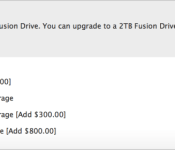
When the newest Mac mini first launched in October of 2014, Apple did not give the option for it to be configured with a 2TB drive, much to the disappointment of many Mac mini fans.
As noted by 9to5MacApple reversed its decision to only offer 1TB of storage space in December and quietly updated the Mac mini build-to-order options, adding an option for a 2TB Fusion Drive for an additional $100. Before the change, users could only choose a 1TB Fusion Drive or 1TB of PCIe-based flash storage.

Though the return of a 2TB storage option will likely please some potential Mac mini buyers, the new 2014 machine has not been well received due to its soldered RAM and lack of a quad-core processor option.
Apple’s Mac mini can be purchased from the company’s online store, with pricing starting at $499. The high-end 2.8GHz option with a custom 2TB Fusion Drive and 8GB of RAM is priced at $1,099.
New concept renders for Nexus 5 (2015)

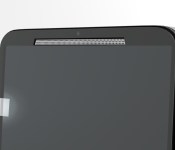
Hey folks, we’ve got a while off until another Nexus phone shows up anywhere, but a lot of talk and predictions are that there will be a refreshed Nexus 5 phone rather than another Nexus 6. This is only talk of course, but for your enjoyment and imagination, we’ve got some fresh concept pictures of what I hope the upcoming Nexus phone will look like.
With aluminum sides, dual front-facing speakers and a clean, minimal front and back, this was designed to have Motorola and HTC qualities combined. The back is meant to look and feel like the plastic on the Nexus 6 back. The IR blaster is what you see on the top, and dual-flash located on both sides of the back camera.


Also, here’s a picture of customizable back covers, “Material Style”

Again, this is just a fan-made concept only to be taken as so.
The post New concept renders for Nexus 5 (2015) appeared first on AndroidGuys.
PayPal Here to get public SDK with Windows support later this month [updated]

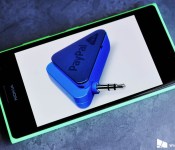
PayPal announced today that an SDK with Windows support for PayPal Here, which is a point-of-sale credit card service akin to Square, will be launching publicly later this month.

Evolve is now available for pre-order and pre-download for Xbox One

Today, Turtle Rock Studios announced that you can now pre-order and pre-download Evolve for Xbox One ahead of the beta which launches this week. The pre-order comes with some early access in the beta as well as in the full game when it starts on February 10.
 AIVAnet