



Google partners with its home city, brings electric-powered shuttles to residents

The City of Mountain View, the location of Google’s Googleplex headquarters, just took a large leap forward in public transportation by announcing the commission of four shuttles powered exclusively by electricity. The shuttles were made possible by a two-year fund set up by Google and utilize a power-train designed by Motiv Power Systems.
Motiv’s electric Powertrain Control System (ePCS) was created specifically for trucks and buses, making it one of the firsts of its kind to apply electric drive systems to such a category of transportation. Motiv is no stranger to its technology being applied to buses. In 2014, Motiv was the first to design an all-electric school bus and the first in North America to create an all-electric garbage truck.
The shuttles themselves are not meant to replace the current Mountain View public transportation system, but rather add an additional layer of green, public commuting. Mountain View hopes that these shuttles will reduce traffic and assist its residents in reaching medical plazas and shopping centers.
Additionally, the shuttles will offer free WiFi to its passengers and racks for bicycles. The shuttles will also be handicap compliant, which includes access for wheelchairs.
It should be noted that while the shuttles themselves are “green,” the increased demand on the electric power grid is usually not. One supplier of electricity in Mountain View is Pacific Gas & Energy. When looking at PG&E’s power sources, you can see that 51% of its power is created by green-friendly sources, but 27% of their power generation still comes from natural gas. PG&E has stated it intends on further eliminating its reliance on fossil fuels and increase the utilization of renewable energy.
If you’re a Mountain View resident, or visitor, and would like more information about the shuttles, you can visit their website by clicking here.
Source: 9 to 5 Google
Come comment on this article: Google partners with its home city, brings electric-powered shuttles to residents

Lumoid now offers wearables to try before you buy

The wearables market has exploded with products over the past year, but with so much choice comes the inevitable struggle of picking out the right one to suit your needs. Enter Lumoid, a US based company that started out in the short-term camera rental business, which is now offering a range of wearables to try before you buy.
The Lumoid website’s wearables section contains around 25 different products, ranging from fitness trackers to basic smartwatches. Although you won’t find any Android Wear smartwatches in the collection just yet, the service offers popular fitness trackers from brands like Jawbone and FitBit, as well as the Samsung Gear Fit. There is also an original Pebble smartwatch available to take for a test drive.
From this selection, you can pick five up to devices to try for a week and, if you find something that you like, you can then proceed to purchase one from Lumoid’s website. You won’t have to live with a used device either, as you send the rental back and Lumoid will provide you with a shiny new one. If you don’t fancy any of the rental wearables, you can send them back to Lumoid and only pay $20 for the rental time.
As well as wearables, gadget enthusiasts will also find a small selection of drones and camera equipment available to rent. Will you be taking your next wearable for a trial run before buying?

Microsoft to release Skype update for iPhone, announces pre-release testing program

Microsoft has announced a new version of Skype for the iPhone, which will arrive later today. Version 5.9 will introduce a couple of new features. The company also revealed a new program that will allow iOS users to test pre-release versions of the VoIP client before they are released to the public.
Here’s what will be new when the update is released today:
In Skype 5.9 for iPhone, when you start typing a phone number in the dial pad, Skype will suggest contacts with matching phone numbers, making it faster to find who you want to talk to.
We’ve also updated the new chat picker to make starting conversations easier. Once you’ve chosen who you want to talk to, tap the phone or video icon at the top to start your call. (To open the chat picker, tap on the message icon on the bottom navigation bar when in the recents, favorites or people view.)
As noted already, Microsoft is looking for iOS users who want to test pre-release upcoming versions of Skype for that operating system. Those folks who are picked are required to offer regular feedback on those builds, be 18 years old or older and have a valid email and Skype or Microsoft Account. Microsoft has set up a website for people to register their interest in the pre-release program.
- Free – Download now
Source: Microsoft

Watch a four-finned robot fish swim in any direction

There’s now at least a few robots that swim like fish, but they have their limits: they still take time to turn around, and they’re not exactly precision instruments. Researchers at ETH Zurich are well on their way to solving those problems with their Sepios robot, though. As you’ll see in the video below, the cuttlefish-inspired creation undulates its four fins in tandem to move in any direction, even through obstacles (such as seagrass and metal frames) that would trip up other animal-like automatons. It’s quiet, too, so it can float near real fish without immediately causing a panic.
Sepios got its first real field test last year, and the ETH crew is now focused on getting the machine’s sensors (including the camera, distance-measuring laser and depth sensor) to talk to each other more effectively. So long as development continues hiccup-free, this uniquely shaped rover and its successors could be very helpful for filming and studying undersea life without disturbing the very conditions you’re trying to observe.
Via: New Scientist, Geek.com
Source: Sepios

Check out this Android 6.0 Muffin concept

With us all revelling in the beauty of Material Design and Android 5.0 Lollipop, why not take a look at what Android 6.0 could hold for us?
Potentially codenamed Muffin, the below concept video comes courtesy of AndroidHackz who created a video showing off some new features that Android 6.0 could bring, including a new opening and closing animation, as well as a multi-window feature.
What do you guys think? Drop us a comment below.
The post Check out this Android 6.0 Muffin concept appeared first on AndroidGuys.
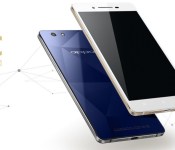
Oppo R1C officially announced, costs around $400

Oppo has taken the wraps off its latest phone, the Oppo R1C. The new device has a 5 inch, 720p HD LTPS LCD display and uses a 64-bit, octa-core Qualcomm Snapdragon 615. But the biggest feature of the phone is its sapphire clad rear panel.
As you can see from the photos, the phone has a flat back, without the traditional removable battery cover. Instead there is a sapphire glass pane which protects the phone from scratches and hopefully from shattering! The sapphire glass has also helped Oppo keep the thickness down, it measures just 6.85mm thick.

Looking at the rest of the phone, you get 2GB of RAM, 16GB of internal storage and a 2420 mAh battery. The device runs ColorOS 2.0.1 which is based on Android 4.4 KitKat.
As for the optics, there is a 13MP rear facing camera that uses a Sony Exmor RS IMX214 sensor and an F2.0 lens. On the front there is a 5MP camera. The bundled camera app also does some clever tricks and allows you to tweak the focus of your photos, as well as create depth-of-field and blur effects. There is also a double exposure mode so that you can make a subject appear twice in the same photo.
The phone offers 4G LTE connectivity (for Asia) and supports dual SIM cards, one micro and one nano. The Oppo R1C costs 2499 RMB, which is about $400.

The two-face YotaPhone 2 is coming to T-Mobile this spring

The YotaPhone 2 made quite a splash at last week’s CES 2015, after a few rumors began circulating around the web regarding the availability of the device. Currently, the YotaPhone 2 is available in 20 countries throughout Europe, the CIS and the Middle East, though it was originally slated to head to the US by the end of 2014. Up until now, we’ve had no word as to which US carrier would get the device.
According to our sources that are familiar with the matter, the YotaPhone 2 will make its way to T-Mobile around March-April. Though we are very confident in the validity of this information, sometimes even the most reliable sources can prove inaccurate, so do not treat this information as official. There’s always a chance that unforeseen issues will change the schedule.
The device is also headed to a Canadian carrier sometime in 2015, but that name has yet to be disclosed.
So far, no pricing information has been revealed regarding the device in the US. The YotaPhone 2 is currently available in Europe for €699 (~$850), which is the typical price of a flagship device. We can only speculate that the cost will be around . The fact that this device is headed to T-Mobile isn’t necessarily a surprise, given the carrier’s track record with other devices that normally wouldn’t make their way to the US. T-Mobile was one of the first carriers to offer the LG G Flex, as well as one of the only carriers to offer any device from Sony’s Xperia line. So, it’s not unlike T-Mobile to carry a device such as this one.
We interviewed Vlad Martynov, CEO of Yota Devices, last week at CES. While he didn’t comment on specific carrier availability, we got a first-hand look at Yota Devices’ vision for future smartphones and what they’re doing to improve the E Ink technology on the back of the phone.
If you’d like more information on the YotaPhone 2, check out our full review!
We’ll be sure to keep you updated when we hear more about the YotaPhone 2’s availability. If this device comes to T-Mobile for around $600-$700 unlocked, are you willing to try it out? Let us know what you think in the comments!

Even the police feel over-charged by Rogers

If you think you’re dishing out too much to service provider Rogers, you’d be in the same boat as the Royal Canadian Mounted Police. Newly discovered documents have revealed that as of August 1, Rogers had imposed a new set of fees on police divisions seeking data about their service subscribers. Though many of these requests were processed for free according to Rogers, some required a “minimal” charge to produce affidavits in court and track location when provided a warrant. The fees for affidavits have since been dropped, but location tracking charges remain.

How to instantly switch audio sources in OS X

If you have your Mac connected to different audio input and output sources, having to switch between them can be a process: You have to open up System Preferences, click on the Sound preference, and toggle the Input and Output tabs to find the right source. Or do you? Here’s a much faster way to do it.
The Mac is well-designed for audio media management. Whether you’re just listening to music and podcasts, or whether you’re a professional musician, the Mac has abilities (and complicated software tools and workflows) to suit you.
So it’s easy to get your Mac set up with audio inputs ranging from USB interfaces to the digital audio input, output including Bluetooth speakers, AirPlay and more. And keeping track of what audio is routing through which device can get to be a bit much to manage, at least if you’re doing it all through the Sound system preference.
How to add volume to the menu bar
You’re probably familiar with the volume level manager in the menu bar. If not, let’s get that out of the way first. Here’s how to turn it on:
- Click on the menu.
- Select System Preferences.
- Select Sound.
- Check Show volume in menu bar.

Now click on the sound icon in the menu bar. You can adjust the volume of whatever speaker is selected for output at present.
How to get more volume menu bar options
If you hold down the option button on the keyboard and then click on the sound icon in the menu bar, you’ll see a different menu appear. Now you can select whichever sound input method you’d like, and if you do it again, you can select whatever sound output method you’d like.

Obviously this has its limits: If you have really complicated audio workflows, you may not see all of your options listed here. And if you’re trying to manage multiple devices at once — let’s say AirPlay speakers throughout the house, for example — you may have to resort to iTunes or whatever app you’re using to control audio instead.
But this offers a quick and easy way to redirect audio into and out of your Mac without having to deal with the Sound system preference, so that’s something.
Any questions?
Any trouble with this? Or have any questions, comments or thoughts to add? Let me know!

Alien Isolation ‘Safe Haven’ DLC introduces new game mode, map, and character
Get ready to be terrified yet again. SEGA has announced that its new DLC pack for Alien Isolation is available today. The add-on pack, called “Safe Haven,” introduces a new challenge map, the new salvage game mode, and a new playable character in Hughes, Sevastopol Station’s Communications Manager.
 AIVAnet