


Google Chrome update now enables Guest Browsing and easy switching of accounts

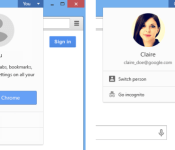
Google appears to have updated the Chrome browser for desktops with the ability to switch profiles right from the top right corner of your window. This feature was originally announced on Chrome Beta back in August, but has now made its way to the standard Chrome as well.
There’s also a new Guest Mode feature, which will open a new browser window with no access to history, which is ideal if you don’t want guests to snoop on your browsing history. This can be easily turned on from the Switch Person option which appears when you click on your name (located on the top right corner).
To add or remove people from Chrome, you can head over to the browser settings and make the necessary changes under the People section. It is important to note that Chrome will not use the browsing history of one user when browsing from another account, which is a very handy security feature.
So if you have two accounts on the browser, your browsing history will not be visible to the other person and vice versa. The browsing history and bookmarks available on your account will be accessible on connected devices as usual.
Overall, it’s a very neat addition to Chrome on desktops. Chromebooks are yet to receive the update apparently, but we’re certain that an update is on the horizon. Make sure you give this feature a try if you happen to use the Chrome browser on your computer.
Via: Unofficial Google OS Blog
Come comment on this article: Google Chrome update now enables Guest Browsing and easy switching of accounts
Original Moto X will get new Moto X Moto Voice features

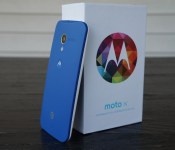
Motorola has made themselves known in the last year or so to update their devices quickly and as fully as possible. When the new Moto X was announced, one of the many questions that owners of the original Moto X had been whether or not the device would get the new Moto Voice features, like being able to change the hotword to start voice control. Well, in a post regarding Lollipop update details for the original Moto X, Luciano Carvalho also confirmed the answers to these questions in the comments.
In the comments on Carvalho’s post on Google+ about the Lollipop updates for other devices, another Google+ user asked if he could confirm whether or not features from the 2014 Moto X would come to the 2013 Moto X. His answer is as follows:
The original Moto X will get all features from 2nd gen that are not dependent on hardware. This excludes Best Photo feature from Camera/Gallery and a couple Moto Actions dependent on the new IR sensors)… Yes, the Moto app with new Moto Voice app will be there.
The Best Photo feature he later explains is semi-dependent on the new camera in the 2014 Moto X, which is why it is not included. However, it would seem the features from the new Moto Voice is not hardware dependent, so owners of the original Moto X have that to look forward to.
Which non-hardware dependent feature are you looking forward to on your older Moto X?
The post Original Moto X will get new Moto X Moto Voice features appeared first on AndroidGuys.
Bring tech to class; Google releases Classroom mobile apps for Android and iOS
I distinctively remember constantly getting my little flip taken away in class all the time for playing snake and attempting to text. Now kids are encouraged to bring their phones, tablets and laptops to class as an extension of the learning environment. I for one am rather happy to see it really. Today Google announced […]
The post Bring tech to class; Google releases Classroom mobile apps for Android and iOS appeared first on AndroidSPIN.

Wireless Charging Looks to Go Mainstream in 2015
As the largest consumer electronics show in the world, CES often gives us a hint of the technologies we can look forward to in the near future, based on the products that are shown off at the show. In 2013 and 2014, there was a heavy focus on wearables, and this year’s emphasis on home automation suggests 2015 will be a big year for connected home products.
There’s one other important emerging technology that we may see explode over the course of the next few years — wireless charging. Several companies, including Energous and WiTricity, demoed upcoming wireless charging solutions, and the Alliance for Wireless Power had a booth showing off how wireless charging will work in the Home of the Future.
MacRumors had a chance to sit down with Alex Gruzen, the CEO of WiTricity, who walked us through the company’s technology, its existing partnerships, and gave us details on when we might see the debut of the first products using WiTricity’s technology, which uses the Rezence specification agreed upon by the Alliance for Wireless Power. WiTricity’s wireless charging solutions, which we have covered multiple times in the past, works using magnetic resonance, which is able to transfer power over distances using the magnetic near-field.
In the past, wireless charging solutions like the Powermat (which uses a competing technology from the Power Matters Alliance) have required the electronic device being charged to rest directly on the power source, but WiTricity’s wireless charging technology is unique because it does not require direct contact. The magnetic field used for charging is able to wrap around barriers, letting WiTricity charging pads be placed in unassuming locations like under desks, rugs, tables, and more.
In our time at the WiTricity booth, we saw charging pads that were placed under concrete, under desks, and more, hidden out of sight but still capable of delivering a full charge to a device (or multiple devices at once) equipped with WiTricity’s technology. This type of hidden charging technology is what we can expect in the future, and Energous, previously mentioned, also debuted a similar “WattUp” technology that uses radio frequencies to charge devices, replacing a charging pad with a transmitter that can provide power up to 15 feet away. Read more 

Samsung reportedly in talks to buy Blackberry for $7.5 billion

According to a new report from Reuters, Samsung is in talks to buy Blackberry for $7.5 billion. The South Korean electronics company is interested in the company for Blackberry’s patent portfolio, according to unnamed sources associated with Reuters. Samsung didn’t offer a flat rate of $7.5 billion, though they put in an offer to buy individual shares for $13.35 to $15.49 per share. As long as currency conversions change over correctly, Samsung could end up paying anywhere from $6 billion to $7.5 billion for the company, as long as the $1.25 billion in debt transfers over as well. Reportedly, this represents a premium of 38% to 60% over Blackberry’s current trading price.
This isn’t really anything surprising, though. Blackberry has been struggling for quite some time to get the company out of the red. After countless failed smartphone attempts and US carriers refusing to carry their products, Blackberry has been dead in the water for quite some time. If you can remember back to November 2014, Samsung and Blackberry were in talks to improve Android’s enterprise security through Samsung devices. Now, Samsung devices might get even more security-centric if this sale goes through. Remember, this is just a rumor so far, and nothing is confirmed yet. Stay tuned to Android Authority for more coverage as this rumor develops.

11 best funny apps for Android

They say that laughter is good for the body and soul and we agree with that notion. In most cases, you’ll find your laughs online through a range of websites but there are some good Android apps that can get the job done too. Here are the best funny apps for Android.
 9GAG
9GAG
[Price: Free with in app purchases]
First up is 9GAG and it boasts a large collection of memes, funny images, gifs, videos, and a lot more. There are non-funny things like cosplay and cute stuff as well so you can get your quota of furry kittens and Comicon stars. The app is free to use and claims to give the complete 9GAG experience on Android, including message boards, sharing, and the ability to participate in voting.


 Cheezburger
[Price: Free]
Cheezburger is one of the more popular humor sites on the internet that boasts more than 10 million visitors per month and the app is pretty popular as well. The app lets you browse gifs, videos, images, jokes, comics, and tons of other hilarious content. You can also create posts using the app, sign in using Facebook or email, and you can access other sites like Memebase, ROFLRazzi, and more.

 theCHIVE
[Price: Free]
theCHIVE is a humor site that posts pictures, stories, videos, and more. The Android app is fairly solid and contains a lot of humorous things. A recent update now allows people to submit more funny stuff to be used by the site as well as a navigation menu to quickly get to categories, top rated, favorites, and other parts of the site. The interface is clean and minimal which makes finding funny stuff even easier. It’s a solid app with some funny stuff in it.

 Food Battle
[Price: Free with in app purchases]
Food Battle is every tap-and-play, cutesy game on Android rolled up into one giant parody. In this game, you must kill homicidal donuts that have taken your friends and family hostage. It features cameos from Smosh and dialogue that is geared toward a more mature audience which is a pleasant change from all the for-kids games like Angry Birds or Candy Crush. It features simple controls, puzzles, and characters voiced by Smosh.

 Funny Facts Free 8000
[Price: Free]
Funny Facts Free is essentially what the name says it is. It’s a bunch of funny, weird, goofy, or otherwise entertaining facts and the app is, in fact, free. It doesn’t have the shock value or immediacy of apps like Cheezburger or 9GAG but it does have some entertaining facts. The interface is simple and the app is totally free with no in app purchases. The app will also read you the facts if you want it to. It hasn’t been updated in a while and we imagine that one day this will leave the list due to developer disinterest, but for now it seems to work well.
 Funny Jokes
[Price: Free]
Despite the obvious lack of creativity when it comes to names, Funny Jokes is an app that contains within it a bunch of funny jokes. You can choose by category and some categories include Chuck Norris facts, one liners, yo mamma jokes, and others. The interface is very simple which is exactly what an app like this should have and it’s free to use. Users can also comment on jokes and rate them. It was also updated somewhat recently.

 Goat Simulator
[Price: $4.99]
Goat Simulator is a game where you play the every day life of a goat assuming, of course, that the goat is on many, many drugs. This game started out as a tech demo some years back and the bugs were so hilariously bad that the gaming community clamored for a release. What we get is a game that is intentionally half done because it’s funnier that way. The fun comes with seeing exactly what you can get the goat to do. It’s a tad expensive but it’s still fun.
 LOL Pics
[Price: Free]
LOL Pics is a lot like 9GAG and Cheezburger in that you get to look through a collection of funny pictures. The user base adds new photos every day in a gigantic range of categories including fails, FMLs, puns, and other random stuff. The app itself does need a little work if you want more rich features like profile management but it handles general browsing well enough. Also, the interface could use an update but otherwise it’s a good app.
 Opera Browser
[Price: Free]
Opera Browser is not, in and of itself, a funny app. However, most of the big funny websites don’t actually have an Android app which means the only way to access them is via a web browser. Any web browser will do really thanks to bookmarks, but the way Opera handles them is why they’re on this list. When you bookmark an app, it shows up on the app’s front page (called Speed Dial) as a nice, clean icon. That means you can bookmark all of your favorite sites and they show up on the front page of Opera much like a miniature app drawer making them easy to access with a clean presentation.
 PiVi & Co’s Booth series
[Price: Free]
The booth series apps are a range of photo editing apps that make the subject of the picture look a particular way. There is FatBooth, AgingBooth, UglyBooth, and others that will make people look fat, old, ugly, and other things. They are gimmicky apps that have no real functionality but it’s a fun to spend a couple of hours manipulating your friends’ Facebook photos. All of the apps are free and some perform better than others. Some have found a couple of these apps offensive, so if you’re easily offended, we recommend you not try these apps.

 Surgeon Simulator
[Price: $4.83]
Last up is another simulation app that is simply hilarious. In surgeon simulator, you play as a doctor who has no intention on saving any of his patients. You can play as an ER surgeon or a dentist as you slowly destroy the lives of the people foolish enough to put their lives under your care. It is a little bit morbid and dark so those with weak stomachs probably shouldn’t give this one a go. Think of it like Operation except the point is to lose the game.
Wrap up
If we missed any great funny apps on Android, and we probably did, let us know about them in the comments!
To see our complete list of Android apps and games lists, click here!

Google has some new friends working on its self-driving car

Apparently following the adage about keeping your friends close and (potential) enemies closer, the Automotive News World Congress in Detroit hosted Elon Musk last night and followed up today with Chris Urmson of Google. He’s the director of its self-driving car project, and while there are no big name car manufacturers lined up as partners yet, he did call out seven particular industry friends providing various parts for the latest prototypes. That includes LG (battery), Bosch (LIDAR), ZF Lenksysteme (steering gear), RCO, Continental, FRIMO, while Roush is helping to actually put it together here in the Detroit area. There are also NVIDIA chips inside, which Urmson said run mostly Linux software “with some other stuff happening.” He confirmed that Google has talked to the usual list of big names (GM, Ford, Toyota, Daimler, etc.), and hopes cars are ready to go by 2020.
Interestingly, in opposition to what most automakers have said about autonomous vehicles, Urmson stated that he did not anticipate regulatory hurdles to their introduction and is focused on making sure they are socially accepted. He feels that NHTSA does not consider itself a “permission-granting” authority — with a former Deputy Administrator on the team, we guess he’d know — but couldn’t speak in detail about the legal wranglings or how self-driving cars are insured. Still, the exec is confident that self-driving cars could start rolling out in places in the US once they’re safe enough. Those places probably won’t include cold-weather climates, at least at first, since in response to a question he mentioned they haven’t been tested in snowy environments yet.
When the prototypes roll out though, there will always be a driver in them, although it’s testing empty vehicles at its facility, they’re not ready to hit public roads yet. Another element is the LIDAR unit used to keep a 360-view of what’s around the car, but Urmson said Google does not consider that a big hurdle, and is already testing cheaper, more capable prototype units than the usual $75,000 roof-mounted racks we’ve seen so far.

That also plays into the current design of the prototypes, which he said isn’t final, but is friendlier than seeing the first self-driving car in your neighborhood appears as a big SUV. In a Q&A with reporters after his talk, Urmson said the test cars had racked up over 700,000 miles without an at fault accident. That’s despite being side-swiped on the freeway and a much publicized rear-ending that happened while an engineer (in control of the car) was distracted by someone taking a picture and rear-ended another car. The plan for the prototypes is to start testing in Northern California “later this year” and run small pilot tests over the next couple of year. Before that happens though, the leader of Google’s self-driving car project said he is going to hit the Auto Show floor to check out the new Ford GT.
Filed under: Transportation, Google


New owner’s manual for Samsung Galaxy Note 4 updated with Lollipop screens

Samsung appears to be getting very close to releasing the Android 5.0 Lollipop update for the Samsung Galaxy Note 4 smartphone. A strong indicator that this is close to happening is the availability of the manual for the Galaxy Note 4 that has been updated to include screenshots and information referring to Android Lollipop.
Reports from people who have seen some early builds of Lollipop on both the Galaxy Note 4 and the Galaxy S 5 indicate Samsung did a good job of incorporating Google’s Material Design philosophy into the TouchWiz UI. The notification area and animations used by Samsung mimic the default Android Lollipop, so anyone familiar with Lollipop should not be in for any surprises.
Even within apps like the Dialer or Contacts, Samsung has incorporated Google’s design standards, so users will see a fresh splash of color when using these apps. There is still no word on exactly when Samsung will release the Lollipop update or how long it will take carriers to prepare their own updates to roll out to users. However, if you want to check out the new owner’s manual, hit the source link below to grab the PDF.


source: Galaxy Club
via: phoneArena
Come comment on this article: New owner’s manual for Samsung Galaxy Note 4 updated with Lollipop screens

Top 5 news and RSS apps for Android [January 2015]
 Keeping up with news articles can be a cluttered process, especially if you use multiple apps or bookmarks on your phone or tablet. Using a news aggregation app or an RSS reader can tidy up your mobile device and make keeping up with things even easier. There are tons of apps that can get the job done, but we’re going to go over the best options in this guide to help you get started on staying on top of the news.
 Flipboard is one of the most popular apps on the Play Store for keeping up with multiple news sources, and its even the backbone of pieces of some of Samsung’s new UI on their phones or tablets. It offers a slick experience for quickly browsing over popular news and comes with a handful of extra features that make it fun to use.
Flipboard lets you select different topics for things you want to follow, such as food, technology, music, etc. and then it displays relevant content from top sites as you browse through the main feed. If you select mobile games as something you want to stay caught up on, you’ll see news stories for when Gameloft announces something new or Angry Birds get a major update, while if you subscribe to a scuba diving topic, you’ll see tons of pictures, articles, and content related to scuba diving. You can also subscribe to particular sites if you want.
While reading news articles, Flipboard lets you save particular articles to read later by either tying them to your Flipboard account or exporting them to an external app like Pocket, Readability, or Instapaper. There are also full blown comment sections specifically for Flipboard users on articles, and you’ll be able to take complete advantage of Android’s built-in sharing menu.
For social media enthusiasts, Flipboard also integrates multiple social networks into your news. The app allows you to sign into your Facebook, Twitter, Instagram, and multiple other accounts, after which content from those social media sites will start appearing in your main feed. This is really helpful for keeping all of the barrage of information in one place if you’ve avid about keeping up with tons of different networks and sources.
Flipboard is completely free, and if you’ve owned a recent Samsung device, there’s a good chance you’ve already played with it a bit.
 Feedly is an RSS reader application that works fairly similarly to apps like Flipboard, but you get a more fine-tuned experience if there are specific sites or blogs that you want to track throughout the day. It has an excellent, easy-to-navigate interface that has several customization options that most other aggregation apps lack.
When setting up Feedly, there are preset options for curating content that you’re interested in, like cooking, mobile phones, or video games. Within each of those topics, you can further narrow it down to which sites you want to see in your feed. This can be useful for narrowing down how many music blogs you’re subscribed to, for instance, so you don’t see six different posts about the same thing all within an hour of each other.
With Feedly, you can also specifically set up a URL as an RSS feed, which is useful for tracking more obscure or less popular sources that you may want to keep up with. Plus, Feedly can also handle a bevy of social networks which you can either blend in with your main feed or view separately from the other sources. There are also options for using your favorite save-for-later apps like Pocket and Instapaper, and Feedly also has a tool for setting up a quick-share button. If you typically only ever tweet out news stories, you can set Twitter as your default sharing app and skip Android’s built-in sharing menu.
Feedly is free and offers a web based version for tracking and syncing your news sources on all of your devices. There is a pro version that runs $5 per month that nets you Evernote support, quick article searching, and prioritized customer support, if that’s your thing.
 Google has had a splotchy track record when it comes to news and RSS apps. Originally, Google Reader was a fairly successful option for keeping all of your news sources in one place. Google axed Reader in 2013 and offered up Google Currents in its place, but then that app was put on the chopping block in favor of rolling its functionality into Google Play Magazines, which leads us to the current iteration of Google’s news solution: Play Newsstand.
Play Newsstand offers a very unique feature that none of the other apps on this list do. You can purchase and subscribe to magazines through the Play Store, and they’re fully integrated into your other news sources so you can view everything in one place. There isn’t much in the way of RSS feeds, but Newsstand has an enormous selection of magazines and web content. You can look up specific news channels from tons of categories ranging from technology to business to travel, dig into a particular magazine, or see everything thrown together in a main feed.
Newsstand also has a very useful “bookmark” feature that lets you save your spot in a particular magazine or clip an article on the web to read later. These bookmarked articles and magazines are available for viewing offline, and the bookmark will hold your place so you can pick up right where you left off.
While Play Newsstand doesn’t have social media integration or tons of customization options, it’s one of your only choices for magazines and offers an excellent way to keep all of your main news sources in one place. Plus you get the excellent Material Design interface that Google has been pushing lately, so it’s worth taking for a spin.
 Press is one of the apps that doesn’t try to throw in the kitchen sink in its feature set, but instead, focuses on building an excellent application with a slick interface that’s easy to use. The app has enough features to appeal to most users, but it really stands out thanks to the fantastic UI.
Press works as an RSS reader with tons of preset news sources. You can set up all of your favorite hobbies and interests, and Press displays everything in a clean, easy-to-read manner. As a bonus, the app will also sync with your other RSS feed sources, including ones from Feedly, Fever, FeedBin, and Feed Wrangler. If you juggle multiple apps and services, this is a huge time saver.
When it comes to features, Press nails the important things. There are a couple different theme options, depending on if you prefer white or dark interfaces, and a few other tweaks tailored to the UX. There is full support for apps like Pocket and Instapaper, offline support, image zooming, and widget/lock screen widget support. There isn’t any magazine store or social media integration here, but the interface is much faster and cleaner with Press than with some of the other apps.
If the other apps on the list are too bloated or heavy for your tastes, Press is worth a shot. At only $2.99 it’s one of the best designed and well-performing Android apps on the Play Store.
 Digg is a service that was beginning to fade in popularity but made a fairly strong comeback on the announcement of Google Reader’s demise. The redesigned app that was released into the Play Store really put the service back on the right track and is a great option for someone that wants a slightly more hands-off approach to curated news.
Digg offers most of the best features of any other RSS or news application. You can add specific feeds from your favorite site or select from a list of the most popular sites in different categories, and you’ll still have access to do things like saving the stories to read later in Pocket or Instapaper. Where Digg really shines, though, is in the focus on popular and social content.
To make sure you’re caught up on the biggest stories online, Digg actually uses algorithms to see what people are talking about and sharing. There’s a little help from the Digg staff, but the whole point behind putting this content front and center is to keep you updated with the latest viral videos or the hottest political stories, even if it’s not something that would normally be in your primary circles. For some people, that might sound like an annoyance, but for others, it’s an easy way to stay up to date on what your friends and coworkers are talking about.
To push that even further, Digg makes it a priority to let you quickly and easily share stories to your social networks or to your Digg account. These shares likely play into the algorithm that they use to decide what’s popular or not, so the app almost functions like a crowd sourced news feed.
On top of everything else, the Digg app has a great interface. It’s slick, intuitive, and very easy to use. It’s completely free, and creating a Digg account lets you access your stories on the app or on the web.
These are the top five apps for keeping up with your favorite news each day, but there’s no shortage of other news apps on the Play Store. Did we miss any of your favorites? Drop a comment and let us know.
Come comment on this article: Top 5 news and RSS apps for Android [January 2015]
 AIVAnet