



We’re giving out more than 20 copies of Sniper Elite III tonight on Twitch

On Thursday, 505 Games announced that Sniper Elite III Ultimate Edition will be coming to Xbox One and 360 and Playstation systems in March. That will be an excellent time to buy the game, as the Ultimate Edition will include tons of DLC at no extra cost. But maybe you’d like to get it sooner…
Lucky for you guys, 505 Games has kindly given us more than twenty copies of Sniper Elite III (spread across Xbox One, PS4, and Steam) to give out as prizes tonight. All you have to do is follow me at Twitch.tv/Eastxtwitch and then tune in to our stream at 8pm Central (9pm Eastern, 6pm Pacific) for 90 minutes of sniping fun. It’s like a live podcast, only you also get to watch a game while chatting with our awesome readers and viewers!
We stream and give out free copies of a different game every Saturday at the same starting time, but this is the first full retail game we’ve given away as prizes. Don’t miss it!

What we know so far: LG G4

Earlier this week, we wrote about some early rumors of the LG G4, the expected flagship from LG for 2015. Those details included the possibilities of a Qualcomm Snapdragon 810 processor, 3GB of RAM, and a wide-angle 16-megapixel camera. It is also expected to run Android 5.0 Lollipop right out of the box.
Android Pit also excellently rounded up some rumors of the device, which are featured below.
Price
Since the LG G3 is available for 599.99 USD off of contract through Amazon, it is safe to assume that an unlocked LG G4 will cost the same or more at its launch. On contract, we can expect it to go for at least $200.
Design
Korean site Heraldcorp reported that LG (and Samsung) is scaling back on smartphone production. In addition, Phandroid discovered that LG has launched a trademark filing for the G Pen, a new stylus.
This may mean that LG may add a stylus to current and/or future devices as a means to maintain profit while scaling back smartphone production. Android Pit added that this could also be a re-branding of the LG G series in the making. Therefore, the LG G4 could be a direct challenger to the Samsung Galaxy Note 5.
The G3 has a brushed finish on its backside in order to give its plastic a premium appearance. However, the G4 may go for an aluminum body especially since Samsung has already used it for its Galaxy Note 4 and Galaxy Alpha handsets.

Display
Due to the popularity of the G3’s QHD display, it is safe to assume to expect one with an equal or higher resolution on the upcoming successor. Android Pit doesn’t expect the screen to grow likely because this would make it more difficult for users to reach the rear power and volume buttons. With rumors of the Samsung Galaxy S6 having a 4K display, LG may not settle for anything less than one on the G4.

Software
Android 5.0 Lollipop with LG’s Optimus UI is probably the rumor likeliest to be accurate on this list. Although, it is not far-fetched to believe it will incorporate a fingerprint scanner on the rear next to the controls. Perhaps, the company might even add an eye/retina scanner.

On the G3, LG offers the option to remove some of the pre-installed applications on the smartphone, which was well received by consumers. Generally, such an action requires root access. Hopefully, it will bring this feature to the G4 with the option to remove any application from the device.
Release Date
LG’s next smartphone should not be expected until at least May of this year. In the previous three years, the G Pro was released on May 10, 2013, and the G3 was released on May 28th, 2014. The G2 was the anomaly. It was released on September 12, 2013.
Specifications
Lastly, Android Pit has reported on two sets of specs so far. The first that is more likely to be confirmed as true has the G4 running the aforementioned Android 5.0 with Optimus UI and a Snapdragon 810/808 clocked at 3GHz. The other specs include:
- a 5.7-inch, 3840 x 2160p display
- 3 to 4GB of RAM
- 32/64GB of internal storage with microSD expansion
- a 3,500 to 4,000mAh battery
- a 16MP rear-end camera and a 5.1MP front-facing camera
- HSPA, 4G, NFC, Bluetooth, and Wi-Fi connectivity
The second set, brought to us by wccftech, lists:
- a Snapdragon 810 processor
- a 5.3-inch QHD screen
- a 20.7 MP rear-end camera
- 4GB of RAM
- a 3,500mAh battery
- 32/64GB of internal storage with microSD expansion
As Android Pit has done, we must note that this site does not mention a source and should be taken more lightly than the preceding specs for now.
FEATURED POSTS


The post What we know so far: LG G4 appeared first on AndroidGuys.
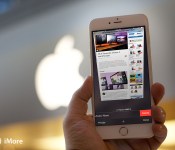
Secret Safari shortcuts: 8 gestures to speed up your iPhone browsing!

Safari for iPhone spun out of Safari for Mac and was one of the very first fully functional web browsers ever to hit mobile. Taking all that power and making it simple and accessible for the masses meant that, over the years, a lot of shortcuts and time savers got hidden away behind gestures. Luckily, once you know how to long-tap (touch and hold) and swipe your way around, you’ll be using Safari for iPhone faster than ever!
Note: Some shortcuts, like history list and tab restore don’t work in private browsing mode, because private.
1. Jump to the top

One of the first and still one of the best iPhone gestures, while I’m sure almost all of you already know this, I’m including it just in case. If you’ve spent a while scrolling down a page but decide you want to go back to the top, instead of scrolling all the way back up, try this:
- Tap the title bar at the very top of the screen. (If the address bar is minimized, tap twice — once to maximize it, once to jump up.)
2. Tap to show toolbar

To show you more of the page content, Safari hides the toolbar as you scroll down. Instead of trying to make it reveal itself by scrolling back up, try this:
- Tap the very bottom of the screen.
- Tap the tool button you want to invoke.
3. Swiftly save or copy an image

If you come across an image on a website you want to save or copy to the clip board, try this:
- Touch and hold down on an image.
- Choose to save or copy it from the menu.
(If it doesn’t work, the image may be embedded in the style sheet instead of the page — no luck!)
4. Flash back in history

If you’ve tapped a bunch of links and decide you want to go back to a previous page, instead of tapping the back button or swiping to go back a page at a time, try this:
- Touch and hold down on the back arrow button at the bottom left to pull up the history list of pages you visited previously.
- Tap the page you want to jump back to.
5. Flash forward in history

If you’ve already jumped back but decide you want to go forward again, instead of tapping the forward button or swiping forward a page a time, try this:
- Touch and hold down on the forward arrow button at the bottom left to pull up the history list of pages you visited next.
- Tap the page you want to jump forward to.
6. Bookmark ‘em in a blink

If you land on a page you love and you want to make sure you remember it, instead of tapping the share button and then choosing what you want to do, try this:
- Touch and hold down on the bookmark button at the bottom center to bring up the bookmark menu.
- Tap add a bookmark, add to reading list, or add to shared links.
7. Rapidly restore tabs

If you close a tab or set of tabs by mistake, or you close them but later wish you hadn’t, instead of trying to remember the page, try this:
- Tap the tabs button at the bottom right
- Touch and hold down the + button to bring up a list of recently closed tabs.
- Tap the tab you want to restore
8. Remotely close iCloud tabs

If you leave a tap open on an iPad or Mac you wish you hadn’t, instead of running back to the device, turning it on, going to Safari, and closing the tab, try this:
- Tap the tabs button and scroll down to iCloud tabs
- Swipe across the iCloud tab to bring up the delete button.
- Tap the delete button to close the tab.
Your favorite shortcuts?
These Safari shortcuts should have you browsing faster than ever! We’re always on the lookout for more, however, so if you’ve come across a favorite gesture, tell us all about it!
<!–*/
.imageleft
float: left;
margin: 0 25px 0 0;
.imageright
float: right
margin: 0 0 0 25px;
.screenshot-16×9
height: auto;
width: 88.97%;
.screenshot-16×9.imageleft,
.screenshot-16×9.imageright
width: 50%;
.screenshot-4×3
height: auto;
width: 66.66%;
.screenshot-4×3.imageleft,
.screenshot-4×3.imageright
width: 50%;
/*–>*/

NSA brags about turning the tables on cyberwarfare hackers

How confident is the National Security Agency about its ability to wage cyberwarfare? Enough so that it’s bragging about it. A new round of Edward Snowden leaks published by Der Spiegel reveal that the institution has not only been gearing up for a future of digital battles (it asked for $1 billion to improve its cyberattacks back in 2013), but boasts about what it can already do. For example, it touts that it can “drink your milkshake” (There Will Be Blood style) if you dare attack American government computers. When China hacked the Department of Defense in 2009, the NSA not only pinpointed the source of attack, but broke into China’s intelligence network and monitored the country’s spying efforts. This “fourth party collection,” as the NSA calls it, lets the agency find out what’s happening without doing all the hard work.
The NSA also makes it a point to use the tools and methods of their attackers against them, and to develop its own attacks against critical systems (like energy grids) in case they’re needed. Its agents all that worried about getting caught, either. They regularly cover their tracks, such as by placing data on the servers of “scapegoat” targets to throw people off the scent.
It’s not surprising that the NSA would turn the tables on its foes. However, it’s willing to use “fourth party” techniques on any country that isn’t part of the Five Eyes Alliance (Australia, Canada, New Zealand, the UK and the US), including its allies. And there’s a concern that the US is shifting too much of its attention toward offensive capabilities, rather than focusing on defense — it’s hard to claim the moral high ground in cyberwarfare when you’re willing and able to inflict serious damage.
Filed under: Internet
Via: Christopher Soghoian (Twitter)
Source: Der Spiegel
ICYMI: January 17, 2015

A lot can happen in a week. New apps join the Windows Phone Store or Windows Store. Your favorite apps can get a big update with a new look or new features. Device rumors come and go. Seven days might not seem like much, but it can be an eternity in the tech news cycle. Every week we’re going to compile the biggest stories into one post, so you never fall behind – In Case You Missed It (ICYMI).
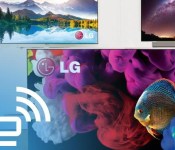
Best of CES 2015 Awards, TV Product: LG Art Slim 4K OLED TV
#fivemin-widget-blogsmith-image-512352display:none; .cke_show_borders #fivemin-widget-blogsmith-image-512352, #postcontentcontainer #fivemin-widget-blogsmith-image-512352width:570px;display:block;
 trydocument.getElementById(“fivemin-widget-blogsmith-image-512352″).style.display=”none”;catch(e)
CES is a tech show that isn’t lacking in TVs. That’s especially true for the major central hall, where you’re never far from the glow of a giant sumptuous TV. It makes choosing the Best TV on show a difficult task, but we got there. LG’s Art Slim 4K OLED took the prize, boasting the beauty of OLED technology, 4K resolutions and a handful of sizes set to go on sale in 2015. Sure, there’s curved and curving options too, but it was the more typical, flat designs that we were drawn to.
Filed under: Home Entertainment, HD, LG
Nexus 6 owners try to hold it together amidst new problem with devices

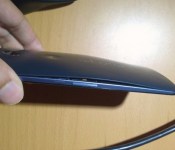
Reports are starting to trickle out onto the Internet about Nexus 6 devices that are falling apart. Owners are reporting the back covers are coming off of the units although the reason has not yet been identified. In some cases it appears to be a problem with the glue that Motorola used to affix the back covers. However, others are reporting their batteries are swelling to the point they cause the covers to pop off.
The reports that have come in so far have varied as to how soon owners of the Nexus 6 are experiencing problems. Some buyers report their devices were showing signs of separation out of the box when they received their new device. Others are reporting the problem takes some time to develop. In an unfortunate turn for Motorola, reports of similar problems have also started to surface for the Moto X 2014 and the Motorola DROID Turbo.
Motorola appears to be aware of the problem even though they have not come out with a public statement. In response to a tweet directed to Motorola Support, they did acknowledge they are “seeing a few” devices being returned with defective back covers.
If you do notice the problem with your Nexus 6, you can try to contact the retailer where you bought your device and see if you can get a refund. Choosing a replacement may result in a refurbished unit being provided to you if you go that route. In either case, it is not clear whether the replacement unit may be subject to the same issue.
source: Phandroid
Come comment on this article: Nexus 6 owners try to hold it together amidst new problem with devices
Five things a big screen does better

Sometimes bigger is better
The debate over screen size will never end. Some folks love a big-screen Android like the Nexus 6 or the Galaxy Note 4, others want something smaller like the Sony Xperia Z3 Compact. Some of us are torn, and want both somehow.
But there are some things that are just better on a bigger screen. Here are five of those things.
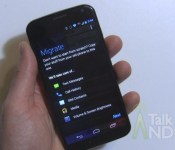
Motorola Migrate gets updated with Material Design

Motorola is currently in the midst of pushing out an update for its official Migrate application via the Play Store. This upgrade doesn’t transport much with regards to new features, but it does bring support for contact transfers from non-smartphones and an appearance transformation that complies with Google’s recently-announced Material Design guidelines.
Hit the break for the full changelog.
- Android: Contacts transfer from old phone’s memory to new phone’s memory
- iOS: Support iCloud Two Factor Authentication (2FA)
- Android 5.0 Lollipop material design changes
- Non-smartphone: Contact transfers for Motorola TracPhone w418, w419 and Motorola iDEN i296, i418, i420, i460,i475,i485, i485w
- Bug fixes
To install the update, simply open up the Play Store on your device, toggle the hamburger menu by swiping in from the left-hand side of the screen, select ‘My Apps’ and click on ‘Motorola Migrate. Next, hit the update button, and the application will instantly start to download and install the upgrade from the Google Play servers. Alternatively, you can scan the QR code below to initiate the procedure.
Come comment on this article: Motorola Migrate gets updated with Material Design
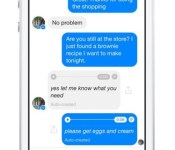
Facebook testing transcripts for Messenger voice clips

Rather than leaving a message with voicemail, people are sending voice clips. They are quicker to access and easier to manage. Messaging apps want to keep users within the service and adding support for voice clips does just that. To take things a bit further, transcripts of voice clips are gaining traction. Facebook Messenger is rolling out a feature to its users that converts voice clips into a message with text automatically created by the app. Facebook is testing the feature with a very small amount of users at this time so do not be surprised if your voice clips will not convert into transcripts just yet.
Source: David Marcus (Facebook)
Come comment on this article: Facebook testing transcripts for Messenger voice clips
 AIVAnet