


Smart Lock for Chrome open to all Chrome OS users
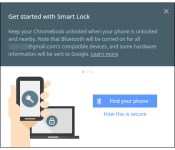

Prior to today, Smart Lock was only available to users of the Chrome OS Dev Channel. Today, that is no more as the feature is open to any and every Chrome OS user (with a Bluetooth connection). Smart Lock allows Android 5.0 Lollipop devices to unlock nearby Chromebooks seamlessly. The Chrome OS device will recognize the user is already signed in on their phone and bypass the lock screen.
Google provides these directions to setup Smart Lock:
- If you have more than one compatible phone nearby, turn off the ones you won’t be using.
- Sign in to your Chromebook.
- Make sure that your phone and Chromebook are connected to the internet.
- Click your account picture in the bottom right corner.
- Click Settings > Show advanced settings…
- In the “Smart Lock” selection, click Set up.
- Follow the on-screen instructions to connect your phone and your Chromebook.
- Place the phone and the Chromebook close together so that they can detect each other’s Bluetooth signal.
For a comprehensive look at how exactly Smart Lock works, click here.
Source: +Google Chrome
Come comment on this article: Smart Lock for Chrome open to all Chrome OS users
Visit TalkAndroid for Android news, Android guides, and much more!
 AIVAnet