


The iPad unveiling, five years later
Five years ago this week — February 27, 2010 to be precise — Steve Jobs put sneaker to stage to show off what he himself considered to be one of the most important products of his life. The Mac had been introduced decades before, the iPhone only a few years, yet on that stage, at that event, Jobs would make the case that there was room between them for a new category of device. One that, in order to exist, had to be not only better at certain key tasks, but significantly better at them.. It had to be the iPad.
No one knew what it really was or would mean that day, not even Apple. It would take until the next year and the iPad 2 for it to begin to crystalize. Yet everyone with vision for the future of mainstream computing knew it would be something.
For some it became the accessible, approachable, understandable window into apps and the internet they’d been waiting for their entire lives.
Today we have bigger iPhones and lighter MacBooks, and an iPad Air 2 that’s as usable as the former and almost as powerful as the latter. And we seem on the cusp of something… next.
Relive the original introduction by watching the video above and then let me know what you think about the iPad now, five years later.
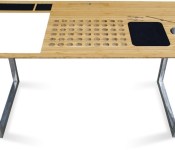
New ‘SlatePro TechDesk SE’ Comes Equipped with Built-In iPhone Dock, Mac Air Vents and Whiteboard [iOS Blog]
Back in March of 2014, iSkelter launched the SlatePro TechDesk on Kickstarter, which was designed with built-in docks and cutouts to accommodate Apple devices like iPhones, iPads, and MacBooks.
The desk was highly successful, leading the company to create a range of furniture products aimed at MacBook and iPhone users, including the new SlatePro TechDesk Special Edition. The SlatePro TechDesk Special Edition is a new version of the original SlatePro desk, introducing an entirely revamped design and several additional features like felt pockets and a dry erase board.

Like the original SlatePro TechDesk, the new edition’s main attraction is its built-in air vents for keeping laptops or desktop computers cool and its cutouts that are able to house an iPhone and an iPad. Design wise, the Special Edition SlatePro takes on a more popular U-shape with steel legs and a hazelnut bamboo surface.

The filing rack has been replaced with a set of recessed felt trays able to hold accessories, pens, and more, and there’s now a stainless steel cupholder instead of the original wood. With the hazelnut bamboo and a new beveled edge, the updated version has a much sleeker look. Finally, there’s a large dry erase board built directly into the desk for taking notes.

When ordering a SlatePro, it can be customized with a variety of options. Users can choose a left or right setup, and opt to remove any of the available features like the ventilation holes, dry erase board, display docks, mousepad, or drink holder.
The SlatePro TechDesk Special Edition is currently on sale and can be purchased from the iSkelter website for $598. The original SlatePro TechDesk is available for purchase at prices starting at $498. iSkelter also produces a range of lap desks and device docks, with prices that start at $30.

Facebook continues to rake in money from mobile as video views increase

While Facebook made waves last year with its investment in Oculus and WhatsApp, it continues to make most of its money from just plain ol’ Facebook. And, in particular, from mobile. In the last quarter of 2014, the social networking giant made $3.85 billion. Of that revenue, about $3.59 billion was from advertising, and ads from mobile accounted for a whopping 69 percent of that. That means Facebook now makes almost two thirds of its money just from mobile advertising. Facebook also posted its overall numbers for 2014, where it made $12.47 billion for the year alone. It marks the first time the company’s made over $10 billion in a single year.
And it’s no wonder, as the site is still enjoying its spot as top dog in the social networking space — it now has 1.39 billion monthly active users (up 13 percent from last year) and around 1.19 billion monthly active users just on mobile (up 26 percent). What’s even more impressive is the number of people who go to Facebook every day — that’s gone up to 890 million users, while daily active users on mobile skyrocketed to 745 million on average. Facebook’s other properties enjoyed growth too — Instagram recently reached 300 million users, Messenger has 500 million, while WhatsApp has around 700 million.
Part of that growth comes from Facebook’s increasing push towards video. In the investor’s call today, Mark Zuckerberg said that Facebook now has around three billion video views per day. Videos posted per person has increased by 75 percent, while over 50 percent of folks in the US watch at least one video per day. Additionally, over 65 percent of video views are on mobile.
“The evolution of content on Facebook is moving toward richer formats that convey more of the moments that people care about,” said Zuckerberg. “Before, a lot of Facebook was primarily text, now it’s primarily photos,” adding that around 2 billion photos are now shared each day across Facebook’s properties. “I wouldn’t be surprised if in the future, if that shifted more towards video.” He also hinted at an increased focus on the photo and video production side of things in the next few years, with perhaps an easier way for you to create “higher quality moments.”
Of course, with the increased push towards video, expect more video ads too. Sheryl Sandberg, Facebook’s COO, said on the call that this presents a great opportunity for the company to grow their video advertising business.
[Image credit: Shutterstock]
Filed under: Internet, Facebook
Source: Facebook

Movie results in Google Search are getting a beautifully-animated update

Google Search has always been extremely convenient when you’d like to know random facts about movies, shows, or really anything else. If you’re searching for a certain actor or actress’ movie list, you’ll be presented with an updated page showing all movies related to that actor. The update is pushing out to Google Search now.

In the example above, searching for “show me Angelina Jolie movies” brings you to a generic Search results page. Clicking on the little arrow will bring you to a big list of movie posters that can be tapped to bring up more information on that particular movie. As shown in the example, each movie will animate and slide to create wonderful Material Design-centric animations.
The update will be pushed to Google Search automatically, so you won’t need to go to the Play Store to update.
Samsung patents home-screen backup and sharing among your devices, possible new feature to Samsung SideSync

In a new patent filed by Samsung, the tech giant is taking a page from third-party launchers: saving and transferring your home-screen designs to be used later on the same device or porting it over to a different device altogether.
Samsung is wanting to add in the extra benefit of making all of this cloud-based, something not really offered by other custom launchers.
When I backup my home-screen layout on a launcher like Nova, to retrieve that file and transfer it elsewhere (to Google Drive for example) the process is actually a little cumbersome. First you need a file manager app like Solid Explorer, then navigate to your Internal Memory, go to data>com.teslacoilsw.launcher>backup in order to find these saved backups. From there you can share the file to your cloud or, if you’re connected to your computer via USB and have done the same navigation from Windows’ file explorer, you can copy/paste it out to your computer’s hard drive.

As you can see in the picture above, Samsung intends on making the process extremely simple. You can select from a number of saved home-screen setups and utilize them as you see fit.

The method in which Samsung wants to implement this home-screen transfer feature is not unique with the company. Samsung offers a service called SideSync, which allows you to synchronize your smartphone, tablet, and PC for screen and data sharing. This home-screen backup and sharing sounds like a perfect fit for the SideSync program.
That being said, there’s no official word on whether or not this home-screen sharing feature will be exclusive to Samsung devices, but I can’t imagine that it would allow for anything outside of the Samsung ecosystem. Worse yet, it may only allow sharing of your home-screen setups done inside of TouchWiz.
Source: Phandroid
Come comment on this article: Samsung patents home-screen backup and sharing among your devices, possible new feature to Samsung SideSync
LG’s sold more than 5 million webOS TVs

At CES this year LG introduced the improvements of their take on webOS for televisions (oh, and Audi was running around with a webOS smartwatch), but shortly afterwards we saw LG announce a milestone for webOS: they've sold more than 5 million televisions with webOS installed.
There was a period where we though we'd never see another new webOS device, let alone the pronouncement of five million sales. It's somewhat surreal.
Of course, it's worth noting that what primarily drives which TV people buy: it looks good and is as big as they can get for as much money as they're willing to spend. There are some who hunt out the best TV they can find, yes, going for quality over pure size:price ratio, but for most people what OS their TV runs is nowhere near as important as what OS, say, their new phone or computer runs. It's becoming more important, sure, but for most it's not a deciding factor.
That said, as it looks like LG is expanding webOS beyond TVs sooner rather than later, if a common codebase exists between the TVs, smartwatches, and whatever else LG has planned to run webOS, these 5 million TVs and the apps being developed for them could serve as a fertile launching ground for a wider webOS app ecosystem.
Source: LG (Google+)
Potential Moto E follow-up images leaked, small exterior upgrades can be seen
The Motorola Moto E wasn’t a top-tier phone. In fact, it sad at the low-end of the spectrum. That didn’t make a great purchase as the device sported much of what makes Motorola devices great at a fraction of the cost and size. Motorola killed it with this device and it would only make sense […]
The post Potential Moto E follow-up images leaked, small exterior upgrades can be seen appeared first on AndroidSPIN.
Evolution – Multiplayer FPS Review
Developers FreezeNova have released a new Android game called Evolution. It’s a multiplayer first person shooter looking to provide a simple premise: allow a place for mobile users to play a multiplayer fps. Without further ado, let’s get into the review.
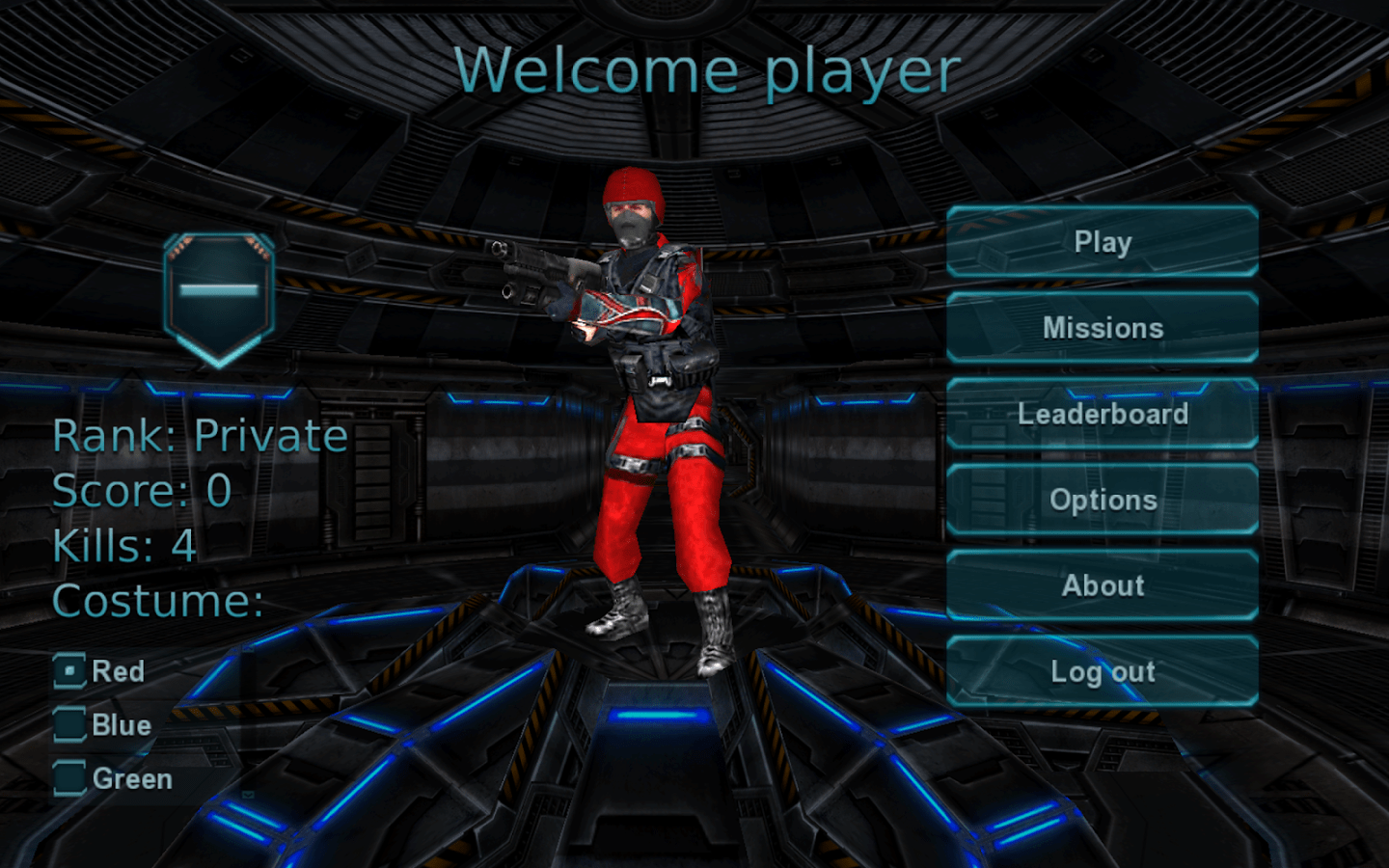
Gameplay
As I mentioned, the gameplay is fairly simple. You open up the app, and you are presented with the menu you see above. “Missions” give you objectives to complete while you’re playing, and will help you level app faster. To get to the action, hit “Play”, where you’re met with the “Room list.” Here you can join a room already created, create your own room, or quick start. Most of the time, I just hit “Quick start”. If you want to create a room, you can choose the max amount of players, the game mode, the map, and the weapon from a selection of: Machine gun, Rocket launcher, Sniper rifle, Light Pistol, and a Combat Knife.
Once you get into a room and are playing, essentially you have one goal: kill the enemy (for death match that’s everyone, for teams that’s the other team). I don’t seem to be very good at the game myself, but after a game or two you get into the gameplay. As is typical with online multiplayer games, you start to get really into it, and this made the game fun. My biggest issue has to do with controls, but more on that later. Other than that, there is not much else to the game, but that seems to be what the developer intended.
Controls
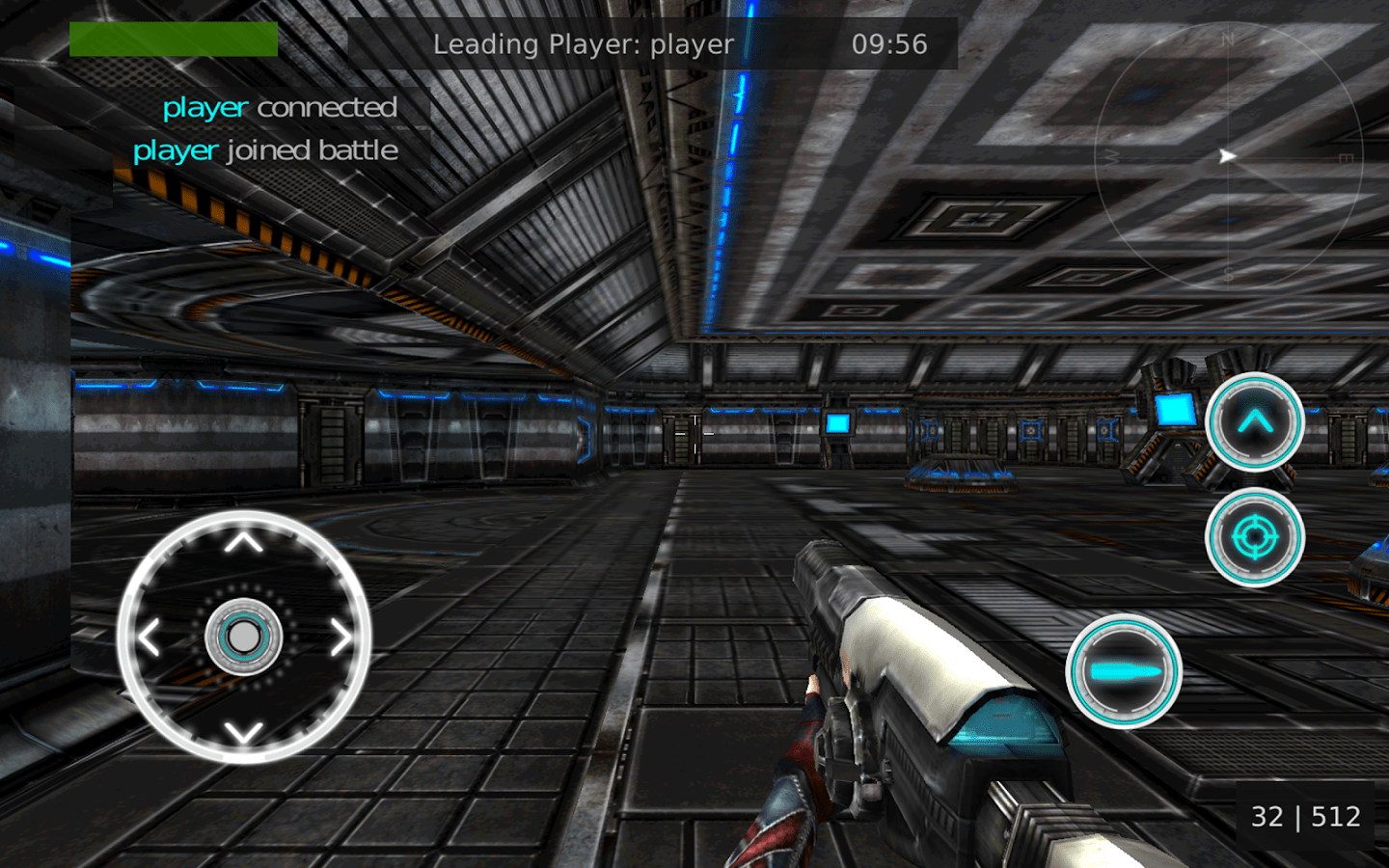
You have just a few controls: a directional pad that moves your character, a jump button, an aim button, and a shoot button. To move the camera, you tap anywhere else on the screen and drag your finger in the direction to face. When I first started playing, it seemed impossible to turn the camera in time to kill another player before I got killed. At the time, I didn’t see any pause or menu button to try and change the sensitivity. It wasn’t until I decided to hit the back button that a menu popped up, and even then there is no options in this menu, just “Resume,” “Chat,” and “Leave room.” Once I got to the main menu, I went into “Options,” and found the option to change the “sensibility,” and once I did that the gameplay was much better. I found it interesting that you couldn’t change some of these options during gameplay so you can actually experience the results right away.
Other than this, the controls are okay. It feels as though they took a video console game and stuck it on a phone, so the controls don’t seem tailor-made for mobile, making them difficult to react quickly.
Graphics
The graphics are retro-looking, and remind me of the computer games I would play when I was a kid. This isn’t a bad thing, but the graphics are very square and flat. In the options you can change the quality, however when I tried to change the graphics, the app would just freeze and blackout. So I don’t know what the difference is between each option. Nevertheless, the graphics aren’t the most beautiful thing, but they aren’t bad, and I believe display what was meant to be displayed.
Overall, this game is pretty good if you’re looking for a multiplayer first person shooter that is fairly casual and not too complex. However, the controls will take some getting used to, and figuring out how to navigate the game my take some exploration.
The post Evolution – Multiplayer FPS Review appeared first on AndroidGuys.
Download and install the HTC One M8’s Gallery app on any Android device [APK Download]
If you’re a fan of the HTC One M8’s Gallery app but aren’t fortunate enough to own the device itself, then good news since you’re now able to download and install the APK file on any device.
“Turkbey06″ over at XDA has modified the One M8’s Gallery app to enable it to work on other Android devices. It was tested on the LG G3, but users of other devices are saying it works just fine.
To download the HTC One M8’s Gallery app, simply head on over to the XDA thread. No root access is required so you should fine it just works.
The post Download and install the HTC One M8’s Gallery app on any Android device [APK Download] appeared first on AndroidGuys.

FTC says Straight Talk’s promises of unlimited data were crooked

If you were seduced by offers of “unlimited” phone data on prepaid carriers like Straight Talk or Simple Mobile only to find your service unbearably slow after a certain point, the Federal Trade Commission has your back. The carriers’ owner, TracFone, has agreed to pay the FTC $40 million to settle charges that it misled customers by advertising unlimited data that was really throttled into oblivion. In other words, Straight Talk was being… less than straight. Beyond the payout, TracFone has to avoid making sketchy claims in its ads and provide refunds to anyone who’s been burned. The settlement won’t affect a huge number of people, but it could serve as a warning sign to AT&T and other big carriers trying to avoid penalties for similarly shady throttling practices.
Filed under: Cellphones, Wireless, Mobile
Via: New York Times
Source: FTC
 AIVAnet